1
Structure FMEA, User Instruction
Version 1.1
19.11.2010
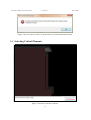
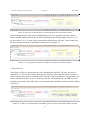
Figure 12: The user can skip analysis of remaining faults of a critical fault element
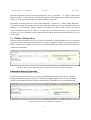
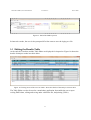
After finishing analysis of the selected FaultElement, the user is prompted if he/she wants to
analyze another fault element in the set retrieved during the initialization phase (Figure 13). If
the user chooses “Yes”, he/she will be presented the dialog shown in Figure 7 again. Otherwise,
he/she is prompted with the reinitialization dialog shown in Figure 14.
Figure 13: A user prompt (in interactive mode) for selection of next fault element
e. Reinitialization
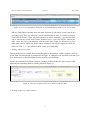
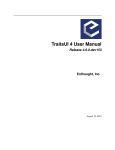
The dialog in Figure 14, prompts the user for reinitialization if desired. The user can select to
reinitialize (i.e. retrieve anew) either fault elements only (the effect elements will be reused), or
effect elements only (the fault elements will be reused), or retrieve both anew. The procedure can
then be repeated with these new sets. If the user opts for “No Initialization”, the FMEA process
terminates, the results in the table editor saved automatically, and he/she will be shown the dialog
in Figure 15.
Figure 14: A dialog for reinitialization of the FMEA process with new Fault and/or Effect elements
8