1
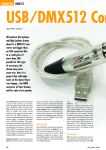
USB-DMX DMX to Computer USB Interface -------------- CE: 1IJ USER MANUAL User Manual: USB-DMX • Introduction Dear customer, congratulations on the purchase of this quality item and the trust having been put in us with this decision . To take full advantage of all possibilities and for your own safety and the safety of your environment, please read these operating instructions carefully before you start using the unit. • Product description The USB-DMX is a USB-to-DMX interface following the "open DMX" standard, based on the FTDI232 chip . Using a simple software application on a PC, it allows to send DMX data from the connected PC. The unit is normally delivered without such PC software, but can be used with a variety of programs. The manufacturer recommends DMX CONTROL which is available as freeware at www.dmxcontrol.org. For other choices, please see chapter "alternative software". • Security advice before use Warning: Read this section carefully before installing, powering, operating, cleaning or servicing this product! The following symbols are used to identify important safety information in this manual: ~ DANGER! Safety hazard . Risk of injury or death. it WARNING! Hazardous voltage . Risk of severe or fatal electric shock. & WARNING! Fire hazard. & WARNING! Read manual before installation and operation. General advice: 1. Read this manual completely before using the product. 2. Keep this manual in your records for future reference . 3. Follow all instruction printed in this manual, otherwise warranty may be void . 4. Carry this product with greatest care . Punches, big forces and heavy vibration may damage this product mechanically. 5. The manufacturer takes no responsibility for injury or damage caused by not following the safety precautions and instructions printed in this manual. V1.00 (06-201 0) 2 User Manual: USB-DMX Protection from electric shock: 1. Only connect this unit to setups with protective earth connection, ground-fault (earth-fault) protection and overload protection. 2. Do not expose this unit or its power supply to any dripping or splashing liquids, and do not place objects filled with liquids, such as vases, on the unit or its power supply. Do not operate this unit near to open water or in high humidity. 3. Choose the position of the unit and the connection cords according to the lowest risk of damage by foot steps or by squeezing it. 4. Do not open the unit for service purpose, as there are no userserviceable parts inside. Warranty will be void in any case of unauthorized service by the user or other not authorized persons . Protection from fire: 1. Take care of not placing the unit or its power supply near sources of heat (e.g. powerful amplifiers, fog machines). 2. Do not operate this unit in environmental temperatures exceeding 40 degrees Celsius. 3. Check the total maximum power of your USB port if you connect several USB devices to one PC, to avoid overloading/overheating. Protection from injury and damage: 1. Never use any accessories or modifications not authorized by the manufacturer of this unit. 2. Choose a location for operation where the unit is protected from vibration and where a fixed position is provided. 3. To meet all aspects of functionality and security during maintenance work to be performed on this unit, all parts should be replaced by genuine spare parts. Consequently, take care of your dealer or maintenance company to be authorized by the manufacturer. • Health advice This unit produces and absorbs electromagnetic radiation . The strength of radiation and the sensitivity for disturbing interference matches the CE and FCC requirements. A corresponding sign is printed on the backside of the unit. Any change or modification may affect the behaviour of the unit concerning electromagnetic radiation, with the CE requirements eventually not to be met any more. The manufacturer takes no responsibility in this case. V1.00 (06-2010) 3 User Manual: USB-DMX • Functional advice This unit is immune to the presence of electromagnetic disturbances - both conducted and radiated - up to a certain level. Under peak conditions, the unit is classified to show a "class C" performance criteria and may encounter temporary degradation or loss of function which may need manual help to recover. In such case, disconnect the USB cable from the unit and reconnect it again to recover. • Environmental advice - This unit is build to conform to the ROHS standards and the WEEE directive 2002/96/EC of the European Parliament and of the Council of the European Union. Under these regulations, the product shall not be discarded into regular garbage at the end of its life, but shall be returned to authorized recycling stations. • Unpacking Please check that the box contains the following items: Main parts: 1 pc. USB-DMX main unit 1 pc. USB cable 1 pc. User Manual If any part is missing, please contact your dealer immediately for replacement. • User Interface V1.00 (06-201 0) 4 User Manual: USB-DMX • Explanation of user interface elements 1. 2. 3. 4. 5. Base plate mounting points. These can be used to accommodate for screws to mount the USB-DMX interface on a stable surface. DMX Output (locking 3-Pin female XLR) . USB input. For connection to a PC. Power LED. Indicates that the unit receives USB bus power. DMX Signal LED. Indicates that a DMX signal is present at the output. NOTE: This unit is powered by the USB bus and does not need a power supply. However, about 1OOmA USB bus power are needed . Make sure that the USB bus is not overloaded with other USB devices, as this may interfere with the stable operation of the USB-DMX interface. • Getting started: A. Recommended system requirements: • Processor speed: Pentium 3 CPU, 1 GHz or faster • Operating system: Windows XP ©I Windows Vista© I Windows 7 © • Hardware interface: USB 1.0 or 2.0 Memory: 512MB RAM • B. Connecting the USB-DMX interface and driver installation • Shut down and re-boot your computer. • Connect the USB-DMX via the supplied USB cable to the USB input (1 ). • Provided that the computer is connected to the internet and runs WindowsXP Home, WindowsXP PROISP3, Windows Vista or Windows 7, the necessary driver will be installed automatically. Correct installation can be checked and confirmed by opening the Windows Device Manager, and checking whether the category "Universal Serial Bus Controllers" contains the entry "FTDI FT8U2XX Device". If this is not the case, or the entry has a yellow exclamation mark in front, a manual driver installation will be necessary, as described below. .. * &J ~~'• !'? 1!1 • • • . ....... ··---. • llgQ'•tlloMI '"'Oil.~ · .,J.~6)1JM . Gi~w-f-r- . QltC .. t~tAH_..., . ..,..... : \,.._.,..._., : • IIUl:JMa.thiMII:Uirolrdln: ... . 'JIIt4"C!Nt~~· ··- ·8~~ • )/IWu((UU,lf'n ·t101n1AAID~ ~Oip~ • ...,... • • • '5ooTQ,~trd~((Jf(J·· .,._,,_;o;;;;;;;;;o;:.~;;;~:::=: : :: ~R.:Il~Wiuw.s.II'WI""'**· .... ........ ......._ _...... t!IIIN..:Il,.,...UY~UII~C..... · lOI toUOilt:tOifflf'tMU$N~110A~ V1.00 (06-201 0) :.oM< 5 User Manual: USB-DMX • If the driver did not install correctly and a yellow exclamation mark is shown in front of the "FTDI FT8U2XX Device" entry in the device manager, then do the following : Download the matching D2XX direct driver for your system from http://www.ftdichip.com/Drivers/D2XX.htm and unpack the driver file into a known location on your hard drive. Right-click on the driver entry in the device manager and select "update driver". A window as below will appear, where you choose "Install from a list of specific locations": Ttis wiuld . . . ycu nstai software f01: FTOI nauzxx De'o'ice In the following window, specify the location where you unpacked the downloaded driver files as follows : Hardware Update Wrzard PI•••• choo" you• "aoch and in•lallalion ,...ion,. del Gsearchforthebe:stdivefr.thete~ Use tl: ct:Ck&MWML~thedeldceafch.v.tichi"cl.ldesloeal p~ «ld removable meek The. be$t dim fOI.ni Mil be iut-.:1. Choose this option to select the device Oiver fKJm a ist. \lrfndowt does not gu&antee that the driver you choose will be !he bed match fot your Mdware. The driver shall now be installed correctly. If you still have the yellow exclamation mark showing with the driver entry, please change/swap the USB cable, USB Port- or try another computer. V1.00 (06-201 0) 6 User Manual: USB-DMX • If no automatic installation of the driver is expedited, or the automatic installation did not yield a correct result, install the driver manually as follows: Download the matching D2XX direct driver for your system from http://www.ftdichip.com/Drivers/D2XX.htm and unpack the driver file into a known location on your hard drive. Install the driver according to the driver manufacturer's instructions. The driver shall now be installed correctly. If you can not locate the driver entry in the device manager list, try again, or if you have a yellow exclamation mark showing with the driver entry, try the above countermeasure to re-install the driver. Eventually, please change/swap the USB cable, USB Port- or try another computer. NOTE: Driver installation and general operation has only been tested on Microsoft Windows © XP I Vista I 7. The manufacturer does not grant proper installation/ operation on other operating systems. C. Installing • • • • • • the DMX CONTROL PC software Shut down and re-boot your computer. Do not run other applications. Make sure the computer is connected to the internet. Download the latest version of DMX CONTROL software at www.dmxcontrol.org , and install. You should have the next file included. Unpack the file 'Entec Open DMX.zip' and copy the content into the program folder of DMX control. Execute the Program PluginAdministrator.exe (located at C:\Programme\DMXControl) and mark all interfaces which are allowed to be used without administrator rights. Start DMX CONTROL and open the configuration menu, select "output plugins" and choose "Open DMX". NOTE: DMX CONTROL is freeware and not manufactured by the manufacturer of this USB-DMX interface. The manufacturer of this unit can hence neither take any liability for the function nor for the compatibility or reliability of DMX CONTROL. We however would like to express our appreciation for the kind permission to distribute DMX CONTROL with this product. More information is available at www.dmxcontrol.org NOTE: Software installation and general operation has only been tested on Microsoft Windows © XP I Vista I 7. The manufacturer does not grant proper installation/ operation on other operating systems. V1.00 (06-2010) 7 User Manual: USB-DMX • Alternative software If you feel that DMX CONTROL does not match your requirements, there are more freeware programs available for download online, with few of them listed here (alphabetically): Abuelites : Frees tyler DMX Configurator DMX Studio64 LightsUp: Manolator: Master Peace: Mega DMX P-Polites: PC Dimmer QLC : Schwarzpeter StageConsole: STL-DMX: Vixen : www .shmithz. com/Freeware/Abuelites%200. 6 .zip http://users .telenet.be/freestylerdmx www.dmx4all.de http://xoomer.virgilio.iUdmx studio 64 www.terbos.com I http://lightsup.sourceforge.net www.freedmx.com http :1/masterpeace. free. fr www.megadmx.com www.shmithz.com/Freeware/ppolites.zip www.pcdimmer.de http://qlc.sourceforge.neU http://karistouf.free .fr/developpement%201ogiciel .html www.chromakinetics.com/DMX www.rc-bot.com/STL-DMX.php www.vixenlights.com Please note that none of the above programs has been tested for full operational compliance with this USB-DMX interface and the manufacturer can take no liability for such compliance. Commercial software shall be considered where required . • Legal disclaimer IBM, Microsoft, Microsoft Windows, Apple Mcintosh, Apple OS X, Open DMX, DMX CONTROL, USB and all software names are trademarks of their respective owners. • Technical Data Chipset. ............................................................................................ FTDI-232 Channels/Memory (DMX Hold) ...............................................................512/none Input connection .............................................................................. USB type B Output connection ................. ................................................. .3-pin XLR (female) Power supply ....... ......................................................................... USB bus +5V Power consumption .......................................................................... max. 80mA Dimension ....................................... .. ............... ........... .. ... LxWxH : 75x37x35mm Weight.. .... ..... ..... ..... ..... ..... .. ...... ..... ..... ..... ..... ..... ..... ..... ..... ..... ..... ..... ... ..... ..... ..0.13kg (net) EU EMC compliance .... ..... .. ... ..... .EN55015: 2006 + A1 :2007, EN61547:1995 + A1 :2000 US EMC compliance .......... ... ............................................................FCC Part 15 This product meets both the EMC Directive 2004/1 08/EC and the Low Voltage Directive 2006/95/EC. V1.00 (06-201 0) 8 Find your dealer on our website to ask about more innovative products from ... 901 Essex Street, Brooklyn, NY 11208 Tel: (718) 237-2299, Fax: (718) 237-2318 Email: [email protected] NO DIRECT SALES, DEALERS AND DISTRIBUTORS ONLY Please register your product on ProXdirect.com or tag us on your social media website #proxdirect