1
Page 3
NB! It has become common that mobile phones are locked to a specific operator, i.e. that
they will only accept SIM cards from the operator that sold the phone. Hence you may be
unable to use your mobile phone to deactivate the PIN code of the SIM card intended for
the GSM Mini if this new SIM card is not from the same operator as the phone. In such a
case, you will have to borrow a phone from someone else or get help in a mobile phone
shop.
Inserting the SIM card
Always ensure that GSM Mini is powered off (i.e., it is not plugged into a socket) when
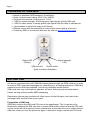
manipulating the SIM card. Insert the SIM-card into GSM Mini as shown in the picture
below, with the clipped corner to the left and the gold contacts down. Push the SIM-card
inwards until you hear a "click". Similarly, to later take the card out, gently push until you
hear a "click".
Start-up
When GSM Mini is plugged into the wall socket (and its SIM card has been activated),
the Signal LED will first turn green after 5 seconds. Then GSM Mini will continue the
start-up procedure and be ready for use after about 15 seconds.
Signal strength
The Signal LED shows the strength of the GSM signal, as follows:
1. Green:
Good signal.
2. Red:
Medium quality signal.
3. Off (no light):
Bad or no signal.
In case situation (2) or (3) occurs, the antenna should be re-oriented for better coverage.
Reset of personal access code
GSM Mini is factory set with “1234” as personal access code. Should you lose or forget
your code, the following procedure will reset it to “1234”:
•
Pull GSM Mini out of the wall socket
•
Press and hold the on/off switch on the bottom faceplate
•
Plug GSM Mini into the wall socket and continue to hold the switch for another
5-10 seconds before releasing it
•
Access code is now set back to “1234”