1
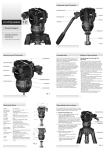
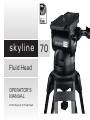
Introduction Safety Instructions Thank you for purchasing the Skyline 70 Fluid Head. The Skyline 70 Fluid Head has been designed to suit payload capacities of EFP, OB and Studio camera systems. Please use this manual to familiarise yourself with the operation of the Skyline 70 Fluid Head and observe these instructions to prevent any damage to your equipment. Ensure that all equipment is operating correctly and free from defects and damage, also please ensure that the tripod is steady, secure and that the bowl is approximately horizontal when attaching the camera. The operator is responsible for the safe operation of this piece of equipment. The robust design and construction of the Skyline 70 Fluid Head offers maximum stability, accuracy and durability and includes precision ball bearing mounted Fluid Drag Plate system in the Pan and Tilt assembly to deliver true fluid drag performance over the entire temperature and payload range. The Fluid Drag and the Counterbalance system were designed to provide excellent control and repeatability and offer progressive equal increments of drag and torque. D o not exceed the maximum payload capacity of the Fluid Head. Do not leave the camera unattended on the Fluid Head. D o not release the SLIDING PLATFORM LOCK whilst the camera is at an angle. The Skyline 70 Fluid Head also offers Illuminated Pan, Tilt, Counterbalance settings and Bubble level. D o not adjust the tripod whilst the camera is attached to the Fluid Head. The Skyline 70 Fluid Head will give best performance when used on Miller Ø150 HD Tripods. This will ensure maximum system stability to suit any professional set-up. The Skyline 70 Fluid Head will suit most industry standard 150 mm tripods as well, please refer to manufactures’ manual for mounting details. E nsure PAN HANDLE CLAMP and CLAMP NUT is securely tightened. A pply TILT LOCK when adding/removing equipment from the camera or when attaching/removing the camera from the Fluid Head. H old camera securely whilst changing Counterbalance, Pan Drag or Tilt Drag settings. H old the camera securely whilst releasing the RELEASE KNOB. H old camera securely whilst adjusting the CLAMP NUT to level the Fluid Head. 3