1
en
Childproof lock
Setting the timer
The timer runs alongside other settings. You can set it
at any time, even if the appliance is switched off. It has
its own audible signal so that you can tell whether it is
the timer or a cooking time which has elapsed.
Adjusting settings
The timer duration always starts at zero minutes.
The higher the value, the greater the time steps when
setting the timer.
The maximum setting is 24 hours.
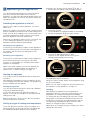
1. Touch the t field.
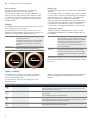
The symbol lights up red. On the display, the timer
duration is shown in white and in focus.
2. Set the timer duration using the rotary selector.
3. Press the t field to start.
Note: After a few seconds, the timer also starts
automatically.
The timer duration counts down.
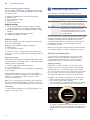
The timer remains visible on the display if the appliance
is switched off. When an operation is running, the
settings for this operation are shown in the foreground.
When you touch the t field, the timer duration is
displayed for a few seconds.
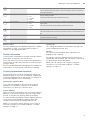
When the timer duration comes to an end, an audible
signal sounds and a note appears on the display. The
symbol is no longer lit up.
Tip: If the set timer duration relates to the appliance
operation, use the cooking time. The time is visible in
the foreground and the appliance switches off
automatically.
Changing and cancelling
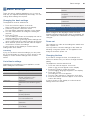
To change the timer duration, touch the t field. The
timer duration is displayed in white and in focus, and
can be changed by using the rotary selector.
If you want to cancel the timer, reset the timer duration
to zero. Once the change has been applied, the symbol
is no longer lit up.
16
AChildproof lock
Your appliance is equipped with a childproof lock so
that children cannot switch it on accidentally or change
any settings.
The control panel is locked and no settings can be
made. The appliance can only be switched off using the
ÿ On/Off button.
kco l f o rpd l i hC
Activating and deactivating
You can activate and deactivate the childproof lock
when the appliance is switched on or off.
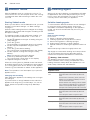
In each case, press the D field for approx. 4 seconds.
A confirmation note appears on the display.
The D field lights up red when the appliance is
switched on. The D field does not light up when the
appliance is switched off.