1
i6000 Series Electronic Controls - User Manual
Welcome …
to the world of
An electronic solution that puts
the pleasure back into boating!
MANUSER6000 Rev 0
i
i6000 Series Electronic Controls - User Manual
RECREATIONAL CRAFT DIRECTIVE 94/25/EC
This product has been designed to be compliant with the above
Directive.
Maximum performance, and compliance with the EMC Directive, can
only be ensured by correct installation. It is strongly recommended
that the installation conforms with the following standards:
APPLICABLE STANDARDS
a) ISO 8846 Small Craft-Electrical Devices – Protection against
ignition of surrounding flammable gases.
b) ISO = International Standards Organization
SAFE BOATING STATEMENT
This device meets or exceeds the applicable ABYC, ISO, and USCG
safe boating rules, regulations, standards, and guidelines.
SAFE BOATING ON THE WEB
U.S. Coast Guard
U.S. Power Squadron
www.uscg.mil
www.usps.org
The information contained in this manual is believed to be accurate at the time of
going to print but no responsibility, direct or consequential, can be accepted for
damage resulting from the use of this information. The manufacturers reserve the
right to make changes, without notice, to any of its products.
© Teleflex Inc. 2004
ii
MANUSER6000 Rev 0
i6000 Series Electronic Controls - User Manual
i6000 Series
User Manual
Rev. 0
Thank you for choosing Teleflex Marine, a #1 name in marine
electronics. Teleflex Marine has built its reputation by designing
and
manufacturing
top-quality,
thoroughly
reliable
marine
equipment. Your Teleflex Marine i6000 system is designed for
trouble-free use in even the harshest marine environment.
We encourage you to read this manual carefully in order to get full
benefit from all the features and uses of your Teleflex Marine
product. Also, please register your purchase by filling out the
warranty registration card at the back of this manual.
MANUSER6000 Rev 0
iii
i6000 Series Electronic Controls - User Manual
Notice to Boat Manufacturer, Installer, and
Consumer
Throughout this manual, Warnings and Cautions (accompanied by
the International Hazard Symbol
) are used to alert the
manufacturer or installer to special instructions concerning a
particular service or operation that may be hazardous if performed
incorrectly or carelessly.
Observe these alerts carefully!
DANGER
WARNING
Immediate hazards which
WILL result in severe
personal injury or death.
These “safety alerts” alone,
cannot eliminate the hazards
that they signal. Strict
compliance to these special
instructions when performing
installation, operation, and
maintenance plus “common
sense” operation are the most
effective accident prevention
measures.
CAUTION
Hazards or unsafe
practices which COULD
result in severe personal
injury or death.
NOTICE
Hazards or unsafe
practices which COULD
result in minor injury or
product and/or property
damage.
Information that is important
to proper installation,
operation or maintenance,
but is not hazard-related.
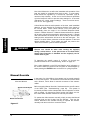
Figure 1
iv
MANUSER6000 Rev 0
i6000 Series Electronic Controls - User Manual
Contents
QUICK START INSTALLATION & SETUP GUIDE...................................................................................................... 1
QUICK START OPERATIONS GUIDE............................................................................................................................... 3
THE I6000 SYSTEM.................................................................................................................................................................... 7
SYSTEM OVERVIEW.....................................................................................................................................................................7
INSTALLATION .......................................................................................................................................................................... 9
BEFORE YOU BEGIN ....................................................................................................................................................................9
INSTALLING CONTROL HEADS.................................................................................................................................................13
INSTALLING TRIPLE ENGINE SELECTION PANELS.................................................................................................................17
INSTALLING ELECTRONIC CONTROL UNITS (ECUS) ............................................................................................................18
INSTALLING MECHANICAL A CTUATORS ................................................................................................................................18
CONNECTING COMPONENTS.....................................................................................................................................................22
CONNECTING OPTIONAL DEVICES ..........................................................................................................................................25
CONNECTING ELECTRICAL POWER.........................................................................................................................................27
SETUP ............................................................................................................................................................................................29
W ORKING WITH THE ECU DISPLAY AND CONTROLS...........................................................................................................29
CALIBRATING THE SYSTEM......................................................................................................................................................32
SELECTING FEATURES AND CUSTOMIZING THE SYSTEM .....................................................................................................40
TESTING THE SYSTEM ...............................................................................................................................................................46
OPERATION ...............................................................................................................................................................................49
GETTING TO KNOW THE I 6000 CONTROL HEADS .................................................................................................................49
STARTING UP THE I 6000...........................................................................................................................................................51
CONTROL STATION SELECTION ...............................................................................................................................................51
INDICATOR DIMMING FEATURE...............................................................................................................................................52
ENGINE SELECTION IN TRIPLE ENGINE SYSTEMS .................................................................................................................52
NEUTRAL THROTTLE W ARMUP (NTW).................................................................................................................................53
POWER TRAIN SYNC (OPTION)................................................................................................................................................54
CRUISE SYNC (OPTION)............................................................................................................................................................55
SPLIT RANGE THROTTLE (OPTION).........................................................................................................................................56
JET DRIVE BOOST (JDB)...........................................................................................................................................................57
SYSTEM FAILURE W ARNINGS & RESPONSES.........................................................................................................................57
M ANUAL OVERRIDE..................................................................................................................................................................58
TECHNICAL INFORMATION .............................................................................................................................................59
SPECIFICATIONS .........................................................................................................................................................................59
TROUBLESHOOTING...................................................................................................................................................................59
M AINTENANCE ...........................................................................................................................................................................63
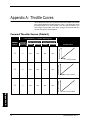
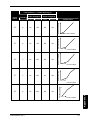
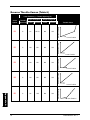
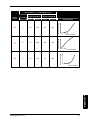
APPENDIX A: THROTTLE CURVES ...............................................................................................................................64
FORWARD THROTTLE CURVES (TABLE 5) .............................................................................................................................64
REVERSE THROTTLE CURVES (TABLE 6) ...............................................................................................................................66
CUSTOMER SERVICE & S UPPORT.................................................................................................................................68
2-YEAR LIMITED WARRANTY..................................................................................................................................................68
PRODUCT RETURN PROCEDURE...............................................................................................................................................69
GLOSSARY..................................................................................................................................................................................71
INDEX ............................................................................................................................................................................................72
MANUSER6000 Rev 0
v
i6000 Series Electronic Controls - User Manual
This page has been intentionally left blank.
vi
MANUSER6000 Rev 0
i6000 Series Electronic Controls - User Manual
Quick Start Installation & Setup Guide
Component Installation and Connection
Required Components for a Single
Station, Single Engine Configuration
Components
Configurations
for
Expanded
The “xx” suffix of wire harness part numbers is
for the required length of the harness in feet.
MagicBus TM network - required for MagicBus TM
tachometers and engine synchronization in multi-engine
systems.
•
CM100xx – Network comm. cable
•
CM10050 - MagicBus TM Tee
•
CM10051 - Male Terminator
•
CM10052 - Female Terminator
•
CM10401 – ECU MagicBus TM connection
harness
12 VDC Power must be supplied through a grounded
Circuit Breaker accommodating a 10 Amp capacity per
ECU installed.
Systems with Electronic Shift capability may replace the
Mechanical Shift Actuator, its Actuator Cable, and its
associated wire harness (CE100xx) with wire harness
CE108xx, which connects directly from the ECU to the
engine’s electronic shifter.
Systems with Electronic Throttle Control capability may
replace the Mechanical Throttle Actuator, its Actuator
Cable, and its associated wire harness (CE101xx) with
wire harness CE109xx, which connects directly from the
ECU to the engine’s electronic throttle body.
Wire harness CE105xx provides tachometer information
passed on to the MagicBusTM by the ECU.
Wire harness CE106xx connects to the engine’s starter
or ignition circuit and provides Neutral Start Protection.
MANUSER6000 Rev 0
1
i6000 Series Electronic Controls - User Manual
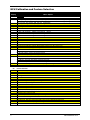
ECU Calibration and Feature Selection
ECU
Display
Menu / Options
CA
Calibration
C1
System Configuration
C1: Single Engine, Single Station, C2: Single Engine, Dual Station, C3: Dual Engine, Single Station
C4: Dual Engine, Dual Station, C5: Single Engine, Single Function, C6: Dual Engine, Single Function
C7: Trip. Eng.,
Sing. Station
C8skipped
: Trip. Eng.,
Dual Station
Sd
ECU/Engine
Assignment
<Step
if configuration
allows.>
Sd:Starboard Po:Port Ce:Center
gS
Engine Type
gS:Gas dS:Diesel Ob: Outboard
g1: Gas o1: Outboard Applies Tach Filtering Band 1
g2: Gas o2: Outboard Applies Tach Filtering Band 2
g3: Gas o3: Outboard Applies Tach Filtering Band 3
g4: Gas o4: Outboard Applies Tach Filtering Band 4
04
RPM - Pulses / Rev
0:No RPM, otherwise number of pulses per revolution (Range: 0 to 399)
L1
Control Head Lever 1
FF:Full Forward IF:Idle Forward nU:Neutral Ir:Idle Reverse Fr:Full Reverse
L2
Control Head Lever 2 <Step skipped if configuration allows.>
FF:Full Forward IF:Idle Forward nU:Neutral Ir:Idle Reverse Fr:Full Reverse
A1
Throttle Actuator <Step skipped if configuration allows.>
PL:Pull PS:Push Cable to WOT
24 to 76 mm - Throttle Stroke, Idle to WOT
SI: Set Idle position - Attach mechanical linkage
A2
Shift Actuator <Step skipped if configuration allows.>
PL:Pull PS:Push Cable to Forward
14 to 40 mm - Forward Shift Stroke, Neutral to Forward
14 to 40 mm - Reverse Shift Stroke, Neutral to Reverse
Sn: Set Neutral position - Attach mechanical linkage
EF
Electronic Throttle Engine Manufacturer <Step skipped if configuration allows.>
EF:GM MEFI CU:Cummins CA:CAT
FE
05
F1
r1
S
4.8
XX
oF
nI
80
90
2
Feature Selection
Throttle Limit <Step skipped if configuration allows.>
05 up to 50%
Forward Throttle Curve
F1 though F8
Reverse Throttle Curve
r1 through r8
Shift Actuator Type <Step skipped if configuration allows.>
S:Standard o:Optional, High Load
Programmable Shift Delay
00, 1.2, 2.4, 3.6, 4.8, 6.0, 8.4, 9.6, 11, 12
Fixed Shift Delay See Manual for Defaults in tenths of seconds. 2 seconds maximum.
00, 01, 02, 03, 04, 05, 06,, 07, 08, 09, 10, 11, 12, 13, 14, 15, 16,17,18,19, 20
Station Select Protect
oF:Protect OFF on:Protect ON
Fail-Safe Response Mode <Step skipped if configuration allows.>
nI:Neutral Idle ra:Range Gear
Center Engine Slave Mode <Step skipped if configuration allows.>
80:Follow Port 81:Follow Same Gear 82:Follow Reverse 83:Neutral Disengage
Transmission Overshift <Step skipped if configuration allows.>
90:No Overshift 91:Overshift
MANUSER6000 Rev 0
i6000 Series Electronic Controls - User Manual
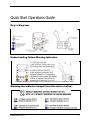
Quick Start Operations Guide
Key to Diagrams
Understanding Failure Warning Indicators
Correction: Press the ENTER button to acknowledge a non-critical error, not the “+” button.
Dimming the Indicator Lamps (from the active station)
MANUSER6000 Rev 0
3
i6000 Series Electronic Controls - User Manual
Engaging/Disengaging Neutral Throttle Warmup (NTW)
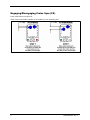
Engaging/Disengaging Split Range Throttle (SRT)
TO ENGAGE
F
F
F
F
N
N
N
N
R
R
R
R
N
N
N
SELECT
SELECT
SYNC
N
SYNC
STEP 1
STEP 2
Return Handle(s)
Press Neutral
to a Gear/Idle
Button(s) (Neutral
Position (Either Light(s) Should Flash)
Forward Idle or
Reverse Idle)
F
N
R
N
SE
L
4
F
N
R
N
N
SE
L
F
N
R
N
SE
L
MANUSER6000 Rev 0
i6000 Series Electronic Controls - User Manual
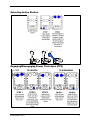
Selecting Active Station
F
N
R
F
N
R
N
N
SE
L
SE
L
F
N
R
N
SE
L
Engaging/Disengaging Power Train Sync (PTS)
MANUSER6000 Rev 0
5
i6000 Series Electronic Controls - User Manual
Engaging/Disengaging Cruise Sync (CS)
Press SYNC button to enable CS.
SYNC Lamp comes ON to indicate CS is enabled, but not necessarily ON.
6
MANUSER6000 Rev 0
i6000 Series Electronic Controls - User Manual
The i6000 System
System Overview
Congratulations on your purchase of the Teleflex Marine i6000!
After spending only a few minutes on the water with your i6000, you
will quickly come to depend on the unit’s accuracy and reliability in
controlling your boat.
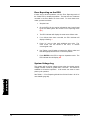
Schematic of various i6000
components and possible
connections.
The i6000 System operates the shifting and throttle controls for your
engines and can control single, dual, and even triple engine systems
from up to two separate control stations if desired. The i6000’s Shift
and Throttle Control Heads come with single lever controls
(controlling both shift and throttle with a single lever). The i6000 also
supports either mechanical or electronic control of your shift and
throttle components depending upon the specific needs of your boat.
Topside, the engines are controlled by the i6000’s Control Head
levers (and Engine Selection Panel in triple engine systems).
Operation of the i6000 Control Head is not dissimilar to that of the
traditional shift and throttle system you’re probably more familiar
with. However, the i6000’s look, feel, and functionality is intended to
match and surpass that available through traditional systems through
its flexibility and features. The i6000’s special features and engine
operation modes are intended to make boating easier, and taking the
time to learn how to use them will inevitably add to your boating
pleasure. In triple engine systems, the i6000’s Engine Selection
Panel allows you to engage and disengage the various engines and
indicates each engine’s engagement status.
Figure 2
MANUSER6000 Rev 0
7
i6000 Series Electronic Controls - User Manual
Below deck, the i6000 monitors and controls your engines through
the use of Electronic Control Units (ECUs) and Actuators. ECUs
coordinate the signals from the Control Heads, engines, and
MagicBus
TM
network and direct the operation of the actuators to
control the engines according to the features and options selected.
Each engine has its own ECU to control it, and an engine’s ECU is
where the calibration, feature selection, and information reporting for
that engine is performed. Actuators perform the physical movement
of the engine parts neccessary to shift gears and change throttle
settings if purchase or use of electronic shift and/or throttle control
options is not practical. Actuators work by moving cables connected
to the engine’s mechanical linkage. Each engine has its own Shift
Actuator and Throttle Actuator if mechanical control is required for
these functions.
MagicBusTM
The i6000 System is engineered to work as a stand-alone system or
as an integrated part of a Teleflex MagicBus
TM
system, which is a
digital network for interconnecting system monitoring and control
devices.
MagicBus
A MagicBus
TM
TM
network is required to use Teleflex
tachometers and engine synchronization in multi-engine
systems. Connecting via the i6000 System, power and tachometer
information can be provided to displays hooked-up throughout a
MagicBus
8
TM
network.
MANUSER6000 Rev 0
Installation
A complete installation of an i6000 system consists of mounting and
interconnecting the system’s components, calibrating the system,
selecting the desired features, and mechanically connecting the
actuators to the engines and transmissions. Calibration and feature
selection, covered in the “Setup” section of this manual (p. 29),
involves tailoring the system to your configuration, your boat, and
your personal preferences.
Before You Begin
Before you mount any of the components, place them on the
surfaces you wish to mount them to. Ensure that the surfaces are
large enough and provide adequate support for each component.
WARNING
Remember when mounting components not to screw or glue
them directly into the hull. If the hull must be used, glue a
wooden block to the hull and screw components into the
wooden block with screws shorter than the thickness of the
block.
Electrical connectors and actuator cable connectors must be
protected from rain, spray, and washdown. Install the components
with these connectors pointing downward, or at least angled
downward, to protect them from drips. The components may have to
be disconnected for service at some point during the boat’s lifetime,
so leave at least 4 inches (10 cm) of clearance in all directions for
releasing and removing their connectors.
As an integrated part of your engine system, you may find it useful to
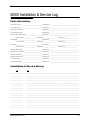
create a log of your i6000 system components to record their
maintenance and service history. A form to help you do this is
provided on page 73. Start by entering each part and serial number.
Then enter the date installed and calibrated, leaving space to record
dates and descriptions for future modifications, updates, problems,
and service. For the Electronic Control Unit (ECU) record the
Required ECU Hardware code, Software Type, Software Version,
and installed Options code. See “Setup” on page 29 to learn more
about the ECU and how to get this information.
MANUSER6000 Rev 0
9
Installation
i6000 Series Electronic Controls - User Manual
i6000 Series Electronic Controls - User Manual
What You’ll Need
Installation
Parts Supplied
The parts that come with your i6000 system depend on the specific
configuration package you purchased.
Packages are chosen
according to the number and type of engines your boat has, the
number of stations you want to install, and the type of Control
Head(s) you desire. Below is a list of the different configuration
packages available and the parts supplied for each type of
installation; please ensure that all the appropriate parts were
included in your package:
•
Single Station, Single Engine (SSSE) - one single-lever Control
Head, one ECU, one Throttle Actuator (if not using electronic
throttle control), and one Shift Actuator (if not using electronic
shift). Actuator cables and all associated wiring should also be
included if harness lengths were given at time of order.
•
Dual Station, Single Engine (DSSE) - two single-lever Control
Heads, one ECU, one Throttle Actuator (if not using electronic
throttle control), and one Shift Actuator (if not using electronic
shift). Actuator cables and all associated wiring should also be
included if harness lengths were given at time of order.
NOTICE
•
Control Heads can be ordered
with or without integrated Trim
control. See “Getting to Know
the i6000 Control Heads” on
page 49 for more information.
Single Station, Dual Engine (SSDE) - one dual-lever Control
Head, two ECUs, two Throttle Actuators (if not using electronic
throttle control), and two Shift Actuators (if not using electronic
shift). Actuator cables and all associated wiring should also be
included if harness lengths were given at time of order.
•
Dual Station, Dual Engine (DSDE) - two dual-lever Control
Heads, two ECUs, two Throttle Actuators (if not using electronic
throttle control), and two Shift Actuators (if not using electronic
shift). Actuator cables and all associated wiring should also be
included if harness lengths were given at time of order.
•
Single Station, Triple Engine (SSTE) - one dual-lever Control
Head, one Triple Engine Selection Panel, three ECUs, three
Throttle Actuators (if not using electronic throttle control), and
three Shift Actuators (if not using electronic shift). Actuator
cables and all associated wiring should also be included if
harness lengths were given at time of order.
•
Dual Station, Triple Engine (DSTE) - two dual-lever Control
Heads, two Triple Engine Selection Panels, three ECUs, three
Throttle Actuators (if not using electronic throttle control), and
three Shift Actuators (if not using electronic shift). Actuator
cables and all associated wiring should also be included if
harness lengths were given at time of order.
NOTICE
Single-lever Control Heads can
be ordered in either top-mount
or side-mount configurations.
See “Getting to Know the i6000
Control Heads” on page 49 for
more information.
10
MANUSER6000 Rev 0
A set of peel-off, pre-printed labels is included in all i6000 packages
to aid in identifying wire harnesses during installation.
If any items are missing, call Technical Support at 1-610-495-7011.
Additional Tools and Items You’ll Need
Be aware that you will most likely need to order the appropriate
number and lengths of wire harnesses and actuator cables from
Teleflex Marine to meet the specific needs of your boat before you
can complete the installation. You will need to take measurements
of several wiring and cable runs. To do so, carefully plan out where
you will be installing the main components of your i6000 system and
where you will be routing the wire harnesses and cables. Then,
preferably, pre-install the various components prior to measuring to
ensure that the measurements will be exact.
If your i6000 was configured by the factory to use mechanical
actuators instead of electronic shift and throttle controls, you will
need to measure for actuator cable lengths. Remember when
planning/measuring the route of actuator cables that actuator
placement should allow for the shortest, straightest possible run of
the actuator cable to the associated engine’s respective mechanical
linkage. Try to avoid a route that bends a cable to a radius smaller
than 6 inches (15 cm), even though a bend radius of 4 inches (10cm)
is within specifications. Actuator cable lengths are measured
differently depending on the type of engine(s) you have:
•
Outboards - Measure from the actuator mounting location
along unobstructed cable route to the center of the outboard.
Add 2 feet (60 cm) to allow for loop, providing unrestricted
engine movement. Round up to the next whole foot (30 cm).
•
Inboards Or Stern-Drives - Measure from the actuator
mounting location along unobstructed cable route to shift or
throttle connection. Round up to the next whole foot (30cm)
and order that length actuator cable.
When planning/measuring the route of wire harnesses, measure
from the ECU mounting location along unobstructed wire runs, as far
as practical from other high current wires, to the various points of
connection. Round off each measurement to next whole foot (30
cm) and add additional length if uncertain.
Below is a list of the part numbers and the measurements and
information to gather for each, if applicable, prior to ordering. The
“xx” suffix is the length of the cable/harness in feet.
•
MANUSER6000 Rev 0
Wire Harness Lengths
o CE100xx - From each ECU to its associated Shift
Actuator
o CE101xx - From each ECU to its associated Throttle
Actuator
o CE104xx - From each ECU to the Circuit Breaker
o CE105xx - From each ECU to its associated
engine’s tachometer sensor connector
11
Installation
i6000 Series Electronic Controls - User Manual
i6000 Series Electronic Controls - User Manual
o
Installation
o
o
o
o
o
CE106xx - From each ECU to the corresponding
engine’s starter or ignition circuit
CE107xx - From each Control Head to each ECU
CE108xx - From each ECU to its associated
engine’s transmission (for Electronic Shift systems)
CE109xx – From each ECU to its associated
engine’s electronic throttle connection (for Electronic
Throttle Control systems)
CE13000 – Engine Selection Panel Y-harness
6345517 – Dual-Lever Top-Mount Control Head
Trim Harnesses
•
Actuator Cable Lengths
o CC648xx - From each actuator to its associated
engine (universal type)
o CC660xx - From each actuator to its associated
engine (Mercury type)
o CC661xx - From each actuator to its associated
engine (OMC type)
•
Actuator Cable Engine Connection Kits (for mechanical
engine linkages)
o Specify Kind - Std 33C, Merc KM, Jet Drive, or OMC
o Specify Connection - Balljoint, post/clip, or pivot
o Other - Cable Mounting Bracket, if needed
•
MagicBus Cables and Connectors
TM
o CM100xx - From each ECU’s MagicBus Tee to its
TM
neighboring ECU’s MagicBus Tee
TM
o CM10050 - MagicBus Tee
TM
o CM10051 - MagicBus Male Terminator
TM
o CM10052 - MagicBus Female Terminator
TM
o CM10401 - From each ECU to the MagicBus
network backbone
TM
When ready, order all wire harnesses, actuator cables, and other
needed parts from Teleflex Marine Customer Service at 1-610-495
7011.
In addition to the items above, you will also need the following for
installation and operation:
• A 3” (75mm) hole saw
• A 3 1/2” (90mm) hole saw
• A powered hand drill and various drill bits
• Phillips and flat-head screwdrivers
• A ruler or measuring tape
• Pen or pencil
• Adhesive tape
• 12 volt power source (your boat’s battery)
• An adjustable wrench
• Standard & Needle Nose Pliers-Medium size
• Wire Strippers & Cutters for #14 AWG wire
• Multimeter or test lamp-DC
• Two 10-amp circuit breakers per ECU
• Insulated butt connectors for #14 AWG wires
• A circuit breaker mounting enclosure
12
MANUSER6000 Rev 0
•
•
•
•
•
•
Engine and transmission wiring connectors and terminals
Stainless steel, self-tapping screws or machine nut-bolt pairs
with various lengths depending on mounting surface
thicknesses
UV nylon mounting head ties. Clamps may be used instead,
especially for actuator cables.
Depending on the electrical requirements for your particular
installation, a terminal crimping tool may be required.
A cable-tie-tensioning tool may be helpful but is not required.
A Polyethylene split loom is optional but recommended for
wire harnesses that may be exposed to water, fuel, or
lubricants.
Installing Control Heads
The i6000 system allows you to install Control Heads at two separate
locations if you desire a second control station.
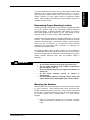
Determining Proper Mounting Location
Single-lever Control Heads (single-engine systems) come in either
top-mount or side-mount configurations. Dual-lever Control Heads
are only available in the top-mount configuration. This limits the
mounting locations that can be used by each type.
Top-mount Control Heads are designed to be mounted on flat,
horizontal surfaces convenient for operation and installation. Sidemount Control Heads are designed to be mounted on flat, vertical
surfaces. See Figures 11-13 on page 49 to view each type.
Placement of i6000 Control Heads must allow for the full range of
lever movement (156 degrees), without clearance problems. Be
certain that control levers can be operated through their entire range
without risk of hand or finger injury. Control Head indicators must be
visible, and pushbuttons must be accessible to fingertips. Placement
must also allow access behind the mounting surface for attaching
mounting nuts and the harness connector.
Control Heads have detent and drag adjustment screws on the fore
side of their housings that should also be accessible. In Side-mount
Control Heads these adjustment screws are located under the cover.
The screws require only 2 inches (5 cm) of clearance if you use a
right-angle screwdriver.
Mounting the Control Head
CAUTION
Before using a template from
the back of this manual,
measure it to be certain it is to
scale.
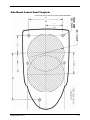
Top-mount Control Heads use the same mounting template. The
Side-mount Control Head uses a different template. The mounting
templates for both types can be found in the back of this manual.
Choose the mounting instructions below that are appropriate for your
Control Head(s) configuration:
1) Top-Mount Control Heads – page 14
2) Side-Mount Control Heads – page 16
MANUSER6000 Rev 0
13
Installation
i6000 Series Electronic Controls - User Manual
i6000 Series Electronic Controls - User Manual
Installation
7.2”
4.35”
7.1”
Wire connections for Dual-Lever
Top-Mount Control Head Trim
Harnesses.
14
Top-Mount Control Heads
1. Tape the Top-Mount Control Head Template from the back
of this manual to the chosen mounting location.
2. Mark the mounting surface for hole placement using the
template.
3. Saw out the primary cutout with a 3-inch or 75-mm. hole
saw.
4. Drill the four 1/4 inch (6 mm) holes for the studs.
5. If your Control Head harness(es) won’t reach from this
installation point to the ECU mounting location, connect
Extension Control Head wire harness(es) (part no.
CE107xx), available from Teleflex Marine Customer Service
at 1 610 495 7011.
6. Using the pre-printed labels, label each end of
the
harness(es) with “Control Head” and mark the Control Head
or station number on each end if two control heads or
stations are to be installed.
7. If the Control Head has more than one harness connected to
it, then also note on each harness end which Control Head
connector (port or starboard) the harness is connected to.
Figure 3
MANUSER6000 Rev 0
8.
If installing a dual-lever Control Head with trim control, you
must connect the trim control wires from the Control Head
through the primary cutout in the mounting surface to the
Dual-Lever Top-Mount Trim Harnesses (part no. 63455517).
Refer to Figure 3 (page 14) throughout the following trim
wiring procedure. There are three harnesses—red, blue,
and green. Attach each Trim Harness by the short end (with
prewired butt splice connectors) to the matching color trim
control wires coming from the Control Head using a crimping
tool and additional insulated male/female butt splice
connectors as needed.
One extra female butt splice
connector is connected and supplied with each Trim
Harness. Connect the two female 250 Spade Terminal
connectors at the other end of the red Trim Harness to the
male power terminals on the port and starboard trim control
switches respectively using piggy back terminals, or connect
them directly to the port and starboard trim power wires from
the engine harness. Using piggy back terminals, connect
the blue Trim Harness’ three female 250 Spade Terminal
connectors to the terminals on the port, center, and
starboard trim control switches used to raise the
drive/engine. You may also connect them directly to the
port, center, and starboard “trim up” control wires from the
engine harness. Using piggy back terminals, connect the
green Trim Harness’ three female 250 Spade Terminal
connectors to the terminals on the port, center, and
starboard trim control switches used to lower the
drive/engine. You may also connect them directly to the
port, center, and starboard “trim down” control wires from the
engine harness. The trim harness for Dual-Lever Control
Heads contains diodes to isolate the i6000 System trim
controls from the other trim controls.
9.
If installing a single-lever Control Head with trim control,
simply connect the trim control wires from the Control Head
through the primary cutout in the mounting surface to the
trim control wires from the engine harness. If the engine
manufacturer does not provide or specify connectors, use
insulated butt connectors. Connect red to red, blue to blue,
and green to green. Red wires connect to input voltage.
Blue wires are active when the trim switch is in the upper
position (for drive/engine raising). Green wires are active
when the trim switch is in the lower position (for drive/engine
lowering).
10. Pass the free ends of the Control Head-to-ECU wire
harnesses through the primary cutout in the mounting
surface and insert the Control Head into the holes you just
made.
11. Secure the Control Head to the mounting surface by
tightening the four 10-32 nuts that were provided with the
Control Head.
MANUSER6000 Rev 0
15
Installation
i6000 Series Electronic Controls - User Manual
i6000 Series Electronic Controls - User Manual
Installation
12. Adjust the screws on the fore side of the Control Head to
change detent position firmness and/or drag (rotational
resistance) for the lever(s) if so desired.
13. Repeat steps 1-12 to install a second control station of the
same type.
5.5”
7.5”
16
Side-Mount Control Heads
1. Tape the Side-Mount Control Head Template from the back
of this manual to the chosen mounting location.
2.
Mark the mounting surface for hole placement using the
template.
3.
Saw out the two primary cutouts with a 3 1/2 inch (90 mm)
hole saw.
4.
If mounting with screws, drill five 1/8 inch (3 mm) holes. If
mounting with nuts and bolts, drill five 1/4 inch (6 mm) holes
instead.
5.
If your Control Head harness(es) won’t reach from this
installation point to the ECU mounting location, connect
Extension Control Head wire harness(es) (part no.
CE107xx), available from Teleflex Marine Customer Service
at 1-610-495-7011.
6.
Using the pre-printed lables, label each end of
the
harness(es) with “Control Head” along with the control
station number if installing two control stations.
7.
If the system has trim control, connect the trim control wires
from the Control Head through the primary cutout in the
mounting surface to the trim control wires from the engine
harness. If the engine manufacturer does not provide or
specify connectors, use insulated butt connectors. Connect
red to red, blue to blue, and green to green. Red wires
connect to input voltage. Blue wires are active when the
trim switch is in the upper position (for drive/engine raising).
Green wires are active when the trim switch is in the lower
position (for drive/engine lowering).
8.
Connect the two black safety lanyard wires. If the switch is
normally open, connect one wire to ground and the other to
the ignition primary according to the engine manufacturer’s
instructions. If the switch is normally closed, connect one
end to a fused 12 volt source and the other end to the
ignition primary according to the engine manufacturer’s
instructions. Unless the engine manufacturer instructions
suggest specific connectors, use insulated butt connectors.
9.
Pass the free ends of the Control Head-to-ECU wire
harnesses through the primary cutout in the mounting
surface and insert the Control Head into the five holes you
just made.
MANUSER6000 Rev 0
10. Remove the cover from the Control Head by loosening the
three slotted screws.
11. Secure the Control Head to the mounting surface using five
10-32” (5 mm) stainless steel screws or stainless steel nutbolt pairs.
12. Adjust the two screws on the Control Head to change detent
position firmness and/or drag (rotational resistance) for the
lever(s) if so desired.
13. Replace the Control Head cover with the three slotted
screws removed in step 10.
14. Repeat steps 1-13 to install a second control station of the
same type.
Installing Triple Engine Selection Panels
Engine Selection Panels are only for installation and use with triple
engine systems.
Determining Proper Mounting Location
Engine Selection Panels are designed to be mounted on flat,
surfaces convenient for operation and installation.
Mounting the Engine Selection Panel
CAUTION
Before using a template from
the back of this manual,
measure it to be certain it is to
scale.
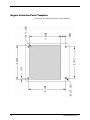
MANUSER6000 Rev 0
1.
Tape the Engine Selection Panel Template from the back of
this manual to the chosen mounting surface
2.
Mark the mounting surface for hole placement using the
template.
3.
If mounting with screws, drill four 3/16 inch (4 mm) holes. If
mounting with nuts and bolts, drill four 1/4 inch (6 mm) holes
instead.
4.
Route and connect the 5’ (1.5 m) cable from the Engine
Selection Panel through the primary cutout to the Engine
Selection Panel Y-harness (part no. CE13000) which has
been placed in a convenient centrally located wiring run.
5.
If installing a second Engine Selection Panel, repeat steps 14 using the second panel.
6.
Secure the Engine Selection Panel(s) to the mounting
surface with four 1/4 inch (6 mm) stainless steel screws or
nut-bolt pairs for each panel being installed.
17
Installation
i6000 Series Electronic Controls - User Manual
i6000 Series Electronic Controls - User Manual
Installing Electronic Control Units (ECUs)
Installation
You must install one ECU per engine to control each engine’s
functions.
Determining Proper Mounting Location
ECUs can be mounted on overheads, bulkheads, or other flat
surfaces. The ECU should be positioned so that its electrical
connectors face downward, or at least not upward, and there should
be at least 4 inches (10 cm) of clearance in all directions around the
electrical connectors for attaching wire harnesses.
The LED display on the ECU must be visible for setup and error
reporting, so be sure the positioning of the ECU allows these to be
easily read, preferably not upside-down. The pushbuttons on the
ECU must also be accessible to fingertips for making adjustments.
WARNING
•
•
•
•
Do not install an ECU where it may become wet.
Do not install an ECU where ambient temperatures may
exceed 158° F (70° C).
Do not install an ECU near high-current devices or
wiring runs.
Do not mount an ECU directly on an engine or
transmission.
Mounting the ECU
1.
Place the ECU on the chosen mounting surface and use the
ECU itself to mark the mounting holes.
2.
If mounting with screws, drill four 3/16 inch (4 mm) holes. If
mounting with nuts and bolts, drill four 1/4 inch (6 mm) holes
instead.
3.
Secure the ECU to the mounting surface with four 1/4 inch (6
mm) stainless steel screws or nut -bolt pairs.
4.
Repeat steps 1-3 for each engine’s ECU. Be sure to note
which ECU serves which engine.
Installing Mechanical Actuators
If both the Electronic Shift (ES) and Electronic Throttle Control (ETC)
options packages were purchased and installed on your system then
you will not need to install any mechanical actuators on your boat.
Otherwise, you will need to install the appropriate number and types
of actuators to operate your system.
18
MANUSER6000 Rev 0
If you don’t have Electronic Shift, then you will need to install a Shift
Actuator for each engine requiring mechanical shift. If you don’t
have Electronic Throttle Control, then you will need to install a
Throttle Actuator for each engine requiring mechanical throttle
control. Optional High-Load Actuators can be installed if required for
outboard and stern-drives.
Determining Proper Mounting Location
Actuator placement should allow for the shortest, straightest possible
run of the actuator cable to the associated engine’s respective
mechanical linkage. In planning actuator cable paths, try to avoid a
bend radius smaller than 6 inches (15 cm), even though a bend
radius as small as 4 inches (10cm) is within specifications.
Actuators should be mounted on overheads, bulkheads, or other flat
surfaces. The actuators should be positioned so that their electrical
connectors face downward, or at least not upward. Leave at least 4
inches (10 cm) of clearance in all directions around electrical
connectors and mechanical cable connectors for attaching wire
harnesses and actuator cables.
As a safety precaution, leave at least 5 inches (13 cm) of clearance
in all directions around the manual override knob on each actuator.
Also leave enough room for someone to use a screwdriver to pry the
manual override wrenches away from the actuator bodies if
necessary.
WARNING
•
•
•
•
•
Do not install actuators where they may become wet.
Do not install actuators where ambient temperatures
may exceed 158° F (70° C).
Do not install the actuators near high-current devices or
wiring runs.
Do not mount actuators directly on engines or
transmissions.
Do not position actuators such that actuator cables will
require bends with a radius tighter than 4 inches (10cm).
Mounting the Actuator
Shift Actuators and Throttle Actuators are externally identical except
for their connectors. Shift Actuators have black connectors and
Throttle Actuators have grey connectors. Their mounting procedures
are the same. Double-check that you have the correct actuator for
the chosen location before mounting each. For each actuator
required:
1.
MANUSER6000 Rev 0
Place the appropriate actuator on the chosen mounting
surface and use the actuator itself to mark the mounting
holes.
19
Installation
i6000 Series Electronic Controls - User Manual
i6000 Series Electronic Controls - User Manual
Installation
2.
If mounting with screws, drill three 3/16 inch (4 mm) holes. If
mounting with nuts and bolts, drill three 1/4 inch (6 mm)
holes instead.
3.
Mount the actuator with three 1/4 inch (6 mm) stainless steel
screws or nut-bolt pairs.
4.
Repeat steps 1-3 for each actuator needed. Make a note of
which actuator is for which function on which engine.
Preparing the Actuator Cable
An actuator cable connects each actuator to its associated shift or
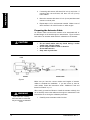
throttle linkage on the actual engine or transmission. Figure 4 shows
both ends of an actuator cable and their orientation to the actuator.
CAUTION
•
•
•
•
Do not install cables with any bends having a radius
smaller than 4 inches (10cm).
Do not subject cables to heat or abrasion.
Do not lubricate core.
Keep ends dry and clean.
i6000 Actuator and Actuator
Cable
Figure 4
Make sure you have the correct number and lengths of actuator
cables to complete the installation. If you are unsure or need to
order cables, review the instructions under “Additional Tools and
Items You’ll Need” on p.11.
WARNING
Open cable box carefully,
because cable is coiled and
may uncoil with considerable
force.
20
When ready, proceed as follows to install the actuator cable(s), but
do not actually connect the cables to the engine or transmission until
instructed to do so during the calibration procedure.
1.
Carefully remove actuator cable from box.
MANUSER6000 Rev 0
2.
Choose an actuator and route the actuator cable along the
shortest, straightest path from the actuator to its associated
engine or transmission linkage. On jet drive systems, the
“transmission” linkage will be at the hydraulic valve that
controls the boat’s split duct thrust reversing deflector
(“bucket”).
3.
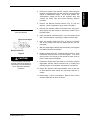
Remove the Manual Override Wrench (Fig. 5) from the
actuator. Use a screwdriver to pry it loose if necessary.
4.
Unscrew the actuator’s Manual Override Knob, then pull it
away slightly from the actuator to expose the square hub on
the metal shaft.
5.
Using the Manual Override Wrench, turn the actuator shaft
180° counterclockwise, exposing the cable Connector Slot.
6.
Place the actuator cable’s Hub (Fig. 4) into the Connector
Slot of the actuator and slide the Cable Hub Nut over the
connection.
7.
With the cable aligned straight into the actuator, hand tighten
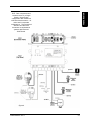
the Cable Hub Nut to the actuator.
8.
Rotate the shaft back 180° clockwise with the wrench. Push
the Manual Override Knob in and hand tighten. If the knob
will not push in far enough for the threads to mesh, push or
pull the cable output end slightly.
9.
Prepare the output end of the cable for connection using the
appropriate Actuator Cable Connection Kit (if needed) and
following engine or transmission manufacturer instructions.
Location of Manual Override
Knob and Wrench.
Figure 5
CAUTION
Do not actually connect the
actuator cable to the engine or
transmission until instructed to
do so during the calibration
procedure.
10. Secure the Actuator Cable approximately every 2 feet (0.6
m) with stainless steel screws and mounting head ties or
clamps.
11. Repeat steps 1-10 for each actuator. Make a note of which
actuator cables are for which functions.
MANUSER6000 Rev 0
21
Installation
i6000 Series Electronic Controls - User Manual
i6000 Series Electronic Controls - User Manual
Installation
Connecting Components
Wire harnesses must now be routed and connected between all the
different components. Every boat is different and there may be
several ways to route the harnesses. Inside the boat there is often a
channel or conduit used for wiring. This can also be used to route
the wire harnesses and cables for the i6000 system.
When routing the harnesses, remember that they must not be cut or
spliced, and care should be taken not to damage the cable
insulation. If a harness is too short, replace it with a correct-length
harness. Don’t add a short harness to make up the required length.
When ordering new harnesses, the xx suffix on the harness part
numbers specifies the length of the harness in feet. Run harnesses
over the shortest and straightest possible path. Secure harnesses
every 2 feet (0.6 m) with stainless steel screws and mounting head
ties or clamps. Excess harness should be neatly coiled and secured
with nylon ties. Harnesses should be run as far as practical from
high current wires or wiring runs and should not be subjected to
water, fuel, lubricants, or excess heat.
The Deutsch connectors on the harnesses are color-coded and
constructed so that a harness connector cannot mate with the wrong
type of component connector. However, in dual station and/or dual
engine configurations, components can be connected to component
connections for the wrong engine, transmission, or control station.
Keep in mind that one ECU controls one engine and transmission.
Therefore, dual engine configurations require two ECUs and two sets
of identical connectors, even if there is only one control station.
Additionally, dual station multi-engine configurations require each
Control Head to be connected to specific connectors on two different
ECUs.
22
MANUSER6000 Rev 0
i6000 Series Electronic Controls - User Manual
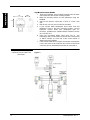
Installation
Component connections to the
ECU. Dark components and
connections are for a Single
Station, Single Engine
configuration with mechanical
shift and throttle actuators. All
others are for expanded
configurations. The mechanical
actuators and their wire
harnesses are eliminated in
systems with Electronic
Shift/Throttle.
Figure 6
MANUSER6000 Rev 0
23
i6000 Series Electronic Controls - User Manual
Installation
Before proceeding, make sure you have the correct number and
lengths of wire harnesses to complete the installation. If you are
unsure or need to order harnesses, review the instructions under
“Additional Tools and Items You’ll Need” on page 11. Refer to
Figure 6 when connecting components.
CAUTION
CAUTION
Once you’ve routed a harness,
make sure the connections are
tight. The i6000 System will
malfunction if harnesses are not
firmly connected.
24
Avoid running wire harnesses along other wires or harnesses
that carry high current or might cause EMI (electromagnetic
interference). Examples are generator leads or spark plug
wires. Such runs could cause system interference or possibly
even failure.
1.
Route the free end of the wire harness that you prepared in
the “Mounting the Control Head” section (page 13) from the
location of the main Control Head to the ECU. If your boat
has more than one engine, start by routing the free end of
the main Control Head’s starboard side harness to the
starboard engine ECU first. If a harness is too short, order
an extension harness (part no. CE107xx, where xx is the
length in feet) from Teleflex Marine Customer Service at 1610-495-7011.
2.
Take the free end of the Control Head harness you just
routed and connect it to the connector on the ECU marked
“CONTROL HEAD #1”.
3.
If your boat has more than one control station, route the free
end of the same-side harness of Control Head/Station #2 to
the same ECU you just connected to but connect it to the
ECU connector marked “CONTROL HEAD #2”.
4.
If you were required to install an Actuator to mechanically
control the engine’s throttle, then connect the Throttle
Actuation wire harness (part no. CE101xx) to the connector
marked “THROTTLE ACTUATION”. Then route the free end
to the Actuator you have assigned to control the throttle for
this ECU’s associated engine and connect it tightly.
5.
For engines with Electronic Throttle Control (ETC), connect
part no. CE109xx to the ECU connector marked
“THROTTLE ACTUATION”. Then route and connect the
free end of the harness to the corresponding engine’s
electronic throttle connection according to the engine
manufacturer’s instructions.
6.
If you were required to install an Actuator to mechanically
shift the engine’s transmission, then connect the Shift
Actuation wire harness (part no. CE100xx) to the connector
marked “SHIFT ACTUATION” on the same ECU you’ve
been working on. Route the free end to the Shift Actuator for
the associated engine and connect tightly.
MANUSER6000 Rev 0
7.
For engines with electronic shifting, connect part no.
CE108xx to the ECU connector marked “SHIFT
ACTUATION”. Then route and connect the free end of the
harness to the corresponding engine’s transmission
according to the engine manufacturer’s instructions.
8.
On the same ECU, connect the Neutral Start Protection wire
harness (part no. CE106xx) to the connector marked
“NEUTRAL START PROTECTION”.
Then route and
connect the free end to the corresponding engine’s starter or
ignition circuit according to the engine manufacturer’s
instructions.
9.
If your boat has more than one engine, repeat steps 1-8
using the port side Control Head wire harness(es) and the
port engine ECU and Actuators instead.
10. Secure all harnesses every 2 feet (0.6 m) with stainless steel
screws and mounting head ties or clamps.
Additional Steps for Triple Engine Systems
11. Connect a set of extension harnesses (part no. CE107xx)
long enough to reach the Center Engine ECU to the free
ends of the previously prepared Engine Selection Panel Yharness (part no. CE13000). Route the newly-extended free
ends to the Center Engine ECU and connect them to the
ECU connectors marked “CONTROL HEAD #1” and
“CONTROL HEAD #2”.
12. Repeat steps 4-8 for the Center engine ECU.
TM
13. Triple engine systems MUST have the MagicBus network
installed. Follow the instructions under “MagicBus™ for
Tachometers and ” below.
14. To finish up, secure remaining harnesses every 2 feet (0.6
m) with stainless steel screws and mounting head ties or
clamps.
Connecting Optional Devices
NMEA Compliant Devices
Many optional devices are available for you to connect to your
system via the NMEA communications protocol. This is a standard
defined by the National Marine Electronics Association and
commonly used by marine electronics manufacturers. You can
quickly and easily connect NMEA 2000 or even NMEA 0183 devices
to your i6000 system to display engine data, etc, if you have properly
set up the MagicBus™ network and have the necessary equipment
installed. For more information on connecting NMEA compliant
devices to the MagicBus™ network, contact Teleflex Marine
Technical Support at 1-610-495-7011.
MANUSER6000 Rev 0
25
Installation
i6000 Series Electronic Controls - User Manual
i6000 Series Electronic Controls - User Manual
Installation
MagicBus™ for
Synchronization
CAUTION
Do not use ties or clamps on
MagicBus Tees, connectors, or
terminators.
CAUTION
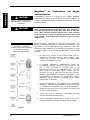
Example: MagicBus
connections. Unshaded
example components are added
to the network to share
information with the ECU.
Tachometers
and
Engine
TM
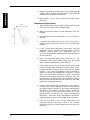
A MagicBus
network is required to use Teleflex MagicBus
tachometers and engine synchronization in multi-engine systems. If
utilizing engine synchronization or MagicBus tachometers, follow the
instructions below.
When installing MagicBus components, pay close attention to
connector polarity, do not stress the cables, and do bend the
Tees. When installing multiple adjacent Tees, make sure that
the mounting surface is flat, so they will not be stressed or bent
when secured. If the surface is not flat, secure only one of the
adjacent Tees.
Before proceeding, make sure you have the correct number and
lengths of cables and connectors to complete the installation. If you
are unsure or need to order cables and/or connectors, review the
instructions under “Additional Tools and Items You’ll Need” on page
TM
11. Refer to Figure 7 for an example of a MagicBus network while
installing.
1.
On each ECU, connect an ECU Comm Cable (part no.
CM10401) to the ECU connector marked “COMM”. Then
connect the free ends of each to the perpendicular
connectors of MagicBus™ Tees.
2.
If installing MagicBus™ tachometer(s), follow the
tachometer’s installation instructions then connect the free
end of each tachometer or interface cable to the
perpendicular connector of a MagicBus™ Tee. On each
ECU, connect a Tachometer Sensor harness (part no.
CE105xx, see Fig. 6, page 28) from the ECU connector
marked “TACHOMETER” (located below “NEUTRAL START
PROTECTION” connector) to the corresponding engine’s
tachometer sensor connector, according to the engine
manufacturer’s instructions.
3.
Connect all MagicBus™ Tees together (or to
MagicBus™ network) using MagicBus™ Comm
no. CM100xx) and terminate each end of the
backbone using male (part no. CM 10051) and
no. CM 10052) terminators.
4.
Secure the Tees to convenient, appropriate mounting
surfaces with stainless steel screws.
5.
Secure MagicBus™ cables every 2 feet (0.6 m) with
mounting head ties or clamps and stainless steel screws.
an existing
Cables (part
MagicBus™
female (part
Figure 7
26
MANUSER6000 Rev 0
Connecting Electrical Power
If you own a Teleflex i1001 Power Distribution Box, you may skip this
section and follow the instructions provided with your i1001 to
connect the power to your i6000. Use of the i1001 provides the best
results and easiest installation solution.
Power is supplied to the i6000 System through a three-conductor
shielded harness. This harness provides voltage redundancy and
minimizes the effects of electromagnetic interference.
Before proceeding, make sure you have the correct length of wire
harness to complete the installation. If you are unsure or need to
order a harness, review the instructions under “Additional Tools and
Items You’ll Need” on page 11. Refer to Figure 8 while connecting
power.
WARNING
Disconnect all DC power before starting wiring installation. Do
not mount the relay where it will be exposed to moisture,
lubricants, fuel, or flammable vapors.
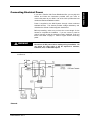
ECU electrical power and wiring
connections.
B
A
Figure 8
Figure 8
MANUSER6000 Rev 0
27
Installation
i6000 Series Electronic Controls - User Manual
i6000 Series Electronic Controls - User Manual
Proceed as follows to connect the i6000 System to 12-volt power:
Installation
1.
2.
3.
4.
5.
6.
7.
8.
NOTICE
Battery ground is required for
proper system operation.
9.
10.
11.
12.
13.
14.
15.
16.
17.
28
Install two sealed SPDT (Single Pole Double Throw) 30 amp
relays.
Connect both relay solenoids to the wire (usually violet) from
the ignition switch.
Install 14 AWG (minimum) wire from voltage source A to a
marine approved circuit breaker rated at 10 amps.
Install 14 AWG (minimum) wire from the circuit breaker to
one side of the relay contact pair for primary power.
Connect the red conductor of the ECU Power harness (part
no. CE104xx) to the other side of the relay contact pair for
primary power.
Install 14 AWG (minimum) wire from voltage source B to a
marine approved circuit breaker rated at 10 amps.
Install 14 AWG (minimum) wire from the circuit breaker to
relay contact pair for backup power.
Connect the white conductor of the ECU Power harness to
the other side of the relay contact pair for backup power.
Connect the black conductor of the ECU Power harness to
battery ground.
Connect DC power.
Turn on the ignition
Verify operation with a test light or meter. See that 12 volts
is applied between contacts A and C on the ECU Power
connector when breaker A is energized and between
contacts B and C when the B breaker is energized.
Connect the Deutsch connector of the ECU Power harness
to the connector on the ECU marked “POWER”.
Remove the large Phillips screw to the right of the POWER
placard on the ECU.
Put the Phillips screw through the terminal on the green wire
and replace the screw; thereby, grounding the harness
shield to the ECU chassis.
Make sure all connections are tight. The i6000 System will
malfunction if harnesses and wires are not firmly connected.
Secure the ECU Power harness and power wires
approximately every 2 feet (0.6 m) with mounting head ties
or clamps and stainless steel screws.
MANUSER6000 Rev 0
i6000 Series Electronic Controls - User Manual
After the i6000 System components have been mounted and
interconnected, the system must be set up to agree with the engine
and transmission and the operator’s preferences. All calibration and
feature selection functions for the i6000 are performed through the
individual engines’ ECUs.
Each ECU must be programmed
separately in order for the i6000 system to function properly.
Working with the ECU Display and Controls
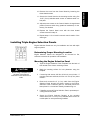
ECU Buttons and Display.
Calibration, feature selection, and attaining information about the
i6000 system are all executed on the ECU through the use of the
three ECU buttons and LED display on the front of the ECU. The
two-digit display will flash repeatedly if a menu option has not been
selected for the menu presented. A steady display indicates that an
option was previously selected.
Figure 9
Figure 9
ECU Button Functions
“+” - If the display is flashing, pushing this button displays the next
menu option. If the display is steady, pushing this button advances
you to the next menu, leaving the selection for the previous menu
untouched.
“-“ - If the display is flashing, pushing this button displays the
previous menu option. If the display is steady, pushing this button
returns you to the previous menu, leaving the selection for the menu
just displayed untouched.
ENTER – If the display is flashing, pushing this button selects the
displayed option. If the display is steady, pushing this button
“deselects” the displayed menu option (causing it to flash), and
allows you to use the “+”, “-“, and ENTER buttons to scroll through
the available menu options for that menu and make a new selection.
MANUSER6000 Rev 0
29
Setup
Setup
i6000 Series Electronic Controls - User Manual
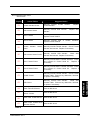
Information mode Software
Type codes.
ECU
Display
00
Setup
01
02
03
Software
Type For
Standard System
Jet Drive System
with General
Motors Delphi
ETC Body
Standard Jet
Drive System
Jet Drive System
with General
Motors Hitachi
ETC Body
Information mode Options
codes. The zeros in the last
three Options codes (10, 20,
and 30) are replaced with any
one of the other Options codes
when those options are
purchased with them in
combination, e.g., the Options
code for VSW with PTS is 24.
ECU
Display
Options Installed
0
No Options
2
4
SRT & PTS
8
Electronic Shift
(ES)
A
ES & SRT
C
ES & PTS
E
ES, PTS, & SRT
20
30
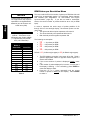
Cruise Sync
(CS)
Variable Shift
Window (VSW)
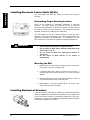
You can determine which mode the ECU is in by checking the code
displayed on the two-character LED display just after powering on
the ECU. The Mode Menu is the initial menu presented whenever
the ECU is powered on.
ECU mode descriptions and their
corresponding display codes are listed below:
•
Operation – oP . This mode is the actual mode of use for
controlling shift and throttle.
It is the initial mode
automatically selected when the system is powered on,
unless the system requires calibration.
•
Information - IF . This mode presents five consecutive
displays:
1) 8 8
. ., which is a 1-second LED test that lights all
segments of the 2-digit LED indicator to ensure they are
all working correctly.
2) the Required ECU Hardware code, which is a set of two
numbers (displays for 1 second) identifying what ECU
electronics the factory installed to work with the
software:
00 (non-diesel), 01 (Electronic Throttle
Control), 02 (diesel), or 03 (jet drive).
3) the Software Type, which is a set of two numbers
(displays for 1 second) identifying which software code
set is installed on the ECU. For a list of Software Type
codes, see Table 1.
4) the Software Version, which is a letter followed by a
number (displays for 1 second) identifying the revision
number of the installed software code set
5) the Options code, which lists which options package was
purchased and installed on your system (displays until
another mode is selected). For a list of Options package
codes, see Table 2.
•
Error Reporting - Er . This mode is for reviewing system
failures. The most recent 100 critical and non-critical codes
are displayed in reverse chronological order. The most
recent error code is displayed first. If more than 100 errors
have been reported, the oldest failures are discarded and
the most recent 100 failures are retained.
•
Feature Selection – FE. This mode is for setting up the
additional features to customize the system to your
preferences. The features are preset to defaults which you
should review prior to use.
•
Calibration - (A . This mode is for calibrating the system to
correctly control your boat. If the system has never been
calibrated, this is the initial mode after power is applied.
CS & VSW
Table 2
30
When you power on an ECU, either by ignition switch or
reconnecting the power harness, the green power indicator next to
the two-character LED display should come on, and the ECU should
start in Calibration mode unless previously calibrated. If it was
previously calibrated, it should start in Operation mode.
Split Range
Throttle (SRT)
Power Train
Sync (PTS)
6
10
ECU Modes
MANUSER6000 Rev 0
i6000 Series Electronic Controls - User Manual
Choosing the ECU Mode
To manually change the ECU mode, first make sure the ECU is
displaying the Mode Menu (see “ECU Modes”, page 30). If the Mode
Menu display is flashing, pushing the “+” or “-“ buttons will display
the other mode choices available. When the desired mode is
displayed, pressing the ENTER button will confirm your choice and
switch the ECU to the desired mode.
When a mode is already selected (indicated by a steady display),
pushing the ENTER button will cause the display to flash, allowing
you to once again use the “+” and “-“ buttons to scroll through the
available mode choices. Pushing the “+” or “-“ buttons while the
display is steady will have no effect.
WARNING
MANUSER6000 Rev 0
Do not use the Information, Error Reporting, Feature Selection,
or Calibration ECU modes while the boat is underway. The
engine(s) should be off since the boat cannot be controlled
while in these modes.
31
Setup
The ECU mode is normally selected automatically by the system at
at the time of startup (see “ECU Modes”, page 30), but it can also be
changed manually by using the “+”, “-“, and ENTER buttons at the
ECU’s Mode Menu. It will be necessary to manually change the
ECU mode in order to thoroughly calibrate and customize your
system.
i6000 Series Electronic Controls - User Manual
Calibrating the System
Setup
Calibration is performed primarily at the ECU. Before you can
operate your i6000 system, you must first teach the ECUs how to
correctly interpret the Control Head signals and manipulate the
mechanical actuators (if any). The calibration procedure allows you
to do this. If the system was previously calibrated with different
Control Heads or actuators, it must be recalibrated to teach the ECU
the characteristics of the new hardware.
The Calibration menus described below are in the sequence
presented by the ECU. The defaults identified are the first choices
presented by an uncalibrated system.
NOTICE
If your boat has more than one engine, you must calibrate each one
of your ECU(s) separately for the system to function properly.
Additionally, many of the menus must be calibrated the same way on
each ECU so that there isn’t conflicting calibration information.
Menus that must be calibrated the same way system-wide are
System Configuration and Engine Type.
Select an ECU and test the ECU’s LED display by selecting the
Information ECU mode (see “IF mode”, page 30). When ready to
calibrate the ECU, select Calibration mode (see “Choosing the ECU
Mode”, page 31) and run through each of the Calibration menus
listed below, following the instructions. When finished, set the ECU
to Operation mode. Repeat this entire procedure for each ECU you
have installed.
System Configuration Menu
This menu tells the ECU how many engines and control stations you
have. The full list of valid configuration codes is:
• (1 - Single Station, Single Engine (SSSE)
• (2 - Dual Station, Single Engine (DSSE)
• (3 - Single Station, Dual Engine (SSDE)
• (4 - Dual Station, Dual Engine (DSDE)
• (5 - Single Station, Single Engine, Single Function Controls
• (6 - Single Station, Single Engine, Single Function Controls
• (7 - Single Station, Triple Engine (SSTE)
• (8 - Dual Station, Triple Engine (DSTE)
Default = (1 (Single Station, Single Engine).
1.
2.
32
The ECU displays one of the configuration codes listed
above (designated by ( and a number).
If the configuration code is correct and steady, press “+” to
move on to the next menu.
MANUSER6000 Rev 0
i6000 Series Electronic Controls - User Manual
3.
4.
If the configuration displayed is incorrect, check to see if the
display is flashing. If it is not flashing, press ENTER to
cause the display to flash.
Press the “+” or “-” button repeatedly until the correct
configuration is flashing on the display. Press ENTER to
select it. The first choice of the next feature menu will then
appear.
NOTICE
The ECU/Engine Assignment
Menu is automatically skipped if
you chose a single engine
configuration.
Identify
•
•
•
the ECU/engine being calibrated. Possible assignments are:
Sd - Starboard
Po - Port
(E - Center (triple engine configurations)
Default = Sd (Starboard).
1. The ECU displays Sd to indicate starboard engine or Po to
indicate port engine.
2. If the correct engine is displayed steady, press “+”.
3. If the engine displayed is incorrect, check to see if the
display is flashing. If it is not flashing, press ENTER to
cause the display to flash.
4. Press the “+” or “-” button repeatedly until the correct
engine is flashing on the display. Press ENTER to select it.
Engine Type Menu
This menu tells the ECU what kind of engine it will be controlling.
The types available are:
• 9S – Gas or 91,92,93,94 (gas)
•
•
ob – Outboard or o1, o2, o3, o4 (outboard)
dS – Diesel
Default = 9S (Gas).
1. The ECU displays 9S to indicate gas, ob to indicate
outboard, or dS to indicate diesel.
2. For outboard and gas some applications may require a wider
RPM band to “lock-in.” The X1,X2,X3,X4 options are user
options if the sync operation does not result in a stable
operation.
3. If the correct engine type is displayed steady, press “+”.
4. If the engine type displayed is incorrect, check to see if the
display is flashing. If it is not flashing, press ENTER to
cause the display to flash.
5. Press the “+” or “-” button repeatedly until the correct
engine type is flashing on the display. Press ENTER to
select.
MANUSER6000 Rev 0
33
Setup
ECU/Engine Assignment Menu
i6000 Series Electronic Controls - User Manual
RPM Pulses per Revolution Menu
NOTICE
Setup
If RPM pulses are specified for
one engine/ECU, they must be
specified for all engines/ECUs,
otherwise you will cause a noncritical error (#26).
RPM pulse settings for Yanmar
systems. *Exceptions to the
below table are models 3GM35
(114 Pulses/Rev) and 4JH3EYEU (116 Pulses/Rev).
Yanmar
Model #
Starts With
1GM
2GM
3GM*
3JH2
3JH3
4JH*
4LH
6LP
6LY
6CH
6CX
In order to represent the entire range of pulses possible of 00
through 399 on the two-digit display, the decimal points are also
given value.
• The right-most decimal point represents 100 when lit
• The center decimal point represents 200 when lit
• Both decimal points lit together represent 300
The following are examples:
•
•
Pulses/Rev
97
97
97*
114
116
127*
127
117
129
129
129
Table 3
34
This menu tells the ECU the number of pulses per RPM that it should
expect from its associated engine if a Tachometer Sensor harness
was installed (see “MagicBus™ for Tachometers and Engine
Synchronization”, page 26). If you did not install a tachometer
sensor, the correct number of pulses should be set to 00 (no RPM
Input).
•
•
29
29.
2.9
2.9.
= 29 pulses per RPM
= 129 pulses per RPM
= 229 pulses per RPM
= 329 pulses per RPM
Default = 04 (for Gas engine types) or 06 (for Diesel engine types).
1.
2.
3.
4.
The ECU displays a number in the range 00 to 399. Table 3
specifies appropriate values for popular marine engines if a
sensor was installed.
If the correct number of pulses is displayed steady, press
“+”.
If the number of pulses displayed is incorrect, check to see if
the display is flashing. If it is not flashing, press ENTER to
cause the display to flash.
Press the “+” or “-” button repeatedly until the correct
number of pulses is flashing on the display. Press ENTER
to select it.
MANUSER6000 Rev 0
i6000 Series Electronic Controls - User Manual
Control Head Levers Menu
NOTICE
In this menu, you are prompted to teach the ECU each of the key
lever positions.
NOTICE
Key Control Head lever
positions.
During the calibration procedure: a lever about to be calibrated is
noted by the flashing green indicator on the same side of the Control
Head as the lever; the amber lamp will flash when you are seeking
the next lever position; and a steady green lamp will indicate that a
lever position was successfully “taught.” If you have a multi-engine
system and the Control Head lamps appear to be lighting on the
wrong side for the ECU/engine you’re calibrating, you may have
connected or calibrated the ECU incorrectly.
Recheck your
connections and repeat the calibration from the beginning.
1.
The ECU displays L1. This is the starting point for Control
Head lever calibration.
2.
Press ENTER to proceed (or push “+” or “-“ to skip to the
next or previous calibration point). The display FF indicates
the ECU is ready to calibrate Control Head lever #1. (Control
Head lever #1 is cabled to this ECU’s Control Head #1
connector.)
3.
Go to the main Control Head.
4.
Move the corresponding lever (starboard or port) for the
engine/ECU you’re calibrating to the “Full Forward” position
and press the button (SELECT or SYNC) next to this lever
on the Control Head. Use SELECT for the port engine lever
and SYNC for the starboard engine lever in multi-engine
systems. After completing this step, the display back on the
ECU should read IF.
5.
*Jet drive systems skip this step* Now move the lever to the
“Idle Forward” position and, again, press the corresponding
button (SELECT or SYNC) next to it on the Control Head.
After completing this step, the display back on the ECU
should read NU.
6.
Now move the lever to the “Neutral” position and, again,
press the corresponding button (SELECT or SYNC) next to it
on the Control Head. After completing this step, the display
back on the ECU should read IR.
7.
*Jet drive systems skip this step* Now move the lever to the
“Idle Reverse” position and, again, press the corresponding
button (SELECT or SYNC) next to it on the Control Head.
After completing this step, the display back on the ECU
should read FR.
Figure 10
NOTICE
Alternately, you can use the
ENTER button on the ECU at
each of the Lever Calibration
steps instead of the SELECT or
SYNC button.
MANUSER6000 Rev 0
35
Setup
The Control Head Levers Menu
is automatically skipped on
center engine ECUs (triple
engine systems).
i6000 Series Electronic Controls - User Manual
Now move the lever to the “Full Reverse” position and,
again, press the corresponding button (SELECT or SYNC)
next to it on the Control Head.
9.
Return to the ECU. If you specified a configuration with
more than one Control Head earlier in the calibration
sequence then the ECU should now be displaying L2
indicating the ECU is ready to calibrate Control Head lever
#2. . (Control Head lever #2 is cabled to this ECU’s Control
Head #2 connector.) Otherwise, you are done calibrating
Control Head levers for this ECU and may skip to the next
menu (“Throttle Actuator Menu”) below.
Setup
8.
10. Press ENTER to proceed (or push “+” or “-“ to skip to the
next or previous menu). The ECU displays FF.
11. Go to your second control station and repeat steps 4-8 using
your second Control Head.
12. Return to the ECU for the next menu.
Throttle Actuator Menu
NOTICE
The Throttle Actuator Menu is
automatically skipped on
systems with Electronic Throttle
Control (ETC).
In this menu, you are prompted to set the following parameters:
1) The action required of the actuator cable to open the throttle:
Pull (PL ) or Push (PS ).
Default = PS.
2) The distance, in millimeters, the actuator cable must be
moved to go from idle to wide open throttle (referred to as
the actuator or throttle stroke). The acceptable range is 24
to 76 millimeters (0.945 to 2.99 inches).
Default = 24 mm.
3) The “Idle” position of the actuator cable.
NOTICE
36
The last parameter of the Throttle Actuator Menu (setting the “Idle”
position) is also the step in which the final physical connection is
made between the actuator cable and the mechanical throttle
linkage.
1.
The ECU displays A1 for Throttle Actuator calibration.
2.
Press ENTER to proceed (or push “+” or “-“ to skip to the
next or previous menu).
3.
The ECU displays PS (Push) or PL (Pull) as the action to
open the throttle.
4.
If the correct action is displayed steady, press “+”.
MANUSER6000 Rev 0
CAUTION
Following the SI display,
pressing ENTER will cause the
Throttle Actuator to move the
actuator cable. Keep clear.
5.
If the action displayed is incorrect, check to see if the display
is flashing. If it is not flashing, press ENTER to cause the
display to flash.
6.
Press the “+” or “-” button repeatedly until the correct action
is flashing on the display. Press ENTER to select it.
7.
The ECU next displays a flashing number in the range of 24
to 76. This is the actuator stroke length, in millimeters, from
idle to WOT (Wide Open Throttle). This should agree with
the stroke recommended by the engine manufacturer. If this
value is unknown, go to the engine, move the mechanical
throttle linkage, and physically measure this distance.
8.
If the correct stroke is displayed steady, press “+”.
9.
If the stroke displayed is incorrect, check to see if the display
is flashing. If it is not flashing, press ENTER to cause the
display to flash.
10. Press the “+” or “-” button repeatedly to change the stroke
in 2 mm increments until the correct stroke is flashing on the
display. Press ENTER to select.
11. The ECU displays a steady SI (Set Idle).
12. Press ENTER to proceed (or push “+” or “-“ to skip to the
next or previous menu).
13. The Throttle Actuator then moves the actuator cable to the
“Idle” position.
14. Go to the engine corresponding to the ECU you’re
calibrating and adjust the actuator cable’s end connector for
the engine’s “Idle” position. Then attach the cable end to the
mechanical throttle linkage on the engine.
15. Return to the ECU and press ENTER.
16. If you have an electronically shifted transmission then the
ECU should display a steady -- , indicating that calibration
has been completed successfully. If the ECU displays a
flashing -- , at least one step was omitted during calibration,
and you will need to repeat the calibration procedure, filling
in any omissions. Pressing “+” will cause the ECU to return
to the Mode Menu.
17. If you have a mechanically shifted transmission then you will
also need to calibrate the Shift Actuator in the next menu
below before you will be finished with calibration.
MANUSER6000 Rev 0
37
Setup
i6000 Series Electronic Controls - User Manual
i6000 Series Electronic Controls - User Manual
Shift Actuator Menu
NOTICE
The Shift Actuator Menu is
automatically skipped on
systems with Electronic Shift
(ES).
In this menu, you are prompted to set the following parameters:
Setup
1.
The action required of the actuator cable to shift the
transmission to Forward: Pull (PL ) or Push (PS ).
Default = PS.
2.
The distance, in millimeters, the actuator cable must be
moved to go from Neutral to Forward (referred to as the
forward shift stroke). The acceptable range is 14 to 40
millimeters (0.551 to 1.57 inches).
Default = 14 mm.
3.
The distance, in millimeters, the actuator cable must be
moved to go from Neutral to Reverse (referred to as the
reverse shift stroke). The acceptable range is 14 to 40
millimeters (0.551 to 1.57 inches).
Default = 14 mm.
4.
The “Neutral” position of the actuator cable.
NOTICE
The last parameter of the Shift Actuator Menu (setting the “Neutral” position) is also the step in which the
final physical connection is made between the actuator cable and the mechanical shift linkage.
38
1.
The ECU displays A2 for Shift Actuator calibration.
2.
Press ENTER to proceed (or push “+” or “-“ to skip to the
next or previous menu).
3.
The ECU displays PS (Push) or PL (Pull) as the action to
shift the transmission to Forward.
4.
If the correct action is displayed steady, press “+”.
5.
If the action displayed is incorrect, check to see if the
display is flashing. If it is not flashing, press ENTER to
cause the display to flash.
6.
Press the “+” or “-” button repeatedly until the correct
action is flashing on the display. Press ENTER to select.
7.
The ECU next displays a flashing number in the range of
14 to 40. This is the actuator stroke length, in millimeters,
from Neutral to Forward. This should agree with the stroke
recommended by the engine manufacturer. If this value is
unknown, you can go to the engine, move the mechanical
shift linkage, and physically measure this distance.
8.
If the correct stroke is displayed steady, press “+”.
MANUSER6000 Rev 0
i6000 Series Electronic Controls - User Manual
9.
If the stroke displayed is incorrect, check to see if the
display is flashing. If it is not flashing, press ENTER to
cause the display to flash.
11. The ECU again displays a flashing number in the range of
14 to 40. This is the actuator stroke, in millimeters, from
Neutral to Reverse. This should agree with the stroke
recommended by the engine manufacturer. If this value is
unknown, you can go to the engine, move the mechanical
shift linkage, and physically measure this distance.
12. If the correct stroke is displayed steady, press “+”.
13. If the stroke displayed is incorrect, check to see if the
display is flashing. If it is not flashing, press ENTER to
cause the display to flash.
14. Press the “+” or “-” button repeatedly to change the stroke
by 2 mm increments until the correct stroke is flashing on
the display. Press ENTER to select it.
CAUTION
Following the SN display,
pressing ENTER will cause the
Shift Actuator to move the
actuator cable. Keep clear.
NOTICE
On jet drive systems, the
“transmission” is the hydraulic
valve that controls the boat’s
split duct thrust reversing
deflector (“bucket”).
15. The ECU displays a steady SN (Set Neutral).
16. Press ENTER to proceed (or push “+” or “-“ to skip to the
next or previous menu).
17. The Shift Actuator then moves the actuator cable to the
“Neutral” position.
18. Go to the transmission corresponding to the ECU you’re
calibrating and adjust the actuator cable’s end connector for
the transmission’s “Neutral” position. Then attach the cable
end to the mechanical shift linkage on the transmission.
19. Return to the ECU and press ENTER.
20. If you are using an actuator to mechanically control your
boat’s throttle then the ECU should display a steady - -,
indicating that calibration has been completed successfully.
If the ECU displays a flashing - -, at least one step was
omitted during calibration, and you will need to repeat the
calibration procedure, filling in any omissions. Pressing “+”
will cause the ECU to return to the Mode Menu.
21. If you have Electronic Throttle Control (ETC) then you will
also need to specify the engine manufacturer in the next
menu below before you will be finished with calibration.
MANUSER6000 Rev 0
39
Setup
10. Press the “+” or “-” button repeatedly to change the stroke
in 2 mm increments until the correct stroke is flashing on
the display. Press ENTER to select it.
i6000 Series Electronic Controls - User Manual
Electronic Throttle Engine Manufacturer Menu
NOTICE
Setup
The Electronic Throttle Engine
Manufacturer
Menu
only
appears on systems with
Electronic
Throttle
Control
(ETC).
In systems with Electronic Throttle Control (ETC), you must specify
the Electronic Throttle Engine Manufacturer for the ECU to use ETC
correctly. The options available are:
• EF - GM MEFI
• (U - Cummins
• (A - CAT
Default = EF (GM MEFI).
1.
2.
3.
4.
The ECU displays EF (GM MEFI) or the last selection
chosen if previously setup.
If the correct selection is displayed steady, press “+”.
If the selection displayed is incorrect, check to see if the
display is flashing. If it is not flashing, press ENTER to
cause the display to flash.
Press the “+” or “-” button repeatedly until the correct
selection is flashing on the display. Press ENTER to select.
The ECU should display a steady -- , indicating that calibration
has been completed successfully. If the ECU displays a
flashing -- , at least one step was omitted during calibration,
and you will need to repeat the calibration procedure, filling in
any omissions. Pressing “+” will cause the ECU to return to
the Mode Menu.
Selecting Features and Customizing the System
Before you use the i6000 System, you should ensure the appropriate
features are selected and setup to your preferences. Feature
selection is performed at the ECU in the Feature Selection mode.
This mode allows you to set up additional features and customize the
system. The features come preset to defaults which are listed in the
procedures below. You should review these prior to use. If all of the
feature selection defaults are acceptable to you then you may skip or
postpone the feature selection procedure.
The Feature Selection menus described below are in the sequence
presented by the ECU. The defaults identified are the first choices
presented by an uncustomized system.
NOTICE
40
If your boat has more than one engine, you must select the features
on each one of your ECU(s) separately for the system to function
properly. Additionally, many of the menus must be setup the same
way on each ECU so that there isn’t conflicting information. Menus
that must be setup the same way system-wide are Throttle Limit,
Forward Throttle Curve, Reverse Throttle Curve, Programmable Shift
Delay, Station Select Protection, and Fail-Safe Response Mode.
MANUSER6000 Rev 0
i6000 Series Electronic Controls - User Manual
Select an ECU and test the ECU’s LED display by selecting the
Information ECU mode (see “IF mode”, page 30). When ready to
select features on this ECU, select Feature Selection mode (see
“Choosing the ECU Mode”, page 31) and run through each of the
Feature Selection menus listed below, following the instructions.
When finished, set the ECU to Operation mode. Repeat this entire
procedure for each ECU you have installed.
NOTICE
The Throttle Limit Menu is
automatically skipped if you did
not purchase a Split Range
Throttle, Jet Drive, or Variable
Shift Window i6000 System.
Depending on the options package or configuration purchased, this
menu either tells the ECU what percentage of throttle is the
maximum for Split Range Throttle, what the boost level is for the Jet
Drive Boost, or what the acceptable throttle setting is for shifting into
gear on Variable Shift Window (VSW) systems that can tolerate
higher throttle level shifting. The selectable range is from 5% to
50%.
Default = 25 (25% Throttle) Note: Is set to 0 for Boost in Jet Boat
Configuration.
1. The ECU displays 25 (25% Throttle) or the prior value
chosen if previously changed.
2. If the correct percentage is displayed steady, press “+”.
3. If the percentage displayed is incorrect, check to see if the display
is flashing. If it is not flashing, press ENTER to cause the display
to flash.
4. Press the “+” or “-” button repeatedly until the correct
percentage is flashing on the display. Press ENTER to select.
Forward Throttle Curve Menu
Eight different forward throttle sensitivity curves (F1 through F8) are
available. These curves determine the relationships between lever
position and throttle movement. These selections can be easily
changed later if you find you are not comfortable with the selected
curve. Possible reasons for changing include a curve that feels
awkward because it is too different from your previous boat or
throttle system or a curve that does not seem optimal for docking.
The relationships between lever and throttle positions are described
in “Appendix A: Throttle Curves” on page 64. This is also referred to
as Programmable Throttle Control.
Default = Forward Throttle Curve F1 (see “Forward Throttle Curves
(Table 5)”, page 64) .
1.
2.
3.
4.
MANUSER6000 Rev 0
The ECU displays F and a number (Forward Throttle Curve F1
through F8 ). The throttle curves are described in “Forward
Throttle Curves (Table 5)” on page 64.
If the correct forward throttle curve is displayed steady, press
“+”.
If the throttle curve displayed is incorrect, check to see if the
display is flashing. If it is not flashing, press ENTER to cause
the display to flash.
Press the “+” or “-” button repeatedly until the correct throttle
curve is flashing on the display. Press ENTER to select.
41
Setup
Throttle Limit Menu
i6000 Series Electronic Controls - User Manual
Reverse Throttle Curve Menu
Setup
Eight different reverse throttle sensitivity curves (R1 through R8) are
available. These curves determine the relationships between lever
position and throttle movement. These selections can be easily
changed later if you find you are not comfortable with the selected
curve. Possible reasons for changing include a curve that feels
awkward because it is too different from your previous boat or
throttle system or a curve that does not seem optimal for docking.
The relationships between lever and throttle positions are described
in “Appendix A: Throttle Curves” on page 64. This is also referred to
as Programmable Throttle Control.
Default = Reverse Throttle Curve R1 (see “Reverse Throttle Curves
(Table 6”)
1. The ECU displays R and a number (Reverse Throttle Curve R 1
through R8 ). The throttle curves are described in “Reverse
Throttle Curves (Table 6)”.
2. If the correct reverse throttle curve is displayed steady, press
“+”.
3. If the throttle curve displayed is incorrect, check to see if the
display is flashing. If it is not flashing, press ENTER to cause
the display to flash.
4. Press the “+” or “-” button repeatedly until the correct throttle
curve is flashing on the display. Press ENTER to select.
Shift Actuator Type Menu
NOTICE
The Shift Actuator Type Menu is
automatically skipped if you
purchased the Electronic Shift
(ES) options package.
This menu tells the ECU what kind of acutator you are using. The
Optional High-Load Shift Actuator is generally used with outboard
and stern-drive boats. Two different shift actuation choices are
available:
• S – Standard Actuator
• o – Optional High-Load Acutator
Default = S (Standard Actuator).
1.
2.
3.
4.
ECU displays S (Standard Actuator) or o (Optional High-Load).
If the correct actuator type is displayed steady, press “+”.
If the actuator type displayed is incorrect, check to see if the
display is flashing. If it is not flashing, press ENTER to cause the
display to flash.
Press the “+” or “-” button repeatedly until the correct actuator
type is flashing on the display. Press ENTER to select.
Programmable Delay Menus
The i6000 system can ensure that all shifts into gear occur at throttle
and power train inertia levels that will not harm your transmission,
such as might occur if someone were to accidentally throw a lever
from Full Forward to Full Reverse. To allow for the specific situation
of your boat, and to allow for inertia to decay before shifting into
gear, a shift delay can be specified. No delay is applied going to
Neutral Gear.
42
MANUSER6000 Rev 0
i6000 Series Electronic Controls - User Manual
The Programmable Shift Delay is a setting for how long the system
will wait before shifting into gear. The application and duration of the
selected shift delay is dependent upon the time spent at a particular
throttle setting while in gear.
When the throttle is moved, the new computed value is added to the
rolling averaged value. If the throttle remains steady the new
computed value will be achieved after the time of 4 times the
Programmable Shift Delay Setting (length of average window) .
Each time the throttle is moved, the new computed value is used by
the rolling average.
The delay will be proportionally less than the selected delay for
shorter durations in gear at throttle settings less than wide open
throttle. This results in shift delay protection while cruising yet zero
shift delay when quickly shifting back-and-forth at low RPMs, such as
during docking maneuvers, when you need quick engine response
the most. The Delay may be selected from 0 (none) to 12 seconds
in 1.2 second increments.
For example with Programmable Shift Delay set at 12 seconds the
following running conditions will occur:
Running at Full Throttle: after 48 sec., a 12-sec. delay is applied
Change to Half Throttle: after 48 sec., a 6-sec. delay is applied
The Fixed Shift Delay is the specific time for which the shifting of
the transmission will be delayed. This number is not a function of
any other variable such as engine speed or time in gear and is
always a delay for the specified time, so as to ensure a fixed delay
time in shifting into gear. The Delay may be selected from 0 (none)
to 2.0 seconds in 0.1 second increments. This delay is additive to
the Programmable Shift Delay.
Programmable Shift Delay (Speed-Time Delay)
The default delay value for the Shift Delay is set as a function of the
engine setting as listed below. The default settings are:
Engine Setting
Outboard - ob
Gas - gs
Diesel - ds
1.
2.
3.
4.
5.
MANUSER6000 Rev 0
Default Delay
4.8
4.8
4.8
The ECU displays two digits (the shift delay between 0 and 12
seconds, however the ECU does not show the decimal points).
If the correct shift delay is displayed steady, press “+”.
If the delay displayed is incorrect, check to see if the display is
flashing. If it is not flashing, press ENTER to cause flash.
Press the “+” or “-” button repeatedly until the correct delay is
flashing on the display. Selections are:
00 – no delay
12 = 1.2 sec.
24 = 2.4 sec.
36 = 3.6 sec.
48 = 4.8 sec.
60 = 6.0 sec.
84 = 8.4 sec.
96 = 9.6 sec.
11 = 11.0 sec.
12 = 12.0 sec.
Press ENTER to select.
43
Setup
The resulting shift delay applied is the selected Programmable Shift
Delay Value proportioned by the current Throttle Percentage and
then applied to a rolling average whose time window is equal to 4
times the Programmable Shift Delay setting.
i6000 Series Electronic Controls - User Manual
Fixed Shift Delay
The default delay value is set as a function of the engine setting and
type of Shift Device. Default delay settings are below:
Setup
System Type
==>
Engine Setting
Outboard: ob
Gas: gs
Diesel: ds
1.
2.
3.
4.
Mech. Shift
MT
Default
0
0
0
Elect. Shift
MT
Default
0
.3
.3
Mech. Shift
ET
Default
0
.2
.2
Elect Shift
ET
Default
0
.5
.5
The ECU displays two digits (the shift delay between 0 and 2
seconds, however the ECU does not show the decimal points).
If the correct shift delay is displayed steady, press “+”.
If the delay displayed is incorrect, check to see if the display is
flashing. If it is not flashing, press ENTER to cause flash.
Press the “+” or “-” button repeatedly for 0.1 second
increments/decrements until the correct delay is flashing on the
display. Selections are:
00 – no delay; 01 = .1 second; 02 = .2 second.; through 20 = 2.0 seconds
5.
Press ENTER to select.
Station Select Protection Menu
Station Select Protection prevents accidental switching between
control stations in dual station boats. If chosen, a change of control
stations requires that Control Head buttons be pressed in a specific
sequence--SELECT, SELECT, port N (neutral), SELECT. The menu
options available are:
• oF – Station Select Protection Off
• on – Station Select Protection On
Default = oF (Station Select Protection Off).
1. The ECU displays oF (Station Select Protection Off) or on
(Station Select Protection On).
2. If the correct selection is displayed steady, press “+”.
3. If the selection displayed is incorrect, check to see if the display
is flashing. If it is not flashing, press ENTER to cause the
display to flash.
4. Press the “+” or “-” button repeatedly until the correct selection
is flashing on the display. Press ENTER to select.
Fail-Safe Response Mode Menu
WARNING
Certain types of failures, such
as actuator sensor or motor
failures, may prevent the system
from reaching the selected FailSafe Mode.
44
Either of two Fail-Safe Response Modes may be selected in case of
a critical system failure: Neutral Idle (nI ) and Range Gear (ra ).
In Neutral Idle Fail-Safe Response Mode, Control head or Throttle
Actuator failure results in neutral gear and idle throttle. Shift actuator
failure results in idle throttle and the Shift Actuator remaining in the
gear engaged at the time of the failure.
MANUSER6000 Rev 0
i6000 Series Electronic Controls - User Manual
The Fail-Safe Response Mode
Menu is automatically skipped
on center engine ECUs (triple
engine configurations); their failsafe
response
mode
is
automatically set to nI (Neutral
Idle).
In Range Gear Fail-Safe Response Mode, failure of a Control Head
or Shift Actuator results in the Shift Actuator remaining in the
engaged gear at the time of the failure, but the Throttle Actuator
position depends on its position at the time of the failure. If the
Throttle Actuator is open more that 40% above idle, it will be reduced
by 10% of its position at the time of the failure. If it is less than 40%
above idle, it will not be changed. For example, if it is at 70% it will
be changed to 63%; if it is at 30% it will not be changed. Note
however that Throttle Actuator failure will result in the throttle
remaining at the last setting when the failure occured.
= nI (Neutral Idle).
The ECU displays nI (Neutral Idle) or ra (Range Gear)
If the correct selection is displayed steady, press “+”.
If the selection displayed is incorrect, check to see if the
display is flashing. If it is not flashing, press ENTER to
cause the display to flash.
4. Press the “+” or “-” button repeatedly until the correct
selection is flashing on the display. Press ENTER to select.
Default
1.
2.
3.
Center Engine Slave Mode Menu
In triple engine systems this menu tells the ECU how the Center
engine is to behave. To understand triple engine operation, some
new terms need to be introduced:
• An engine is ENGAGED when it responds to Control Head lever
movements.
• If it is DISENGAGED, the actuators for that engine are
maintaining their position at Neutral Idle. This should NOT be
read to mean that the engine is turned off. It merely means that
for the configurations described below, the ECU has placed its
actuators at the positions of Neutral Gear and Idle Throttle.
NOTICE
The Center Engine Slave Mode
Menu only appears on properly
assigned Center Engine ECUs.
MANUSER6000 Rev 0
The i6000 offers 4 options for Center engine behavior:
• 80 – Center follows Port. The center engine always responds
exclusively to the movements of the Port handle. Upon powerup, the Center engine is automatically engaged. If desired the
Center engine can be manually disengaged via the Control
Panel.
• 81 – Follow if Same Gear. The center engine responds to the
movements of the Port handle as long as Port & Starboard are
in the SAME GEAR. If Port & Starboard are in different gears,
the Center disengages until Port & Starboard are once again in
the same gear (when it will automatically re-engage). Upon
power-up, the Center engine is automatically engaged. If
desired the Center engine can be manually disengaged via the
Control Panel. This is the default setting for Triple Engine
applications.
• 82 - Follow Reverse. The Center engine responds to the
movements of the Port handle unless the Starboard moves to
Reverse. If the Starboard Engine moves to Reverse, the
Center Engine will follow. If the Starboard engine shifts out of
Reverse, the Center will return to following the Port. Upon
power-up, the Center engine is automatically engaged. If
desired the Center engine can be manually disengaged via the
Control Panel.
45
Setup
NOTICE
i6000 Series Electronic Controls - User Manual
NOTICE
The option code numbers in the
Center Engine Slave Mode
Menu begin with the number 8
to help discriminate them from
other option code numbers seen
in other menus.
• 83 - Neutral disengage. The Center engine responds to the
movements of the Port handle unless either the Port or the
Starboard shifts into Neutral. If either engine is shifted into
Neutral, the Center engine will disengage. It will remain
disengaged until BOTH engines are placed into GEAR AND
the Center is manually re-engaged via the Control Panel.
Default = 81 (Follow if Same Gear).
Setup
1.
2.
3.
4.
The ECU displays 81 (Follow if Same Gear) or the last
selection chosen if previously setup.
If the correct selection is displayed steady, press “+”.
If the selection displayed is incorrect, check to see if the
display is flashing. If it is not flashing, press ENTER to
cause the display to flash.
Press the “+” or “-” button repeatedly until the correct
selection is flashing on the display. Press ENTER to select.
Transmission Overshift Menu
NOTICE
The Transmission Overshift
Menu is automatically skipped if
you purchased the Electronic
Shift (ES) options package.
NOTICE
The option code numbers in the
Transmission Overshift Menu
begin with the number 9 to help
discriminate them from other
option code numbers seen in
other menus.
This menu addresses problems with some engines that are difficult
to pull out of gear. When Transmission Overshift is enabled, the
actuator will move the engine’s mechanical shift linkage out of its
gear position, past its normal Neutral position, then back again to
Neutral to ensure the engine completely shifted out of gear. The
menu options are:
• 90 - No Overshift
• 91 - Overshift
Default = 90 (No Overshift).
1.
2.
3.
4.
5.
The ECU displays 90 (No Overshift) or the last selection
chosen if previously setup.
If the correct selection is displayed steady, press “+”.
If the selection displayed is incorrect, check to see if the
display is flashing. If it is not flashing, press ENTER to
cause the display to flash.
Press the “+” or “-” button repeatedly until the correct
selection is flashing on the display. Press ENTER to select.
The ECU should display a steady -- , indicating that
calibration has been completed successfully. If the ECU
displays a flashing -- , at least one step was omitted during
calibration, and you will need to repeat the calibration
procedure, filling in any omissions. Pressing “+” will cause
the ECU to return to the Mode Menu.
Testing the System
WARNING
For boats using actuators, follow the instructions below for checking
the actuator settings for proper actuator cable movement and stroke
length prior to use on the water. These tests should be performed
with the engine(s) off.
Check with your engine
manufacturer to ensure that
adjustments to the engine’s shift
and throttle settings can be
made while it is off before
performing this test.
46
MANUSER6000 Rev 0
1.
Cycle the power on the i6000 system by either turning the
ignition off and back on or disconnecting and reconnecting
the Power wire harnesses on each ECU.
2.
Physically check to ensure that the mechanical throttle
linkage on the engine and/or shift linkage on the
transmission are firmly attached and have been moved to
the initial “power-up” positions of Neutral gear and Idle
throttle. If either is set improperly, repeat the calibration
sequence for the appropriate actuator.
3.
Check the displays on each ECU. The displays should all
read oP . If stroke length and/or action (push/pull) were set
incorrectly one or more of the following error codes may
have been generated: 28, 29, 11, 12, 61, 62, 64, 65, 66,
and 67. For details on these error codes, their meanings
and solutions, see “Error Reporting on the ECU” on page 60.
If suggested solutions do not remedy the problem, repeat the
calibration sequence for the affected actuator.
MANUSER6000 Rev 0
4.
Move each engine’s lever in turn to Full Forward at the
Control Head. See “Control Station Selection” on page 51
for more information on selecting and activating Control
Heads.
5.
Physically check that the mechanical throttle linkage on the
engine and/or shift linkage on the transmission have been
moved to the Forward gear and WOT positions. Pay
particular attention to the stroke length and action (push/pull)
used by the actuator(s). If either is set improperly, repeat
the calibration sequence for the appropriate actuator.
6.
Check the displays on each ECU. The displays should all
read oP . If stroke length and/or action (push/pull) were set
incorrectly one or more of the following error codes may
have been generated: 11, 12, 61, 62, 64, 65, 66, and 67.
Rule out any other possible causes, then repeat the
calibration sequence for the affected actuator.
7.
Move each engine’s lever in turn to Full Reverse at the
Control Head.
8.
Physically check that the mechanical throttle linkage on the
engine and/or shift linkage on the transmission have been
moved to the Reverse gear and WOT positions. Pay
particular attention to the stroke length and action (push/pull)
used by the actuator(s). If either is set improperly, repeat
the calibration sequence for the appropriate actuator.
47
Setup
i6000 Series Electronic Controls - User Manual
i6000 Series Electronic Controls - User Manual
9.
Check the displays on each ECU. The displays should all
read oP . If stroke length and/or action (push/pull) were set
incorrectly one or more of the following error codes may
have been generated: 12, 62, 64, and 66 . Rule out any
other possible causes, then repeat the calibration sequence
for the affected Shift Actuator.
Setup
10. Repeat steps 4-9 for each Control Head installed.
11. If the linkage positions were correct and no error codes were
generated during the performance of this test, the system is
now ready for testing on the water.
48
MANUSER6000 Rev 0
i6000 Series Electronic Controls - User Manual
Operation
A top-mount single-lever
Control Head.
The i6000’s Shift and Throttle Control Heads come with single lever
controls. A single lever control controls both shifting and throttle for
a single engine. Therefore, dual engine systems are controlled by a
dual-lever Control Head--the port lever controlling shift and throttle
for the port engine and the starboard lever controlling shift and
throttle for the starboard engine. Control Heads that have only a
single, single lever control (single engine systems) come in either
top-mount or side-mount configurations. Dual-lever Control Heads
are only available in the top-mount configuration.
Figure 11
A side-mount single-lever
Control Head.
Figure 12
A top-mount dual-lever Control
Head.
For non-jet drive systems, the forward throttle range is 85.5° of lever
movement; and the reverse throttle range is 40.5°. The total lever
movement is 156°. Forward Idle is the 15° range between Neutral
Idle and Forward Throttle. Reverse Idle is the 15° range between
Neutral Idle and Reverse Throttle.
For jet drive systems, the ranges between Neutral Idle and Forward
and Reverse Throttles is larger than in non-jet drive systems, but the
total lever movement remains the same (156°). The range between
Neutral Idle and Forward Throttle is 27.5°. The range between
Neutral Idle and Reverse Throttle is also 27.5°. This 55° range
between Forward Throttle and Reverse Throttle is called the Jet
Drive Shift Zone because of the jet drive’s ability to shift from
Forward to Reverse in a linear fashion across this range. Certain jet
drive specific functions can only be activated inside or outside the Jet
Drive Shift Zone.
Figure 13
MANUSER6000 Rev 0
49
Operation
Getting to Know the i6000 Control Heads
i6000 Series Electronic Controls - User Manual
Button and indicator lamp
positions on top-mount duallever (a), top-mount single-lever
(b), and side-mount single-lever
(c)
i6000
Control
Head
configurations.
Operation
Amber
Neutral
Lamp
Amber
Neutral
Lamp
Green
SELECT
Lamp
Red
SYNC
Lamp
a
b
c
Control Head Button Functions
or
or
50
N – Neutral button. If the associated Control Head lever is in the
“Neutral Idle” position, pushing this button engages/disengages
Neutral Throttle Warmup (NTW ). If the associated Control Head
lever is in a Gear Idle position, pushing this button
engages/disengages Split Range Throttle (if installed).
SELECT - If the station is inactive, pushing this button activates the
station (used in conjunction with port N when Station Select
Protection is on). If the station is active, repeatedly pushing this
button cycles through four different indicator lamp intensities (the
Control Head lever must also be outside the Jet Drive Shift Zone on
jet drive systems). Additionally, on jet drive systems, pushing this
button at an active station while the Control Head lever is within the
Jet Drive Shift Zone engages/disengages Jet Drive Boost.
MANUSER6000 Rev 0
i6000 Series Electronic Controls - User Manual
SYNC - Pushing this button engages/disengages the Power Train
Synchronization (PTS) option (if installed) when the port and
starboard Control Head levers are set to nearly the same positions.
TRIM - Optional button on the fore or port side of the lever handle
(port lever on dual-lever Control Heads). Rocking this switch up or
down raises or lowers the engine(s) as desired.
Safety Switch - A special function button on side-mount Control
Heads (see Fig. 12, page 49). A lanyard clipped to both the operator
and the Safety Switch trips the switch to kill the engine should the
operator be thrown from the helm.
Your i6000 system is equipped with a Neutral Start Protection option.
If properly installed, this feature prevents the engine from starting
when the boat is in gear. The engine can only be started when the
transmission is in Neutral.
NOTICE
The engine can also be started
with the system in Neutral
Throttle Warmup.
To start your engine, make sure power to the i6000 system is on.
Then move all Control Head levers for all engines to Neutral and
Idle. You may then start your engine using your ignition system.
Start in Gear Override
This feature allows for starting the engine when the system was
powered down in gear. For single, dual and triple engine applications
the Neutral Switch is depressed on i6000 power-up or key-on with
systems using the i1001 module to enable the Start relay for Port
and Starboard engines. On triple applications, the center engine
uses the Center switch on the engine select panel held during
power-up.
Control Station Selection
NOTICE
Station Selection is cancelled if
activity is detected at the old
station or levers at the new
station are not matched to
current
settings
within
5
seconds of the request.
MANUSER6000 Rev 0
If your boat is outfitted with multiple control stations, Station Select
allows you to select which station will be used to control the boat. If
your boat only has one control station, then the station will
automatically be selected upon startup when the Control Head levers
are in Neutral and Idle. A lit SELECT lamp indicates a station is
active.
If Station Select Protection was enabled in Feature Selection ECU
mode, a sequence of button presses si required at the desired
station to gain control of the boat. This sequence is: SELECT,
SELECT, port N (Neutral), SELECT. If Station Select Protection was
not enabled, simply go to the desired station and press the SELECT
button once.
51
Operation
Starting Up the i6000
i6000 Series Electronic Controls - User Manual
In either case, the SELECT indicator will flash if the lever positions at
the new station do not match the lever positions at the old station.
Move the lever(s) to match the active shift and throttle positions.
Once you have done this, the SELECT lamp at the new station will
go steady (and the SELECT lamp at the old station will switch off),
confirming that control has been transferred to the new station and
you can now control the boat from this position.
NOTICE
Control Head (CH) errors on unselected Control Head
On multiple station applications the CH errors should only be
reported after CH selection.
Errors reported from the unselected head will result in a non-critical
error both logged and displayed.
Operation
If the user attempts to select the CH with errors, the request is
ignored.
Indicator Dimming Feature
NOTICE
Indicator Dimming is only
accessible from the active
control station.
On jet drive systems, indicator
dimming only works if the port
Control Head lever is OUTSIDE
theJet DriveShift Zone. Inside
the Zone, the SELECT button
engages the Jet Drive Boost.
The lamps on the Control Head(s) (and Engine Selection Panel(s) in
triple engine systems) can be varied in intensity to a more
comfortable level if desired. Maximum brightness is reserved to
signal a critical or non-critical failure. In normal operation, you may
choose from four levels of brightness. It is suggested that the lowest
intensity be reserved for night running, with the higher levels of
brightness to be used in varying degrees of sunlight.
If the indicator lamps are too bright and you are at the active control
station, push the SELECT button (the Control Head lever must also
be outside the Jet Drive Shift Zone on jet drive systems) and the
lamps will dim. If the lamps are still too bright, you can continue
pressing the SELECT button to cycle through the lamp intensity
choices until you find the desired intensity.
Engine Selection in Triple Engine Systems
The Engine Selection Panel is used to control engine engagement
and indicate each engine’s engagement status. Upon startup, all
engines are engaged. An engaged engine responds to Control Head
lever movements and is indicated by a steadily lit lamp. Disengaged
engines are maintained at Neutral Idle and are indicated by unlit
lamps.
52
MANUSER6000 Rev 0
i6000 Series Electronic Controls - User Manual
NOTICE
While engaged, the Center engine behaves as specified in the
Center engine ECU’s Feature Selection mode (see “Center Engine
Slave Mode”, page 45).
In triple engine systems using the “Follows Reverse” Center Engine
Slave Mode (#82), center engines that have followed another engine
into Reverse will not revert control back to the port lever when the
port engine is in a gear with its throttle at more than 5% (or more
than the Throttle Limit set in Variable Shift Window systems).
Pressing an engaged engine’s switch will disengage that engine and
cause it to be brought to Neutral Idle and its ECU to stop responding
to control head lever commands if the throttle is less than 5% (or less
than the Throttle Limit set in Variable Shift Window systems).
While in Power Train Sync (PTS), any of the engines may be
disengaged. However, disengaging the port engine while in PTS will
cause the port engine ECU to stop providing RPM synchronization
data and the remaining engaged engines will drop to “Lever Sync”.
The remaining engaged engines will still follow the “percent of
throttle” and shift settings of the port Control Head lever but will no
longer perfectly match each others RPMs without the port engine’s
RPM data. To reestablish PTS, the port engine must be reengaged
and the other PTS criteria met.
Neutral Throttle Warmup (NTW)
Neutral Throttle Warmup (NTW ) is an engine mode that allows you
to apply throttle without engaging a gear. This feature is useful in
starting or warming the engine.
WARNING
Neutral Throttle Warmup will
only engage when the system is
in Neutral. Pushing the N
(Neutral) button while in Gear
Idle will engage Split Range
Throttle (if installed).
MANUSER6000 Rev 0
To engage Neutral Throttle Warmup, move the engine’s lever to the
“Neutral Idle” position. Then press the N (Neutral) button next to this
lever on the Control Head. A flashing N (Neutral) lamp indicates that
NTW is engaged for this engine.
While in Neutral Throttle Warmup you can apply throttle in Forward
or Reverse without actually engaging the gear.
53
Operation
NOTICE
In triple engine systems using
the “Neutral Disengage” Center
Engine Slave Mode (#83),
center engines can only be
engaged
when
the
other
engines are in gear.
To engage an engine, simply press the switch for that engine. If the
controlling lever for the engine isn’t set to an acceptable engagement
position, its status indicator lamp will flash once. If necessary, move
the engine’s controlling lever to either Neutral Idle, Gear Idle, or a
gear with its throttle at less than 5% (or less than the Throttle Limit in
Variable Shift Window systems) then press the switch again. The
engine’s status indicator lamp will light steady once the engine has
engaged.
i6000 Series Electronic Controls - User Manual
NOTICE
On jet drive systems, NTW will
not engage while Jet Drive
Boost is engaged.
To disengage Neutral Throttle Warmup, return the engine’s lever to
the “Neutral Idle” position and once again press the N (Neutral)
button next to the lever on the Control Head. The N (Neutral) lamp
will stop flashing and remain steadily lit to indicate that NTW is
disengaged and the engine will now respond to lever commands.
Power Train Sync (Option)
Multi-engine non-jet drive systems have the option of installing
Power Train Sync (PTS ) at the time of purchase. This engine mode
option allows you to synchronize your boat’s engaged engines by
matching their RPMs and controlling them all with just the port
engine Control Head lever, making the port engine the master for all.
Operation
PTS can only be engaged when there are no other engine modes
enabled. Any other engine mode being used, such as Neutral
Throttle Warmup or Split Range Throttle, must be disengaged before
PTS can be engaged. These modes can be used after PTS has
been engaged, however. Upon exiting PTS, each engine will remain
in the mode(s) last used while in synchronization.
Sync entry in reverse.
Do not allow the operator to enter sync mode when in reverse for
power train sync. Operation shall allow exit from sync mode from
reverse.
54
MANUSER6000 Rev 0
i6000 Series Electronic Controls - User Manual
Synchronization will fail to
engage/disengage if port and
starboard Control Head levers
are not positioned correctly
within 5 seconds of the request.
While in synchronization, only the master Control Head lamps
(port lamps) will indicate the engine modes being used. Upon
exiting synchronization, each set of Control Head lamps will
reflect its own engine’s modes independently. For example,
only the port Neutral lamp will flash if Neutral Throttle Warmup
is engaged while in PTS. If PTS is disengaged with NTW still
active then both the port and starboard Neutral lamps will flash
to indicate NTW is now engaged independently on each engine.
To engage PTS, first disengage any other engine modes being used.
Match all engine shift and throttle settings by moving the active port
and starboard Control Head levers adjacent to each other within 10%
of each other’s respective settings. Then press the SYNC button on
the Control Head. The SYNC lamp will flash if the levers are not
within 10% of each other’s settings. Move the levers until they match
the acceptable engagement positions and the SYNC lamp will stop
flashing to remain steadily lit. A steady SYNC lamp confirms that
PTS is engaged.
While the engines are synchronized, the i6000 matches the engines’
speeds and keeps their transmissions in alignment. This enables
you to throttle both engines and shift both transmissions with only the
master (port) engine controls through their entire range of
movement. Neutral Throttle Warmup or Split Range Throttle can
each be engaged while in PTS by simply following their respective
procedures using the master (port) engine controls.
Figure 15
To disengage PTS, the port and starboard Control Head levers must
again be moved to within 10% of each other’s respective settings.
Then press the SYNC button on the Control Head. The SYNC lamp
will flash if the levers are not positioned correctly to disengage.
Move the levers until they match the proper settings and the SYNC
lamp will stop flashing and turn off. An unlit SYNC lamp confirms
that PTS is no longer engaged and the engines are once again
working independently of each other.
Cruise Sync (Option)
Multi-engine systems have the option of installing Cruise Sync (CS)
at the time of purchase. CS is an option allowing you to synchronize
your boat’s engaged engines automatically by matching their RPMs
whenever both Control Head levers are above 20% throttle in
Forward gear and within 10% of each other’s position.
CS can only engage when there are no other engine modes enabled.
Any other engine mode being used, such as Neutral Throttle
Warmup or Jet Drive Boost, must be disengaged before CS can
automatically engage. These modes can be used after CS has
automatically engaged, however. Upon exiting CS, each engine will
remain in the mode(s) last used while in synchronization.
MANUSER6000 Rev 0
55
Operation
CAUTION
i6000 Series Electronic Controls - User Manual
CAUTION
Operation
CS will automatically engage
and remain engaged whenever
Control Head levers are
adjacent to each other and over
20% throttle in Forward gear.
While in synchronization, only the master Control Head lamps
(port lamps) will indicate the engine modes being used. Upon
exiting synchronization, each set of Control Head lamps will
reflect its own engine’s modes independently. For example,
only the port Neutral lamp will flash if Neutral Throttle Warmup
is engaged while in CS. If CS is disengaged with NTW still
active then both the port and starboard Neutral lamps will flash
to indicate NTW is now engaged independently on each engine.
To automatically synchronize your engines using CS, first press the
SYNC button to enable Cruise Sync, then disengage any other
engine modes being used. Match all engine shift and throttle
settings by moving the active port and starboard Control Head levers
adjacent to each other within 10% of each other’s respective
settings. The levers must also be set to over 20% throttle in Forward
gear. After the levers have remained adjacent for 1 second, a steady
SYNC lamp confirms that CS has automatically engaged.
While the engines are synchronized, the i6000 matches the engines’
RPMs. To maintain CS, simply move both Control Head levers
together whenever making adjustments to the engine throttle
settings. Neutral Throttle Warmup or Jet Drive Boost can each be
engaged while in CS by simply following their respective procedures.
Figure 16
To disengage CS, simply move the port and starboard Control Head
levers more than 10% from each other’s respective settings or bring
the Control Head levers below 20% throttle or out of Forward gear.
After the levers have remained in this way for a brief moment, an
unlit SYNC lamp confirms that CS has automatically disengaged and
the engines are once again working independently of each other.
Split Range Throttle (Option)
This engine mode option gives you greater throttle sensitivity. In
Split Range Throttle (SRT), moving an engine’s control lever all the
way to the “Full Forward” position will only produce the maximum
percentage of wide open throttle selected in the Features Selection
ECU mode (see “Throttle Limit Menu”, page 41). Typical Throttle
Limit percentages for SRT are 25% to 50%. When SRT is engaged
your engines temporarily use linear throttle response, as illustrated
by Forward Throttle Curve F2 and Reverse Throttle Curve R4 in
“Appendix A: Throttle Curves ” (page 64), for application of the
chosen SRT Throttle Limit. The throttle curves previously selected in
the Features Selection ECU mode are automatically restored upon
disengaging SRT. To be able to use SRT, it must have been
purchased as a part of the installed options package on your i6000
system. SRT is not available on jet drive systems.
To engage Split Range Throttle, move the engine’s lever to a Gear
Idle position (Forward Idle or Reverse Idle) and press the N (Neutral)
button next to this lever on the Control Head. The N (Neutral) lamp
will flash to indicate that Split Range Throttle is engaged.
56
MANUSER6000 Rev 0
i6000 Series Electronic Controls - User Manual
While in Split Range Throttle, the system will shift normally but the
throttle will be limited in both gears (Forward and Reverse) to the
Throttle Limit percentage programmed for WOT (Wide Open
Throttle) in the Features Selection ECU mode.
If the system is shifted into Neutral while in Split Range Throttle
engine mode, the N (Neutral) lamp will come on (steady) to indicate
that the system is in Neutral. When the lever is moved back into
gear, the N (Neutral) lamp will resume flashing to indicate that the
system is still in Split Range Throttle.
To disengage Split Range Throttle, return the engine’s lever to a
Gear Idle position (Forward Idle or Reverse Idle) and again press the
N (Neutral) button next to the lever on the Control Head. The N
(Neutral) lamp will stop flashing, indicating that Split Range Throttle
has been disengaged.
Jet Drive Boost (JDB)
Jet Drive Boost is only available on jet drive systems and is a
standard jet drive feature. Jet Drive Boost is used to temporarily
increase the throttle in order to counteract a change in water
currents, thereby keeping the boat stationary. It changes the throttle
setting to the Throttle Limit specified in the Features Selection ECU
mode (see “Throttle Limit Menu”, page 41).
NOTICE
JDB will not engage while
Neut ral Throttle Warmup is
engaged.
NOTICE
The flashing of the SELECT
lamp for JDB is faster than that
for Station Select.
To engage Jet Drive Boost, move the port engine Control Head lever
so it is within the Jet Drive Shift Zone. When a Control Head lever is
within this Shift Zone, it is indicated by a steadily lit N (Neutral) lamp.
Press the IDLE/SEL button next to this lever on the Control Head. A
flashing SELECT lamp indicates that JDB is engaged.
To disengage Jet Drive Boost, return the port engine’s lever to the
Jet Drive Shift Zone and once again press the IDLE/SEL button next
to the lever on the Control Head. The SELECT lamp will stop
flashing to indicate that JDB is disengaged.
System Failure Warnings & Responses
A failure in the system is categorized as either a non-critical or
critical failure. The i6000 will signal you when a failure is detected by
flashing the lamps on the Control Head(s), using a different pattern
for each type of failure. Failures detected in the port ECU will be
signaled using the lamps on the port side of the Control Head.
Failures detected in the Starboard ECU are signaled using the lamps
on the starboard side of the Control Head.
MANUSER6000 Rev 0
57
Operation
NOTICE
i6000 Series Electronic Controls - User Manual
Non-critical failures do not effect the immediate safe operation of the
boat but should be reviewed when back at dock. In most cases,
these failures are signaled by a five-second, rapid-flash cycle at
maximum lamp intensity. At the end of the five-second rapid-flash
cycle the lamps will return to previous lamp settings for 15 seconds
(indicating the current system settings). Some non-critical errors,
such as “13” are logged only.
Operation
Critical failures effect the safe operation of the boat, need immediate
attention, and are signaled by continuous flashing of the lamps on
the Control Head. When critical failures occur, the system will
automatically place the engine in the Fail-Safe Response Mode
chosen in Feature Selection. If Neutral Idle was selected, the throttle
will be set to Idle and the transmission shifted into Neutral. If Range
Gear was selected, the throttle will be set according to the last valid
setting and the transmission will be set to the last used gear. The
nature of a critical failure precludes continued operation of the boat
without remedial action. Once repairs are made, the power to the
“failed” ECU must be cycled to resume operation.
WARNING
Extreme care should be taken when starting the engine(s)
during a critical failure. In the special case of a critical failure,
Neutral Start Protection is disabled and the engine(s) can be
started while in gear.
To determine the specific nature of a failure, run through the
procedures listed in the "Troubleshooting” section on page 59.
Error codes displayed on the ECU and flashing error indicators on
the Control Head will continue until the failure is acknowledged by
either pressing the ENTER button on the ECU or cycling its power.
Manual Override
Location of Manual Override
Knob and Wrench.
In the event of a critical failure, the actuators can be moved manually
to control the engines. The actuators have a Manual Override Knob
and a Wrench, which allow for manual movement of the actuator
cables.
Before engaging Manual Override, first determine the specific nature
of the failure (see “Troubleshooting”, page 59). The system is
functionally divided to allow independent manual operation of either
shift or throttle. By discovering which function has failed, one can
then select which actuator needs to be manually overridden.
Figure 17
58
To operate the failed actuator manually, simply unscrew the Manual
Override Knob and pull it away from the actuator. Then use the
wrench attached to the actuator housing to operate the actuator
manually and return to dock to correct the failure.
MANUSER6000 Rev 0
i6000 Series Electronic Controls - User Manual
Technical Information
Specifications
Power
Voltage Input
Circuit Breaker
9 – 16 VDC
One 10-Amp circuit breaker per ECU
Temperature
Operating Range
Storage Range
0° to 158° F (-18° to 70° C)
-40° to 176° F (-40° to 80° C)
Troubleshooting
Troubleshooting starts with a visual inspection. If a problem persists,
use the Error Reporting mode of the “failed” ECU to isolate the
problem.
Visual Inspection
MANUSER6000 Rev 0
Do not use the Information, Error Reporting, Feature Selection,
or Calibration ECU modes while the boat is underway. The
engine(s) should be off since the boat cannot be controlled
while in these modes.
59
Information
WARNING
Technical
If a problem is experienced with the i6000 system, first visually
inspect the system for the most likely causes, which include the
following:
• Loose harness connectors
• Poorly crimped butt connections
• Bent connector pins
• Mechanical obstructions
• Harnesses perforated by excessively tightened wire ties
i6000 Series Electronic Controls - User Manual
Error Reporting on the ECU
If there are no obvious problems, use the Error Reporting mode of
the “failed” ECU to isolate the problem. The last 100 error codes are
recorded in the Error Buffer for future recall. To check these error
codes, proceed as follows:
1.
Stop the boat.
2.
Go to the ECU for the engine indicated by the Control Head
to be the failed system and choose Error Reporting mode
(Er).
3.
The ECU indicator will display the most recent failure code.
4.
If no failures have been recorded, the ECU indicator will
display a flashing - -.
5.
Press “+” once to view each additional error code. The
most recent 100 are stored in the ECU, in reverse
chronological order.
6.
Use Tables 4 and 5 below to interpret the failure codes and
take the appropriate actions to correct the problem.
7.
Press ENTER on the ECU to return to Operation mode. The
ECU indicator should display
oP .
System Voltage Log
This system will log all low voltage events when the system supply
voltage is below 9 volts for greater than 3 seconds. This feature is
available to aid service operation. It will record one event for each
power cycle operation.
See Table 5 – Error Reporting Mode Non-Critical Codes 9 & 10 for
more details (page 62).
Technical
Information
60
MANUSER6000 Rev 0
i6000 Series Electronic Controls - User Manual
Error Reporting mode critical
failure codes.
Suggested Action
51
Throttle Actuator Sensor
Manually override
Throttle Actuator.
52
Shift Actuator Sensor
Manually override Shift Actuator.
Actuator.
53
Lever 1 Sensor
Manually override Shift
Replace Control Head #1.
&
Throttle
Actuators.
54
Lever 2 Sensor
Manually override Shift
Replace Control Head #2.
&
Throttle
Actuators.
55
Throttle
Power
56
Shift Actuator Sensor Power
Manually override Shift Actuator.
Check Shift
Actuator wire harness. Replace if neccessary.
57
Lever 1 Sensor Power
Manually override Shift & Throttle Actuators. Check
wire harness for Control Head #1.
Replace if
neccessary.
58
Lever 2 Sensor Power
Manually override Shift & Throttle Actuators. Check
wire harness for Control Head #2.
Replace if
neccessary.
61
Throttle Current
Manually override Throttle Actuator. Check Throttle
Actuator Cable. Remove any obstruction, lubricate,
or replace if neccessary.
62
Shift Current
Manually override Shift Actuator.
Check Shift
Actuator Cable. Remove any obstruction, lubricate,
or replace if neccessary.
64
Motion Fault Shift Sensor
Same as #62 above.
65
Motion Fault Shift
Abnorm. Current
Same as #62 above.
66
Motion Fault Throttle Sensor
Same as #61 above.
67
Motion Fault Throttle Drive
Abnormal Current
Same as #61 above.
Actuator
Sensor
Drive
Throttle
Actuator.
Replace
Replace Shift
Manually override Throttle Actuator. Check Throttle
Actuator wire harness. Replace if neccessary.
Table 4
MANUSER6000 Rev 0
61
Information
Critical Failure
Technical
ECU
Display
i6000 Series Electronic Controls - User Manual
Error Reporting mode noncritical codes.
ECU
Display
Non-Critical Failure
Suggested Action
1
Throttle Sensor
Replace Throttle Actuator.
2
Shift Sensor
Replace Shift Actuator.
3
Lever 1 Sensor
Replace Control Head #1.
4
Lever 2 Sensor
Replace Control Head #2.
7
Lever 1 Sensor Power
8
Lever 2 Sensor Power
Check wire harness for Control Head #1. Replace
if neccessary.
Check wire harness for Control Head #2. Replace
if neccessary.
Check power supply connections and voltage ( 3
pin connector - red wire)
Check power supply connections and voltage (3
pin connector – white wire)
wire)
Check
Throttle Actuator Cable for travel
interference. Lubricate if neccessary.
Check Shift Actuator Cable for travel interference.
Lubricate if neccessary.
Check MagicBus comm cables. Check & confirm
ECU/Engine Assignment is correct.
Calibrate ECUs to have the same System
Configuration information.
Calibrate ECUs so that none are assigned the
same.
10
Primary Power Supply - Low Voltage (below 9.0
volts) was detected for longer than 3 seconds
volts)
was
detected
for longer
than 3 seconds
Backup
Power
Supply
- Low Voltage
(below 9.0
volts) was detected for longer than 3 seconds
11
Throttle Current
12
Shift Current
13
Peer Communication Stopped
18
System Configuration Calibration Mismatch
19
ECU/Engine Assignment Calibration Error
20
Engine Lead-Follow Setup Error
NA
21
Throttle Limit Feature Selection Mismatch
Select same Throttle Limit for all ECUs.
22
Fail-Safe Response Mode Feature Selection
Mismatch
23
Power Train Sync Available Setup Error
24
Forward Throttle Curve Feature Selection
Mismatch
Select same Fail-Safe Response Mode for all
ECUs.
Ensure that Power Train Sync is installed on all
ECUs or call Teleflex Marine Technical Support to
have it installed.
Select same Forward Throttle Curve for all ECUs.
25
Engine Type Calibration Mismatch
Calibrate ECUs to have the same Engine Type.
26
RPM Pulses per Revolution Calibration Error
Calibrate ECUs to have the same number of RPM
Pulses per Revolution.
27
Reverse Throttle Curve Feature Selection
Mismatch
Select same Reverse Throttle Curve for all ECUs.
28
Throttle Idle Startup Error
9
Technical
Information
29
Shift Idle Startup Error
Check Throttle Actuator Cable. Remove any
obstruction, lubricate, or replace if neccessary.
Check Shift Actuator Cable.
Remove any
obstruction, lubricate, or replace if neccessary.
Table 5
62
MANUSER6000 Rev 0
i6000 Series Electronic Controls - User Manual
Maintenance
Your Teleflex Marine i6000 is designed to provide you with years of
trouble-free operation with virtually no maintenance. Follow the
simple procedures below to ensure that your i6000 continues to
deliver top performance.
If the unit comes into contact with salt spray, simply wipe the affected
surfaces with a cloth dampened in fresh water.
Do not attempt to repair the i6000 yourself. There are no user
serviceable parts inside, and special tools and techniques are
required for reassembly to ensure the waterproof integrity of the
housings. Repairs should be performed only by authorized
Teleflex Marine technicians.
MANUSER6000 Rev 0
63
Information
Technical
Many requests for repair received by Teleflex Marine involve units
that do not actually need repair. These units are returned “no
problem found.” If you have a problem with your i6000, follow the
instructions under “Troubleshooting” on page 59 before calling
Customer Service or sending your unit in for repair. The i6000
contains several tools which can aid in determining if there is a
problem and how to isolate and repair the problem in many cases.
i6000 Series Electronic Controls - User Manual
Appendix A: Throttle Curves
These tables show the lever positions within the forward and reverse
lever ranges where the throttle begins to open. The tables also show
thumbnail sketches of each throttle curve and specify where in the
lever range each throttle curve slope change occurs and what the
amount of throttle is at that position.
Forward Throttle Curves (Table 5)
Lever Position (°) / Throttle Opening (%)
Throttle
Opens At
F1
3°
Slope Change #1
Slope Change #2
Lever
Throttle
Lever
Throttle
NA
NA
NA
NA
Throttle Curve
Percent Throttle
Curve
Option
F3
0°
7°
NA
NA
NA
NA
NA
NA
NA
NA
Percent Throttle
F2
Lever Position
Percent Throttle
Lever Position
Lever Position
Appendix A
64
MANUSER6000 Rev 0
i6000 Series Electronic Controls - User Manual
Lever Position (°) / Throttle Opening (%)
F5
F6
F7
3°
7°
7°
Lever
Throttle
Lever
Throttle
20°
10%
NA
NA
23°
49°
49°
10%
35%
35%
NA
NA
65°
NA
NA
79%
Throttle Curve
Percent Throttle
0°
Slope Change #2
Percent Throttle
F4
Slope Change #1
Percent Throttle
Throttle
Opens At
Lever Position
Lever Position
Lever Position
Percent Throttle
Curve
Option
3°
MANUSER6000 Rev 0
53°
80%
NA
NA
Appendix A
F8
Percent Throttle
Lever Position
Lever Position
65
i6000 Series Electronic Controls - User Manual
Reverse Throttle Curves (Table 6)
Lever Position (°) / Throttle Opening (%)
R2
R3
R4
Appendix A
R5
66
3°
7°
0°
3°
Throttle
Lever
Throttle
41°
40.5%
NA
NA
NA
NA
NA
23°
NA
NA
NA
10%
NA
NA
NA
NA
NA
NA
NA
NA
Throttle Curve
Percent Throttle
Lever
Percent Throttle
0°
Slope Change #2
Percent Throttle
R1
Slope Change #1
Percent Throttle
Throttle
Opens At
Percent Throttle
Curve
Option
Lever Position
Lever Position
Lever Position
Lever Position
Lever Position
MANUSER6000 Rev 0
i6000 Series Electronic Controls - User Manual
Lever Position (°) / Throttle Opening (%)
7°
R7
R8
2°
7°
Slope Change #2
Lever
Throttle
Lever
Throttle
24°
14%
NA
NA
37°
23°
80%
13%
NA
27°
NA
25%
Throttle Curve
Lever Position
Lever Position
Percent Throttle
R6
Slope Change #1
Percent Throttle
Throttle
Opens At
Percent Throttle
Curve
Option
Appendix A
Lever Position
MANUSER6000 Rev 0
67
i6000 Series Electronic Controls - User Manual
Customer Service & Support
If you have any questions, call our Teleflex Marine Technical Support
number: 1 610 495 7011
Hours are Monday- Friday, 8:00 a.m. to 5:00 p.m. Eastern time.
E-mail concerning technical support issues can be directed to:
i6000support @teleflex.com
If reading and following the suggestions under “Troubleshooting” on
page 65 has not resolved any problems you may be experiencing
with the product and you feel the product needs factory service,
please follow the instructions under “Product Return Procedure” on
page 75.
2-Year Limited Warranty
We warrant to the original retail purchaser that Teleflex Marine
products have been manufactured free from defects in materials and
workmanship. This warranty is effective for two years from the
product manufacturer date, except where Teleflex Marine products
are used commercially or in any rental or other income producing
activity; then this warranty is limited to one year from the date of
original purchase for mechanical and electrical products.
Teleflex Marine. products found to be defective and covered by this
warranty will be replaced or repaired at Teleflex Marine’s option, and
returned to the customer. Items must be returned within the
warranty period to the dealer from whom such products were
purchased, or directly to Teleflex Marine.
Teleflex Marine’s sole responsibility under this warranty is limited to
the repair or replacement of product that is, in Teleflex Marine’s
opinion, defective. Teleflex Marine is not responsible for charges
connected with the removal of such product or reinstallation of
replacement or repaired parts.
Teleflex Marine will have no obligations under this warranty for any
product that:
• was not properly installed;
• was used in an installation other than as recommended in our
installation or operation instructions or specifications;
• failed or was damaged due to an accident or abnormal operation
including racing, misuse or alterations outside our factory;
• was repaired or modified by entities other than Teleflex Marine;
• was used on an engine/boat combination where the engine
horsepower exceeds the rating established by the boat
manufacturer;
• was used with other product(s) which, in Teleflex Marine’s
opinion, are incompatible with the Teleflex Marine product.
68
MANUSER6000 Rev 0
i6000 Series Electronic Controls - User Manual
THIS WARRANTY IS EXPRESSLY IN LIEU OF ANY OTHER
WARRANTIES, OBLIGATIONS OR LIABILITIES ON THE PART
OF TELEFLEX MARINE AND WILL BE THE CUSTOMER’S
EXCLUSIVE REMEDY EXCEPT FOR ANY APPLICABLE IMPLIED
WARRANTIES UNDER STATE LAW WHICH ARE HEREBY
LIMITED IN DURATION TO TWO (2) YEARS FROM
MANUFACTURER’S DATE CODE ON PRODUCT. IN NO EVENT
WILL TELEFLEX MARINE BE LIABLE FOR ANY INCIDENTAL OR
CONSEQUENTIAL DAMAGES FOR BREACH OF ANY EXPRESS
OR IMPLIED WARRANTY RELATING TO THE PRODUCTS. Some
states do not allow limitations on an implied warranty, or the
exclusion of incidental or consequential damages, so the above
exclusions may not apply to you. You may also have other
rights that vary from state to state.
Teleflex Marine products returned under this warranty must be
tagged with the customer’s name, street address, and phone
number to ensure proper handling, and returned freight prepaid
to the selling dealer or to Teleflex Marine , 640 North Lewis Rd.,
Limerick, PA 19468.
Product Return Procedure
1.
In order to return a product, please contact a Customer Service
Representative
at
1-610-495-7011
or
e-mail
at
[email protected].
Upon approval, a Return Goods
Authorization (RGA) number will be assigned from the Customer
Service Department. The RGA number is Teleflex’s internal
tracking document, which is necessary in order to process a
return.
2.
The actual product list of items to be returned must be submitted
by telephone, fax or e-mail at [email protected]. This list
must include the Teleflex Marine part number, quantity being
returned, product cost and reason for return. Also please include
the customer debit/reference number if necessary.
NOTE: To ensure prompt attention and response, please
provide an accurate phone number; fax number, and the
name of a contact person.
3.
All returned parts must be individually tagged with an assigned
Teleflex Marine RGA number. All boxes and paperwork must
also reference the assigned RGA number. Teleflex Marine will
provide a return kit which will include:
a.
b.
c.
d.
e.
4.
MANUSER6000 Rev 0
A letter expressing our apology for any inconvenience the
products in question may have caused.
Return instructions
RGA Form
RGA Tags for the return products
Shipping Label (UPS Ground), expenses for overnight
returns are the responsibility of the customer
If the customer tracking process requires a claim/reference
number per part, the customer must individually tag ALL parts
with your claim/reference number.
69
i6000 Series Electronic Controls - User Manual
5.
A packing list must be included with the returned parts. This
packing list must reference our Teleflex Marine part number,
quantity being returned and Teleflex Marine RGA number. Only
parts originally approved for return should be included. An RGA
number cannot be used for multiple shipments. Each shipment
requires a separate RGA number.
6.
Products should be sent to:
Teleflex Marine
ATTN: Warranty Department
640 North Lewis Rd
Limerick, PA 19468
7.
The Limited Warranty does not cover shipping costs to the
Teleflex Marine Limerick facility, or any costs for labor or
otherwise related to product removal or replacement, or any
other costs of any nature without prior consent by Teleflex
Marine Customer Service. Parts, products and accessories
made by others are warranted only to the extent of the original
manufacturer’s warranty to Teleflex Marine.
8.
Teleflex Marine reserves the right to examine all returned
merchandise.
Teleflex Marine tests 100% of the returned
products at its facility.
9.
All returns must be received within 30 days from authorization.
Any product sent C.O.D. or without an RGA number will be
refused. Products eligible for credit will be processed within 30
days.
10. Customer Service is available for questions regarding customer
returns. The customer may also e-mail Teleflex Marine at
[email protected].
11. A 15% restocking fee is required for all returns unless waived by
authorized Teleflex Marine personnel.
70
MANUSER6000 Rev 0
i6000 Series Electronic Controls - User Manual
Glossary
Actuator
i6000 component that performs the physical movement of the engine parts
neccessary to shift gears or change the throttle.
AWG
American Wire Gauge. A system for specifying the diameter of electrical conductors
where the numbers increase as the wire diameters decrease.
CANbus
Control Area Network bus. An open-architecture, digital backbone used to
interconnect monitoring and control devices.
Cruise Sync (CS)
An option to automatically synchronize your boat’s engaged engines by matching
their RPMs whenever both Control Head levers are above 20% throttle and within
10% of each other’s position.
DSDE
Dual Station, Dual Engine.
DSSE
Dual Station, Single Engine.
DSTE
Dual Station, Triple Engine.
Control Head
i6000 component with levers to control the shift and throttle settings of engines.
Electronic Control Unit (ECU)
i6000 component that coordinates the signals from the Control Heads, engines, and
MagicBus TM network to direct the operation of the actuators and/or control the
engines.
Jet Drive
A drive system that generates thrust without propellers by pumping and directing an
extremely high-intensity stream of water to aft.
Jet Drive Shift Zone
The 55° range between Forward Throttle and Reverse Throttle on i6000 jet boat
Control Heads.
Lever Sync
Engaged engines follow the “percent of throttle” and shift settings of the port Control
Head lever but do not match RPMs.
MagicBus™
Teleflex’s CANbus protocol operating on NMEA 2000, providing a continuous
stream of data to all devices plugged into the onboard network.
NMEA®
National Marine Electronics Association (NMEA is a regis tered trademark ®.)
NMEA 2000®
The new NMEA standard for connection protocols (a registered trademark ®).
Outboard
A boat with an engine mounted outside the stern.
Power Train Sync (PTS)
An engine mode option that allows you to synchronize your boat’s engaged engines
by matching their RPMs and controlling them all with just the port engine Control
Head lever.
Shift Window
The maximum throttle value at which the i6000 will allow a shift into gear.
SPDT
Single Pole Double Throw. A switch or relay with one set of contacts and a lever or
energizing solenoid that can be in either of two positions.
SSDE
Single Station, Dual Engine.
SSSE
Single Station, Single Engine.
SSTE
Single Station, Triple Engine.
Stern-Drive
Power train configuration with engine inboard and drive outboard.
Variable Shift Window System
(VSW)
A purchasable i6000 options package that allows the user to change the acceptable
throttle limit for shifting into gear on engine systems that can tolerate higher throttle
level shifting.
WOT
Wide Open Throttle.
MANUSER6000 Rev 0
71
i6000 Series Electronic Controls - User Manual
Index
Actuator
Information
cable..................... 9, 11, 12, 13, 19, 20, 21, 36, 37, 38, 39, 58
voltage ............................................................................ 59
shift....................... 8, 10, 11, 19, 24, 37, 38, 39, 42, 44, 45, 61
Jet Boat / Jet Drive.......... 21, 30, 49, 50, 52, 56, 57, 71
throttle ................................... 8, 10, 11, 19, 36, 37, 44, 45, 61
boos t (JDB)........................................... 41, 50, 54, 55, 56, 57
Control Head...................................................................49
shift zone ................................................... 49, 50, 52, 57, 71
button functions ................................................................ 50
MagicBus TM.................................................25, 26, 34, 71
side-mount....................................................... 13, 49, 51, 75
Manual Override.............................................................19
top-mount ............................................................. 13, 49, 74
Neutral Start Protection....................................25, 51, 58
Cruise Synchronization.......................................... 55, 56
Neutral Throttle Warmup (NTW).50, 53, 54, 55, 56, 57
Electronic Control Unit (ECU)
NMEA........................................................................ 25, 71
button functions ................................................................ 29
Power...................................8, 12, 27, 28, 30, 42, 51, 58
calibration mode ................................ 9, 29, 30, 31, 32, 59, 62
voltage ............................................................................ 12
error reporting mode................................... 30, 31, 47, 59, 60
Power Train Synchronization (PTS)...............54, 55, 56
features mode....................................................... 40, 56, 57
Sensitivity ...........................................................41, 42, 56
information mode........................................ 30, 31, 32, 41, 59
Shift Window............................................................ 53, 71
operation mode .......................................... 30, 32, 41, 49, 60
Split Range Throttle (SRT)...........................................56
Electronic Shift (ES)..........................................12, 18, 19
Start in Gear Override...................................................51
Electronic Throttle Control (ETC).... 12, 18, 19, 24, 30,
Station Selection................................. 40, 44, 47, 50, 51
39, 40
Status Indicators............................30, 35, 50, 52, 53, 60
Engine Selection Panel.............................10, 17, 52, 76
Tachometer................................................... 8, 11, 26, 34
Error Reporting Codes: Critical………………………61
Throttle Limit..................................40, 41, 53, 56, 57, 62
Error Reporting Codes: Critical………………………62
Triple Engine Systems ....................... 17, 33, 45, 52, 53
Failures
Variable Shift Window (VSW) .........................41, 53, 71
critical........................................................ 30, 44, 52, 57, 58
Warranty..........................................................................80
non-critical............................................................ 30, 52, 57
72
MANUSER6000 Rev 0
i6000 Series Electronic Controls - User Manual
i6000 Installation & Service Log
Parts Information
Control Head #1 Type:_____________________________________ Serial Number:____________________________________________________
Control Head #2 Type:_____________________________________ Serial Number:____________________________________________________
Engine Selection Panel #1
Serial Number:____________________________________________________
Engine Selection Panel #2
Serial Number:____________________________________________________
Port/Single ECU Hardware code:_____________________________ Serial Number:____________________________________________________
Software Version:_____________________
Options code:_____________________
Software Type:_____________________
Starboard ECU:__________________________________________ Serial Number:____________________________________________________
Software Version:___________________ __
Options code:_____________________
Software Type:_____________________
Center ECU:_____________________________________________ Serial Number:____________________________________________________
Software Version:_____________________
Options code:_____________________
Software Type:_____________________
Port/Single Shift Actuator:__________________________________ Serial Number:____________________________________________________
Port/Single Throttle Actuator:________________________________ Serial Number:____________________________________________________
Starboard Shift Actuator:___________________________________ Serial Number:____________________________________________________
Starboard Throttle Actuator:_________________________________ Serial Number:____________________________________________________
Center Shift Actuator:______________________________________ Serial Number:____________________________________________________
Center Throttle Actuator:___________________________________ Serial Number:____________________________________________________
Installation & Service History
Date
Notes
______________________
____________________________________________________________________________________________
______________________
_______ _____________________________________________________________________________________
______________________
____________________________________________________________________________________________
______________________
____________________________________________________________________________________________
______________________
____________________________________________________________________________________________
______________________
____________________________________________________________________________________________
______________________
____________________________________________________________________________________________
______________________
____________________________________________________________________________________________
______________________
____________________________________________________________________________________________
______________________
____________________________________________________________________________________________
______________________
____________________________________________________________________________________________
______________________
____________________________________________________________________________________________
______________________
____________________________________________________________________________________________
______________________
____________________________________________________________________________________________
______________________
____________________________________________________________________________________________
MANUSER6000 Rev 0
73
i6000 Series Electronic Controls - User Manual
Top-Mount Control Head Template
Cut out and use for top-mount Control Head installation.
Dual-Lever Control Heads
Single-Lever Control Heads
74
MANUSER6000 Rev 0
i6000 Series Electronic Controls - User Manual
Side-Mount Control Head Template
Cut out and use for side-mount Control Head installation.
MANUSER6000 Rev 0
75
i6000 Series Electronic Controls - User Manual
Engine Selection Panel Template
Cut out and use for Engine Selection Panel installation.
76
MANUSER6000 Rev 0
i6000 Series Electronic Controls - User Manual
Line Drawing: Single Control
MANUSER6000 Rev 0
77
i6000 Series Electronic Controls - User Manual
Line Drawing: Dual Control
78
MANUSER6000 Rev 0
i6000 Series Electronic Controls - User Manual
Line Drawing: Actuator
MANUSER6000 Rev 0
79
i6000 Series Electronic Controls - User Manual
Teleflex Electronics
2-Year Limited Warranty
We warrant to the original retail purchaser that Teleflex Marine products have been
manufactured free from defects in materials and workmanship. This warranty is effective for
two years from the product manufacture date, except where Teleflex Marine products are
used commercially or in any rental or other income producing activity; then this warranty is
limited to one year from the date of original purchase for mechanical and electrical products.
Teleflex Marine, Inc. products found to be defective and covered by this warranty will be
replaced or repaired at Teleflex Marine’s option, and returned to the customer. Items must
be returned (freight prepaid) within the warranty period to the dealer from whom such
products were purchased, or directly to Teleflex Marine.
Teleflex Marine’s sole responsibility under this warranty is limited to the repair or
replacement of product that is, in Teleflex Marine’s opinion, defective. Teleflex Marine is
not responsible for charges connected with the removal of such product or
reinstallation of replacement or repaired parts.
We will have no obligations under this warranty for any product which:
•
was improperly installed;
•
was used in an installation other than as recommended in our installation or
operation instructions or specifications;
•
failed or was damaged due to an accident or abnormal operation including racing,
misuse or alterations outside our factory;
•
was repaired or modified by entities other than Teleflex Marine;
•
was used on an engine/boat combination where the engine horsepower exceeds the
rating established by the boat manufacturer;
•
was used with other product(s) which, in Teleflex Marine’s opinion, are incompatible
with the Teleflex Marine product.
THIS WARRANTY IS EXPRESSLY IN LIEU OF ANY OTHER WARRANTIES, OBLIGATIONS OR
LIABILITIES ON THE PART OF TELEFLEX MARINE AND WILL BE THE CUSTOMER’S
EXCLUSIVE REMEDY EXCEPT FOR ANY APPLICABLE IMPLIED WARRANTIES UNDER STATE
LAW WHICH ARE HEREBY LIMITED IN DURATION TO ONE YEAR FROM THE DATE OF
ORIGINAL PURCHASE.
IN NO EVENT WILL TELEFLEX MARINE BE LIABLE FOR ANY
INCIDENTAL OR CONSEQUENTIAL DAMAGES FOR BREACH OF ANY EXPRESS OR IMPLIED
WARRANTY RELATING TO THE PRODUCTS. Some states do not allow limitations on an implied
warranty, or the exclusion of incidental or consequential damages, so the above exclusions may not
apply to you. You may also have other rights which vary from state to state.
Teleflex Marine products returned under this warranty must be tagged with the
customer’s name, street address, and phone number to ensure proper handling, and
returned freight prepaid to the selling dealer or to the appropriate Teleflex Marine
manufacturing facility. The User Manual contains the return address of the facility.
80
MANUSER6000 Rev 0
i6000 Series Electronic Controls - User Manual
NOTES
MANUSER6000 Rev 0
81
i6000 Series Electronic Controls - User Manual
82
MANUSER6000 Rev 0