1
Am186™CC Voice Over Ethernet CodeKit Software
V1.0 – September 1999
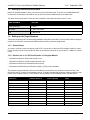
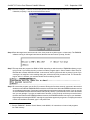
Step 3.Click the Configure... button to set the baud rate and other communications parameters to 19200 baud,
8 data bits, no parity, 1 stop bit, and Xon/Xoff flow control.
Step 4.Reset the target board, wait a second or two, then press the a (either upper- or lowercase). The E86MON
software running on the target board detects the baud rate and issues a prompt, like this:
Step 5.This step loads the program into RAM or ROM, depending on which version of E86MON software you are
trying to load. If you reset the board, you have to load the program again1. Select Transfer->Send Text File.
Note that this is a basic ASCII file transfer. In other words, the file is sent as is with no protocol, just as if you
could type it in really fast. In the resulting dialog box, select the HEX file you want to load. The file transfer
begins. After it is finished, your terminal window looks something like this:
Step 6.To execute the program, use the Go (G) command. During the first three seconds, type an a in the terminal
window to ensure that the E86MON software uses the correct baud rate. When the E86MON software receives
an a, it adjusts its baud rate (if necessary) and displays the welcome message and prompt. If you do not type
an a, the E86MON software assumes a baud rate (usually 19200). If your terminal is set to some other baud
rate, you see garbage. If you type an a within three seconds, or are just lucky and have your terminal set to
the same baud rate that the E86MON software assumes, the E86MON software now runs on your hardware.
Depressing and releasing the RESET switch gives you another opportunity to type an a. To display the version
number and available commands, type ? and press Enter.
1. See the E86MON™ Software User’s Manual, order #21891, for instructions on how to load programs
into Flash memory.
Page 5 of 13