1
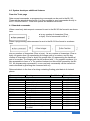
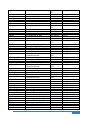
o 6: Make sure your control surfaces still move in the required directions as you
activate your RC Tx sticks. If any move in the wrong direction, then you can
instead connect the servo to the inverted signal out. E.g. if your elevator is
incorrect you can move the connection to the elevator servo onto BL-3G output
2 instead of Output 1. Alternatively you can move the slider switch on your RC
Tx to invert the signal. (Alternatively if the input signal can be inverted with the
PC set up software).
o 7: Pick up the aircraft and move it around in all three axes to check if the gyro
function is as expected. I.e. if you make a sharp move in a particular direction,
the gyro function should activate the control surface in such a way as to
combat the sharp movement.
o 8. If the gyro function is in the opposite way than expected then for whichever
control surface or surfaces are incorrect you will need to follow the procedure
here:
Incorrect Elevator Gyro function:
Activate the RC Tx elevator slider switch (if you have one) on your RC tx
to invert the signal. Now connect the elevator servo to BL-3G output 2
instead of output 1. (Or output 1 instead of 2 if you have it swapped).
Incorrect Aileron Gyro function:
Activate the RC Tx aileron slider switch (if you have one) on your RC tx
to invert the signal. Now connect the aileron servo to BL-3G output 4
instead of output 3. (Or output 3 instead of 4 if you have it swapped).
Incorrect Rudder Gyro function:
Activate the RC Tx rudder slider switch (if you have one) on your RC tx
to invert the signal. Now connect the rudder servo to BL-3G output 6
instead of output 5. (Or output 5 instead of 6 if you have it swapped).
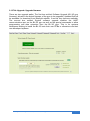
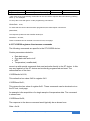
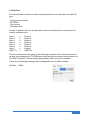
The alternative to the above is to use the BL-3G set up software and invert the
inputs from the Basic tab page instead (You will still need to use the alternative
outputs), or if you prefer, to invert the gyro function itself from either the Quick
Start tab page or the Advanced 1 tab page. (In this case no need to use the
alternative outputs). Before doing this, i.e. before connecting the BL-3G Gyro
to the PC via USB, make sure to have power applied to the BL-3G Gyro from
your aircraft system. Alternatively disconnect the servo outputs from the BL-3G
Gyro before connecting the BL-3G Gyro to the PC and re-connect the outputs
after re-programming is complete and the Gyro disconnected from the PC.
Bluelight Technologies Co. Ltd. | BL-3GRC, 3 axis gyro User Manual V2.4
15 of 71