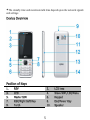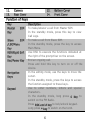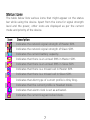
1
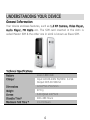
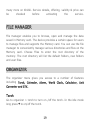
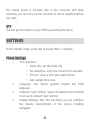
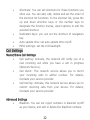
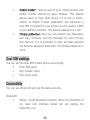
ALL RIGHTS RESERVED Spice Retail Ltd. ©2014. All rights are reserved. No part of this document can be reproduced without permission. All trademarks and brand names mentioned in this publication are property of their respective owners. While all the efforts have been made to ensure the accuracy of contents in this manual, we presume no responsibility for errors or omissions or statements of any kind, whether such errors are omissions or statements resulting from negligence, accidents, or any other cause. We operate a policy of continuous development and reserve the right to make changes, modifications and improvements to the device, device features/specifications or any of its parts without prior notice. Your device may have preinstalled bookmarks and links for third party internet sites and may allow you to access third party sites. These are no affiliated with Spice, and Spice does not endorse or assume liability for them. If you access such sites, take precautions for security or content. The limited warranty does not cover user manuals or any third party software, settings, content, data or links, whether included/downloaded in the product, whether included during installment, assembly, shipping or any other time in the delivery chain or otherwise and in any way acquired by you. To the extent permitted by applicable law(s), Spice does not warrant that any Spice software will meet your requirements, will work in combination with any hardware or software applications provided by a third party, that the operations of the software will be uninterrupted or error free or that any defects in the software are correctable or will be corrected. Note: User’s Manual is provided just to guide the user about the functionality of the device. This does not seem to be any certificate of technology. Some functions may vary due to modifications and up-gradations of software or due to printing mistake. TABLE OF CONTENTS SAFETY PRECAUTIONS ............................................ 1 UNDERSTANDING YOUR DEVICE .............................. 4 GENERAL INFORMATION ..................................................................... 4 TECHNICAL SPECIFICATIONS ................................................................. 4 DEVICE OVERVIEW............................................................................. 5 POSITION OF KEYS ............................................................................. 5 FUNCTION OF KEYS ............................................................................ 6 STATUS ICONS .................................................................................. 7 GETTING STARTED ................................................. 8 INSTALLING SIM CARD AND BATTERY ..................................................... 8 INSTALLING MEMORY CARD ................................................................. 8 CHARGING THE BATTERY ..................................................................... 9 SWITCH ON/OFF THE DEVICE ............................................................... 9 AUTOMATIC CUSTOMER REGISTRATION ................................................ 10 BASIC OPERATIONS ..............................................10 TO MAKE CALLS .............................................................................. 10 TO DIAL INTERNATIONAL NUMBER ...................................................... 10 ANSWER/REJECT AN INCOMING CALL................................................... 11 MAIN MENU ..........................................................12 PHONEBOOK .............................................................................. 12 MESSAGING ............................................................................... 13 CALL HISTORY ............................................................................. 15 MULTIMEDIA .............................................................................. 16 CAMERA ..................................................................................... 18 KHIDKI ........................................................................................ 18 FILE MANAGER ........................................................................... 19 ORGANIZER ................................................................................ 19 SETTINGS .................................................................................... 21 FUN &GAMES ............................................................................. 25 PROFILES .................................................................................... 25 INTERNET SERVICE ...................................................................... 27 SUPPORT AND CONTACT ............................................................ 27 SAFETY PRECAUTIONS Please read the following safety guidelines before using the device. Do not use the phone while you are driving. Do not place magnetic storage media near your phone. Radiation from the phone may erase the information stored on them. Keep your phone and its accessories away from children. Mobile phones can interfere with the functioning of medical devices such as hearing aids or pacemakers. People having active medical implants should keep their cell phone at least 15 cm away from the implant. Permanent hearing loss may occur if you use earphones or headphones at high volume. Use a wireless hands-free system (headphone/ headset) with a low power Bluetooth emitter. Make sure the cell phone has a low SAR. 1 Keep your calls short or send a text message (SMS) instead. This advice applies specially to children adolescents and pregnant women. Use cell phone when the signal quality is good. Notice: Do not dismantle the device or accessories otherwise, manufacturer is not liable to pay for damages as the device and accessories are not covered by warranty. Use only original batteries and charging devices. Please back up your important data timely and keep them properly. The company is not liable for any failure to call or loss of data due to mis-operation, poor signal or power cut, etc. All the screens in this manual are for reference only, and some contents actually displayed may depend upon the presetting of the service provider or the network operator, or the SIM card. If any functions referred to in this manual are different from those of your device, please follow your device. Do not put use it in a place with flammable gas such as a petrol pumps. The temperature recommended for using the device is 5-35℃. Do not touch the charger, power cable or socket with wet hands. This may cause an electric shock. 2 If your phone or any of its accessories do not function normally, then please visit your nearest authorized service facility. The qualified personnel will assist you, and if necessary, will arrange for the service. SAR (Specific Absorption Rate) Your device conforms to the Indian guidelines for exposure to radio waves. The limits are given in terms of a unit referred to as the Specific Absorption Rate (SAR), which is a measure of the amount of radio frequency energy absorbed by the body when using a mobile phone. The SAR value as per the Indian guidelines standard is 1.6 watts per kg (Watt/kg), averaged over a 6 minutes period and taken over a volume containing a mass of 1 gram of human tissue. The highest SAR value of this device when tested is maximum 0.688 Watt/kg. You can check the SAR value of your handset by pressing *#07#. 3 UNDERSTANDING YOUR DEVICE General Information Your device encloses features, such as 1.3 MP Camera, Video Player, Audio Player, FM Radio etc. The SIM card inserted in the slot1 is called Master SIM & the other one in slot2 is known as Slave SIM. Technical Specifications Battery Charger Dimensions Li-ion 1800 mAh Input:AC100-240V 50/60Hz 0.15A Output:DC5.0V-500mA 121.6*52.1*10.5mm Weight Screen Standby Time* Maximum Talk Time * 97.8 g 6.09 QVGA 240*320 400~480 Hours 13~15 Hours 4 * The standby time and maximum talk time depend upon the network signals and settings. Device Overview Position of Keys 1. REV 2. LCD lens 3. 5. 7. 9. LCD Master SIM RSK/Right Soft Key Torch 4. 6. 8. 10. Slave SIM /LSK/Menu Keypad End/Power Key Speaker 5 11. 13. Camera Rear Cover 12. 14. Battery Cover Front Cover Function of Keys Key Master Key SIM Slave SIM /LSK/Menu Key RSK/Right Soft Key End/Power Key Navigation Keys Keypad Description To make/answer a call from Master SIM. In the standby mode, press this key to view Call Logs. To make a call from Slave SIM. In the standby mode, press the key to access Main Menu. Use RSK to execute the functions indicated at the right of the prompt bar on the screen. End an ongoing call. Press and hold this key to turn on or off the device. In the editing mode, use the keys to move the cursor. In the standby mode, press the keys to access the function assigned to these keys. Use to enter numbers, letters and special characters. In the standby mode, long press 0 Key to switch on the FM Radio. Press RSK and # key to lock/unlock keypad. Long press * key to switch on the torch. 6 Status Icons The table below lists various icons that might appear on the status bar while using the device. Apart from the icons for signal strength level and the power, other icons are displayed as per the current mode and priority of the device. Icon Description Indicates the network signal strength of Master SIM. Indicates the network signal strength of Slave SIM. Indicates the current battery capacity. Indicates that there is an unread SMS in Master SIM. Indicates that there is an unread SMS in Slave SIM. Indicates that there is a missed call in Master SIM. Indicates that there is a missed call in Slave SIM. Indicates that Alert type of current profile is Only Ring. Indicates that the current profile is Headset mode. Indicates that alarm clock is set as activated. Indicates the current keypad-locked state. 7 GETTING STARTED Please switch off your device before inserting or removing the battery/SIM card or memory card. Installing SIM Card and Battery Your device is provided with two SIM slots for two different SIM cards. The SIM card inserted in the slot1 is called Master SIM, and the other one in the slot2 is known as Slave SIM. Remove the back cover of the device. Hold the phone with the front facing downwards; pull the cover. Insert the SIM cards and battery in the device. Attach the battery. Push the battery cover until it clicks into place. Installing Memory Card Your device supports T-Flash card, which is a multimedia memory card used to multiply the memory of the device. The T-flash card is small and should be pulled out and installed carefully and prudently in order to avoid any kind of damage. Switch off your device. 8 Remove the battery cover. Slide the T-Flash card into the slot. Attach the battery. Push the battery cover until it clicks into place. Charging the Battery The device prompts a warning tone and message stating insufficient battery when the battery power of your device is low. Please follow the instructions mentioned below to charge your device: Plug the connector of the charger into the jack of the device. Plug the charger into a standard AC wall outlet. Note: When is shown on the screen, it indicates that there is not enough power and you should now charge your device. When charging is complete, the battery icon will stop flashing. You must fully charge the battery before using the device for the first time. It is recommended to charge the battery for four hours before using the device for the first time. If the device is turned on during charging, you can still make or answer calls, but this will consume battery power, thus will extend the charging time of the device. Switch On/Off the Device To turn on/off the device, press and hold the End/Power Key. If you have enabled the SIM Lock function then enter the PIN code (4 to 8 digits secret code of your SIM card). It is preconfigured and provided to you by your network operator or retailer. If you enter an incorrect 9 PIN code 3 times in succession, your SIM card will be locked. To unlock it, you must obtain a code from your network operator. Automatic Customer Registration After 4 hours of usage a SMS from the device will be sent automatically for the customer registration. Note: standard SMS charges apply. BASIC OPERATIONS To Make Calls If the icon / appears on the screen, then you can make or receive calls. Input the phone number (should affix the international/ national/regional code or district code if necessary) and then press the Master/Slave SIM key to make a call. You can select a number from Contacts and call the Contacts person. Tip: The signal strength may influence the quality of connection. To Dial International Number Your device supports dialing the international emergency phone number, such as 112. With the device, you can dial an emergency call in any country or region under the normal situation regardless of 10 SIM card inserted when the device is located within the coverage of the GSM network. Input the emergency phone number and press Master/Slave SIM Key to dial. The device will select the main network automatically after powered on if it is located within the coverage of the main network. The device can use other network, called as roaming, if the device is not located within the coverage of the main network when the network operator protocol permits. You can dial or answer a call when the symbol of the network operator appears on the screen. Answer/Reject an Incoming Call Press Call/Master SIM Key to receive the incoming call. You can use the earphone to answer the call when the generic headset is inserted in the device. Press End Key to reject an incoming call. 11 MAIN MENU Menu guides you to the various applications, features and utilities available in your device. In the idle mode, press LSK to access the Main Menu. Use the navigation keys to choose the desired operation and press Ok to enter the selected operation. Phonebook Messaging Call History Multimedia Camera KHIDKI File Manager Organizer Settings Fun & Games Profiles Internet Service PHONEBOOK Phonebook refers to the directory where in all the Contacts are stored in an alphabetical order. You can view, edit, delete, send message and perform various other functions on each contact of your phonebook. Add New Contact Go to Main Menu > Phonebook > Add new Contact Press ok > select the storage and enter the details 12 Search Contact Go to phonebook > contacts and input the initials of a name to be searched. Select a desired entry from the list. Select a Contact from the list and press Ok/Center Key to perform the following operations: View: view the detailed info of the selected Contacts. Send text message: send message to the Contacts. Edit: edit the Contact information. Delete: delete the Contact. Copy: Copy the entry to phone memory, SIM memory or to a file. Mark multiple for: mark various contacts. Groups: you can add new groups as per you desire. Phonebook settings: view/manage phonebook settings. MESSAGING Your device features, sending and receiving of SMS (Short Message Service). Press LSK key to access Main Menu and then select Messages. 13 Write message You can create and send SMS to a particular Contact using this submenu. Inbox Inbox sub-menu enables you to view all the messages received on your Master/Slave SIM. Drafts The created messages can be saved to drafts folder for future use. After selecting a message from the Drafts folder, select Options to edit/delete or send the saved message from the desired SIM. Outbox The messages that do not reach the receiver successfully get stored in the Outbox folder. Sent Messages All the messages that are sent successfully get stored in sent messages. SMS Templates Your device is provided with some commonly used pre-defined messages. These messages can be edited and send instantly. 14 SMS Settings You can change the SMS settings, such as memory status, preferred storage etc. CALL HISTORY Call Logs sub-menu lets you view the call details i.e. the missed, received & dialed call logs. In the standby mode, press LSK key to access Menu > Call logs. Scroll up/down using the navigation keys to select a call and then press OK key to view the details and perform operations, such as View, Call, Send message, Save, Add to blacklist, Edit before call, Delete. Missed Calls With this function, you can check recent missed calls. Scroll the Up/Down keys to select a missed call. Press Options key to access missed call information, and perform operations, such as View, Call, Send message, Save, Add to blacklist, Edit before call, Delete. Dialed Calls With this function, you can check recent dialed calls. Press OK key to access dialed call information, and perform operations, such as View, Call, Send message, Save, Add to blacklist, Edit before call, Delete. 15 Received Calls With this function, you can check recent received calls. Press OK key to access received call information, and perform operations, such as View, Call, Send message, Save, Add to blacklist, Edit before call, Delete. All Calls With this function, you can check recent missed/dialed/received calls. Press Options key to access received call information, and perform operations, such as View, Call, Send message, Save, Add to blacklist, Edit before call, Delete. Delete Call Logs You can delete all records of missed calls, dialed calls or received calls by accessing this sub-menu. MULTIMEDIA This menu is specifically designed for the entertainment purpose of the user. To enter this menu, go to the Main Menu and select Multimedia. The various multimedia features offered by your device include Image Viewer, Video Recorder, Video Player, Audio Player, Sound Recorder and FM Radio. 16 Image Viewer Pictures taken can be accessed quickly through Image Viewer. Select an image to view and press options key to perform operations, such as, rotate view, use the image as wallpaper, send via bluetooth. Video Recorder In standby mode, select Menu > Multimedia > Video recorder to launch the video recorder and shoot your videos. Video Player Your device supports playing various video formats. To access the Video Player, go to Multimedia and select Video Player. All the videos available in the storage selected by you will be displayed. Select a video clip and press Options key to open it, you can press * key to make the video full play or back from full, and press options key to perform operations, such as, video settings, Help. Audio Player Audio player allows you to play audio files. Please save your audio files in the My Music folder of the memory card. You can stop, pause, play and switch to the next/previous song using the navigation keys. 17 Sound Recorder You can record conversations, which will be saved to the Audio folder under File Manager. After selecting a recording, you can select to play, rename, delete, delete all files etc. FM Radio You can use your device to listen to FM radio stations after inserting the headphones. Go to Main Menu > Multimedia > FM radio. When in the Radio interface, press options to view channel list, Auto search and settings, you can switch to the next/previous channel by short press and stop/play by long press. CAMERA Your device is provided with Camera, which supports the photographing and video shooting functions, you can press options key to perform operations, such as switch, photos, settings etc. KHIDKI "Khidki" provides quality SMS based services at one place. With Khidki you can get your favorite content with great ease. Now enjoy all services like Caller Ringtones, Radio, Jokes, Cinema, Cricket and 18 many more on Khidki. Service details, offering, validity & price can be checked before activating the service. FILE MANAGER File manager enables you to browse, open and manage the data saved in Memory card. The device provides a certain space for users to manage files and supports the Memory card. You can use the file manager to conveniently manage various directories and files on the Memory card. Choose Files to enter the root directory of the memory. The root directory will list the default folders, new folders and user files. ORGANIZER The organizer menu gives you access to a number of features including Torch, Calendar, Alarm, World Clock, Calculator, Unit Converter and STK. Torch Go to organizer > torch to turn on /off the torch. In the idle mode long press * to on/off the torch. 19 Calendar You can view and edit the memo of a specified date with this function. Jump to Date: Skip to the specified date to view or edit the daily arrangements of the day. Go to today: You can switch to the current date. Alarm Your device provides 5 alarms and you can set them as per your need. If you have configured an alarm, an icon indicating that you have configured the alarm will appear on the status bar. World Clock Browse every city’s time zones in the world map. The related date and time will display in the phone’s screen. Calculator The mobile phone is provided with a calculator with basic functions. You can carry out the basic arithmetic operations using the in-built calculator of your device. Unit Converter 20 The mobile phone is provided with a unit converter with basic functions, you can carry out the converter of unit of weight/length as you want. STK You can get the details of your SIM by accessing this menu. SETTINGS In the standby mode, press LSK to access Menu > Settings. Phone Settings Time and Date: • Home city: set the home city. • • • Set date/time: enter the current time and date. Format: select a time and a date format. Auto update time zone. Language: Your device supports English and Hindi language. Preferred input method: Select the desired input method to set as the default input method. Display Settings: With this sub-menu you can configure the display characteristics of the device including wallpaper. 21 Shortcuts: You can set shortcuts for those functions you often use. You can add, edit, delete and set the order of the shortcut list functions. In the shortcut list, press the up and down direction keys or the number keys to designate the function menus, select options to edit the selected shortcut. Dedicated keys: you can set the shortcut of navigation key. Auto update time: set auto update time on/off. MISC settings: set the LCD backlight. Call Settings Master/Slave Call Settings Call waiting: Activate, the network will notify you of a new incoming call while you have a call in progress (Network Service). Call divert: This network service allows you to divert your incoming calls to anther number. For details, Contacts your service provider. Call barring: Activate, this network service allows you to restrict incoming calls from your device. For details, Contacts your service provider. Advanced Settings Blacklist:You can set reject numbers in blacklist on/off as your desire, and edit or delete the blacklist numbers. 22 Auto call recorder: when you are on a calling, it will auto recorder the calling. Auto redial: when you dial a number and the other side not responds, it will dial again automatically. Call time reminder: you can open the function; it will remind you single or periodic. Reject by SMS: You can reject an incoming call by SMS. Vibrate when connected: the phone will vibrate when a call is matured. Answer mode: when a call is coming, you can press any key to answer but end key. Security Settings Master/Slave SIM Security: You can choose to set/change the PIN for Master/Slave SIM. Phone Security: Phone lock: You can lock or unlock the device. Enter the password to activate or deactivate the phone lock. When the device is locked, you will be asked to enter the phone password. 4-8 numbers can be used for the phone password. The default phone password is 1122. Change password: You can change phone password as per your desire. 23 Mobile tracker: Now be sure of your mobile phones with Mobile Tracker offered by Spice Mobiles. This feature allows users to track their phone if it is lost or stolen. Switch on Mobile Tracker application and whenever a new SIM is inserted in your phone you will receive a SMS on pre-defined numbers. The default password is 1122. Privacy protection: Now you can protect your Messages, Call logs, Contacts, and File Manager by using Privacy lock feature. If it is switched on then all these services will become password protected. The default password is 1122. Dual SIM settings You can set the dual SIM mobile phone accordingly: Multi SIM open; Only master open; Only slave open; Connectivity You can use Bluetooth and set the data accounts. Bluetooth: Power: on/off Bluetooth function. When the Bluetooth is on, main LCD interface status bar will display the bluetooth icon. 24 Visibility: view the visibility status of the device. My device: view the other available devices. My name: view your device name. Restore settings Access Settings to select Restore factory settings, and press OK. All settings can be restored to factory settings with this function. The default password is 1122. FUN &GAMES The device is provided with interesting games Eat N Run. Games settings: You can Activate/deactivate audio, vibration and volume level as per your need. PROFILES The phone provides six pre-defined user profiles that allow the operations of the phone to best suit the environment you are in. The profiles are General, Silent, Meeting, Outdoor, Headset and Flight Mode. The phone will automatically enter the headset profile if you connect the headset to your phone. General Activate 25 Customize Alert type: Set Ring only, Vib only, Vib and ring and Vib then ring as your need. Ring type: Repeat and Beep once. Master/Slaver SIM incoming call: Set up the tone of incoming call of Master/slaver SIM. Ringtone volume: Set the volume of ringtone. Master/Slaver SIM message: Set up the tone of message. Message volume: Set the volume of message. Keypad: Set Click, Tone or Silent. Keytone volume: Set the keypad volume. System alert: Set On/Off. Silent Ring, Volume and Alert type mustn’t be set. Select “Activate” in “Options”. Meeting Please select activate to enable the meeting mode on. In the standby mode, long press # key to enable/disable meeting mode. Outdoor Please refer to “General” for more details. Headset Please refer to “General” for more details. 26 Flight mode Phone cannot receive any signal at Flight mode. You can activate flight mode in this menu. INTERNET SERVICE To access this menu, enter the Main Menu in the standby mode and then select Internet Service. You can use the network-related services with this function. SUPPORT AND CONTACT You can visit www.si2imobility.com/spicemobiles/ for additional information, downloads and services related to your Spice handset. For further assistance or queries, you can call on SPICE customer care number 011-42921000 or mail at [email protected] or [email protected]. Note: After sales service of the device is confined to the country in which the purchasing is done. 27 ENVIRONMENTAL CONCERN Help us save Our Environment…GO GREEN..!! All our endeavors are directed towards providing environment friendly products to you. The material used in our devices are recyclable and can be reused to make new products. We strive to make products that are safe for our consumers as well as the environment. Come join hands with us and make world a better place to live. 28 Preserve natural resources for future generations by recycling your phone. The phone contains some metals, when recycled properly; these can be put back into circulation, decreasing the need for new metal mining. Recycling reduces the need for raw materials, saves energy, helps mitigate Global Warming and reduces pollution, reduces waste products in landfills; therefore preserving natural resources for the future and saving the planet. Follow some simple steps and contribute towards saving the planet. DOs DONTs Recycle your handset and its accessories. To protect natural resources and to promote re-use of the material, kindly separate batteries from other type of waste. Do not dispose off your mobile and its battery in fire. Do not dispose your mobile with the regular waste. Do not over charge your handset. Remove the charger when battery is full. 29 Don’t trash your phone, instead RECYCLE it This logo signifies that this product and/or its constituents should not be disposed off with other household waste. Hazards of Improper handling, accidental breakage, damage and /or improper recycling of hazardous elements If this product is improperly handled, broken or damaged or carelessly recycled or disposed off in the fire, can result in environmental and data security concerns, including the following: Affect nearly every system in the human body and result in birth defects, brain, heart, liver, kidney and skeletal system damage. They will also significantly affect the nervous and reproductive systems of the human body ; When burned, create cancer-producing dioxins which are released into the air we breathe ; 30 If thrown in landfills, may leach into groundwater affecting your local community ; In warm climates, the oxidation of mercury in the environment can be accelerated, leading to the creation of oxidized Hg atoms that are known to be associated with ozone depletion; and Improper recycling additionally results in data security issues, as private electronic information remains on hard drive, if not properly removed before disposal. How to Recycle Please get your electronics products recycled only through authorized recyclers, approved by Pollution Control Board. We provide facility of recycling of our products. For details of our collection centers, please visit our website or call our customer care. Help us to GO GREEN. Constitution of Hazardous Elements in your Device: Your device does not contain the following hazardous elements in a proportion higher than the limits provided hereunder: maximum concentration value of 0.1% by weight in homogenous materials for lead, mercury, hexavalent 31 chromium, polybrominated biphenyls and polybrominated diphenyl ethers ; and maximum concentration value of 0.01% by weight in homogenous materials for cadmium. 32