1
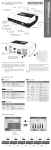
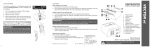
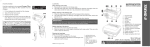
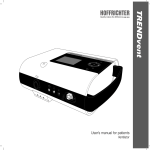
Display Power LED Battery LED Unlocking button for humidifier Heating button OK button Touch wheel with cursor buttons esc button Alarm button Handle Contact sockets for humidifier ON/OFF button Oxygen sensor cable connection Oxygen connection Control tube connection Oxygen output Pressure measuring tube connection brief instructions Connection for tube system/ humidifier TRENDvent Quality makes the Difference for patients as of device software 1.300 This document does not replace the manufacturer's user's manual. Follow the user's manual. Main switch DC Mains socket 24V~/5A Air inlet with integrated filter cassette (fine and coarse filter), detachable CHANGING AND CLEANING THE FILTERS The coarse filter must be cleaned once a week. The white fine filter cannot be cleaned. It should be inspected visually weekly and replaced monthly or more frequently if heavily soiled. 1. Pull the cover of the air inlet from the device. 2. Slide the filter cassette out from the cover of the air inlet. 3. Remove the coarse filter (black) and the fine filter (white) from the filter cassette. 4. Clean the coarse filter with mild soapy water, afterwards rinse the filter thoroughly with clear water. Let the filter dry completely in the air. Instead of cleaning the coarse filter, you can insert a new one. LEDs AND BUTTONS Power LED Color green red none Battery LED Condition lit flashing off Power supply Voltage > 22.0 V Voltage > 22.0 V Voltage > 22.0 V (confirmed) Heating button Color Condition Status green lit Heating on green flashing Heating on standby white lit Heating off white flashing Heating deactivated by battery operation Color Condition Device Capacity green lit on > 80 % yellow lit on > 30 % red lit on < 30 % red flashing on Battery error green flashing off > 80 % (Battery charging) yellow flashing off > 30 % (Battery charging) red flashing off < 30 % (Battery charging) yellow lit off Battery charging error (capacity < 80 %) red lit off Battery charging error (capacity < 30 %) Alarm button Color Condition Priority red flashing HIGH yellow flashing MEDIUM yellow lit LOW or not yet confirmed alarm OPERATING CONCEPT Curve screen Patient screen or on alarm or to last active screen Ventilation sets Comfort screen Alarm screen Counter screen Service screen Status screen MOST IMPORTANT OPERATIONS Action Execution Start ventilation press Stop ventilation press Switch humidifier heating on and off press , confirm query with “Yes” (press Activate the safety lock press => , then press => Deactivate the safety lock => , then press => Switch from curve screen to patient screen Activate other ventilation set Supressing the alarm sound for 2 min press and confirm with ) press Select desired ventilation set with or touch wheel and press or , then select “ Activate changes“ with to confirm press MEANING OF SYMBOLS IN THE SYMBOL AREA OF THE DISPLAY Symbol Meaning Capacity of internal battery Device is set for operation with valve tube system Device is set for operation with leakage tube system Alarm sound was muted Safety lock active Safety lock inactive Device must be serviced Mask test active Softstart ramp active Trigger initiated through patient’s spontaneous respiration Trigger Lock active IMPORTANT ALARMS AND MESSAGES Alarm / message Pressure too high Priority HIGH Pressure too low HIGH Frequency too high HIGH Apnea HIGH Leakage HIGH Volume too high Volume too low Oxygen too high Oxygen too low Min. Volume not reached HIGH HIGH MEDIUM MEDIUM Note Safety Mode active Message Priority Incorrect Tube HIGH System Check HIGH Measuring Tube Internal Battery HIGH empty Check Expiration Valve Battery Operation Error int. Battery Int. Battery low Calibrate O2 Sensor --- Cause Pressure greater than set “Max. Pressure” or positive pressure deviation greater than set deviation Pressure lower than set “Min. Pressure” or negative pressure deviation greater than set deviation Measured frequency greater than “Max. Frequency” Set apnea time exceeded Leakage greater than set leakage (volume too great for 3 breaths) or flow greater 1 l/s (2 l/s in CPAP mode) Tidal volume greater than “Max. Volume” Tidal volume smaller than “Min. Volume” Measured FiO2 greater than set “Max. Oxygen” Measured FiO2 lower than set “Min. Oxygen” Tidal volume smaller than set minimum volume - Additional pressure insufficient Patient not breathing spontaneously; minimum frequency safeguard via the device; only in PSV mode Cause Incorrect tube system connected (valve tube) Pressure difference to 2nd pressure sensor greater 3 hPa (> 15 s) Battery empty Remedy Change setting of tube system on rear of device or replace tube system Check connection between measuring tube and device Battery must be charged; 1 minute until the power supply fails completely; ventilation only possible with external power supply HIGH Expiration valve does not allow Check expiration valve and replace if respiratory air to escape necessary Incorrect tube system connected Change setting of tube system on rear (leakage tube) of device or replace tube system MEDIUM Device is not connected to mains Press alarm button power and is being supplied with power by the internal battery MEDIUM Battery defective Device must be serviced MEDIUM Battery capacity 10 % Battery must be charged Oxygen sensor plugged in after Calibrate oxygen sensor with ventilation LOW device was turned on switched off HOFFRICHTER GmbH · Mettenheimer Strasse 12 / 14 · 19061 Schwerin · Germany Tel.: +49 385 39925 - 0 · Fax: +49 385 39925 - 25 · E-mail: [email protected] · Web: www.hoffrichter.de TRENDvent Patient kurz-eng-160511-02, Art. No.: 5000 0405