1
Chapter 9
Introduction
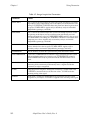
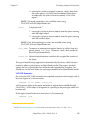
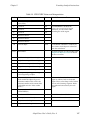
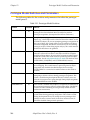
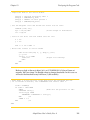
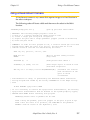
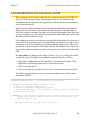
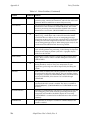
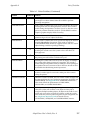
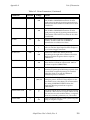
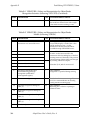
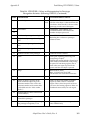
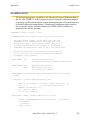
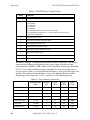
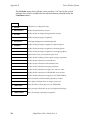
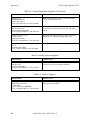
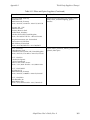
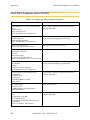
Table 9-1. Boundary Analysis Switches (Continued)
Switch
Effects
V.CENTROID
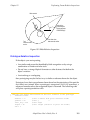
The centroid of an object is calculated if this switch is enabled. This switch
increases processing time and should be disabled if the centroid information is
not needed. (V.BOUNDARIES must be enabled.)
V.MIN.MAX.RADII
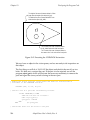
The perimeter points closest to and farthest from the centroid of an object are
calculated when this switch is enabled. (V.BOUNDARIES and V.CENTROID
must be enabled.)
V.2ND.MOMENT
The 2nd moments of inertia and best fit ellipse are calculated when this switch
is enabled (V.CENTROID and V.BOUNDARIES must be enabled).
V.SUBTRACT.HOLES is ignored.
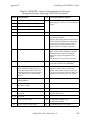
V.PERIMETER
The perimeter of an object is calculated if this switch is enabled.
V.HOLES
If this switch is enabled, the statistics gathered for objects will also be gathered
for the holes in the objects.
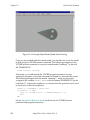
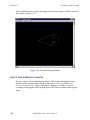
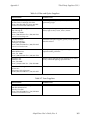
V.SHOW.EDGES
If this switch is enabled, the vision system will display the attempts at fitting
primitive edges to an object.
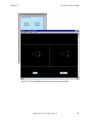
V.SHOW.BOUNDS
If this switch is enabled, the vision system will display the results of
attempting to fit lines and arcs during boundary analysis. This switch is useful
during development as it allows you to see how the vision processor performs
boundary analysis.
V.FIT.ARCS
Enabling this switch causes the system to attempt arc fitting during boundary
analysis. If arcs are unimportant in your images, processing time will be
improved by disabling this switch.
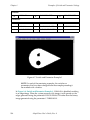
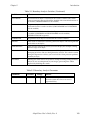
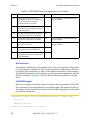
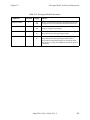
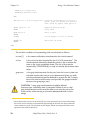
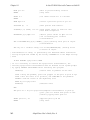
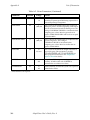
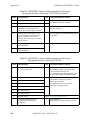
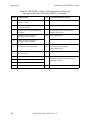
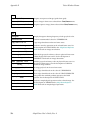
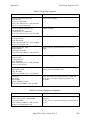
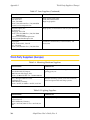
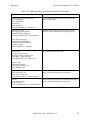
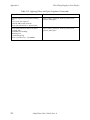
Table 9-2. Boundary Analysis Parameter
Parameter
V.MAX.PIXEL.VAR
Default
1.5
Range
Effects
0
Sets the maximum pixel variation allowed
when the system fits a line or an arc to a
region boundary.
8
AdeptVision User’s Guide, Rev. A
143