1
Acknowledge
the Alert
Set An Alert
Highlight
the bed
Wake
Button
Enter
Acknowledge
Gimme 3
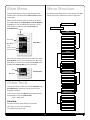
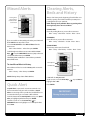
To highlight the bed – touch the bed you want from the
View My Beds (default screen).
The alarm will shut off after 15 seconds (factory default).
You are able to select any combination of audible/visual/
vibrate alarm modes, as well as customize the sound of
the alarm. You are also able to extend the time that the
alarm sounds/vibrates from 10-30 seconds, (see page 8 for
Adjusting Settings).
Bed
Categories
List of Alerts
To Acknowledge the Alert – Press the Wake Button to
unlock touch screen.
Highlight Acknowledge or highlight Gimme 3 for a
3 minute snooze, press any key to exit.
Missed Alerts – If you were unable to acknowledge the alert,
the alert will be stored in Missed Alerts and also in History
with an asterisk next to it. (See page 7 on Missed Alerts).
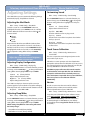
Use the PREV/NEXT buttons to scroll through the
categories of alerts.
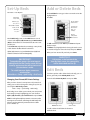
Simply touch Alert you wish to set.
Alert
IMPORTANT:
Final screen displays
the Alert info.,
reminds you to wash hands
and check patient ID.
Prev/Next
Date/Time
Arrow Keys
Repeat up to
12 times
OK
Use the Arrow Keys
Reminder to
Wash Hands and
Check Patient ID.
to set time.
Alert Info.
Use the PREV/NEXT buttons to navigate to Repeat Every,
and move between hours, minutes and times.
Use Arrow Keys to set hours, minutes and repeats (repeats
up to 12 times).
When done press OK.
6
Back to Index