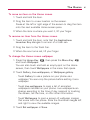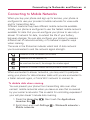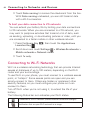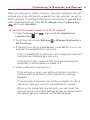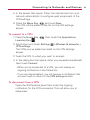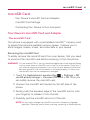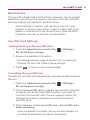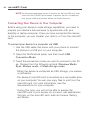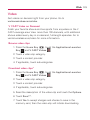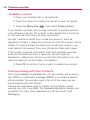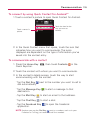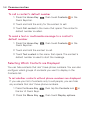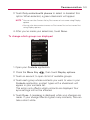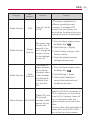
1
SAMPLE(1.0) H
GUÍA DEL
USUARIO
USER GUIDE
USER
GUIDE
This booklet is made from 60% post-consumer recycled paper.
This booklet is printed with soy ink.
Copyright©2010 LG Electronics, Inc. All rights reserved.
LG and the LG logo are registered trademarks of LG Group
and its related entities. VORTEXTM is a trademark of Verizon
Wireless. All other trademarks are the property of their
respective owners.
Important Health Information and Safety Precautions
When using this product, the safety precautions below must be
taken to avoid possible legal liabilities and damages.
Retain and follow all product safety and operating instructions.
Observe all warnings in the product operating instructions. To
reduce the risk of bodily injury, electric shock, fire, and damage to
the equipment, observe the following precautions.
ELECTRICAL SAFETY
This product is intended for use when supplied with power from the
designated battery or power supply unit. Other usage may be
dangerous and will invalidate any approval given to this product.
SAFETY PRECAUTIONS FOR PROPER GROUNDING
INSTALLATION
CAUTION: Connecting to improperly grounded equipment can result in an
electric shock to your device. This product is equipped with a USB Cable
for connecting to a desktop or notebook computer. Be sure your
computer is properly grounded (earthed) before connecting this product
to the computer. The power supply cord of a desktop or notebook
computer has an equipment-grounding conductor and a grounding plug.
The plug must be plugged into an appropriate outlet which is properly
installed and grounded in accordance with all local codes and ordinances.
SAFETY PRECAUTIONS FOR POWER SUPPLY UNIT
Use the correct external power source
A product should be operated only from the type of power source
indicated on the electrical ratings label. If you are not sure of the
type of power source required, consult your authorized service
provider or local power company. For a product that operates from
battery power or other sources, refer to the operating instructions
that are included with the product.
Handle battery packs carefully
This product contains a Li-ion battery. There is a risk of fire and
burns if the battery pack is handled improperly. Do not attempt to
open or service the battery pack. Do not disassemble, crush,
1
2
Important Health Information and Safety Precautions
puncture, short external contacts or circuits, dispose of in fire or
water, or expose a battery pack to temperatures higher than 60°C
(140°F).
WARNING: Danger of explosion if battery is incorrectly replaced. To
reduce risk of fire or burns, do not disassemble, crush, puncture,
short external contacts, expose to temperature above 60°C (140°F),
or dispose of in fire or water. Replace only with specified batteries.
Recycle or dispose of used batteries according to the local
regulations or reference guide supplied with your product.
Take extra precautions
●
●
●
●
●
●
●
Keep the battery or device dry and away from water or any liquid
as it may cause a short circuit.
Keep metal objects away so they don’t come in contact with the
battery or its connectors as it may lead to short circuit during
operation.
The phone should be only connected to products that bear the
USB-IF logo or have completed the USB-IF compliance program.
Do not use a battery that appears damaged, deformed, or
discolored, or one that has any rust on its casing, overheats, or
emits a foul odor.
Always keep the battery out of the reach of babies and small
children, to avoid swallowing of the battery. Consult a doctor
immediately if the battery is swallowed.
Only use the battery with a charging system that has been
qualified with the system per this standard, IEEE-Std-1725-200x.
Use of an unqualified battery or charger may present a risk of fire,
explosion, leakage or other hazard.
Replace the battery only with another battery that has been
qualified with the system per this standard, IEEE-Std-1725-200x.
Use of an unqualified battery may present a risk of fire, explosion,
Important Health Information and Safety Precautions
●
●
leakage or other hazard.
Avoid dropping the phone or battery. If the phone or battery is
dropped, especially on a hard surface, and the user suspects
damage, take it to a service center for inspection.
If the battery leaks:
Do not allow the leaking fluid to come in contact with skin or
clothing. If contact occurs, flush the affected area immediately
with clean water and seek medical advice.
Do not allow the leaking fluid to come in contact with eyes. If
contact occurs, DO NOT rub; rinse with clean water immediately
and seek medical advice.
Take extra precautions to keep a leaking battery away from fire as
there is a danger of ignition or explosion.
SAFETY PRECAUTIONS FOR DIRECT SUNLIGHT
Keep this product away from excessive moisture and extreme
temperatures. Do not leave the product or its battery inside a
vehicle or in places where the temperature may exceed 140°F
(60°C), such as on a car dashboard, window sill, or behind glass that
is exposed to direct sunlight or strong ultraviolet light for extended
periods of time. This may damage the product, overheat the battery,
or pose a risk to the vehicle.
PREVENTION OF HEARING LOSS
CAUTION: Permanent hearing loss may occur if earphones or
headphones are used at high volume for prolonged periods of time.
SAFETY IN AIRCRAFT
Due to the possible interference caused by this product to an
aircraft’s navigation system and its communications network, using
this device’s phone function on board an airplane is against the law
in most countries. If you want to use this device when its use is
restricted on board an aircraft, remember to switch to Airplane
Mode which turns off RF functions that could cause interference.
3
4
Important Health Information and Safety Precautions
ENVIRONMENT RESTRICTIONS
Do not use this product in gas stations, fuel depots, chemical plants or
where blasting operations are in progress, or in potentially explosive
atmospheres such as fueling areas, fuel storehouses, below deck on
boats, chemical plants, fuel or chemical transfer or storage facilities,
and areas where the air contains chemicals or particles, such as grain,
dust, or metal powders. Please be aware that sparks in such areas
could cause an explosion or fire resulting in bodily injury or even death.
EXPLOSIVE ATMOSPHERES
When in any area with a potentially explosive atmosphere or where
flammable materials exist, the product should be turned off and the
user should obey all signs and instructions. Sparks in such areas could
cause an explosion or fire resulting in bodily injury or even death.
Users are advised not to use the equipment at refueling points such
as service or gas stations, and are reminded of the need to observe
restrictions on the use of radio equipment in fuel depots, chemical
plants, or where blasting operations are in progress. Areas with a
potentially explosive atmosphere are often, but not always, clearly
marked. These include fueling areas, below deck on boats, fuel or
chemical transfer or storage facilities, and areas where the air
contains chemicals or particles, such as grain, dust, or metal powders.
ROAD SAFETY
Vehicle drivers in motion are not permitted to use communication
services with handheld devices, except in the case of emergency.
In some countries, using hands-free devices as an alternative is
allowed.
SAFETY PRECAUTIONS FOR RF EXPOSURE
●
Avoid using your phone near metal structures (for example, the
steel frame of a building).
●
Avoid using your phone near strong electromagnetic sources,
such as microwave ovens, sound speakers, TV and radio.
Important Health Information and Safety Precautions
●
Use only original manufacturer-approved accessories, or
accessories that do not contain any metal.
●
Use of non-original manufacturer-approved accessories may
violate your local RF exposure guidelines and should be avoided.
INTERFERENCE WITH MEDICAL EQUIPMENT FUNCTIONS
This product may cause medical equipment to malfunction. The use
of this device is prohibited in most hospitals and medical clinics.
If you use any personal medical device(s), consult the manufacturer
of your device(s) to determine if the device(s) are adequately
shielded from external RF energy. Your physician may be able to
assist you in obtaining this information.
Turn your phone OFF in health care facilities when any regulations
posted in these areas instruct you to do so.
Hospitals or health care facilities may be using equipment that could
be sensitive to external RF energy.
HEARING AIDS
Some digital wireless phones may interfere with some hearing aids. In
the event of such interference, you may want to consult your service
provider, or call the customer service line to discuss alternatives.
NON-IONIZING RADIATION
Your device has an internal antenna. This product should be
operated in its normal-use position to ensure the radiative
performance and safety from interference. As with other mobile
radio transmitting equipment, users are advised that for satisfactory
operation of the equipment and for personal safety, it is
recommended that no part of the human body be allowed to come
too close to the antenna during operation of the equipment.
Use only the supplied integral antenna. Use of unauthorized or
modified antennas may impair call quality and damage the phone,
causing loss of performance and SAR levels exceeding the
recommended limits as well as result in non-compliance with local
5
6
Important Health Information and Safety Precautions
regulatory requirements in your country.
To assure optimal phone performance and ensure human exposure
to RF energy is within the guidelines set forth in the relevant
standards, always use your device only in its normal-use position.
Contact with the antenna area may impair call quality and cause
your device to operate at a higher power level than needed.
Avoiding contact with the antenna area when the phone is IN USE
optimizes the antenna performance and the battery life.
HAC
This phone has been tested and rated for use with hearing aids for
some of the wireless technologies that it uses.
However, there may be some newer wireless technologies used in
this phone that have not been tested yet for use with hearing aids.
It is important to try the different features of this phone thoroughly
and in different locations, using your hearing aid or cochlear implant,
to determine if you hear any interfering noise.
Consult your service provider or the manufacturer of this phone for
information on hearing aid compatibility.
If you have questions about return or exchange policies, consult
your service provider or phone retailer.
Warning
In Android, applications do not work directly with resolution that
some of the applications from Android Market would support only
the certain resolution. Please be advised that some of the
downloaded applications from the Adroid Market would not be
available on your phone due to LCD resolution difference. In
addition, please be aware that your phone could get into reset
mode by downloading bugged applications.
The UI of Google GMS application can vary depends on its version.
Table of Contents
Important Health Information and Safety Precautions . . . .1
Important Customer Information . . . . . . . . . . . . . . . . . . . .14
Technical Details . . . . . . . . . . . . . . . . . . . . . . . . . . . . . . . . . .15
The Basics . . . . . . . . . . . . . . . . . . . . . . . . . . . . . . . . . . . . . . .19
Phone Overview. . . . . . . . . . . . . . . . . . . . . . . . . . . . . . . . . . . . . . . . . . . . . 19
Installing the Battery and microSD Card . . . . . . . . . . . . . . . . . . . . . . . . 22
Charging the Phone . . . . . . . . . . . . . . . . . . . . . . . . . . . . . . . . . . . . . . . . . 24
Optimizing Battery Life . . . . . . . . . . . . . . . . . . . . . . . . . . . . . . . . . . . . . . 26
Turning the Phone On and Off . . . . . . . . . . . . . . . . . . . . . . . . . . . . . . . . 28
SETTING UP YOUR DEVICE . . . . . . . . . . . . . . . . . . . . . . . . . . . . . . . . . .29
Setting up your Google Account . . . . . . . . . . . . . . . . . . . . . . . . . . . . . . .30
Phone’s Status Icons . . . . . . . . . . . . . . . . . . . . . . . . . . . . . . . . . . . . . . . . 32
Getting to Know the Home Screen. . . . . . . . . . . . . . . . . . . . . . . . . . . . . 34
Touchscreen . . . . . . . . . . . . . . . . . . . . . . . . . . . . . . . . . . . . . . . . . . . . . . . 36
Text Input Methods . . . . . . . . . . . . . . . . . . . . . . . . . . . . . . . . . . . . . . . . . .38
Using the Swype Keyboard . . . . . . . . . . . . . . . . . . . . . . . . . . . . . . . . . . . .38
Swype Tips . . . . . . . . . . . . . . . . . . . . . . . . . . . . . . . . . . . . . . . . . . . . . . . . .39
Swype Settings . . . . . . . . . . . . . . . . . . . . . . . . . . . . . . . . . . . . . . . . . . . . . .39
Using the Android keyboard . . . . . . . . . . . . . . . . . . . . . . . . . . . . . . . . . . 42
Entering text by speaking . . . . . . . . . . . . . . . . . . . . . . . . . . . . . . . . . . . . 45
Editing text . . . . . . . . . . . . . . . . . . . . . . . . . . . . . . . . . . . . . . . . . . . . . . . . 47
Applications: How to View, Open and Switch . . . . . . . . . . . . . . . . . . . . . 49
Working with Menus. . . . . . . . . . . . . . . . . . . . . . . . . . . . . . . . . . . . . . . . . 53
Managing Notifications . . . . . . . . . . . . . . . . . . . . . . . . . . . . . . . . . . . . . . 54
Searching Your Phone and the Web . . . . . . . . . . . . . . . . . . . . . . . . . . . . 56
Locking the Screen . . . . . . . . . . . . . . . . . . . . . . . . . . . . . . . . . . . . . . . . . 58
Customizing the Home Screen . . . . . . . . . . . . . . . . . . . . . . . . . . . . . . . . 60
Connecting Quickly With Your Contacts. . . . . . . . . . . . . . . . . . . . . . . . . 62
Connecting to Networks and Devices . . . . . . . . . . . . . . . .63
7
8
Table of Contents
Connecting to Mobile Networks . . . . . . . . . . . . . . . . . . . . . . . . . . . . . . . 63
Connecting to Wi-Fi Networks . . . . . . . . . . . . . . . . . . . . . . . . . . . . . . . . 64
ActiveSync . . . . . . . . . . . . . . . . . . . . . . . . . . . . . . . . . . . . . . . . . . . . . . . . . .67
USB Autorun . . . . . . . . . . . . . . . . . . . . . . . . . . . . . . . . . . . . . . . . . . . . . . .70
Enable DUN . . . . . . . . . . . . . . . . . . . . . . . . . . . . . . . . . . . . . . . . . . . . . . . .74
Sharing your phone’s mobile data connection . . . . . . . . . . . . . . . . . . . . 75
Make Your Device a 3G Mobile Hotspot . . . . . . . . . . . . . . . . . . . . . . . . . 75
Connecting to Bluetooth Devices . . . . . . . . . . . . . . . . . . . . . . . . . . . . . . 79
Connecting to Virtual Private Networks . . . . . . . . . . . . . . . . . . . . . . . . . 82
Working With Secure Certificates . . . . . . . . . . . . . . . . . . . . . . . . . . . . . . 84
microSD Card . . . . . . . . . . . . . . . . . . . . . . . . . . . . . . . . . . .85
microSD Card . . . . . . . . . . . . . . . . . . . . . . . . . . . . . . . . . . . . . . . . . . . . . . 85
Your Device's microSD Card and Adapter . . . . . . . . . . . . . . . . . . . . . . .85
microSD Card Settings . . . . . . . . . . . . . . . . . . . . . . . . . . . . . . . . . . . . . . .87
Connecting Your Device to Your Computer . . . . . . . . . . . . . . . . . . . . . .88
Placing and Receiving Calls . . . . . . . . . . . . . . . . . . . . . . . .90
Placing and Ending Calls. . . . . . . . . . . . . . . . . . . . . . . . . . . . . . . . . . . . . 90
Answering or Rejecting Calls. . . . . . . . . . . . . . . . . . . . . . . . . . . . . . . . . . 92
Working with the Call Log . . . . . . . . . . . . . . . . . . . . . . . . . . . . . . . . . . . . 93
Calling Your Contacts . . . . . . . . . . . . . . . . . . . . . . . . . . . . . . . . . . . . . . . . 95
Voice Dialer . . . . . . . . . . . . . . . . . . . . . . . . . . . . . . . . . . . . . . . . . . . . . . . . 95
Options During a Call. . . . . . . . . . . . . . . . . . . . . . . . . . . . . . . . . . . . . . . . 96
Managing Multiple Calls. . . . . . . . . . . . . . . . . . . . . . . . . . . . . . . . . . . . . . 97
Listening to Your Voicemail . . . . . . . . . . . . . . . . . . . . . . . . . . . . . . . . . . . 99
Search. . . . . . . . . . . . . . . . . . . . . . . . . . . . . . . . . . . . . . . . . . . . . . . . . . . . 101
Bing Search . . . . . . . . . . . . . . . . . . . . . . . . . . . . . . . . . . . . . . . . . . . . . . . .101
Setting Web and Quick Search Box Options . . . . . . . . . . . . . . . . . . . . .101
Searching the Web and Your Phone Using the Quick Search Box . .102
Browser . . . . . . . . . . . . . . . . . . . . . . . . . . . . . . . . . . . . . . . . . . . . . . . . . . 102
Internet . . . . . . . . . . . . . . . . . . . . . . . . . . . . . . . . . . . . . . . . . . . . . . . . . . .102
Table of Contents
Bing Maps . . . . . . . . . . . . . . . . . . . . . . . . . . . . . . . . . . . . . . . . . . . . . . . . 106
Searching For Locations and Places . . . . . . . . . . . . . . . . . . . . . . . . . . . 106
Getting Directions . . . . . . . . . . . . . . . . . . . . . . . . . . . . . . . . . . . . . . . . . . .106
VZ Navigator . . . . . . . . . . . . . . . . . . . . . . . . . . . . . . . . . . . . . . . . . . . . . . 107
Navigating with Spoken, Turn-by-Turn Directions . . . . . . . . . . . . . . . . .108
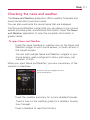
Checking the news and weather . . . . . . . . . . . . . . . . . . . . . . . . . . . . . . . 111
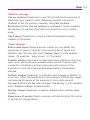
Changing News and Weather Settings. . . . . . . . . . . . . . . . . . . . . . . . . . 112
RSS Reader . . . . . . . . . . . . . . . . . . . . . . . . . . . . . . . . . . . . . . . . . . . . . . . 115
Using RSS Reader . . . . . . . . . . . . . . . . . . . . . . . . . . . . . . . . . . . . . . . . . .115
City ID. . . . . . . . . . . . . . . . . . . . . . . . . . . . . . . . . . . . . . . . . . . . . . . . . . . . 115
Slacker . . . . . . . . . . . . . . . . . . . . . . . . . . . . . . . . . . . . . . . . . . . . . . . . . . . 116
Skype mobile . . . . . . . . . . . . . . . . . . . . . . . . . . . . . . . . . . . . . . . . . . . . . . 117
Backup Assistant . . . . . . . . . . . . . . . . . . . . . . . . . . . . . . . . . . . . . . . . . . . 118
How to Access and Register Backup Assistant . . . . . . . . . . . . . . . . . . .118
Using Backup Assistant . . . . . . . . . . . . . . . . . . . . . . . . . . . . . . . . . . . . . .120
Kindle. . . . . . . . . . . . . . . . . . . . . . . . . . . . . . . . . . . . . . . . . . . . . . . . . . . . 122
Video . . . . . . . . . . . . . . . . . . . . . . . . . . . . . . . . . . . . . . . . . . . . . . . . . . . . 123
Music and Tones . . . . . . . . . . . . . . . . . . . . . . . . . . . . . . . . . . . . . . . . . . . 124
Communication . . . . . . . . . . . . . . . . . . . . . . . . . . . . . . . . .128
Mobile IM . . . . . . . . . . . . . . . . . . . . . . . . . . . . . . . . . . . . . . . . . . . . . . . . 128
Contacts . . . . . . . . . . . . . . . . . . . . . . . . . . . . . . . . . . . . . . . . . . . . . . . . . 128
Using Your Contacts . . . . . . . . . . . . . . . . . . . . . . . . . . . . . . . . . . . . . . . . .128
Contact Multiselect . . . . . . . . . . . . . . . . . . . . . . . . . . . . . . . . . . . . . . . . .130
Adding Contacts . . . . . . . . . . . . . . . . . . . . . . . . . . . . . . . . . . . . . . . . . . .132
Importing, Exporting, and Sharing Contacts . . . . . . . . . . . . . . . . . . . . .133
Adding a Contact to Your Favorites . . . . . . . . . . . . . . . . . . . . . . . . . . . .135
Searching for a Contact . . . . . . . . . . . . . . . . . . . . . . . . . . . . . . . . . . . . . .135
Editing Contact Details . . . . . . . . . . . . . . . . . . . . . . . . . . . . . . . . . . . . . .136
Communicating with Your Contacts . . . . . . . . . . . . . . . . . . . . . . . . . . . .138
Selecting Which Contacts are Displayed . . . . . . . . . . . . . . . . . . . . . . . .140
Joining Contacts . . . . . . . . . . . . . . . . . . . . . . . . . . . . . . . . . . . . . . . . . . .142
Separating Contact Information . . . . . . . . . . . . . . . . . . . . . . . . . . . . . . .143
9
10
Table of Contents
Adding and Removing Accounts . . . . . . . . . . . . . . . . . . . . . . . . . . . . . . 144
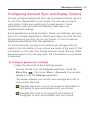
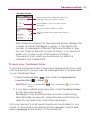
Configuring Account Sync and Display Options. . . . . . . . . . . . . . . . . . 147
Email . . . . . . . . . . . . . . . . . . . . . . . . . . . . . . . . . . . . . . . . . . . . . . . . . . . . 150
Opening Email and the Accounts Screen . . . . . . . . . . . . . . . . . . . . . . .150
Reading Your Messages . . . . . . . . . . . . . . . . . . . . . . . . . . . . . . . . . . . . . .152
Responding to a Message . . . . . . . . . . . . . . . . . . . . . . . . . . . . . . . . . . . .154
Starring Messages . . . . . . . . . . . . . . . . . . . . . . . . . . . . . . . . . . . . . . . . . .155
Composing and Sending Email . . . . . . . . . . . . . . . . . . . . . . . . . . . . . . .156
Working with Account Folders . . . . . . . . . . . . . . . . . . . . . . . . . . . . . . . . .157
Adding and Editing Email Accounts . . . . . . . . . . . . . . . . . . . . . . . . . . .158
Changing Email Account Settings . . . . . . . . . . . . . . . . . . . . . . . . . . . . .160
Facebook . . . . . . . . . . . . . . . . . . . . . . . . . . . . . . . . . . . . . . . . . . . . . . . . . 165
Facebook for LG Application . . . . . . . . . . . . . . . . . . . . . . . . . . . . . . . . . .165
Visual Voice Mail . . . . . . . . . . . . . . . . . . . . . . . . . . . . . . . . . . . . . . . . . . . 169
Gmail is Different . . . . . . . . . . . . . . . . . . . . . . . . . . . . . . . . . . . . . . . . . . .172
Opening Gmail and Your Inbox . . . . . . . . . . . . . . . . . . . . . . . . . . . . . . . .173
Reading Your Messages . . . . . . . . . . . . . . . . . . . . . . . . . . . . . . . . . . . . . .175
Composing and Sending a Message . . . . . . . . . . . . . . . . . . . . . . . . . . .178
Replying to or Forwarding a Message . . . . . . . . . . . . . . . . . . . . . . . . . . .179
Working with Conversations in Batches . . . . . . . . . . . . . . . . . . . . . . . . .180
Labeling a Conversation . . . . . . . . . . . . . . . . . . . . . . . . . . . . . . . . . . . . . .181
Starring a Message . . . . . . . . . . . . . . . . . . . . . . . . . . . . . . . . . . . . . . . . .183
Viewing Conversations by Label . . . . . . . . . . . . . . . . . . . . . . . . . . . . . . .184
Reporting Spam . . . . . . . . . . . . . . . . . . . . . . . . . . . . . . . . . . . . . . . . . . . .185
Searching for Messages . . . . . . . . . . . . . . . . . . . . . . . . . . . . . . . . . . . . .185
Archiving Conversations . . . . . . . . . . . . . . . . . . . . . . . . . . . . . . . . . . . . .186
Synchronizing Your Messages . . . . . . . . . . . . . . . . . . . . . . . . . . . . . . . . .186
Appending a Signature to Your Messages . . . . . . . . . . . . . . . . . . . . . .188
Changing Gmail Settings . . . . . . . . . . . . . . . . . . . . . . . . . . . . . . . . . . . .188
Messaging . . . . . . . . . . . . . . . . . . . . . . . . . . . . . . . . . . . . . . . . . . . . . . . . 190
Opening Messaging . . . . . . . . . . . . . . . . . . . . . . . . . . . . . . . . . . . . . . . . .190
Exchanging Messages . . . . . . . . . . . . . . . . . . . . . . . . . . . . . . . . . . . . . . . .191
Changing Messaging Settings . . . . . . . . . . . . . . . . . . . . . . . . . . . . . . . .194
Talk. . . . . . . . . . . . . . . . . . . . . . . . . . . . . . . . . . . . . . . . . . . . . . . . . . . . . . 196
Table of Contents
Signing in and Opening your Friends List . . . . . . . . . . . . . . . . . . . . . . .196
Chatting with Friends . . . . . . . . . . . . . . . . . . . . . . . . . . . . . . . . . . . . . . . .197
Changing and Monitoring Online Status . . . . . . . . . . . . . . . . . . . . . . .200
Managing Your Friends List . . . . . . . . . . . . . . . . . . . . . . . . . . . . . . . . . . .201
Changing Google Talk Settings . . . . . . . . . . . . . . . . . . . . . . . . . . . . . . .204
Twitter . . . . . . . . . . . . . . . . . . . . . . . . . . . . . . . . . . . . . . . . . . . . . . . . . . . 206
Twitter for LG application . . . . . . . . . . . . . . . . . . . . . . . . . . . . . . . . . . . .206
The Phone application. . . . . . . . . . . . . . . . . . . . . . . . . . . . . . . . . . . . . . 209
Phone . . . . . . . . . . . . . . . . . . . . . . . . . . . . . . . . . . . . . . . . . . . . . . . . . . . .209
Voice Dialer . . . . . . . . . . . . . . . . . . . . . . . . . . . . . . . . . . . . . . . . . . . . . . . 211
Call a Contact by Voice Dialling . . . . . . . . . . . . . . . . . . . . . . . . . . . . . . . .211
Open an Application . . . . . . . . . . . . . . . . . . . . . . . . . . . . . . . . . . . . . . . . .211
Voice Search . . . . . . . . . . . . . . . . . . . . . . . . . . . . . . . . . . . . . . . . . . . . . . 212
Entertainment . . . . . . . . . . . . . . . . . . . . . . . . . . . . . . . . . . .213
Camera . . . . . . . . . . . . . . . . . . . . . . . . . . . . . . . . . . . . . . . . . . . . . . . . . . 213
Video Camera . . . . . . . . . . . . . . . . . . . . . . . . . . . . . . . . . . . . . . . . . . . . . .218
Your Photos and Videos . . . . . . . . . . . . . . . . . . . . . . . . . . . . . . . . . . . . .220
Gallery . . . . . . . . . . . . . . . . . . . . . . . . . . . . . . . . . . . . . . . . . . . . . . . . . . . 221
Opening Gallery and Viewing Your Albums . . . . . . . . . . . . . . . . . . . . . .221
Working with Albums . . . . . . . . . . . . . . . . . . . . . . . . . . . . . . . . . . . . . . .222
To Work with Batches of Pictures or Videos . . . . . . . . . . . . . . . . . . . . .224
Working with Pictures . . . . . . . . . . . . . . . . . . . . . . . . . . . . . . . . . . . . . . .226
Working with Videos . . . . . . . . . . . . . . . . . . . . . . . . . . . . . . . . . . . . . . . .230
Market. . . . . . . . . . . . . . . . . . . . . . . . . . . . . . . . . . . . . . . . . . . . . . . . . . . 232
Opening Android Market and Finding Applications . . . . . . . . . . . . . .232
Downloading and Installing Applications . . . . . . . . . . . . . . . . . . . . . . .235
Managing Your Downloads . . . . . . . . . . . . . . . . . . . . . . . . . . . . . . . . . . .237
Music . . . . . . . . . . . . . . . . . . . . . . . . . . . . . . . . . . . . . . . . . . . . . . . . . . . . 241
Transferring Music Files to Your Phone . . . . . . . . . . . . . . . . . . . . . . . . .241
Opening Music and Working with Your Library . . . . . . . . . . . . . . . . . .242
Playing Music . . . . . . . . . . . . . . . . . . . . . . . . . . . . . . . . . . . . . . . . . . . . . .244
Working with Playlists . . . . . . . . . . . . . . . . . . . . . . . . . . . . . . . . . . . . . . . .247
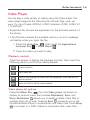
Video Player . . . . . . . . . . . . . . . . . . . . . . . . . . . . . . . . . . . . . . . . . . . . . . 249
11
12
Table of Contents
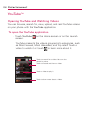
YouTubeTM . . . . . . . . . . . . . . . . . . . . . . . . . . . . . . . . . . . . . . . . . . . . . . . . 250
Opening YouTube and Watching Videos . . . . . . . . . . . . . . . . . . . . . . .250
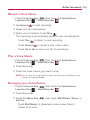
Voice Recorder . . . . . . . . . . . . . . . . . . . . . . . . . . . . . . . . . . . . . . . . . . . . 252
Record a Voice Memo . . . . . . . . . . . . . . . . . . . . . . . . . . . . . . . . . . . . . . .253
Play a Voice Memo . . . . . . . . . . . . . . . . . . . . . . . . . . . . . . . . . . . . . . . . .253
Managing your Voice Memos . . . . . . . . . . . . . . . . . . . . . . . . . . . . . . . . .253
Scrabble . . . . . . . . . . . . . . . . . . . . . . . . . . . . . . . . . . . . . . . . . . . . . . . . . 254
Tetris . . . . . . . . . . . . . . . . . . . . . . . . . . . . . . . . . . . . . . . . . . . . . . . . . . . . 255
Tool . . . . . . . . . . . . . . . . . . . . . . . . . . . . . . . . . . . . . . . . . . .256
Calendar . . . . . . . . . . . . . . . . . . . . . . . . . . . . . . . . . . . . . . . . . . . . . . . . . 256
Viewing Your Calendar and Events . . . . . . . . . . . . . . . . . . . . . . . . . . . .256
Working in Agenda View . . . . . . . . . . . . . . . . . . . . . . . . . . . . . . . . . . . .258
Working in Day View . . . . . . . . . . . . . . . . . . . . . . . . . . . . . . . . . . . . . . . .259
Working in Week View . . . . . . . . . . . . . . . . . . . . . . . . . . . . . . . . . . . . . .260
Working in Month View . . . . . . . . . . . . . . . . . . . . . . . . . . . . . . . . . . . . . .261
Viewing Event Details . . . . . . . . . . . . . . . . . . . . . . . . . . . . . . . . . . . . . . .262
Creating an Event . . . . . . . . . . . . . . . . . . . . . . . . . . . . . . . . . . . . . . . . . .263
Editing or deleting an event . . . . . . . . . . . . . . . . . . . . . . . . . . . . . . . . . .264
Setting an Event Reminder . . . . . . . . . . . . . . . . . . . . . . . . . . . . . . . . . .265
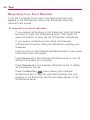
Responding to an Event Reminder . . . . . . . . . . . . . . . . . . . . . . . . . . . .266
Synchronizing and Displaying Calendars . . . . . . . . . . . . . . . . . . . . . . . .267
Changing Calendar Settings . . . . . . . . . . . . . . . . . . . . . . . . . . . . . . . . .268
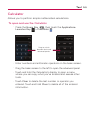
Calculator . . . . . . . . . . . . . . . . . . . . . . . . . . . . . . . . . . . . . . . . . . . . . . . . 269
Clock . . . . . . . . . . . . . . . . . . . . . . . . . . . . . . . . . . . . . . . . . . . . . . . . . . . . 270
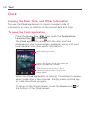
Viewing the Date, Time, and Other Information . . . . . . . . . . . . . . . . . .270
Setting Alarms . . . . . . . . . . . . . . . . . . . . . . . . . . . . . . . . . . . . . . . . . . . . .272
Changing Clock Alarm Settings . . . . . . . . . . . . . . . . . . . . . . . . . . . . . . .273
ThinkFree Office. . . . . . . . . . . . . . . . . . . . . . . . . . . . . . . . . . . . . . . . . . . 274
Create a New Document . . . . . . . . . . . . . . . . . . . . . . . . . . . . . . . . . . . . .274
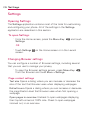
Settings. . . . . . . . . . . . . . . . . . . . . . . . . . . . . . . . . . . . . . . . . . . . . . . . . . 278
Opening Settings . . . . . . . . . . . . . . . . . . . . . . . . . . . . . . . . . . . . . . . . . . .278
Changing Browser settings . . . . . . . . . . . . . . . . . . . . . . . . . . . . . . . . . . .278
Table of Contents
Settings . . . . . . . . . . . . . . . . . . . . . . . . . . . . . . . . . . . . . . .278
Wireless & networks . . . . . . . . . . . . . . . . . . . . . . . . . . . . . . . . . . . . . . . .280
Call settings . . . . . . . . . . . . . . . . . . . . . . . . . . . . . . . . . . . . . . . . . . . . . . .283
Sound . . . . . . . . . . . . . . . . . . . . . . . . . . . . . . . . . . . . . . . . . . . . . . . . . . . .284
Display . . . . . . . . . . . . . . . . . . . . . . . . . . . . . . . . . . . . . . . . . . . . . . . . . . .286
Location & security . . . . . . . . . . . . . . . . . . . . . . . . . . . . . . . . . . . . . . . . .286
Applications . . . . . . . . . . . . . . . . . . . . . . . . . . . . . . . . . . . . . . . . . . . . . . .288
Accounts & sync . . . . . . . . . . . . . . . . . . . . . . . . . . . . . . . . . . . . . . . . . . .290
Privacy . . . . . . . . . . . . . . . . . . . . . . . . . . . . . . . . . . . . . . . . . . . . . . . . . . . .291
SD card & phone storage . . . . . . . . . . . . . . . . . . . . . . . . . . . . . . . . . . . .291
Search . . . . . . . . . . . . . . . . . . . . . . . . . . . . . . . . . . . . . . . . . . . . . . . . . . . .292
Language & keyboard . . . . . . . . . . . . . . . . . . . . . . . . . . . . . . . . . . . . . . .292
Voice input & output . . . . . . . . . . . . . . . . . . . . . . . . . . . . . . . . . . . . . . . .294
Connectivity . . . . . . . . . . . . . . . . . . . . . . . . . . . . . . . . . . . . . . . . . . . . . . .295
Accessibility . . . . . . . . . . . . . . . . . . . . . . . . . . . . . . . . . . . . . . . . . . . . . .295
Date & time . . . . . . . . . . . . . . . . . . . . . . . . . . . . . . . . . . . . . . . . . . . . . . .296
About phone . . . . . . . . . . . . . . . . . . . . . . . . . . . . . . . . . . . . . . . . . . . . . .296
Safety . . . . . . . . . . . . . . . . . . . . . . . . . . . . . . . . . . . . . . . . .297
TIA Safety Information . . . . . . . . . . . . . . . . . . . . . . . . . . . . . . . . . . . . . 297
Safety Information . . . . . . . . . . . . . . . . . . . . . . . . . . . . . . . . . . . . . . . . . 301
Caution: Avoid potential hearing loss. . . . . . . . . . . . . . . . . . . . . . . . . . 305
FDA Consumer Update . . . . . . . . . . . . . . . . . . . . . . . . . . . . . . . . . . . . . 307
10 Driver Safety Tips. . . . . . . . . . . . . . . . . . . . . . . . . . . . . . . . . . . . . . . . 315
Consumer Information on SAR(Specific Absorption Rate) . . . . . . . . . 317
FCC Hearing-Aid Compatibility (HAC) Regulations for Wireless
Devices . . . . . . . . . . . . . . . . . . . . . . . . . . . . . . . . . . . . . . . . . . . . . . . . . . 320
Specifications . . . . . . . . . . . . . . . . . . . . . . . . . . . . . . . . . .322
FAQ . . . . . . . . . . . . . . . . . . . . . . . . . . . . . . . . . . . . . . . . . . .324
LIMITED WARRANTY STATEMENT . . . . . . . . . . . . . . .335
13
14
Important Customer Information
Please be advised that many services and applications offered
through this unique device are provided by various device, operating
system, software and application developers (e.g., GoogleTM,
Motorola, Microsoft, Palm). If you use, link to or download such a
service, or an application such as a non-Verizon Wireless location
based GPS-type service, chat room, marketplace or social network
from this device, you should carefully review the terms of such
service or application. If you USE ANY of these non-Verizon
Wireless services or applications, personal information you submit
may be read, collected, or used by the service or application
provider and/or other users of those forums.
Verizon Wireless is not responsible for your use of those
applications or information you choose to submit or share with
others. Specific terms and conditions, terms of use, and privacy
polices apply to those applications and services. Please review
carefully any and all terms and conditions applicable to those
applications and services including those related to any locationbased services for any particular privacy policies, risks, or waivers.
Your Verizon Wireless customer agreement terms and conditions
and certain other specifically identified terms govern your use of
any Verizon Wireless products and services.
TIP!
●
●
Please hold the mobile phone straight up as a regular phone. While
making/receiving calls or sending/receiving data, try to avoid holding the lower
part of the phone where the antenna is located. It may affect call quality.
If the phone does not respond to user input or the screen freezes:
Remove the battery, insert it again and power on the phone.
If it still does not work, please contact the service center.
Technical Details
Important Information
This user’s guide provides important information on the use and
operation of your phone. Please read this guide carefully prior to
using the phone to be able to use your phone to its greatest
advantage and to prevent any accidental damage or misuse. Any
unapproved changes or modifications will void your warranty.
Technical Details
The LG VortexTM is an all digital phone that operates on both Code
Division Multiple Access (CDMA) frequencies: cellular services at
800 MHz and Personal Communication Services (PCS) at 1.9 GHz.
CDMA technology uses a feature called DSSS (Direct Sequence
Spread Spectrum) that enables the phone to keep communication
from being crossed and to use one frequency channel by multiple
users in the same specific area. This results in a 10-fold capacity
increase when compared with analog mode. In addition, features
such as soft/softer handoff, hard handoff, and dynamic RF power
control technologies combine to reduce call interruptions.
The Cellular and PCS CDMA networks consist of MSO (Mobile
Switching Office), BSC (Base Station Controller), BTS (Base Station
Transmission System), and MS (Mobile Station).
The 1xRTT system receives twice as many subscribers in the
wireless section as IS-95. Benefits from using 1xRTT instead of IS95 include extending your device's battery life (up to twice as long)
and high speed data transmission capability. However, in applicable
areas, EV-DO system is optimized for data service and therefore is
much faster than 1xRTT.
The table on the following page lists some major CDMA standards.
15
16
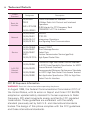
Technical Details
CDMA
Standard
Designator
TIA/EIA-95A
Description
TIA/EIA-IS2000
CDMA Dual-Mode Air Interface
14.4kbps Radio Link Protocol and Inter-band
Operations
IS-95 Adapted for PCS Frequency Band
CDMA2000 1xRTT Air Interface
Network
TIA/EIA/IS-634
TIA/EIA/IS-651
TIA/EIA/IS-41-C
TIA/EIA/IS-124
MAS-BS
PCSC-RS
Intersystem Operations
Non-Signaling Data Communications
Service
TIA/EIA/IS-96-B
TIA/EIA/IS-637
TIA/EIA/IS-657
IS-801
TIA/EIA/IS-707-A
Speech CODEC
Short Message Service
Packet Data
Position Determination Service (gpsOne)
High Speed Packet Data
Basic Air
Interface
TSB-74
ANSI J-STD-008
TIA/EIA/IS-856
1x EV-DO
Related
Interface
TIA/EIA/IS-878
TIA/EIA/IS-866
TIA/EIA/IS-890
CDMA2000 High Rate Packet Data Air Interface
1x EV-DO Inter-Operability Specification for HRPD
Access Network Interfaces
Recommended Minimum Performance Standards
for HRPD High Rate Packet Data Access Terminal
Test Application Specification (TAS) for High Rate
Packet Data Air Interface
FCC RF Exposure Information
WARNING! Read this information before operating the phone.
In August 1996, the Federal Communications Commission (FCC) of
the United States, with its action in Report and Order FCC 96-326,
adopted an updated safety standard for human exposure to Radio
Frequency (RF) electromagnetic energy emitted by FCC regulated
transmitters. Those guidelines are consistent with the safety
standard previously set by both U.S. and international standards
bodies. The design of this phone complies with the FCC guidelines
and those international standards.
Technical Details
Bodily Contact During Operation
This device was tested for typical use with the back of the phone
kept 0.79 inches (2.0 cm) from the body. To comply with FCC RF
exposure requirements, a minimum separation distance of 0.79
inches (2.0 cm) must be maintained between the user’s body and
the back of the phone, including the antenna. Third-party belt-clips,
holsters, and similar accessories containing metallic components
should not be used. Avoid the use of accessories that cannot
maintain 0.79 inches (2.0 cm) distance between the user’s body and
the back of the phone and have not been tested for compliance
with FCC RF exposure limits.
Vehicle-Mounted External Antenna
(Optional, if available.)
To satisfy FCC RF exposure requirements, keep 8 inches (20 cm)
between the user / bystander and vehicle-mounted external
antenna. For more information about RF exposure, visit the FCC
website at www.fcc.gov.
FCC Notice and Cautions
This device and its accessories comply with part 15 of FCC rules.
Operation is subject to the following two conditions: (1) This device
and its accessories may not cause harmful interference, and (2) this
device and its accessories must accept any interference received,
including interference that causes undesired operation.
Any changes or modifications not expressly approved in this user
guide could void your warranty for this equipment. Use only the
supplied antenna. Use of unauthorized antennas (or modifications to
the antenna) could impair call quality, damage the phone, void your
warranty and/or violate FCC regulations.
Don’t use the phone with a damaged antenna. A damaged antenna
could cause a minor skin burn. Contact your local dealer for a
replacement antenna.
17
18
Technical Details
Part 15.21 statement
Changes or modifications that are not expressly approved by the
manufacturer could void the user’s authority to operate the
equipment.
Part 15.105 statement
This equipment has been tested and found to comply with the
limits for a class B digital device, pursuant to Part 15 of the FCC
rules. These limits are designed to provide reasonable protection
against harmful interference in a residential installation. This
equipment generates, uses, and can radiate radio frequency energy
and, if not installed and used in accordance with the instructions,
may cause harmful interference to radio communications. However,
there is no guarantee that interference will not occur in a particular
installation. If you experience interference with reception (e.g.,
television), determine if this equipment is causing the harmful
interference by turning the equipment off and then back on to see if
the interference is affected. If necessary, try correcting the
interference by one or more of the following measures:
- Reorient or relocate the receiving antenna.
- Increase the separation between the equipment and receiver.
- Connect the equipment into an outlet on a circuit different from
that to which the receiver is connected.
- Consult the dealer or an experienced radio/TV technician for help.
The Basics
Phone Overview
Front View
Power/Lock Key
Earpiece
Proximity
Sensors
Touchscreen
Quick Keys
- Phone Key
- Contacts Key
- Messaging Key
- Browser Key
Menu Key
Home Key
Applications
Launcher Key
Search Key
Back Key
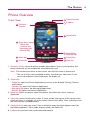
1. Proximity Sensors senses proximity towards other objects (such as your head) so that
touch commands are not accidentally activated during a call.
Note *Do not block the sensor or near sensor area with film cover or phone case.
* The use of a film cover produced by other manufacturers other than LG can
cause a disturbance in touch operation, the display, etc.
2. Quick Keys
- Phone Key opens the Phone Application for access to the dialpad, Call log, Contacts,
and Favorites.
- Contacts Key opens the Contacts Application.
- Messaging Key opens the Messaging Application.
- Browser Key opens the Browser Application.
3. Menu Key Opens an options menu with options that affect the current screen or
application.
4. Home Key returns to the Home screen. If you're already viewing one of the Home screen
extension panes, it navigates you to the central Home screen pane. Press and hold to view
the most recently used applications.
5. Power/Lock Key locks the screen. Press and hold to open the phone options menu (for
the following options): Silent mode, Airplane mode, and Power off.
6. Earpiece lets you hear callers and automated prompts.
19
20
The Basics
7. Touchscreen displays all the information needed to operate your phone, such as
applications, call status, date, time, signal status, and battery strength.
8. Applications Launcher Key opens the Launch screen, where you can view installed
applications.
9. Search Key opens Quick Search BoxTM from the Home screen to search the phone and
the web. In many applications, you may touch this key to search within the application
itself. Touch and hold to open Bing search by voice.
10. Back Key returns to the previous screen. Also closes pop-up display items such as menus
and dialog boxes.
Rear View
3.5mm Headset
Jack
Camera Lens
Back Cover
Accessory/
Charger Port
Microphone
11. 3.5mm Headset Jack allows you to plug in an optional headset for convenient, hands-free
conversations. The 3.5mm jack also allows you to plug in headphones to listen to music.
12. Camera Lens use for taking pictures and recording videos. Keep clean for optimal
performance.
13. Back Cover encloses the battery compartment.
14. Accessory/Charger Port allows you to connect the phone charger, USB cable, or other
compatible accessories.
15. Microphone transmits your voice to the other caller and to Voice-activated functions.
The Basics
Left Side
Right Side
Volume Keys
microSD Slot
16. Volume Keys allow you to adjust the ringer, media volumes, or the in-call volume during a
call.
17. microSD Slot accommodates the pre-installed 2GB microSDTM card (expandable up to
16GB)
NOTE Insert a microSD card to use the camera and other multimedia features.
Multimedia contents will be saved in the microSD card.
Your LG Vortex has a microSDTM card pre-installed.
21
22
The Basics
Installing the Battery and microSD Card
NOTE
It is important to fully charge the battery before initial use of the phone.
The phone comes with a rechargeable battery. Keep the battery
charged while not in use in order to maximize talk, use, and standby
time. The battery charge level is shown at the top right part of the
screen.
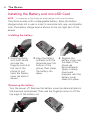
Installing the battery
1. Hold the phone
with both hands
and use the
fingertip cutout at
the top of the
phone to pull
open the battery
cover (as shown
above).
2. Align the battery
contacts with the
terminals near the
bottom of the
phone, then press
the battery into
place.
3. Replace the
battery cover over
the back of the
phone (as
demonstrated).
Apply a steady
downward
pressure until the
battery cover
clicks into place.
Removing the battery
Turn the power off. Remove the battery cover (as demonstrated in
the previous instructions). Then use the fingertip cutout to lift the
top edge of the battery out.
23
Inserting a microSD card
Gently uncover the microSD slot located on the left side of the
phone. Position the microSD card facing up and slide it into place
until it is fully inserted and locked in place.
NOTE The microSD card can be easily damaged by improper operation. Please be
careful when inserting, removing or handling it.
To remove the microSD card
1. Unmount the microSD card (see steps below), then uncover
the microSD slot located on the left side of the phone.
2. Gently push the exposed edge of the microSD card in with
your fingertip to release it from the slot.
3. Carefully pull the microSD card out of the slot and replace
the cover to the slot.
NOTE To safely remove the microSD card from your phone, unmount it from your
phone first, as described below.
To unmount the microSD card
1. Press the Home Key
Key
.
, press the Applications Launcher
2. Touch Settings > SD card & phone storage.
3. Touch Unmount SD card.
24
The Basics
Charging the Phone
Your LG VortexTM device comes with a Wall/USB charger and a USB
data cable which connect together to charge your phone. To charge
your phone:
NOTICE
Please use only an approved charging accessory to charge your LG phone.
Improper handling of the charging port, as well as the use of an incompatible charger,
may cause damage to your phone and void the warranty.
1. Connect the USB cable into the Wall/USB charger. When
connecting, as shown below, the LG logo on the USB cable
should face toward you.
USB Cable
Wall/USB charger
2. Plug the USB cable (as shown below) into the phone's
charger port.
The Basics
Battery temperature protection
Though extremely rare, if the battery becomes overheated, the
phone will automatically turn off.
Battery charge level
You can find the battery charge level at the top right part of the
screen. When the battery level becomes low, the phone will notify
you. Once the battery level becomes exceedingly low, the phone
will shut off without notice. As a result, unsaved items may be lost.
Charging with USB
You can use your computer to charge your phone. To be able to
charge with the USB cable, you need to have the necessary USB
drivers installed on your PC first. Connect one end of the USB
cable to the charger port on your phone and connect the other
end to a USB port on your PC. It is best to use the rear USB port
when connecting to a desktop PC. The USB hub should be
powered by an external power source.
NOTES ● Low-power USB ports are not supported, such as the USB port on your
keyboard or bus-powered USB hub.
●
LG USB Driver is downloadable from the following site:
http://www.lgmobilephones.com > Click Mobile Support > Select the
Carrier(Verizon) > Select the Model > Click USB Cable Driver to download.
Using the phone without battery
It is possible to use the phone without the battery. Connect the
charger to the phone and plug the charger into a wall. After doing
this, you can turn the phone on and place calls.
NOTE Using the phone without a battery may cause the phone to turn off
unexpectedly if the supply of power is interrupted.
25
26
The Basics
Optimizing Battery Life
You can extend your battery's life between charges by turning off
features that run in the background. You can also monitor how
applications and system resources consume battery power.
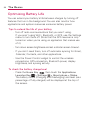
Tips to extend the life of your battery
'
Turn off radio communications that you aren't using.
If you aren't using Wi-Fi, Bluetooth, or GPS, use the Settings
menu to turn them off. (Note that the GPS receiver is only
turned on when you're using an application that makes use
of it.)
'
Turn down screen brightness and set a shorter screen timeout.
'
If you don't need them, turn off automatic syncing for Gmail,
Calendar, Contacts, and other applications.
'
Use the Power Control widget to control the wireless
connections, GPS connection, Bluetooth power, display
brightness, and syncing activity.
To check the battery charge level
'
Press the Home Key
, then touch the Applications
Launcher Key
> Settings
> About phone > Status.
The battery status (Charging and Discharging) and level (as a
percentage of fully charged) will be displayed at the top of
the screen.
The Basics
To monitor and control what uses the battery
The Battery use screen allows you to see which applications are
consuming the most battery power. Information on this screen
allows you to identify downloaded applications you may want to
turn off when not being used, so you can get the most out of your
battery power.
'
Press the Home Key
, then touch the Applications
Launcher Key
> Settings
> About phone > Battery
use. The screen will display battery usage time. Either how
long since last connected to a power source, if connected to
a power source, and how long you were last running on
battery power.
The list of applications or services using battery power are
displayed in order of energy used, from greatest amount to
least.
'
Touch an application in the Battery Use screen to see the
details about its power consumption.
Different applications offer different kinds of information, and
they may even include options to modify the settings so you
can reduce power consumption by that application.
27
28
Turning the Phone On and Off
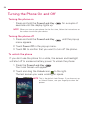
Turning the phone on
'
Press and hold the Power/Lock Key
seconds until the display lights up.
for a couple of
NOTE When you turn on your phone for the first time, follow the instructions on
the screen to activate your device.
Turning the phone off
1. Press and hold the Power/Lock Key
until the pop-up
menu appears.
2. Touch Power Off in the pop-up menu.
3. Touch OK to confirm that you want to turn off the phone.
To unlock the phone
If you don’t use the phone for a while, the screen and backlight
will shut off to conserve battery power. To unlock the phone:
1. Press the Power/Lock Key
Your Lock Screen will appear.
.
2. Touch and drag the Unlock icon
to the right.
The last screen you were working on opens.
NOTE This is the default Lock Screen. If you have set up
an Unlock Pattern, use your fingertip to draw the
pattern.
29
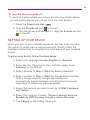
To turn the phone sounds off
If you're in a place where your phone sounds may disturb others,
you can quickly silence your phone from the Lock Screen.
1. Press the Power/Lock Key
.
2. Drag the Sounds off icon
to the left.
To turn the phone sounds back on, drag the Sounds on icon
to the left.
SETTING UP YOUR DEVICE
When you turn on your wireless device for the first time, you have
the option to quickly set up various accounts. Simply follow the
onscreen instructions to complete the initial setup of your wireless
device.
To set up your device, follow the steps below :
1. Select your language between English and Español.
2. If you see the ‘Welcome to the LG Vortex’ page, touch
Continue on the bottom.
3. Select whether to Skip or Start the Backup Assistant.
4. Select whether to Skip or Start the Google account setup.
With a Google Account, Google applications are
automatically synced between your phone and computer
regardless of where you make an update.
5. Select the account you want to set up. (E-Mail, Facebook,
and Twitter).
6. Select the Location Consent. (Verizon Location Services/
Standalone GPS Services/ Google Location Services)
7. Touch Begin to start using the phone.
30
The Basics
For more information on how to set up your email, visit
smartphones.verizonwireless. com/. Click on the Smartphone
Support tab and select your phone.
Setting up your Google Account
1. At the setup screen, touch Create or Sign in.
2. Enter your username and password.
3. Touch Sign in.
Now your Gmail, Google Contacts, and Google Calendar events
will all be loaded to your phone automatically.
Use the area below to record your Google account information for
future reference.
Username:[email protected]
Password:________________________________________________
Your Google Account
You must sign into a Google Account to use Gmail, Google Talk,
Google Calendar, and other Google Apps; to download applications
from Android Market; to back up your settings to Google servers;
and to take advantage of other Google services on your phone.
IMPORTANT
c If
you want to restore your settings to this phone, from
another phone that was running Android release 2.0 or later,
you must sign into your Google Account now, during setup. If
you wait until after setup is complete, your settings are not
restored.
c If
you don’t have a Google Account, you’re prompted to
create one.
c If
you have an enterprise account through your company or
other organization, your IT department may have special
instructions on how to sign into that account.
c When
you sign in, your contacts, Gmail messages, Calendar
events, and other information from these applications and
services on the web are synchronized with your phone.
The Basics
c If
you don’t sign into a Google Account during setup, you are
prompted to sign in or to create a Google Account the first
time you start an application that requires one, such as Gmail
or Android Market.
c When
you sign in, you’re prompted to enter your username
and password, using the onscreen keyboard.
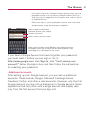
Touch to open the onscreen
keyboard to enter your Google
Account username.
Touch to enter your password.
When you’re finished, touch Done on the keyboard (or press
the phone’s Back Key) to close the onscreen keyboard. Then
touch Sign in at the bottom of the screen.
If you have a Google Account but have forgotten your password,
you must reset it before you can sign in. Go to
http://www.google.com, click Sign In, click “Can’t access your
account?” below the sign-in box, and then follow the instructions
for resetting your password.
Additional accounts
After setting up your Google Account, you can set up additional
accounts. These include, Google, Microsoft Exchange Server,
Facebook, Twitter, and other e-mail accounts. However, only the first
Google Account you sign into is backed up to Google servers. Some
applications that only work with a single account and display data
only from the first account that you sign into.
31
32
The Basics
Phone’s Status Icons
The Status bar appears at the top of every screen. It displays icons
indicating that you’ve received notifications (on the left) and icons
indicating the phone’s status (on the right), along with the current time.
Notification icons
Status icons
If you have more notifications than can fit in the Status bar, a plus
icon prompts you to open the Notifications panel to view them all.
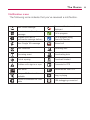
Status icons
The following icons indicate the status of your phone.
3G connected
Roaming
3G in use
No signal
Connected to a Wi-Fi network
No microSD card installed
Bluetooth is on
Vibrate mode
Connected to a Bluetooth device
Ringer is silenced
Airplane mode is set
Phone microphone is muted
Alarm is set
Battery is very low
Signal strength
Battery is low
Speakerphone is on
Battery is partially drained
GPS is on
Battery is full
Receiving location data from GPS
Battery is charging
Location Off
Location On
The Basics
Notification icons
The following icons indicate that you've received a notification.
New Gmail message
New text or multimedia
message
Problem with text or
multimedia message delivery
3 more notifications not
displayed
Call in progress
Call in progress using
Bluetooth headset
New Google Talk message
Missed call
New voicemail
Uploading data
Upcoming event
Downloading data
Data is syncing
Download finished
Problem with sign-in or sync
Connected to VPN
New email
Disconnected from VPN
An open Wi-Fi network is
available
Phone is connected via USB
cable
Song is playing
USB debugging connected
33
34
The Basics
Getting to Know the Home Screen
The Home screen is your starting point to access all the features on
your phone. It displays application shortcuts, icons, widgets,
and other features.
Status Bar
Shows device status information
including the time, signal strength,
battery status, and notification
icons.
Application Icon
Touch an icon (application, folder,
etc.) to open and use it.
Quick Keys
Provide easy, one-touch access to
the functions you use the most.
Applications Launcher Key
Touch to open the Launch screen
to view installed applications.
The Basics
Quick Keys
On the home screen, the Quick Keys are located on a bar along the
bottom of the Home screen and the Launch screen.
: opens the Phone application, which displays the dialpad so
you can dial an unsaved number. You can also access the Call
log, Contacts and Favorites by touching the tabs across the
top.
: opens your Contacts list. You can also access access Phone,
Call log, and Favorites by touching the tabs across the top.
: opens the Launch screen, where you can view all of your
installed applications.
: opens the Messaging application.
: opens the Browser application.
To return to the Home screen
'
Press the Home Key
at any time, from any application.
To view other Home screen panes
'
Slide your finger left or right across the Home screen. The
Home screen spans five panels, allowing more space for
icons, widgets, shortcuts, etc.
35
36
The Basics
Location Indicator
The dots indicate which Home screen pane you are viewing.
Touchscreen
Your touchscreen provides an excellent way to interact with and use
your Android phone. With the touch of your finger, you can
download and use available applications, make menu selections,
and access data saved to your phone.
The following terms are used for describing the different available
actions using the touchscreen:
Touch A single finger touch selects items. For example, touch an
icon (e.g., application or menu item), touch words (e.g., menu
selection or to answer onscreen question), or touch letters to type.
Touch and hold Touch and hold an item on the screen by
touching it and not lifting your finger until an action occurs. For
example, to open a pop-up menu for customizing the Home
screen, touch an empty area on the Home screen until the menu
pops up.
Drag Touch and hold an item for a moment and then, without
lifting your finger, move your finger on the screen until you reach
the target position. You can drag items on the Home screen to
reposition them.
The Basics
Swipe or slide To swipe or slide, quickly move your finger across
the surface of the screen, without pausing when you first touch it
(so you don’t drag an item instead). For example, you can slide the
screen up or down to scroll a list, or browse through the different
Home screens by swiping from left to right (and vice versa).
Double-tap Double-tap to zoom a webpage or a map. For
example, quickly double-tap a section of a webpage to zoom that
section to fit the width of the screen. You can also double-tap to
control the Camera zoom, in Bing Maps, and in other applications.
Pinch-to-Zoom Use your index finger and thumb in a pinch or
spread motion to zoom in or out when using the browser, viewing
a map or pictures.
Rotate the screen From many applications, the orientation of the
screen rotates with the phone as you turn it from upright to
sideways and back again.
Rotate the phone counter-clockwise for
landscape orientation.
Rotate the phone clockwise for portrait
orientation.
NOTE To turn this feature on and off, from the Home screen, touch the Applications
Launcher Key
checkbox.
> Settings > Display. Then touch the Auto-rotate screen
37
38
The Basics
Text Input Methods
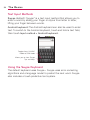
Swype (default): Swype™ is a text input method that allows you to
enter a word by sliding your finger or stylus from letter to letter,
lifting your finger between words.
Android keyboard: The Android keyboard can also be used to enter
text. To switch to the Android keyboard, touch and hold a text field,
then touch Input method > Android keyboard.
Toggles from 123/ABC
mode to SYM mode
Allows you to view Swype
Tips and Help.
Using the Swype Keyboard
The default keyboard uses Swype™. Swype uses error correcting
algorithms and a language model to predict the next word. Swype
also includes a touch predictive text system.
The Basics
Swype Tips
Access the Swype Tips to watch a video or tutorial on using Swype.
You can also use the following Swype text entry tips.
'
Create a squiggle (like an S shape) to create a double letter
(such as pp in apple).
'
Touch and hold a key to enter the alternate letter or symbol
located at the top right corner of the key.
'
Move your finger or stylus over the apostrophe to enter
contractions.
'
Double-touch on the word you want to change to correct a
misspelled word.
'
Touch the delete key to erase one character. Touch and hold
the delete key to erase an entire word.
Swype Settings
To configure Swype settings
1. From the Home screen, touch the Applications Launcher
Key
> Settings
Language & keyboard > Swype.
2. Touch one of the following Swype settings to configure the
setting:
Preferences settings
Preferences settings provide access to Swype operation
preferences.
Language allows you to select the current text input language.
Default language is US English.
Word prediction allows you to use a built-in word database to
predict words while entering text in Swype.
39
40
The Basics
Audio feedback allows you to turn on sounds generated by the
Swype application.
Vibrate on keypress allows you to activate a vibration sensation
as you enter text using the keypad.
Enable tip indicator allows you to turn on an on-screen flashing
indicator that provides helpful user information.
Swype Advanced Settings
Swype Advanced Settings provide access to Swype advanced
operation settings.
Auto-spacing allows you to automatically insert a space between
words. When you finish a word, just lift your finger or stylus and
start the next word.
Auto-capitalization allows you to automatically capitalize the first
letter of a sentence.
Show complete trace allows you choose whether or not you
want the complete Swype path to display.
Word choice window sets the amount of times the word choice
selection window displays on screen. Move the slider between
Never or Always and touch OK.
Speed vs. accuracy sets how quickly Swype responds to onscreen input. Move the slider between Fast Response (speed) or
Error Tolerance (accuracy) and touch OK.
The Basics
Help
This menu provides help and a tutorial to guide you through the
process.
Swype help displays the Swype User Manual.
Tutorial provides an on-screen tutorial.
About
The about menu provides the current software version for the
Swype application.
41
42
The Basics
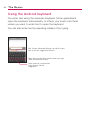
Using the Android keyboard
You enter text using the onscreen keyboard. Some applications
open the keyboard automatically. In others, you touch a text field
where you want to enter text to open the keyboard.
You can also enter text by speaking instead of by typing.
See 'Swype Advanced Settings' on p38 to know
how to set the suggestion function.
Touch once to capitalize the next letter you type.
Touch and hold for all caps.
Touch space or a punctuation
mark to enter the red
suggestion.
The Basics
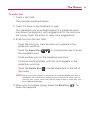
To enter text
1. Touch a text field.
The onscreen keyboard opens.
2. Touch the keys on the keyboard to type.
The characters you’ve entered appear in a predictive word
box above the keyboard, with suggestions for the word you
are typing. Touch the arrow to view more suggestions.
3. Enter text into the text field.
'
Touch the word you want as soon as it appears in the
predictive word box.
'
Touch the Space Key
the predicted word.
'
Touch another word in the predictive word box.
'
Continue touching letters until the word appears in the
predictive word box.
'
Touch the Delete Key
the cursor.
Deutsch
or a punctuation key to enter
to erase characters to the left of
NOTE Words that do not appear in the predictive word box before you enter it
completely are automatically added to your dictionary for future use. To
manually add a word, touch and hold the word to open a dialog box, then
touch Add to dictionary.
4. When you're finished typing, press the Back Key
close the keyboard.
to
43
44
The Basics
To enter numbers, symbols, and other characters
'
Touch the Symbols Key
to switch to the numbers and
symbols keyboard.
Touch the Alt Key
on the symbols keyboard to access
additional symbols; touch it again to switch back.
'
Touch and hold any of the letter keys to access alternate
symbols. Initially, the symbol at the top of the key pops up.
When the menu pops up, touch any of the alternate
characters or symbols displayed.
'
Touch and hold the Period Key (.) from abc mode to open a
small window to choose from various symbols.
'
Touch and hold a number or symbol key to open a window of
additional symbols.
To change the keyboard orientation
'
Turn the phone sideways or upright.
The keyboard is reoriented to take best advantage of the
new phone orientation.
Many people find the larger horizontal onscreen keyboard
easier to use.
You can control whether the screen
changes orientation automatically when
you turn the phone.
The Basics
Entering text by speaking
You can use voice input to enter text by speaking. Voice input is an
experimental feature that uses Google’s speech-recognition service,
so you must have a data connection on a mobile or Wi-Fi network
to use it.
To enter text by speaking
You can enter text by speaking in most places where text is
allowed to be introduced.
1. Touch a text field.
2. Touch the Microphone Key on the keyboard (if you set
the Microphone Key to appear on the symbols keyboard,
first).
touch the Symbols Key
45
46
The Basics
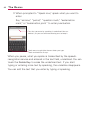
3. When prompted to “Speak now,” speak what you want to
enter.
Say “comma,” “period,” “question mark,” “exclamation
mark,” or “exclamation point” to enter punctuation.
Text that you enter by speaking is underlined. You can
delete it, or you can continue entering text to keep it.
Touch once to capitalize the next letter you type.
Touch and hold for all caps.
When you pause, what you spoke is transcribed by the speechrecognition service and entered in the text field, underlined. You can
touch the Delete Key to erase the underlined text. If you start
typing or entering more text by speaking, the underline disappears.
You can edit the text that you enter by typing or speaking.
The Basics
Editing text
You can edit the text you enter in text fields and use menu
commands to cut, copy, and paste text, within or across
applications. Some applications don’t support editing some or all of
the text they display; others may offer their own way to select text
you want to work with.
To edit text
1. Touch and hold the text field that contains the text you want
to edit.
2. A context menu with editing options is displayed. Choose an
option to edit the text.
3. Once you are finished editing the text, press the Back Key
to close the keyboard.
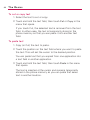
To select text
You can select text to cut or copy. Selected text is highlighted in
orange.
1. Touch and hold the text field or other portion of the screen
that contains the text to select.
2. In the context menu that opens, touch Select text.
3. Select text by touching and dragging across the text you
want to select.
4. Touch and hold the text field again and touch Cut or Copy.
47
48
The Basics
To cut or copy text
1. Select the text to cut or copy.
2. Touch and hold the text field, then touch Cut or Copy in the
menu that opens.
If you touch Cut, the selected text is removed from the text
field. In either case, the text is temporarily stored in the
phone memory so that you can paste it into another text
field.
To paste text
1. Copy (or Cut) the text to paste.
2. Touch the position on the text field where you want to paste
the text. This will set the cursor to the desired position.
You can paste text that you copied from one application into
a text field in another application.
3. Touch and hold the text field, then touch Paste in the menu
that opens.
The text is inserted at the cursor and remains temporarily
stored in the phone memory so you can paste that same
text in another location.
The Basics
Applications: How to View, Open and Switch
All of the applications on your phone, including any applications that
you downloaded and installed from Android MarketTM or other
sources, are grouped together on one Launch screen that you
access from your Home screen. You can slide the screen up or
down to view more applications.
Overview
Home screen
Touch to open the Launch screen
Launch screen
Slide the screen up or down to
bring more icons into view
Touch an application icon to open
the application
Touch to close the Launch screen
Quick Keys
49
50
The Basics
Opening and Closing the Launch screen
Opening the Launch screen
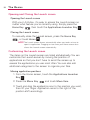
With your LG Vortex, it's easy to access the Launch screen no
matter what feature you're currently using. Simply press the
Home Key
, then touch the Applications Launcher Key
.
Closing the Launch screen
To manually close the Launch screen, press the Home Key
, or touch Home
.
NOTE The Launch screen closes automatically when you touch an icon to
open its application. Dragging an icon onto your Home screen also
closes the Launch screen automatically.
Customizing the Launch screen
The items on the Launch screen are listed alphabetically. You can
customize the Launch screen by moving the position of
applications so that you don't have to scroll the screen up to
access the applications you use most often. You can also add
additional categories to the screen to organize your files.
Moving application positions
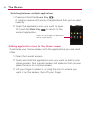
1. From the Home screen, touch the Applications Launcher
Key
.
2. Press the Menu Key
and touch Move Item.
3. Touch and drag the application icon to the position you want,
then lift your finger. Application icons to the right of the
position shift accordingly.
The Basics
Adding a category
1. From the Home screen, touch Applications Launcher Key
.
2. Press the Menu Key
and touch Add category.
3. Enter the category name, then touch OK.
Opening and Switching Applications
Multi-tasking is easy with AndroidTM because open applications
keep running even when you open another application. There’s no
need to quit an application before opening another. You can use
and switch among several open applications. Android manages
each application, stopping and starting them as needed to ensure
that unused applications don’t waste your device's resources.
Opening an application
'
Open an application simply by touching its icon on the
screen.
TIP! You can customize your Home screen with the application icons you use
most often. Applications are located on the Launch screen, but you can
copy any application icon to your Home screen for faster access. No
matter where the icon is, on the Launch screen or your Home screen,
just touch it to open and use it.
Opening multiple applications
1. Touch an application icon to open it.
2. Press the Home Key
.
NOTE If the application icon you want is on your Home screen, simply touch
the icon to open and use it.
3. Touch the Applications Launcher Key
.
4. Touch the icon for the other application you want to open.
51
52
The Basics
Switching between multiple applications
1. Press and hold the Home Key
.
A window opens with icons of applications that you’ve used
recently.
2. Touch the application icon you want to open.
to return to the
Or touch the Back Key
current application.
Touch an icon to open an application
you've used recently.
Adding application icons to the Home screen
Customize your Home screen with the applications you use most
often.
1. Open the Launch screen.
2. Touch and hold the application icon you want to add to your
Home screen. Your Launch screen will close so that you can
place the icon on a Home screen.
3. Lift your finger to place it, or drag the icon to where you
want it on the screen, then lift your finger.
The Basics
Working with Menus
There are two kinds of Android menus: Options menus and Context
menus.
Options menus
Options menus contain tools that apply to the activities of the
current screen or application, not to any specific item on the
screen. To open the available Options menu, press the Menu Key
. Not all applications have Options menus; if you press the
Menu Key
on a screen that has no Options menu, nothing
will happen.
Some applications have more Options menu items than can fit in
the options menu; touch More to open the additional items.
Options menus contain items that
apply to the current screen or
to the application as a whole.
Touch to open more menu items.
53
54
The Basics
Context menus
Context menus contain options that apply to a specific item on
the screen. To open a Context menu, touch and hold an item on
the screen. Not all items have Context menus. If you touch and
hold an item that has no Context menu, nothing will happen.
When you touch and hold
certain items on a screen, a
Context menu opens.
Managing Notifications
Notification icons report the arrival of new messages, calendar
events, alarms, as well as ongoing events, such as when you are in
a call.
When you receive a notification, text appears briefly and the
notification icon will be displayed in the Status bar.
You can open the Notifications panel to view a list of all recent
notifications. Depending on your settings, you may hear a
notification sound or the phone may vibrate.
Applications whose activities produce notifications, such as GmailTM
and Google Talk, have their own settings, which you can use to
configure whether, and how, they send notifications.
The Basics
To open the Notifications panel
'
Touch and drag the Status bar to the bottom of the screen.
OR
Touch a notification
to open it.
'
From the Home screen, press the Menu Key
Notifications.
and touch
The Notifications panel displays your wireless provider and a
list of your current notifications, organized into ongoing and
event-based notifications.
To respond to a notification
1. Open the Notifications panel. Your current notifications are
listed in the panel, each with a brief description.
2. Touch a notification to view it.
The Notification panel will close and the application that
corresponds to your response will open. For example, new
voicemail notifications dial your voicemail box, and Gmail
notifications will open up the Gmail application so you can read
your messages.
55
56
The Basics
To clear all notifications
1. Open the Notifications panel.
2. Touch the Clear button at the top right of the panel.
All event-based notifications will be cleared; ongoing
notifications will remain in the list.
To close the notifications panel
Touch and drag the tab at the bottom of the Notifications panel to
the top of the screen or just touch the Back Key
.
The panel will also close when you touch a notification.
Searching Your Phone and the Web
You can search for information on your phone and on the web by
using the Quick Search Box or Bing search.
Some applications, such as Gmail, Contacts, and Browser have the
ability to search contents within those specific applications.
Along with being able to search by typing in search terms, you are
also able to search by voice.
Phone and Web search using text entry
1. Press the Search Key
.
When you press the Search Key
on the Home screen
or in other applications that support this, the Quick Search
Box will open automatically.
Voice Search
Touch to search by voice.
Search results
Provides one-touch shortcut to
matching search items.
The Basics
In some applications, such as Gmail, Contacts, and Browser,
the application's own search box opens when you press the
Search Key
. This is indicated by the application's icon
on the left side of the search box.
OR
Press the Menu Key
and touch Search
.
Enter the text you're searching for in the Quick Search Box.
Touch to conduct the search.
As you type, search results from
your phone, previous search
terms, and web search
suggestions appear. Touch an
item to search that term.
You can use the Search preferences to configure some
aspects of Bing web search (for example, whether it makes
suggestions below the Quick Search Box as you type), and
what phone features you want to include in searches.
2. Touch Search
to search for the entered terms.
OR
If what you want to search for what appears in the
suggestions list, touch that item to conduct the search.
57
58
The Basics
Locking the Screen
You can lock your screen so that only you can unlock it to make
calls, access your data, buy applications, and so on.
Setting a Lock Pattern for the First Time
1. Press the Home Key
Launcher Key
.
, then touch the Applications
2. Scroll down and touch Settings > Location & security.
3. Touch Set up screen lock (under Screen unlock section).
4. Touch Pattern.
5. Read the instruction screen, touch Next to see tutorial
instructions on how to create an unlock pattern, then touch
Next when you're ready to create your unlock pattern.
6. You're prompted to draw and redraw your own pattern.
Draw your unlock pattern.
Touch Continue to draw your
pattern again to confirm it.
From then on, any time you wish to turn the phone on or
unlock the screen, you will need to draw your unlock pattern to
unlock the screen.
Changing Your Lock Pattern
1. Press the Home Key
Launcher Key
.
, then touch the Applications
The Basics
2. Scroll down and touch Settings > Location & security.
3. Touch Change screen lock (under Screen unlock section).
4. Draw your current lock pattern.
5. Touch Pattern to change it (or touch None to remove it).
6. You're prompted to draw and redraw your new pattern.
Using a PIN or Password to Lock the Screen
1. Press the Home Key
Launcher Key
.
, then touch the Applications
2. Scroll down and touch Settings > Location & security.
3. Touch Change screen lock (under Screen unlock section).
4. Touch Pin to lock the screen with a number sequence or
touch Password for an alphanumeric lock sequence.
5. You're prompted to enter and reenter the lock sequence.
From then on, you will need to enter the sequence and
touch OK to unlock the screen.
NOTES ● You have 5 opportunities to enter your unlock Pattern, PIN or Password. If
you used all the 5 opportunities, you can attempt it after 30 seconds.
●
When you can’t recall your unlock Pattern, PIN, or Password:
- If you’ve created a Google account on the phone, touch the Forgot
pattern? Key. Then, you are required to sign in with your Google account
to unlock your phone.
- If you haven’t created a Google account on the phone, you need to
perform a factory reset.
(Caution: If you perform a factory reset, all user applications and user data
will be deleted. Please remember to back up any important data before
performing a factory reset.)
1. Turn the power off.
2. Press and hold the following keys at the same time for 5 seconds:
Down Volume Key + Home Key + Power/Lock Key.
3. When the power turns on, release the keys.
59
60
The Basics
Customizing the Home Screen
You can personalize your Home screen by adding application icons,
shortcuts, widgets, and other items to any Home screen pane. You
can also change the wallpaper.
To add an item to the Home screen
1. Go to the Home screen pane where you want to add the
item.
2. Press the Menu Key
and touch Add.
Or, just touch and hold an empty spot on the Home screen
pane.
NOTE If there is no available space on a particular Home screen pane, Add will
not be available; you must delete or remove an item before you can add
another item. In this case, you have the option of switching to another
Home screen pane.
3. In the menu that opens, touch the type of item to add.
You can add the following types of items to the Home screen:
Shortcuts Add shortcuts to applications, a bookmarked webpage,
a favorite contact, a destination in Bing Maps, a Gmail label, a
music playlist, and more. The shortcuts available depend on the
applications you have installed.
Widgets Add any of a variety of widget applications to your Home
screen, including a clock, a music player, a picture frame, Bing
search bar, a power manager, a calendar of upcoming
appointments, a News and Weather widget, and more. Note that
more widgets can also be found on Android MarketTM.
Folders Add a folder where you can organize other Home screen
shortcuts and icons, or folders that contain all your contacts,
contacts with phone numbers, or starred contacts. Your folders'
contents are kept up-to-date automatically.
The Basics
To move an item on the Home screen
1. Touch and hold the item.
2. Drag the item to a new location on the screen.
Pause at the left or right edge of the screen to drag the item
onto the next available Home screen pane.
3. When the item is where you want it, lift your finger.
To remove an item from the Home screen
1. Touch and hold the item, note that the Applications
Launcher Key changes to an icon of a trash can.
2. Drag the item to the Trash Can.
3. When the icon turns red, lift your finger.
To change the Home screen wallpaper
1. Press the Home Key
, then press the Menu Key
and touch Wallpaper.
You can also touch and hold an empty spot on the Home
screen, then touch Wallpapers in the menu that opens.
2. Touch Gallery, Live wallpapers, or Wallpaper gallery.
'
Touch Gallery to use a picture on your phone as a
wallpaper. You can crop the picture before setting it as a
wallpaper.
'
Touch Live wallpapers to open a list of animated
wallpapers installed on your phone. Live wallpapers can
change according to the time of day, respond to touching
the screen, tell the time, or offer other information.
'
Touch Wallpapers to open a screen of wallpaper images
that come with the phone. Slide the thumbnail images left
and right to view the available images.
3. Touch Set wallpaper or Save.
61
62
The Basics
To rename a folder
1. Touch the folder icon to open it.
2. Touch and hold the folder window's title bar.
3. Edit the current folder name.
4. Touch OK.
Connecting Quickly With Your Contacts
As you build up your list of contacts on your phone, you can use
Quick Contact for Android to quickly chat, email, text message,
place a call, or to locate your contacts. Quick Contact for Android is
a special set of icons that you can use to quickly and easily connect
to a contact.
'
Open your Contacts list and touch the contact icon to the left
of the contact's name. A bubble will open with the available
options, displayed as icons. This is the Quick Contact bubble.
Depending on the contact information saved, the available
actions will be displayed above the name.
'
Touch a Quick Contact icon to communicate with the
contact.
Depending on the icon you've touched, a different application
will open. For example, the Bing Maps icon will be available
if an address is saved in that contact entry. By touching the
Bing Maps icon, the Bing Maps application will open and the
address will be mapped in Bing Maps.
If you add a shortcut for a contact to your Home screen, you will be
able to open Quick Contact for that contact.
Connecting to Networks and Devices
Connecting to Mobile Networks
When you buy your phone and sign up for service, your phone is
configured to use your provider's mobile networks for voice calls
and for transmitting data.
Different locations may have different mobile networks available.
Initially, your phone is configured to use the fastest mobile network
available for data. But you can configure your phone to use only a
slower 1X network for data, to extend the life of your battery,
between charges. You can also configure your phone to access a
different set of networks entirely, or to behave in specific ways
when roaming.
The icons in the Status bar indicate which kind of data network
you're connected to and the network signal strength.
Connected to the 3G network (EVDO revA)
Connected to a 2G network (1x)
The more bars that are lit, the stronger the wireless signal
Connected to another wireless service provider’s network (roaming)
When connected to slower networks, you may want to postpone
using your phone for data-intensive tasks until you are connected to
a faster network again, or find a Wi-Fi network to connect to.
To disable data when roaming
You can prevent your phone from transmitting data over other
carriers' mobile networks when you leave an area that is covered
by your carrier's networks. This is useful for controlling expenses if
your cell plan doesn't include data roaming.
, then touch the Applications
1. Press the Home Key
Launcher Key
.
2. Scroll down and touch Settings
> Wireless & networks >
Mobile networks.
63
64
Connecting to Networks and Devices
3. Touch Data roaming to remove the checkmark from the box.
With Data roaming unchecked, you can still transmit data
with a Wi-Fi connection.
To limit your data connection to 2G networks
You can extend your battery life by limiting your data connections
to 2G networks. When you are connected to a 2G network, you
may want to postpone activities that transmit a lot of data, such
as sending, uploading, or downloading pictures or video, until you
are connected to a faster mobile or other wireless network.
1. Press the Home Key
Launcher Key
.
, then touch the Applications
2. Scroll down and touch Settings
> Wireless & networks >
Mobile networks > Network mode.
3. Touch 1x only.
Connecting to Wi-Fi Networks
Wi-Fi is a wireless networking technology that can provide Internet
access at distances of up to 100 meters, depending on the Wi-Fi
router and your surroundings.
To use Wi-Fi on your phone, you must connect to a wireless access
point, or “hotspot.” Some access points are open and you can
simply connect to them. Others are hidden or implement other
security features, so you must configure your phone so it can
connect to them.
Turn off Wi-Fi when you're not using it, to extend the life of your
battery.
The following Status bar icon indicates your Wi-Fi status.
Connected to a Wi-Fi network (waves indicate connection strength)
Notification that an open Wi-Fi network is in range
Connecting to Networks and Devices
When you connect to a Wi-Fi network, the phone obtains a network
address and other information it needs from the network, using the
DHCP protocol. To configure the phone with a static IP address and
other advanced settings, from Wi-Fi settings press the Menu Key
and touch Advanced.
To turn Wi-Fi on and connect to a Wi-Fi network
1. Press the Home Key
Launcher Key
.
, then touch the Applications
2. Scroll down and touch Settings
Wi-Fi settings.
> Wireless & networks >
3. If the Wi-Fi box is not checkmarked, touch Wi-Fi to turn it on
and scan for available Wi-Fi networks.
c
A list of available Wi-Fi networks will be displayed. Secured
networks are indicated by a lock icon.
c
If the phone finds a network that you have connected to
previously, it automatically connects to it.
4. Touch a network to connect to it.
c
If the network is open, you will be prompted to confirm
that you want to connect to that network by touching
Connect.
c
If the network is secured, you will be prompted to enter a
password. (Ask your network administrator for details.)
c
When you're connected to a network, you can touch the
network name in the Wi-Fi settings screen for details about
the speed, security, address, and related settings.
65
66
Connecting to Networks and Devices
To receive notifications when open networks are in range
By default, when Wi-Fi is on, you receive notifications in the
Status bar when your phone detects an open Wi-Fi network.
1. Turn on Wi-Fi, if it's not already on.
2. From the Wi-Fi settings screen, touch Network notification
to checkmark the box.
Touch again to remove the checkmark and stop receiving
notifications.
To add a Wi-Fi network
You can add a Wi-Fi network so the phone will remember it, along
with any security credentials, and connect to it automatically when
it is in range. You can also add a Wi-Fi network manually if it does
not broadcast its name (SSID) or if you want to add a Wi-Fi
network when you are out of its range.
To add a secured network, you need to contact the network's
administrator to obtain the password or other required security
credentials.
1. Turn on Wi-Fi, if it's not already on.
2. From the Wi-Fi settings screen, touch Add Wi-Fi network.
3. Enter the Network SSID (name) of the network.
4. Touch the drop-down menu arrow in the Security box, then
touch the type of security used on the network.
5. Enter the required passwords and security credentials.
6. Touch Save.
The phone will connect to the wireless network. Any
credentials that you entered are saved, so you are
connected automatically the next time you come within
range of this network.
Connecting to Networks and Devices
To forget a Wi-Fi network
You can make the phone forget about the details of a Wi-Fi
network that you added. For example, if you don't want the phone
to connect to it automatically or if it is a network that you no
longer use.
1. Turn on Wi-Fi, if it's not already on.
2. In the Wi-Fi settings screen, touch and hold the name of the
network.
3. Touch Forget network.
ActiveSync
ActiveSync synchronizes information on your device with
information on your PC, such as Outlook content. ActiveSync can
also synchronize over a cellular network with Microsoft Exchange
Server, if your company or service provider is running Microsoft
Exchange Server with Exchange ActiveSync. When you synchronize,
ActiveSync compares the information on your device with the
information on your PC and/or Exchange Server and updates all
locations with the most recent information.
With ActiveSync, you can:
'
Synchronize information, such as Outlook E-mail, Contacts,
Calendar, or Tasks information on your device with your PC,
as well as pictures, video, and music.
'
Synchronize Outlook E-mail, Contacts, Calendar
appointments, and Tasks on your device directly with
Exchange Server so that you can stay up to date even when
your PC is turned off.
'
Exchange files between your device and your PC without
synchronizing.
67
68
Connecting to networks and devices
'
Select which types of information are synchronized and
specify how much information is synchronized. For example,
you can choose how many weeks of past Calendar
appointments to synchronize.
Before you can synchronize information with a PC, first, install
ActiveSync on your PC, then create a synchronization pairing
between your device and the PC. You can install ActiveSync from
the Getting Started disc that comes with your VortexTM.
Once you have installed ActiveSync and set up a synchronization
relationship, ActiveSync on the PC recognizes your device when you
connect it, and automatically transfers the synchronization settings
you specified on your device.
You may be able to synchronize your device with Exchange Server
through your company or wireless service provider. If you plan to do
so, obtain e-mail address, Exchange Server address, user name,
password, and domain name from your administrator before starting
the Sync Setup Wizard.
Windows Media Sync
By using PC Client programs like Windows Media Player or
Rhapsody you can easily sync the Multimedia files from the PC
(Music, Video, Image).
Follow the process below to Connect.
1. Touch the Applications Launcher Key
Key
> Sync
.
> Music > Menu
OR
Connect the USB Cable. Then open the Notifications panel and
touch USB Connection Mode > Windows Media Sync.
Connecting to networks and devices
Follow the process below to Disconnect.
1. Open the Notifications panel and touch USB Connection
Mode > Modem Mode or Mass Storage Mode.
2. Open the Notifications panel and touch Windows media
sync. When the pop-up appears, touch OK for disconnection.
3. Disconnect the USB Cable.
NOTE SD Card must be inserted on the mobile and it is recommended to use
the USB Cable that is supplied by LG. If the microSD Card is used in
other device, it is better to use after the format.
69
70
Connecting to networks and devices
USB Autorun
USB Autorun is a feature that allows a LG VortexTM to connect to a
PC using a USB cable and sets up the on a PC without a physical
CD-ROM.
'
Automatically installs the LG USB Modem Driver.
'
Allows the phone to be used as a Mass Storage when a
microSD card is present in the LG VortexTM. It allows transfer
of unprotected content from phone to PC and vice versa.
To select USB mode for Autorun
1. Press the Home Key
, then touch the Applications
Launcher Key
> Settings
> Connectivity > Default
connection mode.
2. Touch Mass Storage mode to connect PC for Autorun.
NOTES ● USB Autorun only works with Windows® XP, Window 7 and, VistaTM
operating systems.
●
●
Log on to the PC as Administrator. Non-Administrator accounts have
insufficient privilege to install USB Modem driver and don’t run Autorun
feature.
Do not unplug USB cable during Autorun.
Autorun automatically installs USB device driver for every USB
mode.
Connecting to networks and devices
Modem Mode with Autorun
Autorun may automatically use Modem mode in certain
circumstances.
'
If no SD card is inserted in device, Autorun automatically
switches to Modem mode even if the mode is set to
Window Media Sync or Mass Storage mode.
'
Even if the option Always ask is checkmarked, Autorun
automatically switches to Modem mode without additional
pop-up message notice.
'
Autorun automatically switches to Modem mode if the
connection fails while syncing or connecting.
Autorun is not available when:
'
Phone is booting (powering up).
'
PC operating system is not set to Autorun (automatic
execute command).
To set Autorun on your PC operating system:
Insert the LG disk in your PC, double-click the CD drive, when the
disc drive window opens, double-click the LG Autorun application
(TL_Bootstrap.exe).
For Autorun in Windows VistaTM and Windows 7, open the Control
Panel, then click Autoplay > Software and games > Install (or run
program. Autorun is only executed manually when it's set as:
Open folder to view files using Windows Explorer - Take no action
/ Ask me every time.
To change the setting while Autorun is running :
You can change the settings while Autorun is running. Press the
Home Key
, then touch the Applications Launcher Key
>
Settings
> Connectivity > Default connection mode > Mass
Storage mode.
71
72
Connecting to networks and devices
NOTE Be sure to checkmark the box Always ask if you want to be asked to
confirm the USB mode connection when the phone is connected to a computer.
Using the Status bar to change the settings
The Status bars shows the current USB connection mode so you
can easily open the the Status bar and change the settings as
needed.
When the USB is connected, the current USB connection mode
appears on the Notifications panel. Touch the connection setting to
display a pop-up box where you can change the USB connection
mode.
NOTE If the Always ask checkbox is marked, the pop-up box is only provided
during USB connection, but is not provided in the notification area.
If the default sync mode is 'Windows media sync', the sync
connection is listed separately in the Notifications panel. Select it
to display a pop-up box that asks if you want to disconnect. If you
choose to disconnect, the connection changes to modem mode.
Step 1. Connecting Phone to PC
' Connect your phone to your PC with a compatible USB cable
(supplied) and LG Autorun starts automatically.
'
Click ‘I accept the terms in the agreement’ and ‘Yes’.
NOTES ● Without the Autorun, the release notes for USB Autorun would pop-up as
shown.
●
Autorun is only supported for Windows® XP, Windows® Vista, Windows®7,
Mac OS X® above v10.5.
Connecting to networks and devices
●
The ‘USB Autorun’ feature works only under an Administrator account.
The installer has insufficient privileges under a Non-Administrator account.
Log on as Administrator. The device is switched back to the user set
mode with 30 seconds.
Step 2. Downloading LG USB Modem Driver.
NOTES ● If previous version of LG USB Modem Driver is installed in the computer,
it will automatically be updated to the recent version of Driver.
●
If recent version of LG USB Modem Driver is installed in the computer,
LG Autorun skips ‘Step 2.’
Step 3. Installing LG USB Modem Driver.
Step 4: Downloading or Running V Cast Media Manager
NOTES ● If V Cast Media Manager is already installed in the computer, USB
Autorun would not download V Cast Media Manager and just runs the
installed program.
●
Downloading or running V Cast Media Manager works only in Mass
storage mode. To set the mode, press the Home Key
, then touch
> Settings
> Connectivity >
the Applications Launcher Key
Default connection mode > Mass storage mode.
73
74
Connecting to networks and devices
Enable DUN
While traveling, you can use your phone as a modem for your
notebook. Use either VZAccess Manager or the Modem Link
program to use your phone as a USB or Bluetooth modem.
Before you proceed
'
To connect your device to a computer via USB, you must first
install the LG USB driver on the computer.
'
Make sure your phone has a data or dial-up modem
connection on the device manager of your computer.
'
To use a Bluetooth connection, make sure your computer
has built-in Bluetooth capability. If your computer does not
have Bluetooth, you can connect and use a Bluetooth
dongle.
Connecting to networks and devices
Sharing your phone’s mobile data connection
You can share your phone’s data connection with up to eight
devices at once, by turning your phone into a portable Wi-Fi hotspot.
When your phone is sharing its data connection, an icon appears in
the Status bar and as an ongoing notification in the Notifications
panel.
For the latest information about tethering and portable hotspots,
including supported operating systems and other details, visit
www.android.com/tether.
Make Your Device a 3G Mobile Hotspot
3G Mobile Hotspot can share the phone’s 3G data connection with
any Wi-Fi capable devices.
WARNING! There are security risks associated with creating a wi-fi network open to the
public. It is highly recommended that you take steps to protect your wi-fi
network from unauthorized access. To add encryption to your Wi-Fi hotspot:
1. Touch 3G Mobile Hotspot
from the Menu.
75
76
Connecting to networks and devices
2. Touch 3G Mobile Hotspot.
3. Touch the 3G Mobile Hotspot checkbox to enable this
feature.
4. Touch 3G Mobile Hotspot settings to set up and manage the
3G Mobile Hotspot.
Connecting to networks and devices
5. Touch Configure from menu to view the SSID, Security, and
Password.
Portable Wi-Fi hotspot is active
Portable hotspot are active
6. You are allowed to configure the SSID and Password on this
screen.
77
78
Connecting to Networks and Devices
7. If you want to change the security protocol, touch the
Security menu and choose Open or WPA2 PSK from the pop
up menu.
If you select WPA2 PSK, input a password for the connection and
then touch Save.
Your portable hotspot is now created.
You will use the Portable Wi-Fi hotspot checkbox from above to
enable and disable the connection. Once the connection is active,
go to the device you wish to connect and configure its wireless
connection to the Network SSID for your Android device and input
the password (if you are using WPA2 PSK). You will now have
wireless access on your device.
NOTE WEP is the weakest option because it is highly vulnerable to hacking.
WPA2 is recommended by IEEE.
Connecting to Networks and Devices
Connecting to Bluetooth Devices
Bluetooth is a short-range wireless communications technology that
devices can use to exchange information over a distance of about
30 feet. The most common Bluetooth devices are headphones for
making calls or listening to music, hands-free kits for cars, and other
portable devices, including laptops and cell phones.
There are several Bluetooth profiles that define the features and
communications standards for Bluetooth devices.
To connect to a Bluetooth device, you must turn on your phone's
Bluetooth. To use your phone's Bluetooth with another device, you
must first pair the two devices. Pairing creates a secure
Bluetooth is on
Connected to a Bluetooth device
connections between the two devices.
Turn off Bluetooth when you're not using it to extend the life of your
battery between charges. Bluetooth is one of the wireless functions
that is turned off when Airplane mode is set to On.
The Status bar displays icons that indicate the Bluetooth status.
To turn Bluetooth on or off
1. Press the Home Key
Launcher Key
.
, then touch the Applications
2. Scroll down and touch Settings
> Wireless & networks.
3. Touch Bluetooth to turn the function on or off.
The phone supports HFP, HSP, A2DP, AVRCP, OPP, PBAP, FTP, DUN.
Bluetooth® QD ID B016832
79
80
Connecting to Networks and Devices
To change your phone’s Bluetooth name
Your phone has a generic Bluetooth name by default, which is
visible to other devices when you set the phone as 'Discoverable'.
You can change the name to customize it to your preference.
1. Press the Home Key
Launcher Key
.
, then touch the Applications
2. Scroll down and touch Settings
Bluetooth settings.
c
> Wireless & networks >
If Bluetooth is off, touch Bluetooth to turn it on.
3. Touch Device name, enter a new name then touch OK.
To pair your phone with a Bluetooth device
You must pair your phone with another device before you can
connect to it.
1. Press the Home Key
Launcher Key
.
, then touch the Applications
2. Scroll tdown and touch Settings
Bluetooth settings.
> Wireless & networks >
c
If Bluetooth is off, touch Bluetooth to turn it on.
c
Touch Scan for devices to scan for and display the IDs of all
available in-range Bluetooth devices.
c
If the device you want to pair with isn't on the list, make
sure the target device is set to be discoverable, then touch
Scan for devices to scan again.
3. Touch the ID of the device you want to pair with your phone.
c
Often, the target device will be discovered and pairing will
occur automatically.
Connecting to Networks and Devices
c
If you're prompted to enter a passcode, try entering 0000
or 1234 (the most common passcodes), or consult the
documentation that came with the target device to find its
passcode.
c
Once the pairing is successful, your phone will connect to
the device.
To connect to a Bluetooth device
Once paired, you can connect to a Bluetooth device as needed.
1. Press the Home Key
, then touch the Applications
Launcher Key
.
2. Scroll down and touch Settings > Wireless & networks >
Bluetooth settings.
c If Bluetooth is off, touch Bluetooth to turn it on.
3. In the list of Bluetooth devices, touch and hold the name for
the paired device on the list.
To configure the Bluetooth features you want to use
Some Bluetooth devices have multiple profiles. Profiles can be the
ability to transmit your phone conversations, to play music with
Bluetooth stereo headphones, or to transfer files or other data.
1. Touch and hold the device listed in the Bluetooth settings
screen.
2. Touch Options in the menu that opens.
A screen opens with a list of the available profiles.
3. Touch a profile to add or remove the checkmark (to enable or
disable the profile).
4. When you're finished, press the Back Key
.
81
82
Connecting to Networks and Devices
To disconnect from a Bluetooth device
1. Touch the device in the Bluetooth settings screen.
2. Touch OK to confirm that you want to disconnect.
To unpair a Bluetooth device
You can unpair a Bluetooth device and erase all pairing information
about it.
1. Touch and hold the device listed in the Bluetooth settings
screen.
2. Touch Disconnect and unpair or Unpair in the menu that opens.
Connecting to Virtual Private Networks
Virtual private networks (VPNs) allow you to connect to resources
inside a secured local network, from outside that network. VPNs are
commonly deployed by corporations, schools, and other institutions
so that their users can access local network resources when not on
campus, or when connected to a wireless network.
There are numerous systems for securing VPN connections,
including some that rely on secure certificates or other methods to
ensure that only authorized users can connect. For information
about installing secure certificates, see Working with Secure
Certificates on page 84.
To configure VPN access from your phone, you must obtain the
details from your network administrator.
To add a VPN
1. Press the Home Key
Launcher Key
.
, then touch the Applications
2. Scroll down and touch Settings
VPN settings.
3. Touch Add VPN.
4. Touch the type of VPN to add.
> Wireless & networks >
Connecting to Networks and Devices
5. In the screen that opens, follow the instructions from your
network administrator to configure each component of the
VPN settings.
6. Press the Menu Key
and touch Save.
The VPN will be added to the list on the VPN settings
screen.
To connect to a VPN
1. Press the Home Key
Launcher Key
.
, then touch the Applications
2. Scroll down and touch Settings
> Wireless & networks >
VPN settings.
The VPNs you've added are listed on the VPN settings
screen.
3. Touch the VPN to which you want to connect.
4. In the dialog box that opens, enter any requested credentials
then touch Connect.
c
When you're connected to a VPN, you will receive an
ongoing notification in the Status bar.
c
If you are disconnected, you will receive a notification that
you can touch to return to the VPN settings screen.
To disconnect from a VPN
'
Open the Notifications panel then touch the ongoing
notification for the VPN connection. This will allow you to
disconnect.
83
84
Connecting to Networks and Devices
Working With Secure Certificates
If your organization's VPN or Wi-Fi network relies on secure
certificates, you must obtain the certificates and store them in your
phone's secure credential storage before you can configure access
to that VPN or Wi-Fi network on your phone.
For specific instructions, contact your network administrator.
To install a secure certificate from the microSD card
1. Copy the certificate from your computer to the root (that is,
not in a folder) of the microSD card.
2. Press the Home Key
Launcher Key
.
, then touch the Applications
3. Scroll down and touch Settings > Location & security.
4. Scroll down and touch Install from SD card.
5. Touch the file name of the certificate to install.
Only the names of certificates that you have not already
installed on your phone are displayed.
6. If prompted, enter the certificate's password then touch OK.
7. Enter a name for the certificate then touch OK.
If you have not already set a password for your phone's
credential storage, you will be prompted to enter a password
for it, twice, then touch OK.
You can now use the certificate that you installed when
connecting to a secure network. For security purposes, the
certificate will be deleted from the microSD card.
microSD Card
microSD Card
'
Your Device's microSD Card and Adapter
'
microSD Card Settings
'
Connecting Your Device to Your Computer
Your Device's microSD Card and Adapter
The microSD Card
Your phone is equipped with a preinstalled microSDTM memory card
to expand the phone’s available memory space. It allows you to
store images, videos, music, and voice data in your device.
Removing the microSD Card
To safely remove the microSD card from your device, first you need
to unmount the microSD card before removing it from the phone.
WARNING! On the Android OS 2.2, you can download applications from Android Market
and can store them on microSD card as well as on the device. Since that, if
you skip the unmount procedure, it can cause an error because information
between microSD card and the device is accorded properly. In worst case,
the microSD card can be corrupted or damaged.
1. Touch the Applications Launcher Key
> Settings > SD
card & phone storage > Unmount SD card > OK. Now you
can safely remove the microSD card.
2. Uncover the microSD slot located on the left side of the
phone.
3. Gently push the exposed edge of the microSD card in with
your fingertip to release it from the slot.
4. Carefully pull the microSD card out of the slot.
NOTE You can easily damage the microSD card and its adapter by improper
operation. Please be careful when inserting, removing, or handling them.
85
86
microSD Card
Inserting the microSD Card
1. Gently uncover the microSD slot located on the left side of
the device.
2. Position the microSD card with the label side facing up and
slide it into place until it is fully inserted and locked in place.
NOTE Be sure to use only recommended microSD cards (up to 32GB). Using
non-recommended microSD cards could cause data loss and damage
your device.
microSD Icon Indicators
The following icons show your microSD card connection status at a
glance:
card has been unmounted (released from use) from the device.
card is being prepared for use and for mounting.
NOTE DO NOT remove a microSD card while files are being accessed or
transferred. Doing so will result in loss or damage of data. Make sure
your battery is fully charged before using the microSD card. Your data may
become damaged or unusable if the battery runs out while using the
microSD card.
microSD Adapter
The supplied microSD adapter allows you to use microSD cards in
other SD-compatible devices, like computers, cameras, and printers.
Before using the microSD card with an SD-compatible device, you
will need to insert the microSD card into the microSD adapter.
To insert the microSD card into the microSD adapter:
' With the label side of the microSD card facing up, insert the
card into the supplied microSD adapter, and gently slide the
card until it is fully inserted.
To remove the microSD card from the microSD adapter:
' Hold the front edge of the microSD card, and gently pull it
out to remove it from the adapter.
microSD Card
Write Protection
The microSD adapter has a built-in Write Protection lock to prevent
accidental overwriting or removal of your data when the microSD
card and adapter are inserted in another device.
'
Slide the Write Protection lock tab down into the “Lock”
position to prevent overwriting of data. To allow data to be
added or removed from the microSD card, slide the Write
Protection lock tab up into the normal position.
microSD Card Settings
Viewing Memory in the microSD Card
1. Touch the Applications Launcher Key
SD card & phone storage.
> Settings >
2. Review the available information.
c
The storage capacity page is divided into two sections:
External SD card and Internal phone storage.
3. Press
to return to the previous page.
Formatting the microSD Card
Formatting a microSD card permanently removes all files stored on
the card.
1. Touch the Applications Launcher Key
SD card & phone storage.
> Settings >
2. Touch Unmount SD card to release the microSD card from
its use by the device. Touch OK to confirm you want to
unmount the microSD card. The icon appears within the
Notifications panel to indicate an unmounted internal
microSD card.
3. Once released, touch Format SD card > Format SD card >
Erase everything.
c
Once completely formatted, the card is automatically remounted (reconnected for use by the device).
87
88
microSD Card
NOTE The formatting procedure erases all the data on the microSD card, after
which the files CANNOT be retrieved. To prevent the loss of important
data, please check the contents before you format the card.
Connecting Your Device to Your Computer
Before using your device's mass storage capabilities, you need to
prepare your device's data services to synchronize with your
desktop or laptop computer. Once you have connected the device
to the computer, you can transfer your data to or from the microSD
card.
To connect your device to a computer via USB:
1. Use the USB cable that came with your phone to connect
the phone to a USB port on your computer.
2. Open the Notifications panel, and then touch USB
Connection Mode.
3. Touch the connection mode you want to connect to the PC
as. Choose from the following options: Windows Media
Sync, Modem mode, or Mass storage mode.
c
When the device is connected as USB storage, you receive
a notification.
c
You device's microSD card is mounted as a removable drive
on your computer. You can now copy files to and from the
microSD card. For more information, see the
documentation for your computer.
c
During this time, you will not be able to access the
microSD card in your device, so you can't use applications
that rely on the microSD card, such as Camera, Gallery,
and Music.
microSD Card
To remove the connection:
WARNING! Carefully follow your computer's instructions to unmount, remove, or
disconnect any removable USB devices or disks, to avoid losing information
on the microSD card when disconnecting your phone from your computer.
1. On your computer, complete the process to safely Stop, or
Remove, the USB device (in this case, the phone). For
example, use the Safely Remove Hardware option to Stop
the USB device, on Windows® XP.
2. If using Windows Media Sync, make sure you disconnected
by opening the Notifications panel and touching Windows
media sync.
3. Carefully remove the USB cable from the phone.
Important Connection Information
'
To avoid loss of data, DO NOT remove the USB cable, the
microSD card, or the battery while accessing or transferring
files.
'
DO NOT use your computer to change or edit folder or file
names on the microSD card, and do not attempt to transfer
large amounts of data from the computer to the microSD
card. Doing so may cause the microSD card to fail.
'
DO NOT turn off or restart your computer, or put it into
standby mode, while using a mass storage device. Doing so
will result in loss or damage of data.
'
The internal microSD card can only be mounted for use by
either the device or a connected computer. Prior to
accessing the card via a different method, it must first be
unmounted from its current device (phone or computerUSB).
IMPORTANT The internal microSD card can only share a connection
with one device at a time, either your device or your
computer (via its USB connection), not both. You cannot
browse the contents of the card via your device if they
are currently being browsed via your computer.
89
90
Placing and Receiving Calls
Placing and Ending Calls
You can place calls using the Phone application on any of the four
tabs across the top of the screen. You can dial calls manually using
the Phone tab. You can dial using your phone's memory, using the
Call log tab; the Contacts tab; or the Favorites tab.
To open the Phone application
'
From the Home screen, touch the Phone Key
.
To place a call by dialing
1. Open the Phone application.
Touch and hold to enter +, for
international calls.
Touch to erase a digit. Touch and hold
to erase the entire number.
2. Touch the keys on the dial pad to manually enter a phone
number.
c
If you enter a wrong number, touch the Delete Key
erase digits one by one.
c
To erase the entire number, touch and hold the Delete Key
.
X
to
X
c
To dial an international number, touch and hold the 0 key to
enter the plus ( + ) symbol. Then, enter the international
prefix for the country; followed by the full phone number.
3. Touch the Call Key
to dial the number that you entered.
91
The duration of the call.
Information from Contacts about the
person you're calling.
Touch to enter additional numbers
during your call.
Touch to end a call.
c
You can use other phone features while the call is
underway. If you open another application, the Call icon
appears in the Status bar for the duration of the call.
c
Press the Up/Down Volume Keys to adjust the call volume.
c
Use the onscreen buttons to enter additional numbers,
place the call on hold and take an incoming call, add
another call, use the speakerphone, end the call, and other
options.
NOTE If you opened other applications while on a call, you'll need to press the
Home Key
and touch the Phone Key
or drag down the
Notifications panel down and touch the Call icon
.
Airplane mode
Some locations may require you to turn off your phone's wireless
connections by placing your phone in Airplane mode.
1. Press and hold the Power/Lock Key
.
2. Touch Airplane mode.
The Wireless & networks settings also has a checkbox to
enable or disable Airplane mode.
92
Placing and Receiving Calls
Answering or Rejecting Calls
When you receive a phone call, the Incoming Call screen opens
with the caller ID and any additional information about the caller that
you have saved in the Contacts list.
All incoming calls are recorded in the Call log.
To answer a call
'
Use the Answer Key to answer a call. If your screen is
unlocked, simply touch the Answer Key
, but if the screen
is locked, drag the Answer Key
to the right.
If you were already on a call, the first call is placed on hold
while you answer the new call.
To silence the incoming call ringer, press the Up/Down
Volume Key.
When unlocked
Touch the
Answer Key to
answer the call.
Touch the Send
SMS Key to send
an Excuse
message to the
caller instead of
answering the call.
When locked
Drag the
Answer Key to
the right to
answer the call
Placing and Receiving Calls
To decline a call and divert it to voicemail
'
Drag the Decline Key to the left. The caller is sent directly to
your voicemail box to leave a message.
When unlocked
When locked
You can touch
the Send SMS
Key to send an
Excuse message
instead of
sending the
caller to your
voicemail.
Touch the
Decline Key to
decline the call.
'
To silence the ringer, press the Down Volume Key.
Working with the Call Log
The Call log is a list of all the calls you’ve placed, received, or
missed. It offers a convenient way to redial a number, return a call,
or add a number to your Contacts.
To open the Call log
'
Press the Home Key
, touch the Phone Key , then
touch the Call log tab
at the top of the screen.
Calls are listed in the Call log tab, the most recent calls are
located at the top of the list. Scroll down to see older entries.
Touch to return the call.
Indicates an outgoing call.
Touch to open a group of calls exchanged
sequentially with the same number.
Touch and hold an entry for more options.
93
94
Placing and Receiving Calls
To dial a number in the Call log
'
From the Call log, touch the Call Key
at the right of the
entry.
You can also touch and hold the entry to open a menu with
more options, to communicate with that contact in other
ways.
To add an entry’s number to your Contacts
1. Touch and hold the entry.
2. Touch Add to contacts.
3. In the list of contacts that opens, touch Create new contact
at the top, or touch an existing contact to add the new
number to that existing contact.
To take other actions on a Call log entry
'
Touch a Call log entry to open a screen from where you can
call the contact, send the contact a message, add the
number to your Contacts list, and learn more about the
original call.
'
Touch and hold a Call log entry to open a menu where you
can call the contact, view contact information, edit the
number before you redial, and more.
To clear the Call log
'
Press the Home Key
, touch the Phone Key , then
touch the Call log tab
at the top of the screen. Press the
Menu Key
, then touch Clear call log.
You can also touch and hold an entry in the log. In the menu
that opens, touch Remove from call log to remove just that
entry from the log.
Placing and Receiving Calls
Calling Your Contacts
Instead of manually dialing phone numbers using the dialpad, you
can use your Contacts list to dial quickly and easily.
You can also quickly call a contact by using Quick Contact.
If you have contacts on the web, they're synchronized with your
phone when you first connect to your GoogleTM Account.
To call a contact
1. Press the Home Key
, then touch Contacts .
2. Touch the contact to call.
3. Touch the desired phone number to call the contact.
To call a favorite contact
1. Press the Home Key
, touch Contacts
then the
Favorites tab.
You can add and remove favorites by touching the star next
to their name (when you're viewing information about the
contact).
2. Touch the favorite you want to call.
3. Touch the desired phone number to call the contact.
Voice Dialer
You can use the Voice Dialer application to place a phone call by
speaking the name of a contact or a phone number.
To place a call by speaking
1. Touch Voice Dialer
screen.
in the Launch screen or on the Home
If you have a BlueTooth headset that supports “voicerecognition” or “voicedialing,” you may be able to open Voice
Dialer by pressing your headset’s main button or in some
other way, and dial by voice using your headset. For details,
see the documentation that came with your headset.
95
96
Placing and Receiving Calls
The Voice Dialer application opens, listening for your spoken
instructions, and displaying some hints for how to use it.
2. Say “Call” followed by the name of the contact to call.
Or follow one of the suggestions for dialing a number or
controlling your phone in other ways.
Options During a Call
When a call is in progress, you have various convenient features at
your disposal, such as muting your microphone, using the
speakerphone, or making a conference call.
To mute the microphone during a call
'
Touch the Mute Key
.
The Mute Key lights up to indicate that the microphone is
muted. The Mute Key
will appear in the Status bar to
remind you that the microphone is turned off.
When viewing the current call screen, you can unmute the
microphone by touching the Mute Key again.
The microphone is unmuted automatically when the call
ends.
Placing and Receiving Calls
To turn the speakerphone on or off
'
Touch the Speaker Key Speaker .
The Speaker Key lights up to indicate that the speakerphone
is on. The Speaker icon Speaker will appear in the Status bar
and the sound from your call is played through the phone's
speaker.
When viewing the current call screen, you can turn the
speakerphone off by touching the Speaker Key again.
The speaker is turned off automatically when the call ends.
WARNING! To avoid damage to your hearing, do not hold the phone against
your ear when the speakerphone is turned on.
To switch between a Bluetooth headset and the phone
When a Bluetooth headset is paired and connected to your phone,
you can conduct calls on the headset for hands-free conversation.
During a call, you can opt to use the Bluetooth headset or just the
phone.
When using the Bluetooth headset during a call, the Ongoing Call
notification icon is blue in the Status bar.
'
Touch the Bluetooth Key Bluetooth to switch the call from the
headset to the phone, or vice versa.
Managing Multiple Calls
If you accept a new call when you're already on a call, you can
switch between the two calls or merge the two calls into a single
conference call. You can also set up a conference call with multiple
callers.
To switch between current calls
'
Touch the Swap Key .
The current call will be placed on hold and you will be
connected with the other call.
97
98
Placing and Receiving Calls
Touch to swap calls.
To set up a conference call
Contact your wireless service provider to learn whether they
support conference calls and how many participants you can
include.
1. Place a call to the first participant.
2. When you're connected, Contacts
or Dialpad . Touch
Contacts to search for a contact to call. Touch Dialpad to
open the dialpad and introduce a number to dial.
The first participant is put on hold and you're prompted to
dial the second caller.
3. After you're connected, touch the Merge calls button
The participant is added to the conference call.
.
Touch to end a conference call
and disconnect all callers.
Placing and Receiving Calls
Listening to Your Voicemail
When you have a new Voicemail message, you will receive a
notification in the Status bar. To listen to your Voicemail messages,
touch Voicemail
on the Home screen. If you have not set up
your Voicemail number, or if you need to change it, you can do that
with the Call settings.
To listen to your Voicemail
'
Open the Notifications panel then touch New voicemail.
OR
'
Press the Home Key
, touch the Phone Key
and then
touch the Voicemail Key . Typically, your carrier's voicemail
system guides you through the process of listening to and
managing your voicemail. The first time you call your
voicemail, it also guides you through the process of
recording greetings, setting a password, and so on.
99
100
Placing and Receiving Calls
To set up your Voicemail
1. Press the Home Key
, then touch the Phone Key .
You can also touch the Phone Key from the Launch screen.
2. Dial *86, then touch the green phone button
3. Touch Dialpad
Dialpad
.
so you can enter numbers.
4. If you hear a system greeting, touch # to interrupt it, if
applicable.
5. Follow the setup tutorial.
6. Select a password.
7. Record a voice signature and greetings for your Voice
Mailbox.
To access your voice mail from your wireless device
1. Press the Home Key
, then touch the Phone Key .
You can also touch the Phone icon from the Launch screen.
2. Dial *86, then touch the Call Key .If you hear a system
greeting or your own greeting, touch # immediately to
interrupt the system greeting and follow the prompts.
3. Follow the prompts to enter your password and retrieve your
messages.
Web
Search
Bing Search
You get one-touch access to Bing's search, maps, news, images,
and videos, all in one package. The image search, for example,
features endless scrolling--no more clicking through multiple pages
of images to find what you want.The quick tab for movie show all
the movies playing near you, along with their play times and reviews.
Setting Web and Quick Search Box Options
1. Press the Home Key
, then touch the Applications
Launcher Key
> Settings .
2. Scroll the screen up, then touch Search.
101
102
Web
Searching the Web and Your Phone Using the Quick
Search Box
1. Press the Home Key
,then press the Search Key
.
2. Enter the search item in the Quick Search Box. As you type,
matching items on your phone and suggestions from Bing
web search are shown as a list.
The suggested items that appear will depend on the options that
you have selected in the search settings.
3. Do one of the following:
'
If what you’re searching for is in the list of suggestions,
touch it in the list. The item opens in the appropriate
application.
'
If what you’re searching for is not in the list, touch
Search the web to search the Web. The web browser opens,
displaying results of a Bing search on the Web.
Browser
The Browser feature allows you to access the internet from your
Verizon Wireless device. Access and selections within this feature are
dependent upon your service provider. For specific information on
Browser access through your phone, contact your service provider.
Internet
Learn to access and bookmark your favorite web pages.
NOTE • You may incur additional charges for accessing the
web and downloading media. For details, contact
your service provider.
NOTE • Available icons may vary depending on your region.
Web
Browse web pages
1. Press the Home Key
, then touch the Applications
Launcher Key
> Browser
to launch the Browser and
open your homepage. To access a specific web page, touch
the URL input field, enter the web address (URL) of the web
page, and select Go.
2. Navigate web pages using the following:
Enter a web address of
the web page to access
and touch
.
While browsing the web page, use the following options:
'
To zoom in or out, double-tap the screen. You can also use
the two finger zoom. Place your two fingers on the screen
and slowly pinch or spread apart.
'
To open a new window, press the Menu Key
touch Windows
.
'
To view the list of bookmarks, press the Menu Key
,
then touch Bookmarks . You can also add, edit, or delete a
bookmark.
'
To view the currently active windows, press the Menu Key
then touch Windows
. You can open multiple pages
and switch back and forth between them.
, then
103
104
Web
'
To reload the current web page, press the Menu Key
then touch Refresh
.
,
Refresh menu appear after being finished loading of web
page.
'
To stop loading web page, press the Menu Key
touch Stop
.
Stop menu appear when web page is loading.
'
To go to previous page, press the Back Key
'
To go to a next page in history, press the Menu Key
then touch Forward
.
'
To bookmark the current web page, press the Menu Key
, then touch More
> Add bookmark.
'
To search for text on the web page, press the Menu Key
, then touch More
> Find on page.
'
To select text on the web page, press the Menu Key
,
then touch More
> Select text. Highlight the text you
want with your finger.
The highlighted text is copied to the clipboard and you can
paste it anywhere that allows text to be entered.
'
To view the web page details, press the Menu Key
then touch More
> Page info.
NOTE
●
, then
.
,
,
When you are in secure page, you can see the cerificate of current page
by pressing View certificate Key on Page info.
'
To send the web address (URL) of the web page to others,
press the Menu Key
, then touch More
> Share
page.
'
To view the download history, press the Menu Key
then touch More
> Downloads.
'
To customize the Browser settings, press the Menu Key
, then touch More
> Settings.
,
Web
Bookmark your favorite web pages
If you know the web address of the web page, you can manually
add a bookmark. To add a bookmark,
1. Press the Home Key
, then touch the Applications
Launcher Key
> Browser
.
TIP The Browser icon
is one of the Quick Keys located on the Home screen
and Launch screen. Quickly launch the Browser by touching its icon.
2. Press the Menu Key
, then touch Bookmarks
.
3. Touch Add. Enter a page title and a web address (URL).
4. Touch OK .
From the bookmark list, touch and hold a bookmark and use the
following options:
'
To open the web page in the current window, touch Open.
'
To open the web page in a new window, touch Open in new
window.
'
To edit the bookmark details, touch Edit bookmark.
'
To add the bookmark shortcut to the one of the Home
screen panes, touch Add shortcut to Home.
'
To send the web address (URL) of the web page to others,
touch Share link.
'
To copy the web address (URL) of the web page, touch Copy
link URL.
'
To delete the bookmark, touch Delete bookmark.
'
To use the web page as your Browser homepage, touch Set
as homepage.
105
106
Web
Bing Maps
Searching For Locations and Places
You can search for a location and view it on a map. You can also
search for places on the map that you're viewing.
To search for a location
1. While viewing a map, touch the search box at the top of the
screen.
2. In the search box, enter the place you're looking for. You can
enter an address, a city, or a type of business or
establishment. For example, “theater in New York”.
3. Touch the Search Key.
Markers with letter labels indicate search matches on the
map.
You can touch a marker to open a balloon that contains a
label. Touch the balloon to open a screen with more
information about the location, as well as options for
obtaining directions.
Getting Directions
Bing Maps can provide directions for travel by foot or car.
To get directions
1. While viewing a map, press the Menu Key
Directions.
and touch
2. Enter a starting point in the first text box and your
destination in the second text box. You can also select an
address from your Favorites, Contacts or recent places.
To reverse directions, touch the Reverse icon.
3. Touch the icon for car or walking directions.
Web
4. Touch Go.
5. Choose to view directions on Bing from the Directions popup menu that is displayed.
Your route is displayed on a map.
6. To view a list of your directions, press the Menu Key
and touch List view.
To switch back to your map route from List view, press the
Menu Key
and touch Map view.
VZ Navigator
The VZ Navigator application allows you to get directions to
locations when you're out and about with:
'
Voice-prompted turn-by-turn directions with auto-rerouting if
you miss a turn
'
The option to view detailed color maps that can be panned
and zoomed
'
The ability to find points of interest
Access and Options
1. Press the Home Key
Launcher Key
.
2. Touch VZ Navigator
, then touch the Applications
.
107
108
Web
Navigating with Spoken, Turn-by-Turn Directions
You can use Bing Maps Navigation to get turn-by-turn driving
directions, both spoken and displayed on your screen.
To navigate with turn-by-turn directions
'
Get directions to a location, then touch VZNavigator in the
Directions pop-up menu.
OR
1. Press the Home Key
, then touch the Applications
Launcher Key
> VZ Navigator
.
2. Touch Find and touch a destination type. Then enter the
necessary destination information.
3. Touch
, then touch Navigate.
OR
'
To search by voice, touch and hold the Search Key
.
c
When prompted to speak, say the city name. In the search
results displayed, touch the
next to the city name.
c
On the navigation screen that opens, touch Go. Then select
VZNavigator from the Directions pop-up menu.
c
As you navigate your route, each direction is spoken in
turn, and the next turn is displayed.
c
The Bing Maps application downloads and temporarily
stores a copy of the directions and other information about
your route on the phone, so if you lose your connection to
a data network, you can still navigate to your destination.
Web
Your current location and direction
A compass indicates north.
You can control the volume of the spoken directions with the
Up/Down Volume Keys.
To view turn-by-turn directions in a list
You can view each turn in your route as a list of written directions.
'
While in Navigation View, press the Menu Key
and
touch List .
A screen opens with a list of turn-by-turn directions to your
destination.
'
Touch the Menu Key
Navigation View.
> 3D View or 2D to return to
109
110
Web
To preview your route
To preview your route, from Navigation View, press the Menu Key
and touch Trip Summary.
To view traffic conditions on your route
To view traffic, you must be in the Trip Summary screen. Once you
are there, press the Menu Key
and touch Show Traffic.
To get an alternate route to your destination
If traffic is slow on your current route, or if you just want to try a
different route, you can request an alternate route from the Bing
Maps Navigation service.
1. Press the Menu Key
and touch Detour.
2. Touch the type of detour you would like to take. If applicable,
touch a distance amount or street name.
Web
Checking the news and weather
The News and Weather application offers weather forecasts and
news stories about common topics.
You can also customize the news topics that are displayed.
The News and Weather widget that you can place on your Home
screen provides quick, summarized information. Open the News
and Weather application to view the complete information in
greater detail.
To open News and Weather
'
Touch the news headline or weather icon on the News and
Weather widget on your Home screen, or touch its icon in
the Launch screen.
You can add multiple News and Weather widgets to your
home screen, each configured to show just news, just
weather, or both.
When you open News and Weather, you view a summary of the
weather or headlines.
Touch to scroll the category of news
you’re interested in.
'
Touch the weather summary for a more detailed forecast.
Touch a time on the weather graph for a detailed, hour-byhour forecast.
'
Touch a headline to read the full story.
111
112
Web
Touch a headline to read the full story.
Swipe left or right to change news
categories.
'
Swipe left or right to change news categories.
'
While viewing the weather or news headlines, press the
Menu Key
and touch Refresh to get the latest
information.
Changing News and Weather Settings
You can configure a number of settings for News and Weather.
The location and related settings also affect the display of the News
and Weather widget and the Clock application.
'
To open the News and Weather settings screen, press the
Menu Key
and touch Settings.
Web
Weather settings
Use my location Checkmark to use the phone’s location service to
determine your location when displaying weather information.
Uncheck to set the location manually, using Set Location.
Set location When Use my location is unchecked, touch to specify
the location for weather information by entering a city or postal
code.
Use Celsius Checkmark to use the Celsius temperature scale
instead of Fahrenheit.
News settings
Select news topics Opens a screen where you can select the
categories of news to include in the scrolling list of News and
Weather tabs. You can also touch Custom topic to enter specific
topics - for example, “solar power” or “Olympics”.
Prefetch articles Checkmark to download news articles so that they
open more quickly and are available when you don’t have a data
connection. Prefetching articles improves performance at the
expense of more data use and decreased battery life between
charges.
Prefetch images Checkmark to prefetch news images in addition to
news text, when the headlines are downloaded. Prefetching images
improves performance at the expense of more data use and
decreased battery life between charges. This setting is only available
when Prefetch articles is checkmarked.
Display images Checkmark to display images when reading news
stories.
News terms of service Opens a screen with details about the terms
of service for Google News.
113
114
Web
Refresh settings
These settings control how frequently the information on the News
and Weather widget is updated. In addition to using these settings,
adding or removing the News and Weather widget from the Home
screen also turns Auto-refresh on or off.
Auto-refresh Checkmark to have News and Weather update
information automatically, at the frequency you set with Refresh
interval. Uncheck to update the news and weather only when you
and touch Refresh. For automatic refresh
press the Menu Key
to work, you must also have Background data turned on in the
Accounts & sync menu.
Refresh interval Opens a dialog box where you can set how often
to update the news and weather automatically, if Auto-refresh is
checkmarked. More frequent updates trade the convenience of
current information for increased data use and decreased battery
life between charges.
Refresh status Displays the date and time of the last refresh and
the next scheduled refresh of news and weather.
Application version Displays the version of the News and Weather
application installed on your phone.
Web
RSS Reader
Using RSS Reader
RSS (Really Simple Syndication) is a family of web feed formats
used to publish frequently updated content such as blog entries,
news headlines or podcasts. An RSS document, which is called a
feed, web feed, or channel, contains either a summary of content
from an associated web site or the full text. RSS makes it possible
for people to keep up with their favorite web sites in an automated
manner that is easier than checking them manually. To add an RSS
feed, you must first be on a website that supports RSS. The RSS
registration indicator will show the RSS icon if the site has RSS.
Touch the RSS registration indicator to add the RSS Feed to your
Feeds.
NOTE Press the Menu Key
and touch Settings edit the RSS Reader
Settings.
City ID
City ID is an enhanced Caller ID feature on select Verizon Wireless
handsets that automatically displays the city and state of every
wireless call received. City ID reads the area code and local
exchange of an incoming call and displays the location associated
with that number. City ID includes over 20,000 cities, towns and
neighborhoods in North America and over 200 country codes from
around the world – providing mobile subscribers with a remarkably
accurate tool to help identify incoming callers.
City ID enabled handsets also feature outgoing and call log
identification which displays the city and state of outgoing calls as
well as calls within the handset’s call history.
City ID is a feature with a free trial that works automatically –
displaying the city and state with the very first incoming phone call.
115
116
Web
After the free trial period, subscribers will receive a message to
purchase the application. Subscribers are then presented with the
available purchase options. If after purchasing City ID a subscriber
decides to cancel the application, the subscriber can follow the
standard process to cancel a subscription using the City ID
application.
To purchase City ID if you said “no” during the trial?
1. Press the Home Key
Launcher Key
.
2. Touch City ID
, then touch the Applications
.
3. Touch Subscription status, then touch Subscribe Now to
purchase the application.
4. The application will download. After the application is
successfully installed, touch “yes” to run City ID or “no” to
return to Get It Now.
5. Press the Back Key
to return to the Home screen.
Slacker
Listen to free personalized radio on your Android smartphone. With
millions of songs from thousands of artists, Slacker Radio is the
best way to discover new artists and hear your favorite songs.
Listen for free to over 100 expert-programmed radio stations from
every genre or create your own custom stations.
'
Free application and free service
'
Over 100 expert-programmed stations
'
Create your own custom stations
'
Convenient radio widget mode
'
Integrated Twitter support
Web
'
Vertical and horizontal modes
'
Displays album art, reviews and bios
With a Radio Plus subscription, you can listen even when you are
not connected
To access the Slacker application:
1. Press the Home Key
, then touch the Applications
Launcher Key
> Slacker
.
2. Create your account for the first visit and sign in to connect
to Slacker.
Skype mobile
'
Free Skype-to Skype calling
Speak to anyone in the world for free. Invite friends to join
Skype and you can chat to them for as long as you like,
wherever they are, for free. Say goodbye to quick catch-ups,
say hello to free Skype calls.
'
Call landlines and mobiles
Call people who aren’t on Skype
You can use Skype to call landlines and mobiles worldwide,
at amazing rates. Simply dial a phone number, then start
saving.
'
Free instant messaging
Send an instant message when you can’t talk. Quicker than
email, instant messaging is another way to stay in touch
with one or more of your Skype contacts. You can share
large files, too.
117
118
Web
To use the Skype mobile:
1. Press the Home Key
, then touch the Applications
Launcher Key
> Skype mobile
.
2. Create your account for the first visit and sign in to connect
to Skype mobile.
Backup Assistant
How to Access and Register Backup Assistant
If you didn't set up Backup Assistant when you first turn on your
phone, you can enable it in Settings.
1. Press the Home Key
, then touch the Applications
Launcher Key
> Settings
> Accounts & sync.
2. Touch Backup Assistant
.
3. Create your PIN code and confirm it.
4. Follow the instructions on the screen to sign in to Backup
Assistant and back up your contacts.
5. The Registration complete screen appears and your first backup process begins.
Web
You can launch Backup Assistant from Main Menu.
1. Press the Home Key
, then touch the Applications
Launcher Key
.
2. Touch Backup Assistant
.
Backup Assistant can be accessed directly from the Contacts
application.
1. Press the Home Key
, then touch Contact .
2. Press the Menu Key
, then touch Backup now.
If you've already registered your Backup Assistant account,
background backup will be performed. If not, the Backup
Assistant registration screen will be displayed for you to
complete registration then back up your files.
119
120
Web
Using Backup Assistant
On the schedule you selected, the Backup Assistant application
checks with your phone's address book to see if any changes have
occurred since the last Backup. If changes are detected, the
application will launch (approximately 20-25 seconds after the
phone's clock registers the scheduled time) and the Backup process
will start. If no changes are detected, Backup Assistant sleeps until
the next daily automatic backup is triggered.
Manually backing up your contacts
1. Press the Home Key
, then touch the Applications
Launcher Key
> Settings
> Accounts & sync.
2. Touch Backup Assistant
.
3. Touch Backup now on the setting or the last backup status
screen.
Backup Assistant
setting screen
Backup Assistant last
backup status screen
Changing the backup schedule
1. Press the Home Key
, then touch the Applications
Launcher Key
> Settings
> Accounts & sync.
Web
2. Touch Backup Assistant
.
3. Touch Backup time and touch the timeframe you want. For
example, Every late night (12am-6am).
Change your PIN code
1 Press the Home Key
, then touch the Applications
Launcher Key
> Settings
> Accounts & sync.
2. Touch Backup Assistant
.
3. Touch Change PIN code on the Backup settings screen.
4. Enter your current PIN, touch Next, then enter your new PIN.
121
122
Web
Kindle
Shop for books in the Kindle Store
'
Buy a book from the Kindle Store
'
Experience Kindle Editions with Audio/Video
'
Search and browse more than 630,000 books, including
more than 96 of 112 New York Times bestsellers. If you are a
non-U.S. customer, book availability may vary
'
Get free book samples. Read the first chapter for free before
you decide to buy
'
Books you purchase can also be read on a Kindle
New Features on the Kindle for VortexTM application
'
Instant word lookup on the internal dictionary with 250,000
entries and definitions
'
Search inside the book
'
Look up words on Google and Wikipedia
To open the Kindle application
1. Press the Home Key
, then touch the Applications
Launcher Key
> Kindle
.
2. Sign in using your email address and password associated
with your Amazon account.
If you do not have an Amazon account, you will have to
register and create one.
Web
Video
Get videos on demand right from your phone. Go to
verizonwireless.com/video.
V CAST Video on Demand
Catch your favorite shows and live sports from anywhere in the V
CAST coverage area. View more than 100 channels, with additional
shows added every day in on-demand, full-length episodes. Go to
verizonwireless.com/video for more information.
Browse video clips
1. Press the Home Key
, touch the Applications Launcher
Key
and V CAST Videos
.
2. Touch a video clip category.
3. Touch a content provider.
4. If applicable, touch sub-categories.
Download video clips*
1. Press the Home Key
, touch the Applications Launcher
Key
and V CAST Videos
.
2. Touch a video clip category.
3. Touch a content provider.
4. If applicable, touch sub-categories.
5. Read the description of the video clip and touch the Options.
6. Touch Save**.
7. Touch Yes to accept charges and choose to save in the
memory card, then the video clip will initiate downloading.
123
124
Web
8. Once the video is downloaded a message will appear on
your phone, Download Complete. Play video now?
9. Touch Yes to view video.
10. The video clip will be automatically saved in My Videos.
* Not all Video Clips have the ability to be downloaded.
** This option will not be available for clips that are streaming only.
Music and Tones
Get tuned in with Verizon Wireless Media Store and V CAST Music
with Rhapsody®.
Verizon Wireless Media Store
Go online to find loads of cool apps, as well as the latest games
and music. Make your purchase online, download apps straight to
your phone. Visit verizonwireless.com/ apps.
Ringtones
Pick from over 90,000 tracks and assign a different song to each
person in your address book.
Ringback Tones
Entertain your callers with Ringback Tones—songs or sounds they’ll
hear while waiting for you to answer.
Transform your wireless device into a portable music player.
Download new songs from the V Cast Music | Rhapsody music
catalog right onto your wireless device or a PC. Then you can sync
your music between your PC and phone.
Voice Mail is required for use of Ringback Tones.
Web
V CAST Media Manager
Transfer pictures, videos and music between your phone and
computer with a USB cable. Includes a media player and media
management tools. Compatible phone required. Go to
verizonwireless.com/vmm to download your free copy.
V CAST Music with Rhapsody®
Buy and download individual tracks or subscribe to get unlimited
access to millions of songs.
System requirements: Windows® XP , Windows Vista® or Windows 7.
Purchase songs on your phone
1. Browse the catalog and select the track o 1. r album you
wish to purchase.
2. Confirm the purchase and download the track or album.
Per-song charges apply.
Download a PC copy of an over-the-air (OTA ) purchased track
When you purchase music from your phone, you also get a second
copy that can be downloaded to your PC.
1. Song tracks available for download will pop up upon login
completion.
2. Check the boxes of songs you wish to download.
3. Select Download Tracks.
Purchase songs or albums on your PC
1. Browse the catalog and select the track or album you wish
to purchase.
2. Re-enter your password.
3. Confirm the purchase and the download will begin shortly.
125
126
Web
Add subscription music to your library
Add music to your collection by clicking the Add button next to each
song, or by simply dragging and dropping it to My Library or to your
connected phone (both found under Sources).
V CAST Music with Rhapsody monthly subscription required.
Play songs
To play a song or album, find it in My Library, under Sources.
Sync your music from your PC to your phone
1. Download V CAST for free at verizonwireless.com/music
and install it on your PC.
2. Connect your phone and PC using a USB cable.
3. Drag the Notifications panel down and touch USB
Connection Mode.
4. Touch Windows Media Sync or Mass storage mode, then
touch OK to confirm.
Your phone will appear in the Sources section of the V CAST
application on your PC.
5. Drag and drop the song(s) you want to sync from My Library
to your mobile phone.
6. Once synchronization is complete, right click on your device
and select Disconnect. Then disconnect the USB cable.
7. If you erase music you’ve previously purchased, you can
simply re-sync with your PC to add the song back to your
phone’s music library.
Web
Play songs with your wireless device.
1. From the Home Key
Key
and Music
.
, touch the Applications Launcher
2. Touch one of the following tabs:
Artists/ Albums/ Songs/ Playlists
3. Touch a song to play it.
A compatible USB cable is required for syncing. V CAST wireless device and additional
charges required for V CAST service. 3-D games for additional download fee. V CAST music
not available on all V CAST wireless devices. Per-song charges apply for music downloads.
Always download legally. All brand and product names not owned by Verizon Wireless are
the property of their respective owners. If you have any questions about using V CAST
Music service on your specific wireless device, visit verizonwireless.com/data.
127
128
Communication
Mobile IM
Allows you to send and receive an Instant Message at any time.
1. Press the Home Key
Launcher Key
.
2. Touch Mobile IM
, then touch the Applications
.
3. Choose a Mobile IM community to sign in to.
4. Enter your user name and password and touch Sign In.
Contacts
The Contacts application allows you to store names, phone
numbers and other information in your phone’s memory.
Using Your Contacts
Use the Contacts application to add, view, and communicate with
your friends and acquaintances.
Communication
To open your Contacts application
'
Press the Home Key
, then touch the Applications
Launcher Key
> Contacts .
OR
Press the Home Key
Quick Keys bar.
, then touch the Contacts
in the
NOTE You can also access your contacts by using Quick Contact.
All of your contacts are displayed alphabetically in a list. If you
have a new phone and haven't added any contacts yet, The
Contacts application will display hints on how to start adding
contacts to your phone.
Touch to view only your favorite contacts.
Touch a contact to view its details.
Touch an icon to open Quick Contact.
129
130
Communication
Contact Multiselect
You can work with multiple contacts at once. While viewing your
contacts, press the Menu Key
to access the Multiselect
feature that allows you to send, share, or delete.
To Use the Multiselect Feature
1. Press the Home Key
Quick Keys bar.
2. Press the Menu Key
, then touch the Contacts
in the
and touch Multiselect.
3. Touch the checkbox next to each entry you want to work
with. Then, touch a button at the bottom of the screen to
apply it to all of the selected contacts. Touch Send, Share,
Delete, or Cancel.
Touch Send to send a
message or email to all
of the selected contacts.
Touch Share to share all of
the selected contacts using
Bluetooth, Email, or Gmail.
Touch Delete to delete
all of the selected
contacts at once.
Communication
To open a list of your favorite contacts
'
Open your Contacts application then touch the Favorites tab
at the top of the screen.
The Favorites tab lists the contacts you've added to the list,
followed by a list of your most frequently called contacts.
To view details about a contact
1. Open your Contacts application.
2. Touch the contact whose details you want to view.
Touch to open Quick Contact.
The contact’s status and where it’s from.
Touch the Info tab to view contact information or touch the
History tab to see recent communication with the contact.
Touch an icon to call, email, text, chat,
locate on map, and so on.
Touch a contact method to start
communicating with the contact.
Tap an icon to call, message, or open other applications.
'
The Dial Key
'
The Message Key
places a call to the number.
'
The Mail Key
starts an email.
'
The Chat Key
starts a chat.
'
The Facebook Key
starts a message.
opens the Facebook application.
Press the Menu Key
for menu options including, Edit
contact, Share, Delete contact, Add to home screen, and
Import/Export, as well as Options for additional options.
131
132
Communication
Adding Contacts
You can add contacts on your phone and synchronize them with the
contacts in your GoogleTM Account, Microsoft Exchange ActiveSync
account, or other accounts that support syncing contacts.
The Contacts application tries to join new addresses with existing
contacts, to create a single entry. You can also manage that process
manually.
To add a new contact
1. Press the Home Key
Quick Keys bar.
2. Press the the Menu Key
, then touch Contacts
in the
, then touch New contact.
3. If you have more than one account with contacts, you can
specify the account to use. Touch
next to Contact type,
and touch one of the accounts listed.
4. Enter the contact's name. Touch
to enter a middle name,
nickname or name suffix to the contact's name.
5. Touch a category of contact information, such as Phone or
Email, to enter that kind of information about your contact.
6. Touch a category's plus button
to add more than one
entry for that category. For example, in the phone number
category, add a work number and a home number. Touch the
label button to the left of the entry item information to open
a drop-down menu of preset labels. For example, Mobile
and Work for a phone number.
7. Touch the Picture Frame icon
to select a picture to display
next to the name in your list of contacts and in other
applications.
8. When you're finished, touch Done.
Communication
Importing, Exporting, and Sharing Contacts
If you have contacts stored in vCard format on a microSD card you
can import them into your Contacts application on your phone. You
can also export contacts in vCard format onto a microSD card.
Export to back them up to a computer or other device or so you can
send a contact via email.
To import contacts from your microSD card
You can copy contacts, in vCard format, onto your microSD card
then import them into your phone.
1. Insert the memory card (that contains the vCard files) into
your phone.
2. Press the Home Key
Quick Keys bar.
, then touch Contacts
3. Press the Menu Key
Import/Export.
, then touch More >
in the
4. Touch Import from SD card.
5. If you have more than one account on your phone, touch the
account into which you want to import the contacts.
6. Touch the contacts you want to import to the microSD card.
Then touch Done and OK to confirm.
133
134
Communication
To export contacts to your microSD card
You can export all of the contacts on your phone to your microSD
card, as vCard files. You can then copy this file to a computer or
another device that is compatible with this format, such as an
address book application.
1. Press the Home Key
Quick Keys bar.
, then touch Contacts
2. Press the Menu Key
, then touch More > Import/Export.
in the
3. Touch Export to SD card.
4. Touch the contacts you want to export to the microSD card.
Then touch Done and OK to confirm.
To share a contact
You can share a contact with someone by sending it to them as a
vCard file.
1. Press the Home Key
Quick Keys bar.
, then touch Contacts
in the
2. Open the contact you want to share.
3. Press the Menu Key
, then touch Share.
4. Touch the method you wish to share the contact and
proceed to sharing.
Communication
Adding a Contact to Your Favorites
The Favorites tab contains a short list of the contacts you
communicate with most often.
To add a contact to your favorites list
1. Press the Home Key
Quick Keys bar.
, then touch Contacts
in the
2. Touch a contact to view its details.
3. Touch the gold star to the right of the contact's name.
The star turns gold and the contact is added to your
Favorites list.
To remove a contact from your favorites list
1. Press the Home Key
, then touch Contacts
Quick Keys bar, then touch the Favorites tab.
in the
2. Touch a contact to view its details.
3. Touch the gold star to the right of the contact's name.
The star turns grey and the contact is removed from your
Favorites list.
Searching for a Contact
It's easy to search for a contact by name.
To search for a contact
1. Press the Home Key
Quick Keys bar.
, then touch Contacts
2. Touch the search box or press the Search Key
in the
.
3. Start entering the name of the contact you're searching for.
4. Touch a matching contact in the list to open its entry.
NOTE You can also touch the letters along the right side of the Contacts list
screen to jump directly to entries that begin with that letter.
135
136
Communication
Editing Contact Details
You can change or add details saved in your contact entries. You can
also set specific ringtones to specific contacts or determine
whether calls from specific contacts are diverted to your voicemail.
Some contact entries contain information from multiple sources:
information that you added manually, information that Contacts
joined from multiple accounts to consolidate duplicates, and so on.
If you find duplicate entries in Contacts, you can join them into a
single entry. If you find that information from unrelated contacts
was joined in error, you can separate them.
Changes made to information from one source do not automatically
change the information on the other sources. For example, if you
have information about a contact from a Google Account and an
Exchange ActiveSync account and both are configured to sync
contacts, changes to the contact from the Google Account are
synced to that account on the web, but the information from the
Exchange ActiveSync account will remain unchanged.
To edit contact details
1. Press the Home Key
Quick Keys bar.
, then touch Contacts
in the
2. Touch and hold the contact whose details you want to edit.
In the menu that opens, touch Edit contact.
3. Edit the contact information.
4. Touch Done.
Communication
To change a contact’s default phone number
The default phone number is used when you initiate a call or send
a text message using the context menu (by touching and holding a
contact).
1. Press the Home Key
Quick Keys bar.
, then touch Contacts
in the
2. Touch the name of a contact in the list to view its details.
3. Touch and hold the phone number to use as the contact's
default phone number.
4. Touch Make default number in the menu that opens.
The default phone number is indicated by a checkmark
.
To divert calls from a contact to your voicemail
1. Press the Home Key
Quick Keys bar.
, then touch Contacts
in the
2. Touch the name of a contact in the list to view its details.
3. Press the Menu Key
, then touch Options.
4. Touch Incoming Calls to checkmark it.
5. Touch the Back Key
.
When this contact calls you, your phone will not ring and the
caller will be forwarded directly to your voicemail.
To set a ringtone for a contact
1. Press the Home Key
Quick Keys bar.
, then touch Contacts
in the
2. Touch the name of a contact in the list to view its details.
3. Press the Menu Key
, then touch Options.
4. Touch Ringtone, then touch a ringtone to select it.
5. Touch OK to save the ringtone to the contact.
137
138
Communication
To delete a contact
1. Open your Contacts list or Favorites list.
2. Touch the name of a contact in the list to view its details.
3. Press the Menu Key
, then touch Delete contact.
If you delete a contact from Google Contacts (or another account
with editable contacts), the contact is also deleted from Contacts
on the web the next time you sync your phone.
You can’t delete contacts from a read-only account, such as
Facebook. Instead, a dialog box informs you that the contact will be
hidden. To restore hidden contacts from a read-only account, you
must delete that account from your phone and then add it again.
If the contact contains information from both editable accounts
(such as Contacts) and from a read-only account (such as
Facebook), a dialog box informs you that the information from the
read-only account will be hidden, not deleted.
4. Touch OK to confirm that you want to delete the contact.
Communicating with Your Contacts
From the Contacts or Favorites tab, you can quickly call or send a
text (SMS) or multimedia message (MMS) to a contact's default
phone number. You can also open a list of all the ways you can
communicate with that contact.
This section describes ways to initiate communication when
viewing your list of contacts. The Contacts application shares your
contacts with many other applications, such as GmailTM and
Messaging.
Communication
To connect by using Quick Contact for AndroidTM
1. Touch a contact's picture to open Quick Contact for Android.
Touch the icon for the
way you want to
connect.
Touch a contact's
picture.
2. In the Quick Contact menu that opens, touch the icon that
indicates how you want to communicate. The icons
displayed are dependent on the type of information you've
saved into the contact entry.
To communicate with a contact
1. Press the Home Key
Quick Keys bar.
, then touch Contacts
in the
2. Touch the contact with whom you want to communicate.
3. In the contact's details screen, touch the way to start
communicating with the contact.
c
Tap the Dial Key
dial automatically.
next to the number you want to call to
c
Tap the Message Key
destination.
c
Tap the Mail Key
to start an email to that address.
c
Tap the Chat Key
to start a chat.
c
Tap the Facebook Key
application.
to start a message to that
to open the Facebook
NOTE Anytime you see the Dial Key
next to a number, such as in your
Favorites or Call log, just touch it to call that number.
139
140
Communication
To call a contact’s default number
1. Press the Home Key
Quick Keys bar.
, then touch Contacts
in the
2. Touch and hold the entry for the contact to call.
3. Touch Call contact in the menu that opens. The contact's
default number is called.
To send a text or multimedia message to a contact’s
default number
1. Press the Home Key
Quick Keys bar.
, then touch Contacts
in the
2. Touch and hold the contact to call.
3. Touch Text contact in the menu that opens. The contact's
default number is used to start the message.
Selecting Which Contacts are Displayed
You can hide contacts that don't have phone numbers. You can also
configure which groups of contacts you want to display in the
Contacts list.
To set whether contacts without phone numbers are displayed
If you use your list of contacts only to call people, you can hide
any contacts that don't have phone numbers.
1. Press the Home Key
the bar of Quick Keys.
, then tap the Contacts icon
2. Press the Menu Key
, then touch Display options.
in
Communication
3. Touch Only contacts with phones to select or deselect this
option. When selected, a green checkmark will appear.
NOTE ● You can sort the Contact list by First name or Last name using Display
options
●
You can also view contact names as First name first or Last name first
using Display options
4. After you've made your selections, touch Done .
To change which groups are displayed
1. Open your Contacts application.
2. Press the Menu Key
, then touch Display options.
3. Touch an account to open its list of available groups.
4. Touch each group whose contacts you want to view in your
Contacts application, contact types with a checkmark will
appear in your contacts list.
This action only affects which contacts are displayed. Your
sync settings will not be affected.
5. Touch Done. A message is displayed while your changes are
made. If your change affects a great many contacts, this can
take a short while.
141
142
Communication
Joining Contacts
When you add an account or add contacts in other ways, such as by
exchanging emails, the Contacts application attempts to avoid
duplication by joining contact information automatically. You can also
join contacts manually.
To join contacts
1. Press the Home Key
Quick Keys bar.
, then touch Contacts
in the
2. Touch the contact entry to which you want to add
information.
The contact name for this entry will remain unchanged after
you join with another contact.
3. Press the Menu Key
, then touch Edit contact.
4. Press the Menu Key
, then touch Join.
5. Touch the contact whose information you want to join with
the first contact.
6. Touch Done. The information from the two contacts will be
merged and displayed under the name from the first
contact.
Communication
Separating Contact Information
Each contact entry on your phone may contain ‘joined’ information
from a variety of sources.
If contact information from different sources was joined in error, you
can separate the information back into individual contact entries on
your phone.
To separate contact information
1. Press the Home Key
Quick Keys bar.
, then touch Contacts
in the
2. Touch the contact entry whose information you want to
separate.
3. Press the Menu Key
, then touch Edit contact.
4. Press the Menu Key
, then touch Separate.
5. Touch the OK button to confirm you want to separate the
entries. The contact information will separated into individual
contact entries in the Contacts list.
143
144
Communication
Adding and Removing Accounts
You can add multiple Google Accounts and Microsoft Exchange
ActiveSync accounts.
You may also be able to add other kinds of accounts, depending on
your applications.
Some you can add in the Accounts & Sync settings, as described in
this section.
Others you add using an application that works with those kinds of
accounts; for example, you can add IMAP and POP3 email accounts
with the Email application.
To add an account
To add some accounts, you may need to obtain details from an IT
support representative about the service to which the account
connects. For example, you may need to know the account’s
domain or server address.
1. Open the Accounts & Sync settings screen.
You can do this from the Contacts application. Press the
Menu Key
, then touch More > Accounts. You can also
access it from the Settings application.
The Accounts & Sync settings screen displays your current
sync settings and a list of your current accounts.
2. Touch Add account.
Communication
Touch Add account.
3. Touch the kind of account you want to add.
Touch the kind of account you want to add.
4. Follow the onscreen steps to enter the required and optional
information about the account.
Most accounts require a username and password, but the
details depend on the kind of account and the configuration
of the service you’re connecting to.
For details about adding accounts based on Microsoft
Exchange ActiveSync. These sections also describe how to
add an email account based on IMAP, POP3, or SMTP, using
the Email application.
145
146
Communication
5. Configure the account.
Depending on the kind of account, you may be asked to
configure what kinds of data you want to sync to the phone,
the account name, and other details.
When you’re finished, the account is added to the list in the
Accounts & Sync settings screen. Depending on how you
configured the account, email, contacts, and other
information start syncing to your phone.
To remove an account
You can remove an account to delete it and all information
associated with it from your phone, including email, contacts,
settings, and so on.
You can’t remove the first Google Account you signed into on the
phone, except by deleting all personal information from your phone.
1. Open the Accounts & Sync Settings screen.
You can do this from the Contacts application. Press the
Menu Key
, then touch More > Accounts. You can also
access it from the Settings application.
The Accounts & Sync Settings screen displays your current
sync settings and a list of your current accounts.
2. Touch the account you want to delete.
3. Touch Remove account.
4. Confirm that you want to remove the account.
Communication
Configuring Account Sync and Display Options
You can configure background data use and synchronization options
for all of the applications on your phone. You can also configure
what kinds of data you synchronize for each account. Some
applications, such as Gmail and Calendar, have their own
synchronization settings.
Some applications, such as Contacts, Gmail, and Calendar, can sync
data from multiple applications. Others sync data only from the first
Google Account you sign into on your phone, or from an account
associated specifically with that application.
For some accounts, syncing is two-directional; changes that you
make to the information on your phone are made to the copy of that
information on the web. Your Google Account works this way. Other
accounts support only one-way sync; the information on your phone
is read-only.
To configure general sync settings
1. Open the Accounts & Sync settings screen.
You can do this from the Contacts application. Press the
Menu Key
, then touch More > Accounts. You can also
access it from the Settings application.
The screen displays your current sync settings and a list of
your current accounts.
indicates that some or all of an account’s information is
configured to sync automatically with your phone.
indicates that none of an account’s information is
configured to sync automatically with your phone.
147
148
Communication
2. Touch Background data to place a checkmark to control
application and services data transmission when you are not
working with them directly, but they are running in the
background.
If you remove the checkmark, Gmail stops receiving new
mail, Calendar stops syncing events, and so on, until you
manually refresh the application or send an email.
3. Touch Auto-sync to place a checkmark to control whether
changes you make to information on the phone or on the
web are automatically synced with each other.
For example, when checkmarked, changes that you make in
Contacts on the phone are automatically made in Google
Contacts on the web.
If you remove the checkmark, you may be able to use an
application’s tools to sync data manually.
Communication
To sync information manually
1. Open the Accounts & Sync settings screen. From the
Contacts application, press the Menu Key
, then touch
More > Accounts. You can also access it from the Settings
application.
2. Touch the account whose data you want to sync.
3. Press the Menu Key
, then touch Sync now.
To change an account’s sync settings
1. Open the Accounts & Sync settings screen. From the
, then touch
Contacts application, press the Menu Key
More > Accounts. You can also access it from the Settings
application.
2. Touch the account whose sync settings you want to change.
The Data and Synchronization screen opens, displaying a list
of the kinds of information the account can sync.
Checked items are configured to sync to your phone.
3. Checkmark (or uncheck) the types of information you want
to sync to the phone.
Removing a checkmark does not remove the information
from your phone; it simply stops it from being kept in sync
with the version on the web. To remove the information
previously synced for the account, you must remove the
account.
149
150
Communication
Email
Opening Email and the Accounts Screen
You can use the Email application to read email from services other
than GmailTM. The Email application supports the following account
types: POP3, IMAP and Exchange.
To open the Email application
'
Press the Home Key
Key
> Email .
, touch the Applications Launcher
TIP A shortcut to opening the Email application is pressing the Home Key
, then touching Email
on the Home screen.
The first time you open the Email application, a setup wizard
opens to help you add an email account.
After the initial setup, Email displays the contents of your Inbox (if
you have only one account) or the Accounts screen (if you have
multiple accounts).
You can also add a shortcut to Email on your Home screen so that
you can open it directly from the Home screen.
The Accounts screen
The Accounts screen lists your Combined Inbox and each of your
email accounts. If you have starred, draft, or unsent messages in
any of your accounts, the folders for those items from all accounts
are displayed as well.
'
Open the Email application. If you're not on the Account
, then touch Accounts.
screen, press the Menu Key
Communication
Accounts Screen
Touch to open your Combined Inbox, with
messages sent to all of your accounts.
Touch to open a list of just your starred
messages.
Touch an account to open its Inbox.
Touch the folder icon to open the account’s
folders.
Each folder and account on the Accounts screen displays the
number of unread messages in green, or will display the
number of messages in Starred, Drafts and Outbox in gray.
You can touch an account to view its Inbox, or an account's
folder icon to view a list of that account's folders.
The account from which you send email by default is
indicated with a checkmark.
To open your Combined Inbox
If you have configured Email to send and receive email from more
than one account, you can view all messages sent to all accounts
in your Combined Inbox.
, then touch the Applications
1. Press the Home Key
Launcher Key
> Email .
SHORTCUT Press the Home Key
, then touch Email
on the Home
screen.
2. If you have multiple email accounts, touch Combined Inbox
(in the Accounts screen).
Messages in the Combined Inbox are color coded along
their left sides, by account, using the same colors that are
used for your accounts in the Accounts screen.
Only your account's most recent emails are downloaded to your
phone. To download more (earlier) email messages, touch Load
more messages at the bottom of the emails list.
151
152
Communication
Reading Your Messages
You can read messages from your Combined Inbox, from the Inbox,
or from other folders from the individual accounts.
To read a message
1. Press the Home Key
, then touch Applications
Launcher Key
> Email .
2. Touch the message you want to read.
The message opens in a screen that includes information
about who sent it, the date it was sent, and other related
information.
Touch to read the email.
Corporate Calendar Meeting Invitation
Unread messages are in bold.
Messages are color coded according to the account to
which they were sent.
Touch to star the message.
Previously read messages are grayed out.
Communication
The Google TalkTM online status will be shown (if available) to
the left of the name of the sender of each message. You can
touch that status indicator to open Quick Contact.
Touch the arrow to read the next or previous message in the
folder.
Touch for Meeting Respose function
Touch to reply to or delete the message.
153
154
Communication
Responding to a Message
There are many options how you can respond to a received email
message. You can reply to it, forward it or even just delete it.
To reply to or forward a message
'
While reading a message, touch Reply or Reply all(available
at the bottom of the screen).
'
Press the Menu Key
Forward.
OR
, then touch Reply, Reply all, or
A new Compose message window will open.
You can send this message as you would a new message.
To mark a message as unread
You can set a message to appear as though it has not been read –
for example, to remind yourself to read it again later.
'
While reading a message, press the Menu Key
touch Mark as unread.
, then
To delete a message
There are a few easy ways to delete a message.
'
While reading a message, touch Delete.
OR
'
While reading a message, press the Menu Key
touch Delete.
, then
For many types of accounts, deleted messages are moved to a
Trash folder, so you can retrieve them in case they were deleted
by mistake.
Communication
Starring Messages
You can add stars to important messages to make it easy to keep
track of them. When you star a message, a Starred folder will be
added to the Accounts screen.
To star a message
'
While reading a message, touch the star
in its header.
OR
'
From an account's Inbox or a folder, touch a message's star.
The star turns gold
.
To unstar a message
'
Touch the star again.
To view your starred messages
You can open a folder that contains the starred messages from all
of your accounts.
1. Open the Email application
then touch Accounts.
, press the Menu Key
2. Touch Starred.
A folder opens with your starred messages.
,
155
156
Communication
Composing and Sending Email
You can send email to your contacts or to other people or groups.
To compose and send a message
1. While in the Email application, press the Menu Key
then touch Compose.
,
2. Enter an address for the message's intended recipient.
As you enter text, matching addresses are offered from your
Contacts. You can touch a suggested address or continue
entering a new one. Separate multiple addresses with
commas.
3. Press the Menu Key
, then touch Add Cc/Bcc to Cc or
Bcc other contacts/email addresses.
4. Enter a subject for the message.
5. Enter the text of the message.
, then touch Add attachment to
6. Press the Menu Key
send a photo with the message.
7. Touch Send to send the message.
If you're not ready to send the message, touch Save as draft
(or press the Back Key
) to move the message to the
Drafts folder. Later, when you're ready to send the message,
touch the message in the Drafts folder to resume working on
it.
If you change your mind about the message, touch Discard
to abandon and delete the message, including any saved
drafts.
If you aren't connected to a network, for example if you're
working in Airplane mode, the messages that you send are
stored in your Outbox folder until you're connected to a
network again. The Outbox is displayed on the Accounts
screen if it contains any pending messages.
Communication
Please note that messages sent using an Exchange account will not
be located on the phone; they will, however, be located on the
Exchange server itself.
If you want to see your sent messages in the Sent folder (or with
the Sent label), you will often need to open the Sent folder/label,
press the Menu Key
, then touch Refresh.
Working with Account Folders
Each account has Inbox, Outbox, Sent, and Drafts folders.
Depending on the features supported by your account's service
provider, you may have additional folders.
To view an account’s folders
1. Open the Email application
then touch Accounts.
, press the Menu Key
2. Touch an account's folder icon.
The account's Folders screen will open, with a list of the
folders in the account. Touch a folder to view a list of the
messages it contains.
The account name.
Indicates the number of new messages in the
folder.
Touch a folder to open the messages it
contains.
,
157
158
Communication
Adding and Editing Email Accounts
The first time you open the Email application, you will be prompted
to set up an email account. After that, you can configure Email to
send and receive email from additional accounts. The accounts that
you configure will be displayed in the Accounts screen.
The Email setup wizard helps you set up your account for many
popular email systems, including those based on POP3, IMAP, and
SMTP, so you can read and work with the same email as you would
through on-line email or an email application on your desktop. If
your service provider requires additional settings or if your service
provider is unknown to the Email application, you can enter the
necessary details manually, though you will typically need to contact
your email service provider to determine the correct settings for
your account.
You can also set up a Microsoft Exchange ActiveSync account, so
you can read and work with the same email as you would on a
computer using Microsoft Outlook.
To add an email account
1. Open the Email application
then touch Accounts.
, press the Menu Key
,
2. Press the Menu Key
, then touch Add account.
In the Set up email screen, enter your email address and
password.
If you're adding a second or subsequent email address, you
can checkmark the option to use the new account to send
all outgoing messages.
Communication
3. Touch Next or, if you need to enter email account settings
the wizard can't configure for you, touch Manual setup.
If you touch Next, the Email application attempts to
communicate with your email service provider to validate
your account for sending and receiving mail, using just your
email address and password. This is sufficient for most email
services.
Depending on the service provider, you may be asked what
kind of email account you have. If you're not sure, ask your
email service provider.
If the wizard determines that your service provider requires
additional information, or if you touched Manual setup,
you're prompted to enter your email account details.
Contact your email service provider for the values required
for your account.
4. Enter a name for the account, confirm how you want your
name to appear in outgoing mail, then touch Done to
complete adding the account.
If you are adding an Exchange ActiveSync account, you can
also decide whether you want to synchronize your contacts
from the Exchange ActiveSync server to your phone. You can
change this setting later using the Contacts application.
The Email application will start downloading your email
messages so you can start using it to send and receive
messages.
159
160
Communication
To delete an email account
1. Open the Email application
then touch Accounts.
, press the Menu Key
,
2. Touch and hold the account you want to delete.
3. Touch Remove account in the menu that opens.
4. Touch OK in the dialog box to confirm that you want to
delete the account.
To change an account’s settings
You can change a number of settings for an account, including
how often email is checked and how you're notified of new mail.
1. Open the Email application
then touch Accounts.
, press the Menu Key
,
2. Touch and hold the account whose settings you want to
change. In the menu that opens, touch Account settings.
3. When you're finished changing settings, press the Back Key
to return to the Accounts screen.
Changing Email Account Settings
The following settings can be changed for your Email accounts.
Email account settings
Account name The name of the account as it appears in the
Accounts and Folders screens.
Your name Your name as it appears to others when they receive
email from you.
Communication
Signature Allows you to create a custom signature to include with
your outgoing email.
Email check frequency Sets how often Email checks for new
email sent to this account.
Default account Sets this account as the default account for
when you want to send an email from your phone.
Email notifications Sets whether you want to receive
notifications when you receive new email sent to this account.
Select ringtone Sets the ringtone to sound when you receive an
email notification for this account.
Vibrate Sets the phone to vibrate when you receive an email
notification for this account.
Incoming settings Opens a screen where you can configure
settings for how you receive email for this account.
Outgoing settings Opens a screen where you can configure
settings for how you send email from this account. (Microsoft
Exchange ActiveSync accounts do not have separate outgoing
server settings.)
161
162
Communication
Incoming server settings
Your account's incoming settings are different, depending on the
kind of email service for the account: POP3, IMAP, Exchange
ActiveSync.
Settings for Microsoft Exchange ActiveSync accounts:
If your Exchange ActiveSync server requires that you
specify a domain, enter it before the backslash.
Otherwise, just enter your username (the part before
the @example.com in your email address) after the
Domain\Username backslash. (The backslash is optional if you're just
entering your username; Email uses the correct syntax
for domains and usernames when communicating with
the server.)
Password
The password for your email account.
Server
The hostname for the Exchange ActiveSync server, for
example, owa.example.com.
Use secure
connection (SSL)
Checkmark this option if your Exchange ActiveSync
server requires you to connect to the server securely,
or if you prefer to connect securely.
Accept all SSL
certificates
Checkmark this option if you want to accept a server
certificate from your Exchange ActiveSync server that is
self-signed, out of date, or in some other way not
accepted by the Email application.
Settings for IMAP accounts:
Username
Depending on the requirements of your email service
provider, your full email address or just your username
(that is, the part before @example.com in your email
address) is required.
Password
The password for your email account.
IMAP server
The domain name of your email service provider's
IMAP server; for example, imap.example.com.
Communication
Port
Set the Security type (following item) first for the
server port number to be entered automatically, if it is
available. Or, enter a different port number if your email
service provider requires it.
Security type
Select the security type required by your email service
provider. Select the Accept all certificates option for
your security type to accept a server certificate from
your IMAP server that is self-signed, out of date, or in
some other way not accepted by the Email application.
IMAP path prefix
Leave blank unless instructed to enter a specific prefix by
your email service provider.
Settings for POP3 accounts:
Username
Depending on the requirements of your email service
provider, your full email address or just your username
(that is, the part before @example.com in your email
address) is required.
Password
The password for your email account.
POP3 server
The fully resolved domain name of your email service
provider's POP3 server, for example,
pop3.example.com.
Port
Set the Security type (following item) first for the server
port number to be entered automatically, if it is
available. Or, enter a different port number if your email
service provider requires it.
Security type
Select the security type required by your email service
provider. Select the Accept all certificates option for
your security type to accept a server certificate from
your POP3 server that is self-signed, out of date, or in
some other way not accepted by the Email application.
163
164
Communication
Outgoing server settings
If you use an IMAP or POP3 account for receiving email, you
typically use an SMTP server to send email from that account.
Microsoft Exchange ActiveSync accounts do not have separate
outgoing server settings.
SMTP server
The domain name of your email service provider's
SMTP server; for example, smtp.example.com.
Port
Set the Security type (following item) first for the
server port number to be entered automatically, if it is
available. Or, enter a different port number if your
email service provider requires it.
Security type
Select the security type required by your email
service provider. Select the Accept all certificates
option for your security type to accept a server
certificate from your SMTP server that is self-signed,
out of date, or in some other way not accepted by
the Email application.
Require sign-in
Checkmark this option to enter a username and
password for your SMTP server, if your email service
provider requires that you enter them to send email.
Username
Your username on the SMTP server (this may not be
the same as your username on the POP3 or IMAP
server for incoming mail). Visible only if Require signin is checkmarked.
Password
Your password on the SMTP server (this may not be
the same as your username on the POP3 or IMAP
server for incoming mail). Visible only if Require signin is checkmarked.
Communication
Facebook
Facebook for LG Application
The Facebook application on your phone lets you keep up and stay
close with your friends in Facebook. It offers most of the features
that you are familiar with when using Facebook on your computer.
NOTE If you have more than one Facebook account, you can sign in to the
Facebook application using either Facebook account.
With the Facebook application you can:
'
Share your thoughts and check other people’s status
updates.
'
View your friends list and write on someone’s wall.
'
Comment on and like a friend’s post.
'
View someone’s personal information, including photo
albums.
'
Take a photo and upload it straight to your Facebook account.
Using the Facebook application
1. Press the Home Key
, then touch the Applications
Launcher Key
> Facebook for LG
.
2. If this is your first time to use Facebook, follow the onscreen
instructions to sign in to your Facebook account.
3. On the News Feed screen, press the Menu Key
touch Home to access the other functions.
NOTE • While on the Facebook home screen, press the Menu Key
, then
,
then touch Settings to set refresh and notification options.
• On some Facebook screens, you can press and hold an item to open
an options menu.
165
166
Communication
Press the
Menu Key
, then
touch Home
to go to the
Home screen.
News Feeds screen
Press the Menu
Key
to
configure your
settings or log out.
Home screen
Adding a Facebook widget
Add the My Status Facebook widget to a Home screen pane to let
you quickly share your thoughts and view your friends’ status
updates.
NOTE The widget will only link to the Facebook account that you logged into
on the Facebook application as the main account.
1. Press and hold a spot on a Home screen pane where you want to
place the widget, then touch Widgets > My Status.
My Status
Shows you your current status of Facebook and Twitter and allows
you to do the status update for both Facebook and Twitter
simultaneously.
Home screen
Communication
1. Shows all feeds from your friends. Press and hold a feed
then tap Like in the dialog box that appears if you want to
mark it.
Touch the username or thumbnail image to view his/her
profile.
2. Touch to view your Facebook profile. This shows you all the
feeds, private information and photos on your wall and
profile.
3. Shows a list of all your friends and their status.
4. Shows all Facebook messages you have received and sent
out.
5. Touch to view your Facebook photo albums.
6. Shows people who you choose as your favorite friends.
Share a status message
1. On the News Feed screen, touch the text field with the
words "What's on your mind?".
2. Enter your status message, then touch Share.
3. Tap the Photo icon
to post a picture from Gallery or
Camera and add the photo to the Facebook album of your
choice.
Searching for Facebook users to add to your friends
1. While on the Home screen, touch Friends list.
2. Press the Menu Key
, then touch New
.
3. Input key words in the Search Contacts text field, then touch
Done .
4. On the search results screen, touch Add next to each
person you want to send a friend request to.
167
168
Communication
Sending a facebook message
You can only send a facebook message to your friends.
1. Make sure you are on the Home screen. If you are not,
press the Menu Key
, then touch Home.
2. Touch Inbox > New message.
You can also send a facebook message from your friends
profile screen. Press the Menu Key
, then touch Write
> Facebook message.
3. Touch the To field, then enter the name. As you enter
characters, the names of the Facebook users that match the
characters you enter will appear. Touch the name when you
see it.
OR
Touch the icon to the right of the To field and you can choose
recipients on your friends list.
4. Enter your message, then touch Send.
Setting Facebook options
1. Press the Menu Key
screens.
from any of the Facebook
2. Touch Settings.
Auto refresh Sets the frequency to receive updated information.
Notification After setting Auto refresh, set to be notified of new
Facebook messages and/or Friend requests.
Communication
Visual Voice Mail
Visual Voice Mail allows the management of voicemail directly from
the device rather than accessing voice mail via traditional methods.
Visual Voice Mail displays a list of messages and allows the user to
choose which message to listen to or delete, without having to dial
into their mailbox, listen to voice instructions, or prior messages.
To use Visual Voice Mail
1. Press the Home Key
, then touch the Applications
Launcher Key
> Voicemail
.
2. If it is the first visit, subscribe from the subscription page.
3. After the subscription, you are required to enter the pin
code. You are only allowed to change the pin code by calling
voicemail (dial *86).
4. After entering the pin code, you are allowed to see voice
mail entries in your Inbox.
169
170
Communication
While viewing the voice mail list, you can select an entry (see step
5). For additional options, press the Menu Key
, then touch
Refresh, New, Multiselect, Sort by, Saved messages, or Settings.
5. Touch a voicemail entry in the list to play it. Then, you can
also tap Call back, Save, or Erase. To forward or reply to a
message, press the Menu Key
, then touch Forward or
Reply.
Communication
Touch the buttons at the bottom of the screen to play, stop, or
cancel the message.
NOTE To send a voice message to a number in your Contacts list, use the To: field to
search for it.
If you'd like to cancel the Voicemail Subscription, press the Menu
Key
, then touch Settings > VVM service > Cancel VVM
service.
If the voicemail is sent from a saved number, you are allowed to Rerecord and send it again.
171
172
Communication
Gmail
Gmail is Different
Gmail is web-based: Your messages are stored on-line, on
GoogleTM servers; but you can read, write, and organize messages
by using the Gmail application on your phone, or by using a web
browser on a computer. Because your mail is stored on Google
servers, you can search your entire message history, backed by
the speed and power of Google search.
Actions that you take in one place are reflected everywhere. For
example, if you read a message in Gmail on your phone, it will be
marked as read in a web browser. And a message that you send
using a browser, or even a draft of a message, is visible in Gmail
on the phone.
Gmail is conversation-based: Each message and all replies to it
are grouped in your Inbox as a single conversation. In other email
applications, replies to messages are spread across your Inbox,
typically by date received, so a message and the replies to it are
separated by other messages. Gmail makes it easy to follow the
thread of a conversation.
Gmail is organized by labels, not by folders: By tagging
messages with labels, you can organize your conversations in
many different ways. Whereas in other email applications, each
message can only be located in one folder. For example, with
Gmail you can label a conversation with your mother about your
brother's birthday present with both “Mom” and “Dave.” Later, you
can look for all the messages containing either label. Using
folders, you'd have to store the message in the “Mom” folder or
the “Dave” folder, not both.
Gmail for the phone is optimized for mobile use: Some features
are only accessible on your computer browser. The best place to
organize and learn about Gmail is the web. For example, you can't
use the Gmail application on the phone to create the labels and
Communication
filters that you use to organize your messages, but you can label a
message. Gmail on the web offers complete information about the
service, so it's the best place to learn about all of the features of
Gmail.
Gmail is for Gmail: Of course you can use Gmail to send email to
any email address, and anyone can send email to you at your
Gmail address. But if you want to read messages from another
email service provider (using your AOL, Yahoo!, or other email
account), you must use the Email application.
Opening Gmail and Your Inbox
When you open the Gmail application, the most recent
conversations are displayed in your Inbox.
To open the Gmail application
'
Press the Home Key
, then touch the Applications
Launcher Key
> Gmail .
All of your conversations are displayed in your Inbox unless you
delete, archive, or filter them.
The current Google Account is displayed at the top right of the
Inbox. If you have more than one account, you can switch
accounts to view the messages in each Inbox.
Conversations with new messages are displayed with bold subject
lines. To read a message in a conversation, touch its subject line
text.
173
174
Communication
The number of unread
messages in your Inbox.
Your account.
Bold subject lines indicate
conversations with new
(unread) messages.
The number in
parentheses indicates the
number of messages in
the conversation
Touch a conversation to open it
and read its messages.
Recipient indicator (see below)
: indicates that this message was sent directly to you.
: indicates that this message was that you were CC'd on.
(No indicator): indicates that this message was sent to a group
that includes you.
To open your Inbox when Gmail is running
'
Touch the Back Key
until you return to your Inbox.
OR
'
When reading a message, press the Menu Key
touch Go to Inbox.
, then
'
When viewing a list of labeled conversations, press the
Menu Key
, then touch More > Go to Inbox.
OR
To switch accounts
Gmail displays conversations and messages from one Google
Account at a time. If you have more than one account, you can
open the Accounts screen to view how many unread messages
you have in each account and to switch accounts.
1. From your Gmail Inbox, press the Menu Key
touch Accounts.
, then
Communication
2. Touch the account that contains the email you want to read.
Reading Your Messages
When viewing a list of conversations in your Inbox or in any list of
labeled conversations, you can open a conversation to read its
messages.
To read a message
'
Touch a conversation that contains the message you want to
read.
A conversation opens to the first new (unread) message, or
to the first starred message, if you've previously starred a
message in the conversation.
This conversation has one label.
Touch a sender's Picture icon to
open the Quick Contact menu.
You can archive or delete the
entire conversation or read your
next, oldest, unread message.
175
176
Communication
The Google Talk online status will appear next to the name
of the sender of each message if the sender has a Google
account. Touch contact's picture to open Quick Contact.
When reading messages in a conversation, you can use the
buttons at the bottom of the screen to archive the entire
conversation or delete it. After you delete a conversation,
you can touch Undo in the yellow bar that appears at the top
of the screen to undo the last action and restore the
message to its previous location.
You can also touch the arrow buttons to read the next,
oldest, unread message in a conversation in your Inbox (or
the conversation list you're working in).
You can scroll to the bottom of a message to access buttons
for replying to or forwarding the message.
Communication
To reread a message
When you open a conversation, messages that you've already
read are minimized into a tab that indicates the number of hidden
messages.
1. Press the Home Key
, then touch the Applications
Launcher Key
> Gmail . Then touch the conversation you
want to view and the tab indicating minimized messages.
Touch the tab that indicates
the number of read
messages to view their
summary tabs.
2. Touch the contact name to open that message.
Touch the contact name
of a message to open it,
so you can read it again.
When reading a message or when its tab is selected, you can
, then touch Mark unread to return a
press the Menu Key
read message to the unread state. For example, to remind
yourself to read it again later.
177
178
Communication
Composing and Sending a Message
You can compose and send a message to people or groups with
Gmail addresses or other email addresses.
To compose and send a message
1. Press the Home Key
, touch the Applications Launcher
Key
> Gmail , then press the Menu Key
and
touch Compose.
2. Enter a recipient's address.
As you enter text, matching addresses are offered from your
Contacts list. You can touch a suggested address or continue
entering text to enter a new one.
3. Press the Menu Key
, then touch Add Cc/Bcc to Cc or
Bcc recipients, if necessary.
4. Enter a subject for the message in the Subject field.
5. Continue into the next field to enter your email message.
6. Press the Menu Key
, then touch Attach to add an
attachment to the email.
7. Touch Send.
If you're not ready to send the message, touch Save as draft
instead. You can read your drafts by opening messages with
the Draft label.
Touch Discard to erase the message (including any saved
drafts).
If you aren't connected to a network - for example, if you're
working in Airplane mode - the messages that you send are
stored on your phone with the Outbox label until you
connect to a network again.
Communication
Replying to or Forwarding a Message
You can continue an email conversation by replying to a message or
by forwarding it.
To reply to or forward a message
1. Scroll to the bottom of a message.
2. Touch Reply, Reply to all, or Forward.
Touch Reply to reply just to the sender of
the message. Touch Reply to all to include
all recipients of the message.
Touch Forward to send the conversation
to someone new.
Replying to or forwarding messages without changing the
subject adds your reply to the current conversation.
Changing the subject starts a new conversation.
The message will open in a new screen where you can add
or remove addresses, edit the subject, and add or remove
text or attachments.
You can add one or more people to an ongoing conversation
by replying to all and then adding the new person's
address(es) to the reply.
Note that the conversation text and previous messages are
also included in your reply (or forward).
3. Touch Send.
179
180
Communication
Working with Conversations in Batches
You can archive, label, delete, or perform other actions on a batch of
conversations at once, in your Inbox or in another label views.
1. From the Inbox or a folder with another label, touch the
checkmark for all the messages you want to include in the
batch.
When you checkmark a conversation, the Archive, Labels,
and Delete buttons appear at the bottom of the screen.
Touch to include the message in the batch.
Touch to select an action for the batch or press the
Menu Key
for more options.
Communication
2. Touch Archive, Labels, or Delete or press the Menu Key
, then touch Add star, Report spam, Mute, Mark
unread, or Deselect all.
You action affects the selected batch of messages.
If you accidentally delete a batch of conversations, you can
touch Undo in the yellow bar (that appears briefly after the
action) at the top of the screen to undo the action and
restore the message to the previous location. You can also
use Undo after muting, archiving, and reporting spam.
If you never work with batches of messages, you can hide the
checkboxes to leave more room for the subjects of conversations.
Labeling a Conversation
As mentioned previously, conversations are organized by labels.
Gmail has several default labels, but you can also add your own
through Gmail on the web.
To label a conversation
1. When reading a conversation's messages, press the Menu
Key
, then touch Change labels.
2. In the dialog box that opens, check the labels you want to
assign to the conversation.
181
182
Communication
To label a batch of conversations at once
You can assign or change the labels of one or more conversations
at once.
1. From your Inbox or a folder with another label, checkmark
the conversations to select a batch.
2. Touch Labels at the bottom of the screen.
3. In the dialog box that opens, check the labels you want to
assign to the conversation.
4. Touch OK.
To change a conversation’s labels
1. When reading a specific conversation, press the Menu Key
, then touch Change labels.
2. In the dialog box that opens, check the labels you want to
assign to the conversation.
3. Touch OK.
Communication
Starring a Message
You can star an important message or conversation to make it easy
to locate again.
To star a message
'
When reading a message, touch the star
in its header.
'
When viewing a list of conversations, touch its star
star the newest message in the conversation.
OR
To unstar a message
'
Touch its star again.
To star or unstar all messages in a conversation
'
Touch a star in a conversation list.
to
183
184
Communication
Viewing Conversations by Label
You can view a list of the conversations that have the same label,
including conversations with starred messages.
1. When viewing your Inbox or a folder with another label,
, then tap Go to labels.
press the Menu Key
The number of conversations with this label that
have unread messages.
2. Touch a label to view a list of conversations with that label.
Note that the conversation list will resemble your Inbox.
Most of the options available while using your Inbox will also
be available while viewing these lists of labeled messages.
Communication
Reporting Spam
The Gmail webmail service is quite effective at preventing spam
(junk mail) from reaching your Inbox. But when spam does make it
through, you can help improve the Gmail service by reporting the
conversation as spam.
To report a conversation as spam
'
When reading the email, press the Menu Key
touch More > Report spam.
, then
'
From the Inbox, touch the checkmark box to select the
messages you want to report as spam, then press the Menu
Key
and touch Report spam.
When you report a conversation as spam, the conversation
(and all its messages) are removed from your Inbox. You can
view the messages you've marked as spam by viewing
messages with the Spam label.
OR
Searching for Messages
With the Gmail application, it is very easy to search and find specific
emails. When you search for emails, all of the emails in your Google
account on the web are included in your search (except those
labeled Trash or Spam), not just those that you've synchronized onto
your phone.
You can also use the advanced search options as described on the
Gmail website.
1. From the Gmail Inbox, press the Menu Key
Search.
Or from the Inbox, press the Search Key
, then touch
.
185
186
Communication
2. Enter the word or words to search for, then touch Search
to the right of the text field or touch Go.
A list of results will appear, displaying all of the
conversations with emails that contain the words you
searched for.
You can open these emails as you would any email in your
Inbox; you also have the same options available.
Archiving Conversations
You can archive conversations to move them out of your Inbox
without deleting them. Archived conversations are assigned the All
Mail label, and also retain any other labels you've assigned to them.
Archived conversations are also included in search results. If
someone replies to a message that you've archived, its
conversation will be restored to your Inbox.
To Archive a conversation:
'
From your Gmail Inbox, touch and hold a conversation then
touch Archive in the menu that opens.
OR
'
Checkmark one or a batch of conversations in your Inbox
then touch the Archive Key.
OR
'
When reading a message, touch Archive at the bottom of
the screen.
Synchronizing Your Messages
The Gmail webmail service has the resources to store all the
messages you've ever sent or received; your phone does not. To
save space, Gmail downloads only some of your messages to your
phone. Use the Settings application to control how and when
applications synchronize their data.
Communication
To select which conversations to synchronize
1. Press the Home Key
Key
> Gmail .
, touch the Applications Launcher
2. Press the Menu Key
, then touch More > Settings >
Labels.
The Synchronization settings screen opens, displaying a list
of your Gmail labels. Below each label is its current
synchronization setting: Sync all, Sync 4 days, or Sync
none. (If Sync none is selected, the labeled conversation is
not synchronized).
3. Touch a conversation label whose synchronization settings
you want to change.
A dialog box for that conversation label opens, with three
options:
c
Sync none Don't download any conversations that have
only this label.
c
Sync 4 days Download the previous 4 days (or number of
days you set) of conversations.
c
Sync all Download all conversations with this label.
To set how many days of conversations to synchronize
1. Press the Home Key
Key
> Gmail .
, touch the Applications Launcher
2. Press the Menu Key
Labels.
, then touch More > Settings >
187
188
Communication
3. Touch Number of days to Sync.
4. Enter the number of days then touch OK.
Appending a Signature to Your Messages
You add information to every email you send, such as your name,
contact information, or even “Sent from my AndroidTM phone”.
1. Press the Home Key
Key
> Gmail .
, touch the Applications Launcher
2. Press the Menu Key
Signature.
, then touch More > Settings >
Enter a signature to append your messages.
3. Enter a signature or other information.
4. Touch OK.
Changing Gmail Settings
You can change a number of settings for Gmail. Each Google
account has its own settings, so your changes affect only the
current account. Notification volumes and some synchronization
settings can also be changed in the Settings application.
'
Press the Home Key
, touch the Applications Launcher
Key
> Gmail , press the Menu Key
, then touch
More > Settings.
Communication
General Settings
Signature Allows you to create a customized signature to include
with your outgoing messages.
Confirm actions Show a confirmation dialog whenever you
perform following actions: Archive, Delete and Send.
Auto Advance Sets which screen to display after you delete or
archive a conversation.
Message text size Sets text size for your messages.
Batch operations Checkmark this setting to allow batch
operations.
Clear search history Removes the search history for searches
performed.
Labels Opens the Labels screen, from where you can manage
which conversations are synchronized.
Notification settings
Email notifications Checkmark this setting to receive a
notification whenever you receive new email.
Select ringtone Allows you to select the ringtone to sound when
you receive a new email notification.
Vibrate Sets phone to vibrate (or not) when you receive a new
email notification.
Notify once Checkmark this setting to be notified once for new
email, not for each new email.
189
190
Communication
Messaging
Opening Messaging
To open Messaging
'
Press the Home Key
Quick Keys bar.
, then touch Messaging
in the
The Messaging window will open, where you can create a
new message or open an ongoing message thread.
Touch to compose a new text or multimedia
message.
Touch to open an ongoing message thread.
'
Touch New message to start a new text or multimedia
message.
'
Touch an existing message thread to open it.
To delete a message thread from the Messaging window
1. Touch and hold the message thread.
2. Touch Delete thread in the menu that opens.
3. Touch OK to confirm you want to delete the message
thread.
Communication
Exchanging Messages
You can send text (SMS) messages of up to 160 characters to
another mobile phone. If you keep typing after the limit, your
message is delivered as a series of messages.
Multimedia (MMS) messages can contain text and a picture, a
recorded voice, an audio file, a video, or a picture slideshow.
The Messaging application automatically converts a message into a
multimedia message if you send it to an email address instead of a
phone number, add a subject, or attach a media file.
To send a text message
1. On the Messaging screen, touch New message.
2. Enter a mobile phone number in the To field.
As you enter the mobile phone number, matching contacts
appear. You can touch a suggested recipient or continue
entering the phone number.
3. Touch the text field to start entering your message.
Enter a mobile phone number or the name of a
contact with a mobile number.
Touch the Send button to send your message.
When entering the text, a counter appears in the top right
corner of the text field to tell you how many characters are
left as well as the number of current messages.
while composing a message,
If you press the Back Key
it's saved as a draft in your Messaging menu. Touch the
message to resume composing it.
191
192
Communication
4. Touch Send to send the message.
The Message window opens, with your message displayed.
Responses appear in the same window, creating a message
thread with that contact.
To create and send a multimedia message
1. On the Messaging screen, touch New message.
2. Enter a mobile phone number or email address in the To
field. As you type, matching contacts appear. You can touch
a suggested contact or continue typing.
3. Touch the text field to start entering your message.
4. Press the Menu Key
message subject.
, then touch Add subject to add a
5. Press the Menu Key
, then touch Attach to open a
menu where you can choose the type of media file to attach
to the message.
c
If you touch Pictures, you're prompted to select a picture
from your Gallery.
c
If you touch Capture picture, the Camera application opens
so you can take a picture and attach it.
c
If you touch Videos, you're prompted to select a video
from your Gallery.
Communication
c
If you touch Capture video, the Camcorder application
opens so you can record a video and attach it.
c
If you touch Audio, you're prompted to select an audio file
from your microSD card.
c
If you touch Record audio, the voice recording function
opens and allows you to record a spoken message and
attach it to your message.
c
If you touch Slideshow, a menu opens and allows you to
assemble photos into a slideshow (up to 10 slides) to
attach to the message. Use the buttons in the Compose
Message screen to preview the message, replace the
picture, or remove the slide.
6. Touch Send to send the message.
To respond to messages you receive
If you're working in a message window, messages that you
receive from that contact are displayed. Otherwise, you receive a
new message notification and a new message icon appears in the
Status bar. When you touch the new message notification, the
Message window opens, where you can reply to the message.
If Auto-retrieve is unchecked, you must touch Download to view
the message.
If the message contains a media file, touch Play to view, watch, or
listen to it. Touch and hold the media file to open a menu with
additional options.
To view details about a message
1. Touch and hold a message in a message window.
2. Touch View message details in the menu that opens.
193
194
Communication
Changing Messaging Settings
You can change a number of Messaging settings.
'
To change Messaging settings, open the Messaging window,
press the Menu Key
and touch Settings.
Storage settings
Delete old messages Checkmark to allow the phone to delete
older messages in a thread when the Text message limit or
Multimedia message limit is reached. Remove checkmark to keep
all messages.
Text message limit Sets the number of messages to save per
thread of text messages.
Multimedia message limit Sets the number of messages to save
per thread of multimedia messages.
Signature Touch to checkmark and create a customized signature
to include with your outgoing messages.
Callback Number Touch to checkmark and open a dialog box to
view or edit the callback number sent with your messages.
Text message (SMS) settings
Delivery reports Checkmark to allow your phone to receive
delivery reports for the messages you send.
Multimedia message (MMS) settings
Delivery reports Touch to checkmark and allow your phone to
receive a report on the messages you send.
Auto-retrieve Touch to remove the checkmark to download only
the heading of multimedia messages, which you can then touch to
open a menu to download the whole message. This is useful for
controlling how much data you download.
Communication
Roaming auto-retrieve Touch to remove the checkmark to download
only the heading of multimedia messages when connected to other
carrier's data networks. This is useful for avoiding unexpected
charges if your contract has limits on data roaming.
Notification settings
Notifications Touch to checkmark and allow your phone to display
notifications in the status bar whenever you receive a new message.
Select ringtone Sets the ringtone to sound when you receive
new message notifications.
Vibrate Sets the phone to vibrate (or not) when you receive a
new message notification.
How to select the type of keyboard you want
1. Touch and hold a
text field.
2. Touch Input
method.
3. Select the type
of keyboard you
want to use.
4. Use the
keyboard you
selected to type
your messages.
195
196
Communication
Talk
Signing in and Opening your Friends List
You sign into Google Talk to chat with your friends.
You remain signed in, even when you're using other applications,
until you deliberately sign out.
To open Google Talk and sign in
'
Press the Home Key
, then touch the Applications
Launcher Key
> Talk .
When you first open Google Talk, your Friends list will be
displayed. This list includes all of the friends you've added by
using Google Talk on the web or on the phone.
Your online status.
Touch to open an ongoing chat.
Touch a friend to invite them to chat.
To return to your friends list
You can return to your Friends list when chatting with a friend, so
that you can invite another friend to chat, add a friend, and so on.
'
Press the Menu Key
, then touch Friends list.
Communication
To sign out of Google Talk
You can sign out of Google Talk. For example, if you want to limit
Google Talk conversations to your computer. Also, signing out can
also extend your battery life.
'
From your Friends list, press the Menu Key
, then touch
Sign out.
You will no longer receive chat notifications or see others'
Google Talk status in other applications, such as GmailTM.
Chatting with Friends
To chat with a friend
1. Press the Home Key
, then touch the Applications
Launcher Key
> Talk .
If you're already chatting with someone, you can press the
Menu Key
, then touch Friends list to return to the
friend's list.
2. Touch the friend you want to chat with.
3. Enter your message then touch Send.
Who you’re chatting with and their online status.
Messages sent and received.
Enter a message, then touch Send.
The messages that you exchange are displayed on the
screen and include information about the chat, such as
whether it's on the record, the time a message was sent (if
there's no response after a short while), etc.
197
198
Communication
To enter an emoticon (smiley), just press the Menu Key
, then touch More > Insert smiley to open a list of
emoticons.
Your chat session will remain open until you end it.
Friends you're chatting with are displayed at the top of your
Friends list, with the most recent message displayed in a
black-on-white balloon.
To accept an invitation to chat
When a friend sends you a Google Talk message, you will receive
a notification. The friend's name in the Friends list turns white and
displays the message.
'
Touch the friend in your Friends list.
'
Open the Notifications panel then touch the chat notification.
A chat window will open where you can exchange messages
with your friend.
OR
To switch between active chats
If you have more than one chat going, you can switch between
chats.
'
From the Friends list, touch the name of the person you
want to chat with.
OR
'
From a chat screen, press the Menu Key
, touch Switch
chats, then touch the friend you want to chat with.
OR
'
While chatting with a friend, swipe left or right across the
screen.
Communication
To invite a friend to join a group chat
When you're chatting, you can invite additional friends to join a
group chat.
1. On a chat screen, press the Menu Key
to chat.
, then touch Add
2. Touch the name of the friend to invite.
The friend you invited and the current participants will
receive an invitation to a group chat. Each one who accepts
the invitation will join the group chat. In a group chat,
everyone can see everyone else's messages. Group chats
appear at the top of your Friends list, with a group chat icon.
To chat on or off the record
Your Google Talk messages are stored, so you can review them
later and even search for them, in the Chats folder in Gmail. If
you'd rather not store the messages in a chat, you can chat off the
record.
'
While chatting, press the Menu Key
, then touch Chat
off record.
To return to on-the-record chatting, press the Menu Key
,
then touch Chat on record.
To end a chat
When you've finished your conversation, it is easy to end a chat
session.
'
From your Friends list, touch and hold the friend you want to
stop chatting with. In the menu that opens, touch End chat.
OR
'
From a chat screen, press the Menu Key
End chat.
, then touch
199
200
Communication
Changing and Monitoring Online Status
Google Talk allows you to change how you appear to others; you can
change your online status and status messages, as well as the
picture that appears next to your name on your friend's Friends list.
To change your online status
1. Press the Home Key
, then touch the Applications
Launcher Key
> Talk .
2. Touch the Status icon at the top right of your Friends list.
3. In the menu that opens, touch a status option.
In addition to the standard status settings described in the
table, you can also select a message that you've entered
previously or press the Menu Key
and touch Clear
custom messages to erase them and start over.
Your status and any message appear in your contact's
Friends lists and in other locations where your status or
status message are displayed.
Status Icons
Icons in Google Talk, Gmail, and other applications indicate your
and your friends' Google Talk status.
Available: Signed into Google Talk and available to chat
Away: Signed into Google Talk but not active
Busy: Signed into Google Talk but too busy to chat
Signed out of Google Talk
Invisible: Signed into Google Talk but appear signed out to others
Communication
To change your status message
1. Press the Home Key
, then touch the Applications
Launcher Key
> Talk .
2. Touch the status message field, at the top of your Friends
list.
3. Enter a new status message.
4. Touch Done.
To change your picture
1. Touch your status at the top of your Friends list, then touch
your picture.
2. Touch Change in the dialog box that appears.
3. Touch the picture you want to use.
4. Crop the picture.
5. Touch Save.
Managing Your Friends List
Your Google Talk Friends list contains the friends you've invited to
become friends or whose invitations you've accepted in Google
Talk. Friends can invite each other to chat in Google Talk and see
each others' online status in Google Talk and other applications,
such as in Gmail.
The Google Talk Friends list is sorted by your friends' online status:
active chats, online, busy, and offline. Within each grouping, friends
are listed alphabetically.
201
202
Communication
To add a friend to your Friends list
You can invite anyone with a Google Account to become your
friend in Google Talk, so you can chat with each other and stay upto-date with each others' online status.
1. From the Friends list, press the Menu Key
Add friend.
, then touch
2. Enter your friend's Gmail address, then touch Send invitation.
To view and accept an invitation to become a friend
When a contact invites you to become a friend in Google Talk, you
receive a notification in the Status bar and the invitation appears in
your Friends list.
1. Touch the invitation from either the Status bar or the Friends
list.
2. Touch Accept to chat with the contact or Cancel, if you don't
want to chat with and share your Google Talk status with the
sender.
To view a list of pending invitations to friends
'
From the Friends list, press the Menu Key
, then touch
More > Invites.
All the friends to whom you've extended invitations to
become friends on Google Talk appear in the list until they
accept or cancel your invitation.
To view all friends or only those most popular with you
By default, only the friends that you frequently chat with (the most
popular) are shown in the Friends list. But you can view all friends
instead.
'
In the Friends list, press the Menu Key
, then touch All
friends.
To switch back to just the friends with whom you chat most
frequently, touch Most popular in the menu.
Communication
To add a friend to the 'Most popular' group
You can set a friend to always appear in your Most popular Friends
list.
1. From the Friends list, touch and hold a friend's name.
If you don't see the friend's name, press the Menu Key
, then touch All friends.
2. Touch Always show friend in the menu that opens.
To remove a friend from this list, touch and hold the friend's
name from the Friends list.
In the menu that opens, touch Hide friend.
To block a friend
You can block a friend from sending you messages. When
blocked, your friend will be removed from your Friends list.
1. From the Friends list, touch and hold the friend's name.
, then
If you don't see the friend, press the Menu Key
touch All friends.
2. Touch Block friend in the menu that opens.
You can view a list of your blocked friends by opening your
Friends list, pressing the Menu Key
, then touching
More > Blocked. You can unblock a friend by touching the
friend's name in the blocked list then touching OK in the
dialog box that opens.
203
204
Communication
Changing Google Talk Settings
You can configure Google Talk to send you a notification with the
contents of each message that you receive in a chat, and also to
sound a ringtone or vibrate the phone.
You can also configure Google Talk to sign you in automatically
when you turn on your phone, and you can set whether the mobile
indicator is displayed next to your name in other people's Friends
lists.
To configure notifications for new Google Talk messages
1. From the Friends list, press the Menu Key
Settings.
, then touch
2. Checkmark IM notifications to receive a notification in the
Status bar when a new chat message arrives.
3. Touch Select ringtone to open a list of the ringtones that will
ring to notify you of a new chat.
4. Touch Vibrate to choose the vibration setting when you
receive notification of a new chat.
To show or hide the mobile indicator to friends
1. From the Friends list, press the Menu Key
Settings.
, then touch
2. Checkmark or uncheck Mobile indicator.
If Mobile indicator is checkmarked, your friends see an
outline of an AndroidTM next to your name in their Friends list
when you're signed into Google Talk on an Android phone.
Your friend is signed into Google Talk on his or her
phone.
Communication
To set whether you sign into Google Talk automatically
1. From the Friends list, press the Menu Key
Settings.
, then touch
2. Checkmark or uncheck Automatically sign-in.
When Automatically sign-in is checked, you are signed into
Google Talk when you turn on your phone.
To set Google Talk to change your status
1. From the Friends list, press the Menu Key
Settings.
, then touch
2. Checkmark or uncheckmark Automatic away-status.
When Automatic away-status is checkmarked, your status
will automatically be changed to Away
when the screen is
turned off.
205
206
Communication
Twitter
Twitter for LG application
Tweeting on your phone
Use the Twitter application to send out tweets, read and receive
tweets from people, search for new Twitter users to follow and more.
1. If you did not sign in to your Twitter account when you first
turned on the phone, follow the onscreen instructions to sign
into your Twitter account.
2. Press the Menu Key
, then touch Home.
NOTE You can't use Twitter for LG to create a Twitter account. Create your
Twitter account on a PC before signing in on your phone.
Twitter home screen
The Twitter home screen displays all of the Twitter for LG features.
Communication
1. Shows all tweets from people you follow. Press and hold a
tweet to open an options menu to let you retweet.
Touch the username to view its profile. You can also tap the
thumbnail image to open a Quick Contact menu.
2. Shows all tweets that mention your username using the
“@[your username]” convention.
3. Touch to view your Twitter profile. This displays all of your
account tweets.
4. Lists people who you choose as your favorites to follow.
5. Lists all people you follow and tweets that they've updated.
6. Lists all direct messages you have received.
Sending a tweet
1. On the 'You + Friends' screen, touch the text field with the
words “What’s happening?”.
2. Enter your tweet, then touch Update.
3. Touch the Photo icon to the right of the status field to post a
picture from Gallery or Camera and add the picture link into
the tweet.
207
208
Communication
Searching for Twitter users to follow
1. While on the Twitter home screen, touch People you follow.
2. Press the Menu Key
, then touch New.
3. Enter key words in the Search Contacts text field, then
touch Done.
4. On the Search result screen, touch Add next to the one(s)
you want to follow.
Sending a direct message
You can only send a direct message to someone who is following
you.
1. Press the Menu Key
, then touch Home.
2. Touch Direct messages, then touch New Direct Message.
You can also send a direct message from your follower's profile screen. Press the Menu
Key
, then touch Write.
3. Touch the To field, then enter the name. As you enter
characters, the names of the Twitter users that match the
characters you enter will appear. Tap the name when you
see it.
4. Enter your message, then touch Send.
Setting Twitter for LG options
1. Press the Menu Key
, then touch Home.
2. Touch Settings.
General settings
Set the frequency to run auto refresh for new tweets and
messages and set notifications on/off.
Auto Refresh Sets the frequency to receive updated information.
Communication
Notification After setting the auto refresh frequency, you can set
the Twitter application to notify you when you receive a direct
message or a message mentioned you (@me message) by
checkmarking the corresponding boxes.
The Phone application
The phone features of your device include many ways to make calls.
'
Press the Home Key
, then touch the Phone Key
Quick Keys bar at the bottom of the screen.
in the
The Phone application has four tabs across the top of the
screen: Phone, Call log, Contacts, and Favorites. Using these
tabs, you can dial manually or make calls automatically from
information you've stored in your phone.
Phone
This allows you to dial a phone number manually. You can also call
voicemail using this keypad.
Call log
This tab displays the history of all your calls. From here you can
call or contact any of the entries. To delete an entry, touch and
hold the name, then touch Remove from call log. To manage your
Call log, press the Menu Key
, then touch Multiselect or Clear
call log.
Contacts
This tab displays your Contacts list. From here you can call or
contact any of the entries based on the saved information or
manage your Contact list. For additional options, press the Menu
, then touch:
Key
'
Search to manually search for a contact.
209
210
Communication
'
New contact to add a new contact to your list.
'
Multiselect to be able to select multiple entries to manage
them as a group.
'
Display options to set how your list is displayed.
'
Backup now to back up your Contacts list.
'
More to access Accounts, Import/Export, My profile.
Favorites
This tab displays your Favorite contacts, followed by a list of
recent frequent contact. From here you can call or contact any of
the entries based on the saved information or manage your list of
favorites. For additional options, press the Menu Key
, then
touch:
'
Search to manually search for a contact.
'
New contact to add a new contact to your list.
'
Backup now to back up your Contacts list.
'
Accounts to access the Accounts and sync settings manage
your account(s).
'
Import/Export to send/receive vCard files from an microSD
card.
To add a Contact to your list of favorites:
1. Touch the Contacts tab, then touch the Contact entry you
want to add to your Favorites.
2. Touch the grey star next to the Contact's name. The star
turns gold and the entry is added to your Favorites.
To remove a Favorite, touch the gold star in either the
Contacts list or Favorites list. The star turns grey and the
entry is removed from your Favorites.
Communication
Voice Dialer
Learn to dial a number or open an application by voice.
'
This feature may be unavailable depending on your region.
'
Your device can recognize only American English commands.
'
Recognized languages may vary depending on your region.
Call a Contact by Voice Dialling
You can call numbers directly by saying the contact’s name or
number.
1. Press the Home Key
, then touch the Applications
Launcher Key
> Voice Dialer
.
2. Say “Call” or “Dial” then a name or a phone number.
Or, you can say "Redial" to redial the last number dialled.
3. If a list of results is displayed, touch the option you desire.
If you have a Bluetooth headset that supports “voice
recognition” or “voice dialing,” you may be able to open
Voice Dialer by pressing your headset’s main button or in
some other way, and dial by voice using your headset. For
details, see the documentation that came with your headset.
Open an Application
1. Press the Home Key
, then touch the Applications
Launcher Key
> Voice Dialer
.
2. Say “Open” and then an application name.
3. If a list of results is displayed, touch the option you desire.
The device opens the corresponding application.
211
212
Communication
Voice Search
You can search by voice with just a simple touch of Voice Search
1. Press the Home Key
, then touch the Applications
Launcher Key
> Voice Search
.
2. Wait for the "Speak now" prompt, then say your query.
The search results will be displayed and formatted for the
Android browser.
3. Touch the result you want, or continue searching.
.
Entertainment
Camera
Press the Home Key
Key
> Camera
.
, then touch the Applications Launcher
Getting to know the viewfinder
Brightness – Defines and controls of the amount of
sunlight entering the lens. Slide the brightness indicator
along the bar, towards “-” for a lower brightness image,
or towards “+” for a higher
brightness image.
Zoom – Zoom in or zoom out. The up/down Volume Keys
will also adjust the zoom.
Video mode – Slide down this icon to switch
to video mode.
Capture - Takes a photo.
Gallery – Accesses your saved photos from
within the camera mode. Simply touch, and
your Gallery will appear on the screen.
Settings – Opens the settings menu. See "Using the
advanced settings".
Focus – Choose from Auto, Macro, Face tracking, and
Manual. See "Using the focus mode".
Scene mode – Choose from Auto, Portrait, Landscape,
Sports, Night, and Sunset.
NOTE A memory card needs to be inserted and mounted to be able to use the
Camera application.
TIP!
You can close all the setting icons to give a clearer viewfinder screen.
Just touch the center of the viewfinder once.
To recall the options, touch the screen again.
213
214
Entertainment
Using the focus mode
You can select from the following focus options:
Auto Focus – Sets the camera to focus automatically.
Macro – Sets the camera to be able to take extreme close-ups. If
you are trying to take a close-up shot but the focus box remains
red, try turning the macro mode on.
Face tracking – Sets the camera to detect and focus on human
faces automatically.
Manual – Sets the camera to focus manually.
Taking a quick photo
1. Open the Camera application.
, then touch the Applications
Press the Home Key
Launcher Key
> Camera
.
2. Holding the phone horizontally, point the lens toward the
subject you want to photograph.
3. Touch and hold the Capture button lightly, and a focus box
will appear in the center of the viewfinder screen.
4. Position the phone so you can see the subject in the focus
box.
5. When the focus box turns green, the camera has focused on
your subject.
6. Take your finger off the Capture button
.
Entertainment
Once you’ve taken the photo
Your captured photo will appear on the screen until you touch an
option or icon to proceed.
NOTE Simply touch the screen to redisplay photo options if they recede from
the screen.
Share Touch to share your photo using Bluetooth, Email,
Facebook for LG, Gmail, Messaging, Picasa, Twitter for LG, or
any other application you have downloaded that supports this
feature.
Set as Touch to use the image as a Contact icon or Wallpaper.
Rename Touch to edit the name of the selected picture.
Touch to delete the image.
Touch to take another photo immediately. Your current photo
will be saved.
Touch to view the Gallery of your saved photos.
Using the advanced settings
In the viewfinder, touch
to open all advanced setting options.
The setting options are listed in a box on the left. Scroll the list up
or down to find the setting you want, then touch it to view the
associated settings in a box on the right. After verifying and
changing the settings as necessary, press the Back Key
.
Image size – Touch to set the size (in pixels) of the picture you
take. Select a pixel value from the following options: 3M
(2048x1536), 2M (1600x1200), 1M (1280x960), VGA (640x480),
QVGA (320x240).
ISO – The ISO rating determines the sensitivity of the camera’s
light sensor. The higher the ISO, the more sensitive the camera
will be. This is useful under darker conditions when you cannot
use the flash. Select from ISO values of Auto, 400, 200 and 100.
215
216
Entertainment
White balance – Ensures white areas in your video are realistic. To
enable your camera to adjust the white balance correctly, you may
need to determine the light conditions. Choose from Auto,
Incandescent, Sunny, Fluorescent, and Cloudy.
Color effect – Select a color tone for your new photo. Choose
from Off, Mono, Negative, Solarize, Sepia, Negative Sepia, or
Blue.
NOTE You can change a color picture to black and white or sepia, but you
cannot change a black-and-white or sepia picture to color.
Timer – The self-timer allows you to set a delay after the shutter is
pressed. Select Off, 3 secs., 5 secs., or 10 secs. This is ideal if you
want to be included in a photo.
Shot mode – Choose from Normal, Continuous shot, Smile shot,
Beauty shot, Art shot, Panarama, Face effect, and Cartoon.
Image quality – Choose from Super fine, Fine, and Normal.
The finer the quality, the sharper the photo. However, the file size
will increase as a result, which means you’ll be able to store fewer
photos in the memory.
Auto review – If you set Auto review on, the picture you take will
be automatically displayed after taking it.
Shutter sound – Select one of the four shutter sounds or turn it
off.
Tag location – Activates your phone’s location-based services.
Take pictures wherever you are and tag them with the location. If
you upload tagged pictures to a blog that supports geotagging,
you can see the pictures displayed on a map.
NOTE This function is only available when GPS is active.
Entertainment
– Restores all the settings back the the defaults.
Reset
Provides a quick guide to the Camera application. Touch
whenever you want to find out how a feature or option operates.
TIP!
When you exit the Camera application, all settings will return to their
defaults, except image size and image quality. Any non-default settings
must be reset, such as color tone and ISO. Check settings before you
take your next photo.
TIP!
The settings menu is superimposed over the viewfinder, so when you
change elements of the image color or quality, you will see a preview of
the image change behind the settings menu.
Viewing your saved photos
1. You can access your saved photos from within the camera
mode. Just touch Gallery
, then touch a photo to display
Slideshow and Menu.
TIP!
Slide your finger left or right to view other photos or videos.
Slideshow - Touch to see your photos played in a slide show.
Menu - Touch to open a menu of options including Share, Delete,
or More. If you touch More, you have the following additional
options:
Detail - Displays the information about the selected photo
including (e.g., file type, file size, etc.).
Show on map - If the picture was taken with the Tag location
function activated, the location where this picture was taken can
be displayed in a map.
Set as - Sets the photo as the icon identifying a contact or sets it
as your phone wall paper.
Crop - Allows you to manually crop the photo. Use your finger to
move or resize the cropping box to encompass only the part of
the photo you want to see, then touch Save.
Rotate - Tap one of the rotation icons to rotate the photo
clockwise or counter-clockwise.
217
218
Entertainment
Video Camera
Press the Home Key
Key
> Camera
.
, then touch the Applications Launcher
Getting to know the viewfinder
Brightness – Defines and controls of the amount of sunlight entering the lens.
Slide the brightness indicator along the bar, towards “-” for a lower brightness
Video, or towards “+” for a higher brightness Video.
Zoom – Zoom in or zoom out. The up/down Volume Keys will also set the zoom. Set the
zoom before starting a video. You cannot change the zoom setting during recording.
Camera mode – Switches between Camera and
Video. Slide up for Camera mode and slide down for
Video mode.
Capture - Starts video recording
Gallery – Accesses your saved photos and
videos from video camera mode. Simply
touch, and your Gallery will appear on the
screen.
Settings – Opens settings options. See Using the advanced settings.
Scene mode – Sets the video camera to adjust to the environment. Choose from Auto,
Portrait, Landscape, Sports, Sunset and Night.
Video size – Sets the size (in pixels) of the video you record. Choose your video image size
from VGA (640x480), QVGA (320x240) or QCIF (176x144).
Shooting a quick video
1. Open the Camera application.
Press the Home Key
, then touch the Applications
Launcher Key
> Camera
.
2. Slide the Camera mode icon down to change to Video mode.
The Camera mode icon changes to
and the Capture
button changes to
.
3. The Video camera’s viewfinder will appear on the screen.
4. Holding the phone horizontally, point the lens towards the
subject of the video.
5. Touch the Capture button
once to start recording.
6. REC will appear at the bottom of the viewfinder with a timer
showing the length of the video.
7. Touch
on the screen to stop recording.
Entertainment
After shooting a video
A still image representing your video will appear on the screen
until you touch an option or icon to proceed.
NOTE Simply touch the screen to redisplay video options if they recede from
the screen.
Share Touch to share your video using Bluetooth, Email, Gmail,
Messaging, or YouTube.
NOTE Additional charges may apply when MMS messages are downloaded
while roaming.
Rename Touch to edit the name of the selected video.
Touch to delete the video you just made, and confirm by
touching OK. The viewfinder will reappear.
Touch to shoot another video right away. Your current video
will be saved.
Touch to view the Gallery of your saved videos.
Using the advanced settings
Using the viewfinder, touch the advanced settings icon
additional settings options.
to access
The setting options are listed in a box on the left. Scroll the list up
or down to find the setting you want, then touch it to view the
associated settings in a box on the right. After verifying and
.
changing the settings as necessary, press the Back Key
White balance – Ensures white areas in your video are realistic. To
enable your video camera to adjust the white balance correctly,
you may need to determine the light conditions. Choose from
Auto, Incandescent, Sunny, Fluorescent, and Cloudy.
Color effect – Select a color tone for your new photo. Choose from
Off, Mono, Negative, Solarize, Sepia, Negative Sepia, or Blue.
Duration – Set a duration limit for your video. Choose between
Normal and MMS to limit the maximum size to send as an MMS
message. If you set as MMS, you can record a 1 minute video.
219
220
Entertainment
TIP!
If you set the video for MMS, the video size is automatically set to
QVGA. You can lower it to QCIF, but you cannot increase it to VGA.
Video quality – Choose from Super fine, Fine and Normal. The
finer the quality, the sharper the video. However, the file size will
increase as a result, which means you’ll be able to store fewer
videos in the memory.
Audio recording – Choose Mute to record a video without sound.
Auto review – If you set Auto review on, the video you record will
be automatically displayed after recording it.
Reset
– Restores all the video settings back the the defaults.
Provides a quick guide to the Video Camera application. Touch
whenever you want to find out how a feature or option operates.
TIP!
You can change a video shot in color to black and white or sepia, but you
cannot change a black-and-white or sepia video to color.
Watching your saved videos
1. In the viewfinder, touch Gallery
.
2. Your Gallery will appear on the screen.
3. Touch a video once to bring it to the front of the Gallery. It
starts to play automatically.
Your Photos and Videos
Adjusting the volume when viewing a video
To adjust the volume of a video while it is playing, use the Volume
Keys on the right side of the phone.
Setting a photo as wallpaper
1. Touch the photo you want to set as wallpaper to open it.
2. Touch Menu at the bottom of the screen to open the
Options menu. If Menu disappears, touch the screen to
redisplay it.
Entertainment
3. Touch More > Set as > Set Wallpaper.
4. Adjust the cropping box, if necessary, then touch Save.
Gallery
Opening Gallery and Viewing Your Albums
Open the Gallery application to view albums of your pictures and
videos.
To open Gallery and view your albums
'
Touch Gallery
screen.
on the Home screen or on the Launch
OR
'
Open Gallery from the Camera application by touching
Gallery
.
The Gallery application presents the pictures and videos on
your microSD card, including those you've taken with the
Camera application and those you downloaded from the
web or other locations.
If you have a PicasaTM account associated with one of your
phone's GoogleTM Accounts configured to sync with Picassa,
you'll also see your Picasa web albums in Gallery.
Typical view of an album.
Scroll left or right to view more albums.
221
222
Entertainment
'
Touch an album to open it and view its contents.
The pictures and videos in the album are displayed in
chronological order.
'
Touch a picture or video in an album to view it.
'
Return to the main Gallery screen at any time by touching
at the top left of the screen.
Working with Albums
Albums are groups of images and videos in folders on your microSD
card or in Picasa web albums.
To open an album and view its contents
'
Press the Home Key
, touch the Applications Launcher
Key
> Gallery
and touch the album whose contents
you want to view.
Toggle between grid and stack view.
Displays the name of the current album.
Touch a picture or video to view it.
Slide the bar to scroll horizontally through
your pictures.
'
Use the slider bar
at the bottom of the screen to
scroll horizontally through your pictures and videos.
'
The date of the images in view is displayed, so you can scroll
by date.
'
You can also scroll through an album by swiping the screen
left or right.
Entertainment
To change how the contents of an album are displayed
You can view the images and videos in your albums in a
chronological grid or in stacks, sorted by the date and the location
where they were taken. You switch album views with the Album
View switch at the top right of the screen.
'
Drag the Album View switch
to the right to view the
contents of the album in stacks.
Album View switch
Stacks are sorted by date and location
'
Drag the Album View switch
to the left to view the
album contents in a chronological grid again.
Pinch peek
When browsing your images in stacks, you can use a spread
gesture to open up the contents of an image stack. Photos
contained within that stack are then smoothly cycled between your
two fingertips.
223
224
Entertainment
To Work with Batches of Pictures or Videos
In addition to working with whole albums and with individual
pictures, you can select one or more pictures or videos in an album
to work on them in batches. For example, to send a few pictures
from an album to a friend.
1. Press the Home Key
, then touch the Applications
Launcher Key
> Gallery .
2. Open the album that contains the pictures and videos you
want to work with as a batch.
3. Press the Menu Key
twice.
4. Touch a picture to checkmark the items you want to work
with. Touch a checkmarked item to remove the checkmark.
You can checkmark all items, or remove all checkmarks, by
touching Select All or Deselect All at the top of the screen.
5. Use the control buttons at the bottom of the screen to act
on the checkmarked items. The control buttons available
depend on the mix of items you've selected.
To share an album
You can share the entire contents of one or more albums or
individual images or videos from an album.
1. Press the Home Key
, then touch the Applications
Launcher Key
> Gallery .
2. Press the Menu Key
twice.
3. Checkmark or uncheckmark the album(s) you want to share.
at the bottom left of the screen and
4. Touch Share
touch the application you would like to use to share the
selected albums.
5. Enter the necessary information and send it.
Entertainment
To get details about an album
1. Press the Home Key
, then touch the Applications
Launcher Key
> Gallery .
2. Press the Menu Key
twice.
3. Checkmark or uncheckmark the album(s) you want to see
details about.
4. Touch More
at the bottom right of the screen, then
touch Details from the pop-up menu.
To delete an album
You can delete an album and its contents from your microSD card.
1. Press the Home Key
, then touch the Applications
Launcher Key
> Gallery .
2. Press the Menu Key
twice.
3. Checkmark or uncheckmark the album(s) you want to delete.
at the bottom center of the screen.
4. Touch Delete
Touch Confirm Delete in the pop-up menu.
225
226
Entertainment
Working with Pictures
Use Gallery to view pictures that you've taken with the Camera
application, downloaded, copied onto your microSD card, or that are
stored in Picasa web albums.
To view and browse pictures
1. Press the Home Key
, then touch the Applications
Launcher Key
> Gallery .
Touch to zoom in or
out; simply pinch; or
just double-tap the
picture.
Touch the picture to see
the controls.
Drag left or right to see
the next or previous
picture in the album.
'
Turn the phone to view the picture in vertical (portrait) or
horizontal (landscape) orientation. The picture is displayed
(but not saved) in the new orientation.
'
Touch the picture to view navigation, zoom, and other control
buttons.
'
Touch either Zoom icon to zoom in our out or just double-tap
the screen.
'
When the picture is zoomed in, drag the picture to view parts
that are not in view.
'
When the picture is zoomed to fit in the window, drag left or
right to view the next or previous picture in the album.
Entertainment
To watch a slideshow of your pictures
'
Touch a picture to view the control buttons, then touch
Slideshow
.
'
Touch the screen, or press the Back Key
slideshow.
, to end the
To rotate a picture
1. Touch a picture you want to rotate, then touch Menu
.
2. Touch More.
A menu opens with tools for working with the picture.
3. Touch Rotate Left or Rotate Right.
The picture is saved with the new orientation.
To use a picture as a contact icon or as Home screen
wallpaper
1. Touch the picture you want to use, then touch Menu
.
2. Touch More.
3. Touch Set as.
4. Touch Contact icon to set the picture to a Contact or touch
Wallpaper to set the picture as your wallpaper.
5. Resize and/or reposition the cropping box, if necessary, then
touch Save.
227
228
Entertainment
To crop a picture
You can crop and save pictures that are stored on your microSD
card.
1. Touch the picture you want to crop, then touch Menu
.
2. Touch More.
3. Touch Crop.
The cropping box appears on top of the picture.
4. Use the cropping box to select the portion of the picture to
keep; the rest of the photo will be discarded.
c
Drag from the inside of the cropping box to move it.
c
Drag an edge of the cropping box to resize it to any
proportion.
c
Drag a corner of the cropping box to resize it with fixed
proportions.
Drag from inside the cropping box to move
it.
Drag a corner or edge to resize the
cropping box and zoom in or out.
When you're finished, touch Save.
5. Touch Save to save a copy of the picture as you cropped it.
The original uncropped version remains on your microSD
card.
Entertainment
To get details about a picture
1. Touch the picture you want, then touch Menu
.
2. Touch More.
3. Touch Details.
To share a picture
You can share a picture by sending it to friends or posting it in a
Picasa web album.
1. Touch the picture you want to share, then touch Menu
2. Touch Share
.
.
3. In the menu that opens, touch the application to use to
share the selected picture.
The application you selected opens with the picture (or a
link) attached to a new message.
To delete a picture
You can delete a picture from your microSD card.
1. Touch the picture you want to delete, then touch Menu
2. Touch Delete
box that opens.
.
then touch Confirm Delete in the dialog
229
230
Entertainment
Working with Videos
Use the Gallery application to play videos that you've taken with the
Camera application and to share them with friends.
To play videos
'
Open a Gallery album then touch a video.
(To open the Gallery application, press the Home Key
,
then touch the Applications Launcher Key
> Gallery .)
The video plays, with the orientation (portrait or landscape)
you shot it in.
Touch the video to view the playback controls
for pausing, resuming, and skipping
backward and forward.
'
Touch the video to view the playback controls.
Entertainment
To share a video
You can share your videos in a variety of ways including sending it
by email or multimedia (MMS) message, or via a Bluetooth device.
Or, you even have the option to share your videos publicly by
uploading it to the YouTubeTM website.
1. Press the Home Key
, touch the Applications Launcher
Key
> Gallery , then select an album.
2. While viewing an album, press the Menu Key
twice.
3. Touch to checkmark the videos (or pictures) to share.
4. Touch Share
.
5. In the menu that opens, touch the application you would like
to use to share the selected videos.
6. Enter the necessary information and send it.
To delete a video
1. Press the Home Key
, touch the Applications Launcher
Key
> Gallery , then select an album.
2. While viewing an album, press the Menu Key
3. Touch to checkmark the videos you want to delete.
4. Touch Delete
.
5. Touch Confirm Delete.
twice.
231
232
Entertainment
Market
Opening Android Market and Finding Applications
Open Android Market to browse and search for free and paid
applications.
To open Android Market application
'
Touch Market
screen.
on the Home screen or on the Launch
When you open Android Market application for the first
time, you must read and accept the terms of service to
continue.
Touch to search Market for specific applications.
Touch a category to view its contents.
Touch a featured application to view more
information.
To get help with Android Market
Android Market Help webpages are available from all Android
Market screens.
'
Press the Menu Key
, then touch Help .
The Browser application opens to Android Market Help page,
with links to many help topics.
Entertainment
To browse for applications
You can browse applications by category and sort them in different
ways.
1. On Android Market home page, touch a top-level category.
These are displayed as tab buttons near the top of the
screen and include Apps, Games, and Verizon.
2. Scroll to view subcategories and touch the one you want to
explore.
Touch a subcategory to view its list of
applications.
3. Touch an application to open its details screen, or further sort
the subcategory by touching Top paid, Top free, or Just in.
Touch a tab to view Top paid, Top free,
or Just in from this subcategory.
Touch an application to open its details
screen.
233
234
Entertainment
To open a screen with details about an application
'
At any time while browsing Android Market, touch an
application to open its details screen.
The Application details screens include a description, ratings,
comments, and related information about the application.
From this screen, you can download, install, uninstall, and
rate the application, and more.
To search for applications
1. Touch Search
Search Key
at the top right of the screen or press the
.
2. Enter all or part of an application’s name or description, or
the developer’s name you want to search for, then touch
Search
again or Go on the keypad.
3. Touch a search result to open that application’s details
screen.
To return to Android Market home screen
You can return directly to the Android Market home screen from
most other screens in Android Market.
'
Touch the Market icon
at the top left of the screen.
OR
'
Press the Menu Key
, then touch Home.
Entertainment
Downloading and Installing Applications
When you find an application you want, you can install it on your
phone.
To download and install an application
Before you can download a paid application, you must set up a
billing arrangement.
1. Find an application you want and open its details screen.
In the application’s details screen, you can read more about
the application, including its cost, overall rating, and
comments by users. Scroll down to the About the developer
section to view more applications by this developer, visit the
developer’s website, or send the developer an email
message.
Scroll an application’s details screen to learn
more about the application, the developer,
and what others think of it.
Touch to download and install the application. (If
it’s a paid application, the button is labeled Buy.)
2. Press the Menu Key
, then touch Security to preview
the functions and data the application can access on your
phone if you install it.
If you’re not comfortable with the access the application
requires, don’t continue.
235
236
Entertainment
3. Touch Install (for free applications) or Buy (for paid
applications).
If the application requires access to your data or control of
any functions on your phone, Market tells you what the
application can access.
WARNING! Read this screen carefully. Be especially cautious with applications
that have access to many functions or to a significant amount of
your data. Once you touch OK on this screen, you are responsible
for the results of using this item on your phone.
4. If you agree to the application’s access requirements, touch
OK.
c
If you selected a paid application, you’re redirected to the
GoogleTM Checkout screen to pay for the application
before it’s downloaded to your phone.
c
If you selected a free application (or after touching Buy
now in Google Checkout), you receive a series of
notifications as the application is downloaded and then
installed on your phone.
When the application is installed, you can touch the
notification to open the application or open it by touching
its icon in the Launch screen.
You have 24 hours to try out an application and, if you
decide you don’t want it, to uninstall it for a refund.
If you have another AndroidTM phone, you can download a
paid application to that phone using the same Android
Market account, at no additional charge.
Entertainment
To create a Google Checkout account
You must have a Google Checkout account associated with your
Google Account to purchase items from Android Market.
'
On your computer, go to http://checkout.google.com to
establish a Google Checkout account.
OR
'
The first time you use your phone to buy an item from
Android Market, you’re prompted to enter your billing
information to set up a Google Checkout account.
WARNING! When you’ve used Google Checkout once to purchase an
application from Android Market, the phone remembers your
password, so you don’t need to enter it the next time. For this
reason, you should secure your phone to prevent others from using
it without your permission.
Managing Your Downloads
After you’ve downloaded and installed an application, you can rate
it, view it in a list with your other downloaded applications, and so
on.
To view your downloaded applications
You can view a list of the applications you’ve downloaded from
Android Market and use the list for a number of purposes.
'
On Android Market home screen, press the Menu Key
then touch Downloads .
In the list of the free and paid applications that opens, you
can touch one to rate it, uninstall it and request a refund.
,
237
238
Entertainment
To uninstall an application
1. On Android Market home screen, press the Menu Key
then touch Downloads .
,
2. Touch the application you want to uninstall.
3. Touch Uninstall.
4. Touch OK in the confirmation dialog box.
5. Touch the explanation that best matches why you’re
uninstalling then touch OK.
The application is uninstalled. You can install the application
again at any time without charge if it was a paid application.
To request a refund for an application
If you are not satisfied with an application, you can ask for a
refund within 24 hours of the purchase. Your credit card is not
charged and the application is uninstalled from your phone.
If you change your mind, you can install the application again, but
you can’t request a refund a second time.
1. On Android Market home screen, press the Menu Key
then touch Downloads .
2. Touch the application you want to uninstall for a refund.
3. Touch Uninstall and refund .
Your application is uninstalled and the charge is cancelled.
4. Touch the explanation that best matches why you’re
uninstalling then touch OK.
,
Entertainment
To set whether you’re notified about updated applications
1. On Android Market home screen, press the Menu Key
then touch Downloads .
2. Press the Menu Key
, then touch Notifications.
3. Select whether or not to be notified of updates to the
applications you’ve downloaded.
4. Touch OK.
To rate an application
You can award an application from one to five stars and share
what you think about the application with other shoppers.
1. Open the details screen for an application.
2. Touch the stars under My review.
3. Touch the number of stars to award the application, then
touch OK.
4. To share a comment about the application, touch Post a
comment (below the review stars), enter your comment,
then touch OK.
,
239
240
Entertainment
To flag inappropriate applications
If you discover an application with graphically violent, sexual, or
otherwise hateful or offensive content, you can report it to
Android Market team.
1. Open the details screen for an application.
2. Scroll to the bottom of the details screen, then touch Flag as
inappropriate.
3. Touch the reason you find the application objectionable.
4. Touch Submit.
Your comments are sent to Android Market team.
Entertainment
Music
Transferring Music Files to Your Phone
The Music application plays audio files that are stored on your phone's
microSD card. Copy audio files from your computer onto the microSD
card before you open the Music application. The Music application
supports audio files in numerous formats, including MP3, M4A (DRMfree AAC files, from iTunes® ) AMR , MIDI, and OGG Vorbis.
NOTE The LG USB driver needs to be downloaded to your PC before
connecting your phone to transfer music.
To copy music files onto the phone's microSD card
1. Connect the phone to your computer with a USB cable, then
open the Notifications panel and touch USB Connection
Mode > Mass storage mode.
2. To organize your audio files, you can use the computer to
create a music folder at the top level of the microSD card.
3. Use the computer to copy music and other audio files into
the folder that you created on the microSD card.
c You can use subfolders on the microSD card to organize
your music files or you can simply copy the audio files to
the top level of the microSD card.
c If the music files have accompanying artwork in JPEG
format, rename the art file albumart.jpg and include it in
the same folder as the music files.
c If you have created any playlists, create a subfolder for
them in your music folder on the microSD card and copy
the playlists into it.
4. Open the Notifications panel and touch USB Connection
Mode > Modem mode. Then disconnect the USB data cable
from the phone.
241
242
Entertainment
Opening Music and Working with Your Library
After you've copied some music onto your microSD card you can
open the Music application and see your library of music files,
sorted in one of four ways.
To open Music and view your music library
'
Touch Music
screen.
on the Home screen or on the Launch
The Music application searches the microSD card for music
files you copied to your card, then builds a catalog of your
music based on the information contained in each music file.
This can take from a few seconds to several minutes,
depending on how may files you have copied onto the
microSD card.
When the catalog is complete, the Music library screen
opens, with tabs that you can touch to view your music
library organized by Artists, Albums, Songs, or Playlists.
Touch a tab to view your library according to
the theme.
Touch to show a summary of information of
the current track.
You can return to the main Library screen from most other
screens in the Music application by pressing the Menu Key
then touching Library.
Entertainment
To search for music in your library
1. Open the main Library screen, then press the Search Key
.
2. Start typing the name of the artist, album, or track you're
looking for. Matching songs are displayed in the list below
the search box.
3. Touch a matching song to play it or touch a matching album
or artist to view a list of associated songs.
To delete a song from the microSD card
You can delete music from the storage card.
'
Touch and hold a song in a library list. In the menu that
opens, touch Delete.
OR
'
On the Playback screen, press the Menu Key
touch Delete.
, then
You can also delete music files from the microSD card when
your phone is connected to the computer. To do this, browse
for the music files you wish to delete and delete them from
the folder.
243
244
Entertainment
Playing Music
You can listen to music using the phone's built-in speaker, through a
wired headset, or through a wireless Bluetooth stereo headset that
supports the A2DP profile.
To play music
'
Touch a song in your library to listen to it.
OR
'
While viewing a list of tracks in an album, press the Menu
Key
, then touch Play all.
The Playback screen opens and the song you touched or the
first song in the album or other playlist starts to play. Your
music continues to play even when you switch applications
or receive a phone call. The tracks in the current playlist play
in order until it reaches the end, then stops. If you choose a
repeat option, playback only stops when you stop it.
Touch to open the current playlist.
Touch to shuffle the current playlist.
Touch to repeat the current playlist; touch
again to repeat the current track.
Touch and hold to search for information.
Skip tracks or pause and resume playback.
Drag the slider to go directly to a specific
section of a track.
You can return to the Playback screen from most other
screens in the Music application by touching the currently
playing song at the bottom of the screen.
You can return to the Playback screen from any other
application by opening the Notifications panel and touching
the ongoing music notification.
Entertainment
To control playback
The Playback screen contains several icons that you can touch to
control the playback of songs, albums, and playlists:
Touch to pause playback.
Touch to resume playback.
Touch to skip to the next track in the album, playlist, or shuffle.
Touch to skip to the previous track in the album, playlist, or shuffle.
Touch to open the current playlist.
Touch to play the current playlist in shuffle mode (tracks are played in
random order).
Touch to set repeat mode: Don't repeat, Repeat the playlist, or Repeat
the current track.
To control playback volume
In addition to the techniques for setting media volume, you can
control the volume of music in the Music application.
'
Press the phone's up/down Volume Keys.
A panel opens to show the current media volume.
Some headsets include their own volume controls or ways
to pause and resume playback or to skip tracks.
245
246
Entertainment
To play your tracks in a party shuffle
When you turn on Party Shuffle, the Music application plays tracks
from your microSD card in random until Party Shuffle is turned off.
'
In the Playback or a Library screen, press the Menu Key
then touch Party shuffle.
The Music application creates a current playlist tracks
selected randomly from your microSD card and starts
playing them.
'
View the current playlist that Party Shuffle is playing by
touching the Playlist icon
on the Playback screen.
'
Add a track to the end of the Party Shuffle playlist by
touching and holding the name of a track in your library. In
the menu that opens, touch Add to playlist, then touch
Current playlist.
'
Stop Party Shuffle by pressing the Menu Key
touching Party shuffle off.
, then
To use a song as a ringtone
You can use a song as your phone ringtone, in place of one of the
ringtones that come with the phone.
'
Touch and hold a song in a library list. In the menu that
opens, touch Use as phone ringtone.
OR
'
On the Playback screen, press the Menu Key
touch Use as ringtone.
, then
,
Entertainment
Working with Playlists
You can create playlists to organize your music files into sets of
songs, which you can play in the order you set or in a shuffle.
To create a playlist
1. When viewing a list of songs in the library, touch and hold
the first song you want to add to the new playlist.
2. Touch Add to playlist.
3. Touch New.
4. Enter a name for the playlist, then touch Save.
The new playlist is added to the Playlist library.
You can also add the song that is playing in the Playback
screen as the first song in a playlist by pressing the Menu
Key
, then touching Add to playlist or touching Save as
playlist to save all the songs in an album that you're playing
as a playlist.
To add a song to a playlist
1. While viewing a list of tracks in the Library, touch and hold a
song to display an options menu.
2. Touch Add to playlist.
3. Touch the name of the playlist to add the song to.
You can also add the song that is playing in the Playback
screen to a playlist by pressing the Menu Key
, then
touching Add to playlist.
To remove a song from a playlist
1. Open a playlist.
2. Touch and hold the song you want to remove, then touch
Remove from playlist or when viewing the currently playing
playlist, press the Menu Key
, then touch Clear playlist
to remove all the songs from the playlist.
247
248
Entertainment
To rename or delete a playlist
1. Open the Playlist library.
2. Touch and hold the playlist to display the options menu, then
touch Delete or Rename.
To sync from your phone
To sync your phone from the Music list, press the Menu Key
,
to connect with Windows Media Player or V
then touch Sync
CAST Music Rhapsody.
To shop from your phone
To shop for new music from your phone, while viewing the Music
list, press the Menu Key
, then touch Shop
to connect
with V CAST Music.
Entertainment
Video Player
You can play a wide variety of videos using the Video player. The
video player supports the following file formats: 3gp, mp4, avi,
wmv, flv, mkv (Codec: MPEG4, H.263, Sorenson H.263, H.264, VC1, DivX/XviD).
• Supported file formats are dependent on the software version of
the phone.
• If the file size exceeds the available memory, an error message
will display when you open the file.
1. Press the Home Key
, then touch the Applications
Launcher Key
> Video Player
.
2. Touch the video you want to play.
Playback controls
Touch the screen to display the playback controls, then touch the
following icons to control the video playback:
Pause playback.
Play a video file.
Press to start playing the video from the beginning. Touch and hold to
rewind playback.
Touch and hold to fast-forward playback.
Video player list options
Press the Menu Key
from the Video player list screen to
display an options menu that includes Multiselect, Sync, and
Shop. Multiselect
allows you to select multiple video files to
manage them all at once. Touching Sync
connects you to the
Windows Media Player to synchronize your video files. Touch Shop
to connect to V CAST Videos to download other video files.
249
250
Entertainment
YouTubeTM
Opening YouTube and Watching Videos
You can browse, search for, view, upload, and rank YouTube videos
on your phone with the YouTube application.
To open the YouTube application
'
Touch YouTube
screen.
on the Home screen or on the Launch
YouTube presents the videos grouped into categories, such
as Most viewed, Most discussed, and Top rated. Touch a
video to watch it or touch
to learn more about it.
Touch to search for a video. You can also
search by voice.
Touch to record and share a video.
Touch a video to play it.
Touch to learn more about a video.
Entertainment
To watch and interact with YouTube videos
'
Touch a video to play it.
'
Touch the screen to view the Playback controls. You can
pause, skip forward or backward, or drag the slider to the
point in the video you want to watch.
'
Press the Back Key
videos list.
'
Press the the Menu Key
to rank, comment on, share,
flag as inappropriate, and interact with the video in other
ways.
For details about these features, visit the YouTube website.
to stop playback and return to the
To search for videos
1. At the top of the main YouTube screen, touch the Search Key
.
2. Enter the text to search for or touch the Microphone icon
to search by voice.
3. Touch a suggestion below the search box or touch the
Search Key
.
4. Scroll through the search results and touch a video to watch
it.
251
252
Entertainment
To share your videos on YouTube
You can record and share a video using YouTube. First, you must
create a YouTube account and sign into it on your phone.
You can also share the videos you record with the Camera
application by uploading them to YouTube.
1. Touch Camera
at the top right of main YouTube screen.
2. If you want to set any configurations manually, touch the
screen to open the video camera settings.
3. Point the lens to frame the scene where you want to start.
4. Touch Record
5. Touch Stop
to start recording.
to stop recording.
6. Touch
.
The YouTube Upload details screen is displayed.
7. Enter a title, description, and tags for your video.
8. If you want to share the video with everyone, checkmark
Public. If not, then touch Private.
9. Touch Upload.
Voice Recorder
The Voice Recorder application records audible files for you to use
in a variety of ways. Use them simply to remind you about
something you don't want to forget (like a grocery list). Or, record
sound effects that you can attach to a message or set as a ringtone
for calls, messages, alarms, or other notifications.
Entertainment
Record a Voice Memo
1. Press the Home Key
, then touch the Applications
Launcher Key
> Voice Recorder
.
2. Tap Record
to start recording.
3. Speak into the microphone.
.
4. When you're finished, touch Stop
The recording is automatically saved to your recordings list.
'
Touch Play
'
Touch Record
to listen to your recording.
'
Touch Go to list to view your list of recordings.
to record a new voice memo.
Play a Voice Memo
1. Press the Home Key
, then touch the Applications
Launcher Key
> Voice Recorder
.
2. Touch Go to list.
3. Touch the voice memo you wish to play.
NOTE You can send the voice memo to others by touching and holding a voice
memo and selecting Share.
Managing your Voice Memos
1. Press the Home Key
, then touch the Applications
Launcher Key
> Voice Recorder
.
2. Touch Go to list.
3. Press the Menu Key
Sort by.
'
, then touch MultiSelect, Share, or
Touch MultiSelect to checkmark voice memo files to
delete all at once.
253
254
Entertainment
'
Touch Share to send via Bluetooth, Email, Gmail, or
Messaging.
'
Touch Sort by to choose how to display the list, either by
date or by name.
Voice Recorder Context Menu
To access the Voice Recorder context memo, touch and hold the
file name. The pop-up menu that appears includes the following
options: File info, Rename, Share, Use as phone ringtone, and
Delete.
Scrabble
This exciting update of the classic board game now includes flexible
difficulty levels, built-in word list, dynamic animations, scrolling and
full-board views. An easy-to-use interface lets you play alone,
challenge the computer in your phone, or enjoy pass & play with a
friend.
Easily keep track of your game scores and statistics. Pause when
you have to, and then pick up where you stopped. Fun new features
appeal to both wordplay mavens and casual gamers.
Scrabble contains 178,691 words, based on the Official Scrabble
Players Dictionary (OSPD) with modifications to make it more
suitable for tournament play.
To access Scrabble
Touch the Applications Launcher Key
then touch Scrabble
.
from the Home screen,
Entertainment
Tetris
Tetris lets you spin, flick and move the Minos in three challenging
modes. Clear lines and rows as fast as you can to rack up a big
score in thrilling Forty Lines mode. Race against the clock to earn
points in action packed Ultra mode. See how long you can survive
as the Minos rain down faster and faster in Marathon mode.
Experience dazzling colors and animations, and entertaining music
and sounds effects as you complete level after level. Take on the
challenge of Tetris.
GAME FEATURES:
'
Dynamic resolution
'
Full touch control for enhanced game play: rotate, drop, hold,
or move your Minos left and right with the touch of a finger
'
Advanced touch menu system
'
State-of-the-art dynamic animations, sound effects and
music enhance the Tetris experience
'
Enjoy great single player modes: famous Marathon, Ultra and
Forty Lines
'
Ghost Piece: Each Tetrimino casts a "shadow" where it will
land, enhancing player capabilites
'
Random Tetrimino Bag: This feature eliminates long runs of
bad luck by shuffling the seven Tetriminos
'
15 different speed levels
To access Tetris
Touch the Applications Launcher Key
then touch Tetris
.
from the Home screen,
255
256
Tool
Calendar
Viewing Your Calendar and Events
Open the Calendar application to view events you’ve created or that
others have invited you to.
When you first set up your phone, you configured it to use an
existing Google Account, or you created a new account. The first
time you open the Calendar application on your phone, it displays
any existing calendar events from your Google Account on the web.
You can add additional accounts with Google Calendar or Microsoft
Exchange calendars to your phone, and configure them to display in
Calendar.
When you first set up Calendar to synchronize events on your
phone, it includes events from the previous month through one year
in the future. Subsequently, Calendar keeps a year’s worth of future
events synchronized between your phone and the web, plus any
later events that you add to your calendar using Calendar on your
phone.
To open the Calendar application
'
Press the Home Key
, then touch the Applications
Launcher Key
> Calendar
.
Events from each account you’ve added to your phone and
configured to synchronize calendars is displayed in Calendar.
Events from each calendar are displayed in a different color.
Tool
Agenda view
Day view
Week view
Month view
In Agenda, Day, or Week view, touch an
event to view its details.
Touch a day in Month view to open that day’s events.
To change your calendar view
'
Press the Menu Key
or Month.
, then touch Agenda, Day, Week,
Each view displays the events in your calendar for the period
of time specified.
'
To view more information about an event in Agenda, Day, or
Week view, touch the event.
'
To view the events of a day in Month view, touch a day.
257
258
Tool
Working in Agenda View
Agenda view is a list of your events in chronological order. All-day
and multiday events are listed at the start of each day.
To switch to Agenda view
'
Press the Menu Key
, then touch Agenda
.
Touch an event to view its details.
Drag up or down to view earlier or later events.
This event repeats.
To learn more about events in Agenda view
'
Touch an event.
A screen with details about the event opens.
Tool
Working in Day View
Day view displays a chart of the events of one day, in a table of onehour rows. The current time will be highlighted. All-day and multiday
events are displayed at the top. Part of the title of each event is
displayed in the rows that correspond to when it occurs.
To switch to Day view
'
Press the Menu Key
, then touch Day
.
Touch and hold an event to open an options menu
to view, edit, delete, or new event.
Touch and hold an empty time slot to create a
new event at that time.
Drag left or right to view earlier or later days.
Drag up or down to view earlier or later time slots.
Touch an event to view its details.
To learn more about events in Day view
'
Touch an event to view its details.
'
Touch and hold an event to open an options menu to view,
edit, or delete the event. Also allows you to create another
new event in the same time slot for juggling multiple events.
To add an event in Day view
'
Touch and hold an empty spot or an event in the day to open
an options menu, then touch New event to create a new
event at that time.
259
260
Tool
Working in Week View
Week view displays a chart of the events of one week. All-day and
multiday events are displayed at the top.
To switch to Week view
'
Press the Menu Key
, then touch Week
.
An all-day event.
Touch and hold a time slot or an event to create a
new event at that time.
Touch an event to view its details.
Drag up or down to view earlier or later time slots.
Drag left or right to view earlier or later weeks.
To learn more about events in Week view
'
Touch an event to view its details.
'
Touch and hold an event to open an options menu to view,
edit, or delete the event. Also allows you to create another
new event in the same time slot for juggling multiple events.
To add an event in Week view
'
Touch and hold an empty spot or an event in the week to
open an options menu, then touch New event to create a
new event at that time.
Tool
Working in Month View
Month view displays a chart of the events of the month. Segments
of each day with scheduled events are blue in the day’s vertical bar.
To switch to Month view
'
Press the Menu Key
, then touch Month
.
Drag up or down to view earlier or later months.
Touch a day to view the events of that day.
Touch and hold a day to view an options menu.
To view more information about events in Month view
'
Touch a day to view its events in Agenda view.
261
262
Tool
Viewing Event Details
You can view more information about an event in a number of ways,
depending on the current view.
To view information about an event
'
In Agenda, Day, or Week view, touch an event to view its
details.
'
In Month view, touch a day to switch to Agenda view. Then
touch an event to view its details.
Touch to set whether you’ll attend this event.
Other attendees’ status is shown below yours.
Touch to change when you want to be reminded
about this event.
Touch to delete this reminder.
Touch to add another reminder for this event.
Touch the Attending field to set or change whether you'll attend the
event.
Other attendees’ status is displayed below your own.
Touch the Reminders field to change reminder settings, or touch
to add a reminder.
If you have permission to change events, you can press the Menu
Key
to edit or delete the event.
Tool
Creating an Event
You can use the Calendar application on your phone to create
events that appear on your phone and in Google Calendar on the
web.
To create an event
1. In any Calendar view, press the Menu Key
, then touch
More > New event to open an Event details screen for a
new event.
You can also touch and hold a spot in Day, Week, or Month
view. In the menu that opens, touch New event to open the
Event details screen with that day and time already entered.
2. Add details about the event.
Enter a name, time, and optional additional details about the
event.
If you have more than one calendar, you can choose the
calendar to which to add the event.
Touch
to add more reminders.
3. Invite guests to the event.
In the Guests field, enter the email addresses of everyone
you want to invite to the event. Separate multiple addresses
with commas ( , ). If the people to whom you send
invitations use Google Calendar, they’ll receive an invitation
in Calendar and by email.
then touch Show extra options
4. Press the Menu Key
to add details about the event.
5. Scroll to the bottom of the Event details screen, then touch
Done .
The event is added to your calendar.
263
264
Tool
Editing or deleting an event
You can an edit or delete an event that you created on the phone or
on the web. You can also edit or delete events created by others, if
they have given you permission.
To edit an event
1. Open the View Event summary screen:
Press the Home Key
, touch the Applications Launcher
Key
> Calendar
and touch the event.
2. Press the Menu Key
, then touch Edit event
.
The Event Details screen opens.
Press the Menu Key
, then touch Show extra options
to add or edit additional event details.
3. Make your changes to the event.
4. Scroll to the bottom of the screen, then touch Done.
To delete an event
There are a number of ways to delete an event.
'
In Agenda view, touch an event to view its details. Then
press the Menu Key
and touch Delete
> OK.
'
In Day or Week view, touch and hold the event, then touch
Delete event > OK.
'
When editing an event, scroll to the bottom of the Event
Details screen, then touch Delete > OK.
If the event repeats, you’re asked whether you want to
delete just that occurrence, this and all future occurrences,
or all past and future occurrences in your Calendar.
Tool
Setting an Event Reminder
You can set one or more reminders for an event, whether or not
you created the event or have permission to edit its other details.
To set an event reminder
1. Open the View Event summary screen:
Press the Home Key
, touch the Applications Launcher
Key
> Calendar
and touch the event.
2. If no reminder is set, touch
to automatically add a
reminder for 10 minutes before the event.
If a reminder is already set, you can add an additional
reminder by touching
.
3. Touch the reminder time and, in the dialog that opens, touch
the length of time before the event that you want to be
reminded of it.
When the time comes, you receive a notification about the
event.
You can use Google Calendar on the web to configure
additional reminder settings.
To delete an event reminder
1. Open the View Event summary screen:
Press the Home Key
, touch the Applications Launcher
Key
> Calendar
and touch the event.
2. Touch
.
265
266
Tool
Responding to an Event Reminder
If you set a reminder for an event, the Upcoming Event icon
appears in the Notifications area of the Status bar when the
reminder time arrives.
To respond to an event reminder
'
If you receive notifications in the Status bar, drag the Status
bar down to open the Notifications panel. Then touch the
event notification to open the list of Calendar notifications.
'
If you receive notifications with alerts, the Calendar
notifications list opens, listing all notifications awaiting your
response.
'
Touch an event in the Calendar Notifications list to view more
information about that event.
'
Touch Snooze all in the Calendar Notifications list to turn off
all event reminders for 5 minutes.
'
Touch Dismiss all in the Calendar Notifications list to delete
all reminders in the list.
'
Press the Back Key
when viewing the Calendar
Notifications list to keep the reminders pending. The icon
remains in the Status bar and the reminders remain in the
Notifications panel.
Tool
Synchronizing and Displaying Calendars
When you add a Google Account or Microsoft Exchange ActiveSync
account to your phone that includes a calendar service, and you
configure that account to synchronize calendar events to the phone,
the events from that calendar are added and kept up to date in the
Calendar application on the phone.
You control whether an account synchronizes changes to calendar
events between a Google or other calendar service with the
Settings application’s Accounts & Sync Settings screen. You
configure which calendars to store on the phone (for quicker access)
and which of those to show or hide on the phone in Calendar.
To set whether calendars are stored on the phone or visible
1. From the Calendar application, press the Menu Key
then touch More > Calendars.
,
The Calendars screen displays all the calendars you’ve added
or subscribed to for each account that is configured to
synchronize events to your phone, organized by account.
(Calendars for accounts you’ve configured not to synchronize
Calendar events are not included in the list.)
2. Touch the account name to show or hide its calendars on
your phone. Each time the account name is touched, the
icons cycle systematically on and off.
The icon(s) to the right of each calendar indicate whether its
events are synchronized (in this context, stored on) the
phone and whether they are visible in Calendar.
Calendar events are synchronized on phone and visible in Calendar
Calendar events are synchronized on phone but not visible in Calendar
Calendar events not synchronized to phone and not visible in Calendar.
267
268
Tool
You remain subscribed to Calendars that you configure not
to store on the phone and you can still work with them with
Google Calendar on the web, or in other calendaring
services.
3. Touch OK.
Changing Calendar Settings
You can change the following settings for how Calendar displays
events and how it notifies you of upcoming events.
'
From the Calendar application, press the Menu Key
then touch More > Settings.
,
Hide declined events Checkmark if you don’t want to see events
to which you’ve declined invitations.
Set alerts & notifications Opens a dialog box where you can set
event reminders to open an alert, send you a notification, or turn
off event notifications on your phone.
Select ringtone Opens a dialog box where you can select the
ringtone to sound when you receive an event reminder.
Vibrate Opens a dialog box where you can set the phone to
vibrate whenever you receive an event reminder, only when the
phone is in Silent mode, or never.
Default reminder time Opens a dialog box where you can select
the default time to remind you before an event is scheduled.
Build version The version of the Calendar application you are
using.
Tool
Calculator
Allows you to perform simple mathematical calculations.
To open and use the Calculator
'
Press the Home Key
, then touch the Applications
Launcher Key
> Calculator .
Drag to switch
between basic and
advanced panels.
'
Enter numbers and arithmetic operators on the basic screen.
'
Drag the basic screen to the left to open the advanced panel.
'
Touch and hold the Calculator’s display to open a menu
where you can copy what you’ve entered and access other
tools.
'
Touch Clear to delete the last number or operator you
entered. Touch and hold Clear to delete all of the entered
information.
269
270
Tool
Clock
Viewing the Date, Time, and Other Information
You use the Clock application to monitor several kinds of
information at once, in addition to the current date and time.
To open the Clock application
'
Press the Home Key
, then touch the Applications
Launcher Key
> Clock .
The Clock application opens with the date and time
displayed on your Home screen wallpaper, along with your
local weather and other useful information.
Touch to dim the screen.
Displays the battery charge level when the
phone is plugged into a charger.
Touch an icon to set an alarm, view a
slideshow, listen to music, or go to the
Home screen.
When the Clock application is running, it switches to screensaver mode after a few minutes. Simply press a phone key
to wake the phone up again.
To return to the Home screen, touch the Home icon
the bottom of the Clock screen.
at
Tool
To play a slideshow
You can play a slideshow of the pictures in your Gallery albums
from the Clock application.
'
Touch the Slideshow icon
screen.
'
Press the Back Key
at the bottom of the Clock
to end the show.
To play music
You can play music while the Clock is displayed.
'
Touch the Music icon
at the bottom of the Clock screen.
The Music application opens, where you can select music to
play. You can return to the Clock application or use another
application while the music is playing.
To dim the Clock display
'
If you want to use your phone as a bedside clock, you can
set the screen brightness very low. Touch the Dimmer icon
on the top right of the screen to dim the clock.
'
Touch the Dimmer icon
brightness.
again to restore normal
271
272
Tool
Setting Alarms
You can set an alarm by modifying an existing alarm or by adding a
new one.
To set an alarm
1. Touch the Alarm icon
at the bottom of the Clock screen.
Touch to add an alarm.
Touch to turn an alarm on or off.
Touch to open a screen where you can set an
alarm.
Touch to return to the main Clock screen.
2. Touch an existing alarm to change its time and other
attributes or touch Add alarm to add a new one.
3. Touch Time to set the alarm time, change the time as
necessary, then touch Set.
'
Adjust the alarm time using the + or - buttons.
'
Enter the alarm time manually by touching the hour (or
minutes) field, then use the keypad.
Tool
'
Touch AM or PM to set for morning or afternoon.
4. Touch Repeat to set the day(s) when you want the alarm to
sound. If you don't touch the Repeat setting, the alarm
sounds only the one day you set it to.
5. Touch Ringtone to select a ringtone for the alarm.
The ringtone plays briefly when you select it, then touch OK.
6. Touch to checkmark the Vibrate setting to have the phone
vibrate, in addition to playing the ringtone.
7. Touch Label to enter a name for the alarm.
8. When you're finished, touch Done.
9. Press the Back Key
to return to the main Clock screen.
Changing Clock Alarm Settings
The settings that affect your Alarm clock are accessed directly from
the Clock application. To change how the date and time is displayed,
open the Settings menu (accessed through the Launch screen).
'
To change Clock alarm settings, touch the Alarm icon
the bottom of the Clock screen, press the Menu Key
then touch Settings .
at
,
Alarm in silent mode Touch to checkmark this setting and allow
your phone to play alarms even when it is in Silent mode.
Alarm volume Sets the volume to play the alarm alert.
Snooze duration Sets how long the Clock waits before playing an
alarm again.
Side button behavior Sets how the up/down Volume Keys react
when pressed during an alarm alert.
273
274
Tool
ThinkFree Office
Learn to view and edit document files on a memory card inserted in
your device. The ThinkFree Office application supports the following
file formats: txt, doc, docx, xls, xlsx, ppt, pptx, pdf.
Create a New Document
1. Press the Home Key
, then touch the Applications
Launcher Key
> ThinkFreeOffice
.
2. Touch Accept > Activate now > Close. (This is necessary
only when you launch this application for the first time.)
3. Touch the My Docs tab
your SD memory card.
for folders and documents on
Tool
4. Press the Menu Key
new document.
, then touch New
to start a
5. Touch the type of document and enter a name for the
document, then touch OK.
6. Enter contents in the document using the tools at the
bottom of the screen.
7. When you're done working on the document, press the
Menu Key
, touch File
> Save (or Save As and enter
a new document name), then press the Back Key
to
exit.
NOTE To save without exiting, simply touch Save
at the bottom of the
screen and continue working on the document.
View and edit a document on your device
1. Press the Home Key
, touch the Applications Launcher
Key
> ThinkFree Office
.
2. Touch the My Docs tab
your SD memory card.
for folders and documents on
3. Touch the document you want to view or edit. If it's not in
the root directory, touch the folder where it's stored, then
touch the document name to open it.
275
276
Tool
4. The document opens for you to view. If you want to edit it,
press the Menu Key
, then touch Edit
.
'
To move between pages or pan through the document,
scroll in the corresponding direction.
'
To change the zoom level, press the Menu Key
,
touch Zoom
, then touch the zoom level you want.
'
Use the toolbar at the bottom of the screen to make edits
to the document (word, text, or excel file).
'
Press the Menu Key
, for additional menu options
such as search, preferences, and more.
5. When you're finished editing, touch Save
Back Key
to exit.
, then press the
ThinkFree document tools
The ThinkFree application has a toolbar that appears automatically
when you create a document. To display the toolbar in an existing
, then touch Edit
.
document, press the Menu Key
Touch a toolbar icon and corresponding tools display in a bar
beneath it for you to touch and use. Left and right arrows on the
toolbar indicate that you can scroll horizontally for more icons.
Scrolling works independently. While a tool is selected (for
example the Select text tool
), you can scroll the toolbar to
touch an other toolbar icon (for example the clipboard tool
to
copy the text you just selected). Touch the toolbar icon again to
close tool options.
Tool
The tools in the toolbar vary depending on the document type.
For .docx documents they include:
Touch to save your changes.
Touch to open the keyboard to enter text.
Touch to insert an image.
Touch to select text.
Touch to change the look of the text.
Touch to change the text formatting.
Touch to use the clipboard feature.
Manage documents online
1. Press the Home Key
, touch the Applications Launcher
Key
> ThinkFree Office
.
2. Touch the Online tab
online account.
for access to your ThinkFree Office
3. Enter your user name and password to access your account,
then touch Sign In.
4. View and manage your documents on the server as desired.
277
278
Settings
Settings
Opening Settings
The Settings application contains most of the tools for customizing
and configuring your phone. All of the settings in the Settings
application are described in this section.
To open Settings
'
From the Home screen, press the Menu Key
Settings.
and touch
OR
'
Touch Settings
screen.
on the Home screen or in the Launch
Changing Browser settings
You can configure a number of Browser settings, including several
that you can use to manage your privacy.
'
To open the Browser settings screen, press Menu Key
from the Browser and touch More > Settings.
Page content settings
Text size Opens a dialog where you can increase or decrease the
size of the text that Browser uses when displaying webpages.
Default zoom Opens a dialog where you can increase or decrease
the magnification level that Browser uses when first opening a
webpage.
Open pages in overview Uncheck to open webpages displaying
their top-left corners at 100% size. Check to open webpages
zoomed out, in an overview.
Settings
Text encoding Opens a dialog where you can change the
character-encoding standard that Browser uses when displaying
text on a webpage.
Block pop-up windows Check to prevent websites from opening
windows unless you request it.
Load images Uncheck to omit images when Browser displays a
webpage. This speeds webpage display, which can be useful if
you have a slow connection.
Auto-fit pages Check to have Browser optimize the presentation
of text and other elements of webpages to fit your phone’s
screen. Checking this option also causes the browser to reflow a
column of text to fit the screen if you double-tap the screen
directly after zooming with your fingers. Uncheck to view pages as
designed for a computer screen, and to cause double-tapping to
simply switch between zoomed-in and default view.
Landscape-only display Check to display pages in landscape
(horizontal) orientation on your screen, regardless of how you are
holding the phone.
Enable JavaScript Uncheck to prevent JavaScript from running on
webpages. Many webpages function correctly only if they can run
JavaScript features on your phone.
Enable plug-ins Uncheck to disable plug-ins from webpages.
Open in background Check to open new windows in the
background when you touch & hold a link and touch Open in new
window. This is useful when you are working with windows that
take a long time to download and display. Press Menu , touch
Windows, and then touch the new window to view it. Uncheck if
you prefer new windows that you open in this way to open in
place of the current window.
279
280
Settings
Set home page Opens a dialog where you can enter the URL of a
page that you want to access whenever you open a new Browser
window. If you prefer to open new Browser windows more
quickly, by not opening any page by default, leave the dialog blank.
Wireless & networks
Wireless & networks settings allows you to configure and manage
wireless radio communications. These settings include Airplane
mode.
Airplane mode Checkmark indicates all wireless radio
communications are turned off.
Wi-Fi Checkmark to turn on Wi-Fi functionality to connect to available
Wi-Fi networks.
Wi-Fi settings
'
Wi-Fi settings screen
The Wi-Fi settings menu allows you to set up and manage
wireless access points.
Wi-Fi Checkmark to turn on Wi-Fi so you can connect to Wi-Fi
networks.
Network notification Checkmark to receive a notification when
an open Wi-Fi network becomes available.
Wi-Fi networks Displays a list of Wi-Fi networks you’ve
previously configured and those detected when the phone last
scanned for Wi-Fi networks.
Add Wi-Fi network Allows you to add a Wi-Fi network by
entering its Network SSID (the name it broadcasts) and
security type.
Settings
'
Advanced Wi-Fi settings screen
The Advanced Wi-Fi settings screen is accessed from the Wi-Fi
settings screen. Press the Menu Key
and touch
Advanced.
Regulatory domain Set the number of channels to use.
Wi-Fi sleep policy Allows you to specify when to switch from
Wi-Fi to mobile data. Disabling sleep uses more battery power.
MAC address Displays the Media Access Control (MAC)
address of your phone when connecting to Wi-Fi networks.
IP settings If you checkmark Use static IP, you can use IP
settings to enter an IP address and other network settings for
your phone manually, rather than using the DHCP protocol to
obtain network settings from the W-Fi network itself.
Bluetooth Checkmark to turn Bluetooth functionality to connect
to Bluetooth devices.
Bluetooth settings
'
Bluetooth settings screen
Bluetooth Checkmark to turn on Bluetooth so you can connect
to Bluetooth devices.
Device name Allows you to view and edit the name your
phone displays to other Bluetooth devices when trying to pair.
Discoverable Checkmark to make your phone discoverable to
other Bluetooth devices for 120 seconds.
Scan for devices Touch to search for and display information
about nearby Bluetooth devices.
Bluetooth devices Displays a list of Bluetooth devices that
you’ve previously configured and those detected when the
phone last scanned for Bluetooth devices.
281
282
Settings
3G Mobile Hotspot You can share your phone’s data connection
with several other devices at once, by turning your phone into a
portable Wi-Fi hotspot.
'
3G Mobile Hotspot settings screen
3G Mobile Hotspot Check to share your phone’s mobile
network data connection as a portable Wi-Fi hotspot.
3G Mobile Hotspot settings Opens a screen with settings to
turn the hotspot on and off and to set the its Network SSID (its
broadcast name) and security.
Help Opens a dialog with information about portable Wi-Fi
hotspots as well as information about where to learn more.
VPN settings
'
VPN settings screen
Add VPN Allows you to add different types of Virtual Private
Networks (VPNs).
VPNs Displays the list of VPNs that you’ve previously
configured.
Mobile networks
'
Mobile networks settings screen
Data enabled Uncheck to prevent your phone from transmitting
data on any mobile network. This is useful if you are traveling
in an area where you do not have a mobile data plan and want
to avoid charges for data use on local carriers’ mobile
networks. Unchecking this setting does not prevent your phone
transmitting data on other wireless networks, such as Wi-Fi or
Bluetooth.
Settings
Data roaming Uncheck to prevent your phone from
transmitting data on other carriers’ mobile networks when you
can’t access your own carrier’s mobile networks.
Network Mode Allows you to select the preferred network
mode.
System select Allows you to change CDMA roaming mode
between Home only/ Automatic.
ERI Allows you to enable or disable ERI Alert sound.
Call settings
Use Call settings to configure phone call settings.
Assisted Dial
Assisted Dialing Assisted Dialing allows you to easily dial
international calls while roaming in another country.
Show Dialpad Display dialpad automatically on the selected calls.
Voicemail
Voicemail service Allows you to select your carrier’s voicemail
service or another service, such as Google VoiceTM.
Voicemail settings If you are using your carrier’s voicemail
service, this option allows you to enter the phone number to use
for listening to and managing your voicemail. You can enter a
comma (,) to insert a pause into the number. For example, to add
a password after the phone number. If you are using Google Voice,
this opens a screen where you can view the Google Voice number
or sign out of Google Voice.
283
284
Settings
Other call settings
Excuse Message Shows you the Excuse Message List.
Auto Retry Allows you to enable or disable Auto Retry mode. You
can configure the phone to automatically redial a number after a
certain amount of time.
TTY mode Allows you to set TTY mode to communicate with
other TTY devices.
DTMF Tones Allows you to set the lengh of DTMF tones.
Voice Privacy Allows you to enable or disable enhanced privacy
mode.
Auto Answer Allows you to enable or disable Auto Answer with
Handsfree.
Sound
Use the Sound settings to configure how and at what volume the
phone rings and vibrates when the phone rings, you receive a
notification, an alarm sounds, or when you play music or other
media with audio, as well as some related settings.
General
Silent mode Check to silence all sounds (including call and
notification ringtones) except the audio from music, videos, and
other media and any alarms you have set.
(You must silence media and alarms in their own applications.)
Vibrate Opens a dialog where you can configure when you want
the phone to vibrate when you receive a phone call or notification:
Always, never, only when the phone is in Silent mode, or only
when the phone is not in Silent mode.
Settings
Volume Opens a dialog where you can set the volume of
ringtones that sound when you receive a phone call or notification,
media (music, videos, an so on), and alarms. If you uncheck the
option to use the same volume for both calls and notifications, you
can set the notification ringtone volume independently.
Incoming calls
Phone ringtone Opens a dialog where you can select the ringtone to
sound when you receive a phone call. Touch a ringtone to listen to it.
Notifications
Notification ringtone Opens a dialog where you can select the
ringtone to sound when you receive a notification. Touch a
ringtone to listen to it.
Feedback
Audible touch tones Check to hear tones when you use the dial
pad to dial a number.
Audible selection Check to play a sound when you touch buttons,
icons, and other onscreen items that react to your touch.
Screen lock sounds Check to play a sound when the screen is
locked or unlocked.
Haptic feedback Check to have the phone vibrate briefly when you
touch soft buttons and perform other actions.
Emergency tone On some phones, opens a dialog where you can
configure how the phone reacts when you place an emergency call.
285
286
Settings
Display
Use the Display settings to configure brightness and other screen
settings.
Brightness Opens a dialog for adjusting the brightness of the
screen. For the best battery performance, use the dimmest
comfortable brightness.
Auto-rotate screen Check to automatically switch the orientation
of the screen as you turn the phone sideways.
Animation Opens a dialog where you can set whether you want
to enjoy animated transitions for some effects (such as opening
menus), for all supported effects (including when navigating from
screen to screen), or to enjoy a phone without any optional
animation effects (this setting does not control animation in all
applications).
Screen timeout Opens a dialog where you can set how long to
wait after you touch the screen or press a button before the
screen darkens. For the best battery performance, use the
shortest convenient timeout.
Location & security
Use the Location & security settings to set your preferences for
using and sharing your location when your search for information
and use location-aware applications, such as Bing Maps. You can
also configure settings that help secure your phone and its data.
Settings
Location Settings
E911 E911 Location cannot be turned off on any mobile phone that
you are not allowed to change any settings and it would only be
used as urgent situation.
Verizon Location Services By selecting VZW Location Services,
you are enabling Verizon Wireless and third party authenticated
and validated location services to access certain location
information available through this and/or the network.
Standalone GPS Services Allows you to use your phone’s Standalone global positioning system (GPS) satellite receiver to pinpoint
your location to within an accuracy as close as several meters
(“street level”). Actual GPS accuracy depends on a clear view of
the sky and other factors.
Google Location Services Allows you to use information from WiFi and mobile networks to determine your approximate location,
for use in Google Maps, when you search, and others. When you
checkmark this option, you’re asked whether you consent to
sharing your location anonymously with Google’s location service.
Screen unlock
Set up screen lock Opens a set of screens that guide you through
drawing a screen unlock pattern or setting a PIN or password.
Passwords
Visible passwords Check to briefly show each character of
passwords as you enter them, so that you can see what you
enter.
287
288
Settings
Device administration
Select device administrators Add or remove device
administrators.
Credential storage
Use secure credentials Check to allow applications to access your
phone’s encrypted store of secure certificates and related
passwords and other credentials. You use credential storage to
establish some kinds of VPN and Wi-Fi connections. If you have
not set a password for the credential storage, this setting is
dimmed.
Install from SD card Touch to install a secure certificate from an
SD card.
Set password Opens a dialog where you can set or change the
password for your secure credential storage. Your password must
have at least 8 characters.
Clear storage Deletes all secure certificates and related
credentials and erases the secure storage’s own password, after
prompting you to confirm that you want to do this.
Applications
You use the Applications settings to view details about the
applications installed on your phone, manage their data, force them
to stop, and to set whether you want to permit installation of
applications that you obtain from websites and email.
Unknown sources Permits installation of applications that you
obtain from websites, email, or other locations other than Android
MarketTM.
WARNING! To protect your phone and personal data, download
applications only from trusted sources, such as Android
Market.
Settings
Manage applications Opens a list of all the applications and other
software installed on your phone, along with their sizes. Touch the
tabs at the top of the screen to view applications by type. Press
the Menu Key
and touch Sort by size to display applications
in order by size. Touch an application to open its Application Info
screen.
Running services Allows you to view and control currently
running services and applications. This option displays what
processes each running service needs and how much memory it
is using.
Development Allows you to set options for application
development.
'
Development screen
The Development screen contains settings that are useful for
developing AndroidTM applications. For full information, including
documentation of the Android APIs and development tools, see
the Android developer website (http://developer.android.com).
USB debugging Permits debugging tools on a computer to
communicate with your phone via a USB connection.
Stay awake Allows you to set the phone to prevent the screen
from dimming and locking when it is connected to a charger or
to a USB device that provides power. Don’t use this setting
with a static image on the phone for long periods of time, or
the screen may be marked with that image.
Allow mock locations Permits a development tool on a
computer to control where the phone believes it is located,
rather than using the phone’s own internal tools for this
purpose.
289
290
Settings
Accounts & sync
Use the Accounts & sync settings to add, remove, and manage your
GoogleTM and other supported accounts. You also use these settings
to control how and whether all applications send, receive, and sync
data on their own schedules and whether all applications can
synchronize user data automatically.
GmailTM, Calendar, and other applications may also have their own
settings to control how they synchronize data; see the sections on
those applications for details.
General sync settings
Background data Permits applications to synchronize data in the
background, whether or not you are actively working in them.
Unchecking this setting can save battery power and lowers (but
does not eliminate) data use.
Auto-sync Permits applications to synchronize, send, and receive
data on their own schedule. If you uncheck this setting, you must
touch an account in the list on this screen or press the Menu Key
and touch Sync now to synchronize data for that account.
Synchronizing data automatically is disabled if Background data is
unchecked.
Manage accounts
List of all Google Accounts and other accounts you’ve added to
the phone.
If you touch an account in this screen, its account screen opens.
'
Account screen
This screen contains different options, depending on the kind
of account.
Settings
For Google Accounts, it lists the kinds of data you can
synchronize to the phone, with checkboxes so you can turn
synchronizing on and off for each kind. You can also press the
Menu Key
and touch Sync now to synchronize data. Touch
Remove Account to remove the account along with all its data
(contacts, mail, settings, and so on). You can’t remove the first
Google Account you added to your phone except by resetting
your phone to the factory defaults and erasing all of your user
data.
Privacy
Personal data
Factory data reset Erases all of your personal data from internal
phone storage, including information about your Google Account,
any other accounts, your system and application data and settings,
and any downloaded applications. Resetting the phone does not
erase any system software updates you’ve downloaded or any
files on your microSD card, such as music or photos. If you reset
the phone in this way, you’re prompted to reenter the same kind
of information as when you first started Android.
SD card & phone storage
Use the SD card & phone storage settings to monitor the used and
available space on your phone and on your microSD card, to
manage your microSD card, and if necessary, to reset the phone,
erasing all of your personal information.
SD card
Total space and Available space Lists the amount of space on
any microSD card installed in your phone and the amount you
have used to store photos, videos, music, and other files.
291
292
Settings
Unmount SD card Unmounts the microSD card from your phone
so that you can format the card or safely remove it when the
phone is on. This setting is dimmed if there is no microSD card
installed, if you have already unmounted it, or if you have mounted
the microSD card on your computer.
Format SD card Permanently erases everything on a microSD
card and prepares it for use with your phone. You must unmount a
microSD card before you can format it.
Internal phone storage
Available space Lists the amount of internal phone storage used
by the operating system, its components, applications (including
those you downloaded), and their permanent and temporary data.
Search
You use the Search settings to configure Bing Search, Quick Search
Box, and the data on the phone that you want to include in
searches.
Searchable items Allows you to set what kinds of data to include
in phone searches.
Clear shortcuts Clear shortcuts to recently chosen search
suggestions.
Language & keyboard
Use the Language & keyboard settings to select the language for
the text on your phone and for configuring the onscreen keyboard,
including words that you’ve added to its dictionary.
Select language Allows you to choose a language to use on your
phone.
Settings
Text settings
Swype Swype is a word-based text entry method on a standard
keyboard. Touch this setting and scroll down to read the User
Manual for Swype.
Android keyboard Allows you to use the onscreen touch
keyboard and adjust its settings.
The Android Keyboard settings apply to the onscreen keyboard
that is included with your phone. The correction and capitalization
features affect only the English version of the keyboard.
Vibrate on keypress Allows you to set the phone to vibrate
briefly each time you touch a key on the onscreen keyboard.
Sound on keypress Allows you to set the phone to play a brief
sound each time you touch a key on the onscreen keyboard.
Auto-capitalization Allows you to set the onscreen keyboard to
automatically capitalize the first letter of the first word after a
period, the first word in a text field, and each word in name fields.
Voice input Allows you to enable or disable voice input.
Input language Opens the Input Languages screen, where
you can check the languages you want to have available when
using the onscreen keyboard.
'
Word suggestion settings
Quick fixes Allows the phone to automatically correct some
common misspellings as you type.
Show suggestions Allows the phone to show suggested
words as you type.
Auto-complete Allows the phone to automatically enter a
suggested word when you enter a space or punctuation.
User dictionary Allows you to view, add, and remove words from
your user dictionary. Touch a word to edit or delete it. Press the
Menu Key
and touch Add to add a word.
293
294
Settings
Voice input & output
Voice input
Voice recognizer settings
'
Voice Recognition settings screen
Language Opens a screen where you can set the language
you use when entering text by speaking.
SafeSearch Opens a dialog where you can set whether you
want SafeSearch filtering to block some results when you use
search by voice:
Block no search results (Off), only explicit or offensive images
(Moderate), or both explicit or offensive text and images
(Strict).
Block offensive words When unchecked, voice recognition will
recognize and transcribe words many people consider
offensive, when you enter text by speaking. When checked,
voice recognition replaces those words in transcriptions with a
placeholder comprised of hash symbols ( # ).
Voice output
Text-to-speech settings
'
Text-to-speech settings
You use the Text-to-Speech settings to configure the Android
text-to-speech synthesizer for applications that can take
advantage of it, such as TalkBack.
If you don’t have speech synthesizer data installed, only the
Install voice data setting is available.
Listen to an example Plays a brief sample of the speech
synthesizer, using your current settings.
Always use my settings Allows the phone to use your default
settings and override the application settings.
Settings
Default Engine Allows you to set the default speech synthesis
engine to be used for spoken text.
Install voice data If your phone does not have speech
synthesizer data installed, this option connects to Android
Market and guides you through the process of downloading
and installing the data. This setting is not available if the data is
already installed.
Speech rate Allows you to select how quickly you want the
synthesizer to speak.
Language Allows you to select the language of the text you
want the synthesizer to read. This is particularly useful in
combination with the Always Use My Settings setting, to
ensure that text is spoken correctly in a variety of applications.
Engines Displays the installed engines and allows you to
configure their settings.
Connectivity
Default connection mode Allows you to choose the default
connection mode when connecting your phone to a PC via USB.
Choose from Windows Media Sync, Modem mode, or Mass
storage mode
Always ask Check to have the phone ask you to choose what USB
connection mode it should connect with to a PC.
Accessibility
You use the Accessibility settings to configure any accessibility plugins you have installed on your phone.
Accessibility Allows you to enable all installed accessibility
plug-ins.
Power button ends call During a call, pressing Power ends the
call instead of turning off the screen.
295
296
Settings
Date & time
Use Date & time settings to set your preferences for how dates are
displayed. You can also use these settings to set your own time and
time zone, rather than obtaining the current time from the mobile
network.
Use 24-hour format Check to display the time using 24-hour time
format—for example, 13:00 rather than 1:00 pm.
Select date format Opens a dialog where you can select the
format for displaying dates.
About phone
About phone includes information about your phone.
System updates Allows you to check for Android system
software updates.
Status Allows to view a list of information about your battery,
mobile network connection, and other details.
Battery use Opens a list of the applications and operating system
components that have used and are currently using battery power.
Touch an application in the list to view details about its power use
and, if available, touch a button to open a settings or information
screen for that component or application.
Legal information Allows you to view legal information about the
software included with your phone.
DivX VOD registration Displays information to register your
device to play DivX protected videos.
Version information Lists details about the model numbers and
versions of your phone’s hardware and operating system software.
This information is useful if you need to work with your carrier’s
support team.
Safety
TIA Safety Information
The following is the complete TIA Safety Information for wireless
handheld phones.
Exposure to Radio Frequency Signal
Your wireless handheld portable phone is a low power radio
transmitter and receiver. When ON, it receives and sends out Radio
Frequency (RF) signals.
In August, 1996, the Federal Communications Commissions (FCC)
adopted RF exposure guidelines with safety levels for handheld
wireless phones. Those guidelines are consistent with the safety
standards previously set by both U.S. and international standards
bodies:
ANSI C95.1 (1992) *
NCRP Report 86 (1986)
ICNIRP (1996)
* American National Standards Institute; National Council on
Radiation Protection and Measurements; International Commission
on Non-Ionizing Radiation Protection
Those standards were based on comprehensive and periodic
evaluations of the relevant scientific literature. For example, over
120 scientists, engineers, and physicians from universities,
government health agencies, and industry reviewed the available
body of research to develop the ANSI Standard (C95.1).
The design of your phone complies with the FCC guidelines (and
those standards).
Antenna Care
Use only the supplied or an approved replacement antenna.
Unauthorized antennas, modifications, or attachments could
damage the phone and may violate FCC regulations.
297
298
Safety
Phone Operation
NORMAL POSITION: Hold the phone as you would any other
telephone with the antenna pointed up and over your shoulder.
Tips on Efficient Operation
For your phone to operate most efficiently:
Don’t touch the antenna unnecessarily when the phone is in use.
Contact with the antenna affects call quality and may cause the
phone to operate at a higher power level than otherwise needed.
Driving
Check the laws and regulations on the use of wireless phones in
the areas where you drive and always obey them. Also, if using your
phone while driving, please observe the following:
●
Give full attention to driving -- driving safely is your first
responsibility;
●
Use hands-free operation, if available;
●
Pull off the road and park before making or answering a call if
driving conditions or the law require it.
Electronic Devices
Most modern electronic equipment is shielded from RF signals.
However, certain electronic equipment may not be shielded against
the RF signals from your wireless phone.
Pacemakers
The Health Industry Manufacturers Association recommends that a
minimum separation of six (6) inches be maintained between a
handheld wireless phone and a pacemaker to avoid potential
interference with the pacemaker. These recommendations are
consistent with the independent research by and recommendations
of Wireless Technology Research.
Safety
Persons with pacemakers:
●
Should ALWAYS keep the phone more than six (6) inches from
their pacemaker when the phone is turned ON;
●
Should not carry the phone in a breast pocket;
●
Should use the ear opposite the pacemaker to minimize the
potential for interference;
●
Should turn the phone OFF immediately if there is any reason to
suspect that interference is taking place.
Hearing Aids
Some digital wireless phones may interfere with some hearing aids.
In the event of such interference, you may want to consult your
service provider (or call the customer service line to discuss
alternatives).
Other Medical Devices
If you use any other personal medical device, consult the
manufacturer of your device to determine if it is adequately shielded
from external RF energy. Your physician may be able to assist you in
obtaining this information.
Health Care Facilities
Turn your phone OFF in health care facilities when any regulations
posted in these areas instruct you to do so. Hospitals or health care
facilities may use equipment that could be sensitive to external RF
energy.
Vehicles
RF signals may affect improperly installed or inadequately shielded
electronic systems in motor vehicles. Check with the manufacturer
or its representative regarding your vehicle. You should also consult
the manufacturer of any equipment that has been added to your
vehicle.
299
300
Safety
Posted Facilities
Turn your phone OFF in any facility where posted notices so
require.
Aircraft
FCC regulations prohibit using your phone while in the air. Switch
OFF your phone before boarding an aircraft.
Blasting Areas
To avoid interfering with blasting operations, turn your phone OFF
when in a “blasting area” or in areas posted: “Turn off two-way
radio”. Obey all signs and instructions.
Potentially Explosive Atmosphere
Turn your phone OFF when in any area with a potentially explosive
atmosphere and obey all signs and instructions. Sparks in such
areas could cause an explosion or fire resulting in bodily injury or
even death.
Areas with a potentially explosive atmosphere are often, but not
always marked clearly. Potential areas may include: fueling areas
(such as gasoline stations); below deck on boats; fuel or chemical
transfer or storage facilities; vehicles using liquefied petroleum gas
(such as propane or butane); areas where the air contains chemicals
or particles (such as grain, dust, or metal powders); and any other
area where you would normally be advised to turn off your vehicle
engine.
For Vehicles Equipped with an Air Bag
An air bag inflates with great force. DO NOT place objects, including
either installed or portable wireless equipment, in the area over the
air bag or in the air bag deployment area. If in-vehicle wireless
equipment is improperly installed and the air bag inflates, serious
injury could result.
Safety
Safety Information
Please read and observe the following information for safe and
proper use of your phone and to prevent damage. Also, keep the
user guide in an accessible place at all times after reading it.
Caution
Violation of the instructions may cause minor or
serious damage to the product.
●
Do not disassemble or open crush, bend or deform, puncture or
shred.
●
Do not modify or remanufacture, attempt to insert foreign objects
into the battery, immerse or expose to water or other liquids,
expose to fire, explosion or other hazard.
●
Only use the battery for the system for which it is specified.
●
Only use the battery with a charging system that has been
qualified with the system per this standard. Use of an unqualified
battery or charger may present a risk of fire, explosion, leakage,
or other hazard.
●
Do not short circuit a battery or allow metallic conductive objects
to contact battery terminals.
●
Replace the battery only with another battery that has been
qualified with the system per this standard, IEEE-Std-1725-200x.
Use of an unqualified battery may present a risk of fire, explosion,
leakage or other hazard.
●
Promptly dispose of used batteries in accordance with local
regulations.
●
Battery usage by children should be supervised.
●
Avoid dropping the phone or battery. If the phone or battery is
dropped, especially on a hard surface, and the user suspects
damage, take it to a service center for inspection.
301
302
Safety
●
Improper battery use may result in a fire, explosion or other
hazard.
●
For those host devices that utilize a USB port as a charging
source, check the host device's user manual for the USB-IF logo
or some other means to ensure that it has completed the USB-IF
compliance program.
Charger and Adapter Safety
●
The charger and adapter are intended for indoor use only.
●
Insert the battery pack charger vertically into the wall power
socket.
●
Only use the approved battery charger. Otherwise, you may
cause serious damage to your phone.
●
Use the correct adapter for your phone when using the battery
pack charger abroad.
Battery Information and Care
●
Please dispose of your battery properly or take it to your local
wireless carrier for recycling.
●
The battery doesn’t need to be empty before recharging.
●
Use only LG-approved chargers specific to your phone model
since they are designed to maximize battery life.
●
Do not disassemble or short-circuit the battery.
●
Keep the battery’s metal contacts clean.
●
Replace the battery when it no longer provides acceptable
performance. The battery can be recharged several hundred times
before replacement.
Safety
●
Recharge the battery after long periods of non-use to maximize
battery life.
●
Battery life will vary due to usage patterns and environmental
conditions.
●
Use of extended backlighting, Browser, and data connectivity kits
affect battery life and talk/ standby times.
●
The self-protection function of the battery cuts the power of the
phone when its operation is in an abnormal state. In this case,
remove the battery from the phone, reinstall it, and turn the
phone on.
Explosion, Shock, and Fire Hazards
●
Do not put your phone in a place subject to excessive dust and
keep the minimum required distance between the power cord
and heat sources.
●
Unplug the power cord prior to cleaning your phone, and clean
the power plug pin when it’s dirty.
●
When using the power plug, ensure that it’s firmly connected. If
not, it may cause excessive heat or fire.
●
If you put your phone in a pocket or bag without covering the
receptacle of the phone (power plug pin), metallic articles (such
as a coin, paperclip or pen) may short-circuit the phone. Always
cover the receptacle when not in use.
●
Don’t short-circuit the battery. Metallic articles such as a coin,
paperclip or pen in your pocket or bag may short-circuit the + and
– terminals of the battery (metal strips on the battery) upon
moving. Short-circuit of the terminal may damage the battery and
cause an explosion.
303
304
Safety
General Notice
●
Using a damaged battery or placing a battery in your mouth may
cause serious injury.
●
Do not place items containing magnetic components such as a
credit card, phone card, bank book, or subway ticket near your
phone. The magnetism of the phone may damage the data stored
in the magnetic strip.
●
Talking on your phone for a long period of time may reduce call
quality due to heat generated during use.
●
When the phone is not used for a long period time, store it in a
safe place with the power cord unplugged.
●
Using the phone in proximity to receiving equipment (i.e., TV or
radio) may cause interference to the phone.
●
Do not use the phone if the antenna is damaged. If a damaged
antenna contacts skin, it may cause a slight burn. Please contact
an LG Authorized Service Center to replace the damaged
antenna.
●
Do not immerse your phone in water. If this happens, turn it off
immediately and remove the battery. If the phone does not work,
take it to an LG Authorized Service Center.
●
Do not paint your phone.
●
The data saved in your phone might be deleted due to careless
use, repair of the phone, or upgrade of the software. Please
backup your important phone numbers. (Ringtones, text
messages, voice messages, pictures, and videos could also be
deleted.) The manufacturer is not liable for damage due to the
loss of data.
●
When you use the phone in public places, set the ringtone to
vibration so you don't disturb others.
Safety
●
Do not turn your phone on or off when putting it to your ear.
●
Use accessories, such as earphones and headsets, with caution.
Ensure that cables are tucked away safely and do not touch the
antenna unnecessarily.
Caution:
Avoid potential hearing loss.
Prolonged exposure to loud sounds (including music) is the most
common cause of preventable hearing loss. Some scientific
research suggests that using portable audio devices, such as
portable music players and cellular telephones, at high volume
settings for long durations may lead to permanent noise induced
hearing loss. This includes the use of headphones (including
headsets, earbuds and Bluetooth® or other wireless devices).
Exposure to very loud sound has also been associated in some
studies with tinnitus (a ringing in the ear), hypersensitivity to sound
and distorted hearing. Individual susceptibility to noise-induced
hearing loss and other potential hearing problems varies.
The amount of sound produced by a portable audio device varies
depending on the nature of the sound, the device, the device
settings and the headphones. You should follow some
commonsense recommendations when using any portable audio
device:
●
Set the volume in a quiet environment and select the lowest
volume at which you can hear adequately.
●
When using headphones, turn the volume down if you cannot
hear the people speaking near you or if the person sitting next to
you can hear what you are listening to.
305
306
Safety
●
Do not turn the volume up to block out noisy surroundings. If you
choose to listen to your portable device in a noisy environment,
use noise-cancelling headphones to block out background
environmental noise.
●
Limit the amount of time you listen. As the volume increases,
less time is required before your hearing could be affected.
●
Avoid using headphones after exposure to extremely loud noises,
such as rock concerts, that might cause temporary hearing loss.
Temporary hearing loss might cause unsafe volumes to sound
normal.
●
Do not listen at any volume that causes you discomfort. If you
experience ringing in your ears, hear muffled speech or
experience any temporary hearing difficulty after listening to your
portable audio device, discontinue use and consult your doctor.
You can obtain additional information on this subject from the
following sources:
American Academy of Audiology
11730 Plaza American Drive, Suite 300
Reston, VA 20190
Voice: (800) 222-2336
Email: [email protected]
Internet: www.audiology.org
National Institute on Deafness and Other Communication Disorders
National Institutes of Health
31 Center Drive, MSC 2320
Bethesda, MD USA 20892-2320
Voice: (301) 496-7243
Email: [email protected]
Internet: http://www.nidcd.nih.gov/health/hearing
Safety
National Institute for Occupational Safety and Health
Hubert H. Humphrey Bldg.
200 Independence Ave., SW
Washington, DC 20201
Voice: 1-800-35-NIOSH (1-800-356-4674)
Internet:
http://www.cdc.gov/niosh/topics/noise/default.html
FDA Consumer Update
The U.S. Food and Drug Administration’s Center for
Devices and Radiological Health Consumer Update on
Mobile Phones:
1. Do wireless phones pose a health hazard?
The available scientific evidence does not show that any health
problems are associated with using wireless phones. There is no
proof, however, that wireless phones are absolutely safe. Wireless
phones emit low levels of Radio Frequency (RF) energy in the
microwave range while being used. They also emit very low levels
of RF when in standby mode. Whereas high levels of RF can
produce health effects (by heating tissue), exposure to low level RF
that does not produce heating effects causes no known adverse
health effects. Many studies of low level RF exposures have not
found any biological effects. Some studies have suggested that
some biological effects may occur, but such findings have not been
confirmed by additional research. In some cases, other researchers
have had difficulty in reproducing those studies, or in determining
the reasons for inconsistent results.
2. What is the FDA's role concerning the safety of wireless phones?
Under the law, the FDA does not review the safety of radiationemitting consumer products such as wireless phones before they
can be sold, as it does with new drugs or medical devices.
However, the agency has authority to take action if wireless phones
307
308
Safety
are shown to emit Radio Frequency (RF) energy at a level that is
hazardous to the user. In such a case, the FDA could require the
manufacturers of wireless phones to notify users of the health
hazard and to repair, replace, or recall the phones so that the hazard
no longer exists.
Although the existing scientific data does not justify FDA regulatory
actions, the FDA has urged the wireless phone industry to take a
number of steps, including the following:
●
Support needed research into possible biological effects of RF of
the type emitted by wireless phones;
●
Design wireless phones in a way that minimizes any RF exposure
to the user that is not necessary for device function; and
●
Cooperate in providing users of wireless phones with the best
possible information on possible effects of wireless phone use on
human health.
The FDA belongs to an interagency working group of the federal
agencies that have responsibility for different aspects of RF safety
to ensure coordinated efforts at the federal level. The following
agencies belong to this working group:
●
National Institute for Occupational Safety and Health
●
Environmental Protection Agency
●
Occupational Safety and Health Administration
●
National Telecommunications and Information Administration
The National Institutes of Health participates in some interagency
working group activities, as well.
The FDA shares regulatory responsibilities for wireless phones with
the Federal Communications Commission (FCC). All phones that are
sold in the United States must comply with FCC safety guidelines
that limit RF exposure. The FCC relies on the FDA and other health
Safety
agencies for safety questions about wireless phones.
The FCC also regulates the base stations that the wireless phone
networks rely upon. While these base stations operate at higher
power than do the wireless phones themselves, the RF exposures
that people get from these base stations are typically thousands of
times lower than those they can get from wireless phones. Base
stations are thus not the subject of the safety questions discussed
in this document.
3. What kinds of phones are the subject of this update?
The term “wireless phone” refers here to handheld wireless phones
with built-in antennas, often called “cell”, “mobile”, or “PCS” phones.
These types of wireless phones can expose the user to measurable
Radio Frequency (RF) energy because of the short distance
between the phone and the user’s head.
These RF exposures are limited by FCC safety guidelines that were
developed with the advice of the FDA and other federal health and
safety agencies. When the phone is located at greater distances
from the user, the exposure to RF is drastically lower because a
person's RF exposure decreases rapidly with increasing distance
from the source. The so-called “cordless phones,” which have a
base unit connected to the telephone wiring in a house, typically
operate at far lower power levels, and thus produce RF exposures
far below the FCC safety limits.
4. What are the results of the research done already?
The research done thus far has produced conflicting results, and
many studies have suffered from flaws in their research methods.
Animal experiments investigating the effects of Radio Frequency
(RF) energy exposures characteristic of wireless phones have
yielded conflicting results that often cannot be repeated in other
laboratories. A few animal studies, however, have suggested that
low levels of RF could accelerate the development of cancer in
laboratory animals. However, many of the studies that showed
309
310
Safety
increased tumor development used animals that had been
genetically engineered or treated with cancer-causing chemicals so
as to be pre-disposed to develop cancer in the absence of RF
exposure. Other studies exposed the animals to RF for up to 22
hours per day. These conditions are not similar to the conditions
under which people use wireless phones, so we do not know with
certainty what the results of such studies mean for human health.
Three large epidemiology studies have been published since
December 2000. Between them, the studies investigated any
possible association between the use of wireless phones and
primary brain cancer, glioma, meningioma, or acoustic neuroma,
tumors of the brain or salivary gland, leukemia, or other cancers.
None of the studies demonstrated the existence of any harmful
health effects from wireless phone RF exposures. However, none of
the studies can answer questions about long-term exposures, since
the average period of phone use in these studies was around three
years.
5. What research is needed to decide whether RF exposure from
wireless phones poses a health risk?
A combination of laboratory studies and epidemiological studies of
people actually using wireless phones would provide some of the
data that are needed. Lifetime animal exposure studies could be
completed in a few years. However, very large numbers of animals
would be needed to provide reliable proof of a cancer promoting
effect, if one exists. Epidemiological studies can provide data that is
directly applicable to human populations, but ten or more years
follow-up may be needed to provide answers about some health
effects, such as cancer. This is because the interval between the
time of exposure to a cancer-causing agent and the time tumors
develop - if they do - may be many, many years. The interpretation
of epidemiological studies is hampered by difficulties in measuring
actual RF exposure during day-to-day use of wireless phones. Many
factors affect this measurement, such as the angle at which the
phone is held, or which model of phone is used.
Safety
6. What is the FDA doing to find out more about the possible health
effects of wireless phone RF?
The FDA is working with the U.S. National Toxicology Program and
with groups of investigators around the world to ensure that high
priority animal studies are conducted to address important
questions about the effects of exposure to Radio Frequency (RF)
energy.
The FDA has been a leading participant in the World Health
Organization International Electro Magnetic Fields (EMF) Project
since its inception in 1996. An influential result of this work has
been the development of a detailed agenda of research needs that
has driven the establishment of new research programs around the
world. The project has also helped develop a series of public
information documents on EMF issues.
The FDA and the Cellular Telecommunications & Internet
Association (CTIA) have a formal Cooperative Research And
Development Agreement (CRADA) to do research on wireless
phone safety. The FDA provides the scientific oversight, obtaining
input from experts in government, industry, and academic
organizations. CTIA-funded research is conducted through contracts
with independent investigators. The initial research will include both
laboratory studies and studies of wireless phone users. The CRADA
will also include a broad assessment of additional research needs in
the context of the latest research developments around the world.
7. How can I find out how much Radio Frequency energy exposure I
can get by using my wireless phone?
All phones sold in the United States must comply with Federal
Communications Commission (FCC) guidelines that limit Radio
Frequency (RF) energy exposures. The FCC established these
guidelines in consultation with the FDA and the other federal health
and safety agencies. The FCC limit for RF exposure from wireless
phones is set at a Specific Absorption Rate (SAR) of 1.6 watts per
kilogram (1.6 W/kg). The FCC limit is consistent with the safety
311
312
Safety
standards developed by the Institute of Electrical and Electronic
Engineering (IEEE) and the National Council on Radiation Protection
and Measurement. The exposure limit takes into consideration the
body’s ability to remove heat from the tissues that absorb energy
from the wireless phone and is set well below levels known to have
effects. Manufacturers of wireless phones must report the RF
exposure level for each model of phone to the FCC. The FCC
website (http://www.fcc.gov/cgb/cellular.html) gives directions for
locating the FCC identification number on your phone so you can
find your phone’s RF exposure level in the online listing.
8. What has the FDA done to measure the Radio Frequency energy
coming from wireless phones?
The Institute of Electrical and Electronic Engineers (IEEE) is
developing a technical standard for measuring the Radio Frequency
(RF) energy exposure from wireless phones and other wireless
handsets with the participation and leadership of FDA scientists and
engineers. The standard, “Recommended Practice for Determining
the Spatial-Peak Specific Absorption Rate (SAR) in the Human Body
Due to Wireless Communications Devices: Experimental
Techniques”, sets forth the first consistent test methodology for
measuring the rate at which RF is deposited in the heads of
wireless phone users. The test method uses a tissue-simulating
model of the human head. Standardized SAR test methodology is
expected to greatly improve the consistency of measurements
made at different laboratories on the same phone. SAR is the
measurement of the amount of energy absorbed in tissue, either by
the whole body or a small part of the body. It is measured in
watts/kg (or milliwatts/g) of matter. This measurement is used to
determine whether a wireless phone complies with safety
guidelines.
Safety
9. What steps can I take to reduce my exposure to Radio Frequency
energy from my wireless phone?
If there is a risk from these products - and at this point we do not
know that there is - it is probably very small. But if you are
concerned about avoiding even potential risks, you can take a few
simple steps to minimize your exposure to Radio Frequency (RF)
energy. Since time is a key factor in how much exposure a person
receives, reducing the amount of time spent using a wireless phone
will reduce RF exposure. If you must conduct extended
conversations by wireless phone every day, you could place more
distance between your body and the source of the RF, since the
exposure level drops off dramatically with distance. For example,
you could use a headset and carry the wireless phone away from
your body or use a wireless phone connected to a remote antenna.
Again, the scientific data does not demonstrate that wireless
phones are harmful. But if you are concerned about the RF
exposure from these products, you can use measures like those
described above to reduce your RF exposure from wireless phone
use.
10. What about children using wireless phones?
The scientific evidence does not show a danger to users of wireless
phones, including children and teenagers. If you want to take steps
to lower exposure to Radio Frequency (RF) energy, the measures
described above would apply to children and teenagers using
wireless phones. Reducing the time of wireless phone use and
increasing the distance between the user and the RF source will
reduce RF exposure.
Some groups sponsored by other national governments have
advised that children be discouraged from using wireless phones at
all. For example, the government in the United Kingdom distributed
leaflets containing such a recommendation in December 2000. They
noted that no evidence exists that using a wireless phone causes
brain tumors or other ill effects. Their recommendation to limit
313
314
Safety
wireless phone use by children was strictly precautionary; it was
not based on scientific evidence that any health hazard exists.
11. What about wireless phone interference with medical
equipment?
Radio Frequency (RF) energy from wireless phones can interact
with some electronic devices. For this reason, the FDA helped
develop a detailed test method to measure Electro Magnetic
Interference (EMI) of implanted cardiac pacemakers and
defibrillators from wireless telephones. This test method is now part
of a standard sponsored by the Association for the Advancement of
Medical Instrumentation (AAMI). The final draft, a joint effort by the
FDA, medical device manufacturers, and many other groups, was
completed in late 2000. This standard will allow manufacturers to
ensure that cardiac pacemakers and defibrillators are safe from
wireless phone EMI.
The FDA has tested hearing aids for interference from handheld
wireless phones and helped develop a voluntary standard
sponsored by the Institute of Electrical and Electronic Engineers
(IEEE). This standard specifies test methods and performance
requirements for hearing aids and wireless phones so that no
interference occurs when a person uses a “compatible” phone and
a “compatible” hearing aid at the same time. This standard was
approved by the IEEE in 2000.
The FDA continues to monitor the use of wireless phones for
possible interactions with other medical devices. Should harmful
interference be found to occur, the FDA will conduct testing to
assess the interference and work to resolve the problem.
12. Where can I find additional information?
For additional information, please refer to the following resources:
FDA web page on wireless phones (http://www.fda.gov), under “C”
in the subject index, select Cell Phones > Research.
Safety
Federal Communications Commission (FCC) RF Safety Program
(http://www.fcc.gov/oet/rfsafety/)
International Commission on Nonlonizing Radiation Protection
(http://www.icnirp.de)
World Health Organization (WHO) International EMF Project
(http://www.who.int/emf)
Health Protection Agency (http://www.hpa.org.uk/)
10 Driver Safety Tips
Your wireless phone gives you the powerful ability to communicate
by voice almost anywhere, anytime. An important responsibility
accompanies the benefits of wireless phones, one that every user
must uphold.
When operating a car, driving is your first responsibility. When using
your wireless phone behind the wheel of a car, practice good
common sense and remember the following tips:
1.Get to know your wireless phone and its features such as speed
dial and redial. Carefully read your instruction manual and learn to
take advantage of valuable features most phones offer, including
automatic redial and memory. Also, work to memorize the phone
keypad so you can use the speed dial function without taking your
attention off the road.
2. When available, use a hands-free device. A number of hands-free
wireless phone accessories are readily available today. Whether
you choose an installed mounted device for your wireless phone
or a speaker phone accessory, take advantage of these devices if
available to you.
3. Make sure you place your wireless phone within easy reach and
where you can reach it without removing your eyes from the
road. If you get an incoming call at an inconvenient time, if
possible, let your voicemail answer it for you.
315
316
Safety
4. Suspend conversations during hazardous driving conditions or
situations. Let the person you are speaking with know you are
driving; if necessary, suspend the call in heavy traffic or
hazardous weather conditions. Rain, sleet, snow, and ice can be
hazardous, but so is heavy traffic. As a driver, your first
responsibility is to pay attention to the road.
5. Don’t take notes or look up phone numbers while driving. If you
are reading an address book or business card, or writing a “todo” list while driving a car, you are not watching where you are
going. It is common sense. Do not get caught in a dangerous
situation because you are reading or writing and not paying
attention to the road or nearby vehicles.
6. Dial sensibly and assess the traffic; if possible, place calls when
you are not moving or before pulling into traffic. Try to plan your
calls before you begin your trip or attempt to coincide your calls
with times you may be stopped at a stop sign, red light, or
otherwise stationary. But if you need to dial while driving, follow
this simple tip - dial only a few numbers, check the road and your
mirrors, then continue.
7.Do not engage in stressful or emotional conversations that may be
distracting. Stressful or emotional conversations and driving do not
mix; they are distracting and even dangerous when you are behind
the wheel of a car. Make people you are talking with aware you
are driving and if necessary, suspend conversations which have
the potential to divert your attention from the road.
8. Use your wireless phone to call for help. Your wireless phone is
one of the greatest tools you can own to protect yourself and
your family in dangerous situations -- with your phone at your
side, help is only three numbers away. Dial 911 or other local
emergency number in the case of fire, traffic accident, road
hazard, or medical emergency. Remember, it’s a free call on your
wireless phone!
Safety
9. Use your wireless phone to help others in emergencies. Your
wireless phone provides you a perfect opportunity to be a “Good
Samaritan” in your community. If you see an auto accident, crime
in progress or other serious emergency where lives are in danger,
call 911 or other local emergency number, as you would want
others to do for you.
10. Call roadside assistance or a special wireless non-emergency
assistance number when necessary. Certain situations you
encounter while driving may require attention, but are not
urgent enough to merit a call for emergency services. But you
can still use your wireless phone to lend a hand. If you see a
broken-down vehicle posing no serious hazard, a broken traffic
signal, a minor traffic accident where no one appears injured or
a vehicle you know to be stolen, call roadside assistance or
other special non-emergency wireless number.
The above tips are meant as general guidelines. Before deciding
to use your mobile device while operating a vehicle, it is
recommended that you consult your applicable jurisdiction’s
local laws or other regulations regarding such use. Such laws or
other regulations may prohibit or otherwise restrict the manner
in which a driver may use his or her phone while operating a
vehicle.
Consumer Information on SAR
(Specific Absorption Rate)
This model phone meets the Government’s requirements for
exposure to radio waves. Your wireless phone is a radio transmitter
and receiver. It is designed and manufactured not to exceed the
emission limits for exposure to radiofrequency (RF) energy set by
the Federal Communications Commission (FCC) of the U.S.
Government. These FCC exposure limits are derived from the
recommendations of two expert organizations, the National Counsel
on Radiation Protection and Measurement (NCRP) and the Institute
317
318
Safety
of Electrical and Electronics Engineers (IEEE). In both cases, the
recommendations were developed by scientific and engineering
experts drawn from industry, government, and academia after
extensive reviews of the scientific literature related to the biological
effects of RF energy.
The exposure limit for wireless mobile phones employs a unit of
measurement known as the Specific Absorption Rate, or SAR. The
SAR is a measure of the rate of absorption of RF energy by the
human body expressed in units of watts per kilogram (W/kg). The
FCC requires wireless phones to comply with a safety limit of 1.6
watts per kilogram (1.6 W/kg). The FCC exposure limit incorporates a
substantial margin of safety to give additional protection to the
public and to account for any variations in measurements.
Tests for SAR are conducted using standard operating positions
specified by the FCC with the phone transmitting at its highest
certified power level in all tested frequency bands. Although SAR is
determined at the highest certified power level, the actual SAR level
of the phone while operating can be well below the maximum
value. Because the phone is designed to operate at multiple power
levels to use only the power required to reach the network, in
general, the closer you are to a wireless base station antenna, the
lower the power output.
Before a phone model is available for sale to the public, it must be
tested and certified to the FCC that it does not exceed the limit
established by the government adopted requirement for safe
exposure. The tests are performed in positions and locations (e.g.,
at the ear and worn on the body) as required by the FCC for each
model.
This device was tested for typical body-worn operations with the
back of the phone kept 0.79 inches (2.0 cm) between the user’s
body and the back of the phone. To comply with FCC RF exposure
requirements, a minimum separation distance of 0.79 inches (2.0
cm) must be maintained between the user's body and the back of
the phone. Third-party belt-clips, holsters, and similar accessories
Safety
containing metallic components should not be used. Body-worn
accessories that cannot maintain 0.79 inches (2.0 cm) separation
distance between the user's body and the back of the phone, and
have not been tested for typical body-worn operations may not
comply with FCC RF exposure limits and should be avoided.
The FCC has granted an Equipment Authorization for this model
phone with all reported SAR levels evaluated as in compliance with
the FCC RF emission guidelines.
The highest SAR value for this model phone when tested for use at
the ear is 1.20 W/kg and when worn on the body, as described in
this user’s manual, is 0.79 W/kg. While there may be differences
between SAR levels of various phones and at various positions,
they all meet the government requirement for safe exposure.
SAR information on this model phone is on file with the FCC and
can be found under the Display Grant section of
http://www.fcc.gov/oet/ea/fccid/ after searching on FCC ID.
To find information that pertains to a particular model phone, this
site uses the phone FCC ID number which is usually printed
somewhere on the case of the phone. Sometimes it may be
necessary to remove the battery pack to find the number. Once you
have the FCC ID number for a particular phone, follow the
instructions on the website and it should provide values for typical
or maximum SAR for a particular phone.
Additional information on Specific Absorption Rates (SAR) can be
found on the Cellular Telecommunications Industry Association
(CTIA) website at http://www.ctia.org/
*In the United States and Canada, the SAR limit for mobile phones
used by the public is 1.6 watts/kg (W/kg) averaged over one gram of
tissue. The standard incorporates a substantial margin of safety to
give additional protection for the public and to account for any
variations in measurements.
319
320
Safety
FCC Hearing-Aid Compatibility (HAC)
Regulations for Wireless Devices
On July 10, 2003, the U.S. Federal Communications Commission
(FCC) Report and Order in WT Docket 01-309 modified the
exception of wireless phones under the Hearing Aid Compatibility
Act of 1988 (HAC Act) to require digital wireless phones be
compatible with hearing-aids. The intent of the HAC Act is to ensure
reasonable access to telecommunications services for persons with
hearing disabilities.
While some wireless phones are used near some hearing devices
(hearing aids and cochlear implants), users may detect a buzzing,
humming, or whining noise. Some hearing devices are more
immune than others to this interference noise, and phones also
vary in the amount of interference they generate.
The wireless telephone industry has developed a rating system for
wireless phones, to assist hearing device users to find phones that
may be compatible with their hearing devices. Not all phones have
been rated. Phones that are rated have the rating on their box or a
label located on the box.
The ratings are not guarantees. Results will vary depending on the
user's hearing device and hearing loss. If your hearing device
happens to be vulnerable to interference, you may not be able to
use a rated phone successfully. Trying out the phone with your
hearing device is the best way to evaluate it for your personal needs.
M-Ratings: Phones rated M3 or M4 meet FCC requirements and
are likely to generate less interference to hearing devices than
phones that are not labeled. M4 is the better/higher of the two
ratings.
Hearing devices may also be rated. Your hearing device
manufacturer or hearing health professional may help you find this
rating. Higher ratings mean that the hearing device is relatively
immune to interference noise. The hearing aid and wireless phone
Safety
rating values are then added together. A sum of 5 is considered
acceptable for normal use. A sum of 6 is considered for best use.
In the example to the left, if a hearing aid meets
the M2 level rating and the wireless phone meets
the M3 level rating, the sum of the two values
equal M5. This should provide the hearing aid user
with “normal usage” while using their hearing aid
with the particular wireless phone. “Normal usage” in this context
is defined as a signal quality that’s acceptable for normal operation.
The M mark is intended to be synonymous with the U mark. The T
mark is intended to be synonymous with the UT mark. The M and T
marks are recommended by the Alliance for Telecommunications
Industries Solutions (ATIS). The U and UT marks are referenced in
Section 20.19 of the FCC Rules. The HAC rating and measurement
procedure are described in the American National Standards
Institute (ANSI) C63.19 standard.
When you're talking on a cell phone, it's recommended that you
turn the BT (Bluetooth) mode off for HAC.
According to HAC policy(KDB 285076), we state this handset has
not been rated for hearing aid compatibility with respect to the WiFi
capability.
For information about hearing aids and digital wireless phones
Wireless Phones and Hearing Aid Accessibility
http://www.accesswireless.org/hearingaid/
FCC Hearing Aid Compatibility and Volume Control
http://www.fcc.gov/cgb/consumerfacts/hac_wireless.html
321
322
Specifications
The LG VortexTM phone and AndroidTM 2.2 mobile platform feature
the following specifications.
Physical
dimensions
Height: 4.56 inches
Width: 2.22 inches
Depth: 0.62 inches
Weight: 5.57 oz.
Storage
Internal Memory: 102MB
microSD card: 2GB microSD card included
(expandable to 32GB)
Display
3.2-inch (diagonal) widescreen
320 x 480 pixels
Power and
battery
Removable 1500 mAH Li-Ion Polymer (Optional: 2200 mAH Li-Ion
extended battery)
Talk time: Up to 7 hours
Standby time: Up to 20 days
Cellular and
wireless
800 MHz CDMA
1.9 GHz CDMA PCS
EVDO Rev 0
EVDO Rev A
1xRTT
Wi-Fi (802.11 b/g/n)
Bluetooth 2.1 + EDR
HFP/ HSP/ A2DP/ AVRCP/ OPP/ PBAP/ FTP/ DUN
Power/Lock Key
External keys Function Keys (Menu, Home, Back, and Search)
and controls Volume Up/Down Key
Camera Key
Specifications
Connectors,
sensors,
indicators,
and audio
Location
Camera and
flash
Platform
3.5mm, 4-conductor, stereo headset jack
microSD card slot
Micro USB port
Proximity sensor
Earpiece
Speaker
Microphone
Assisted global positioning system (AGPS) receiver
Cell tower and Wi-Fi positioning
Digital compass
Accelerometer
3.2 megapixels
Autofocus from 10cm to infinity
4X digital zoom
LED flash
Embedded photo location marker capability (from phone's AGPS
receiver)
Video captured at 640x480 pixels
Android mobile technology platform 2.2
DivX Mobile
ABOUT DIVX VIDEO: DivX® is a digital video format created by DivX, Inc. This is an official
DivX Certified® device that plays DivX video. Visit www.divx.com for more information and
software tools to convert your files into DivX video.
ABOUT DIVX VIDEO-ON-DEMAND: This DivX Certified® device must be registered in order
to play purchased DivX Video-on-Demand (VOD) movies. To obtain your registration code,
locate the DivX VOD section in your device setup menu. Go to vod.divx.com for more
information on how to complete your registration.
DivX Certified® to play DivX® video up to 320x240
DivX®, DivX Certified® and associated logos are trademarks of DivX, Inc. and are used
under license.
323
324
FAQ
Please check to see if any problems you have encountered with
your phone are described in this section, before taking the phone in
for service or calling a service representative.
Category
SubCategory
Question
Answer
BT
What are the
Bluetooth functions
Devices available via
Bluetooth?
Connecting to Stereo/Mono
Headset, Car Kit, FTP server is
possible. When it’s connected to
another phone via Bluetooth, you
can receive Contacts data.
(Sending Contacts to another
phone is not possible.)
BT
If my Bluetooth
headset is
connected, can
Bluetooth I listen to my
Headset music through
my 3.5mm
wired
headphones?
When a Bluetooth headset is
connected, all system sounds are
played over the headset. As a
result, you will not be able to
listen to music through your wired
headphones.
Data
Contacts How can I back
Backup up Contacts?
The Contacts data can be
synchronized between your phone
and GmailTM.
Data
Is it possible to
Synchroniz
set up one-wayation
sync with Gmail?
Only two-way synchronization is
available.
FAQ
Category
Data
SubCategory
Question
Is it possible to
Synchroniz synchronize all
ation
the Email
folders?
Answer
The Inbox is automatically
synchronized. You can view other
folders by pressing the Menu Key
and selecting Labels.
Yes, if your contacts can be
extracted into a .CSV file.
Data
Is it possible to
transfer
Contacts data
Synchroniz
from a feature
ation
phone to
AndroidTM
phone?
How to do:
1. Create “.CSV” file with the
contacts on your current phone
(you may be able to use the PC
suite software provided by
LGE).
2. Log into Gmail with your PC.
3. Click Contacts.
4. Click Import.
5. Attach the “.CSV” File.
6. Your contacts will then be
synchronized between your
Android phone and Gmail.
Should I have to
log into Gmail
Gmail
LogOnce you log into Gmail, you don’t
GoogleTM Service
whenever I
In
need to log in Gmail again.
want to access
Gmail?
325
326
FAQ
Category
SubCategory
Question
Answer
Google Is it possible to
Account filter emails?
No, email filtering is not supported
via the phone.
Is it possible to
Phone Function YouTubeTM play YouTube
videos?
Yes, YouTube videos are supported
but may have to be viewed
through the YouTube application
(and not the browser).
Google Service
Phone Function
Email
What happens
when I execute
another
application while
writing an email?
Your email will automatically be
saved as a draft.
Is there a file size
limitation for
Phone Function Ringtone when I want to
There is no file size limitation.
use a .MP3 file
as a ringtone?
My phone does
not display the
You will only be able to see the
Message time of receipt
times for messages received the
Phone Function
for messages
Time
older than 24 hrs. same day.
How can I
change this?
Some applications can be saved to
the microSD card.
Is it possible to
microSD save applications
Phone Function
to the microSD
Card
card?
1. From the Home screen, press
the Menu Key
and touch
Settings > Applications >
Manage applications.
2. Touch an application, then touch
Move to SD card.
FAQ
Category
Phone Function
SubCategory
microSD
Card
Question
What is the
maximum
supported size
for a memory
card?
Answer
32GB memory cards are
compatible.
Is it possible to
install another
Phone Function Navigation navigation
application on
my phone?
Any application that is available on
Android MarketTM and is
compatible with the hardware can
be installed and used.
Is it possible to
synchronize my
Synchroniz
Phone Function
contacts from
ation
all my email
accounts?
Only Gmail & MS Exchange
server(Company Email Server)
contacts can be synchronized.
Phone Function
Is it possible to
save a contact
Wait and
with Wait and
Pause
Pause in the
numbers?
If you transferred a contact with
the W & P functions saved into
the number, you will not be able
to use those features. You will
need to re-save each number.
How to save with Wait and Pause:
1. From the Home screen, press
the Phone Key from the Home
screen
.
2. Dial the number, then press the
Menu Key
.
3. Touch Add 2-sec pause or Add
wait.
327
328
FAQ
Category
SubCategory
Phone Function
Security
You are able to set the phone to
What are the
require the entry of an Unlock
phone’s security
Pattern before the phone can be
functions?
accessed or used.
Phone Function
Unlock
Pattern
After attempting the Unlock
What should I
Pattern 5 times, you can touch
do if I forget my
the Forget Pattern? option and
the Unlock
use your Google account
Pattern?
information to unlock your phone.
Question
Answer
Without entering the Unlock
Pattern, you will not be able to
access your phone.
Phone Function
Unlock
Pattern
Caution: If you perform a factory
reset, all user applications and
user data will be deleted. Please
remember to back up any
What should I
important data before performing
do if I forgot the
a factory reset.
Unlock Pattern
How to perform a factory reset:
and I didn’t
1. Turn the power off.
create the
Google account 2. Press and hold: Home Key
on the phone?
+ Power/Lock Key
+
Down Volume Key.
3. Turn the power on, while
keeping the three keys
pressed.
4. When the LG logo is shown,
release the keys.
FAQ
Category
SubCategory
Question
Answer
1. From the Home screen, press
the Menu Key
.
2. Touch Settings > Location &
security.
Phone Function
Unlock
Pattern
How do I create 3. Touch Set up screen lock
(under the Screen unlock
the Unlock
section of the settings). The
Pattern?
first time you do this, a short
tutorial about creating an
Unlock Pattern appears.
4. Set up by drawing your pattern
once, then again for confirmation.
Speed dialing, as available in
other feature phones, is not
available. However, you are able
to directly save a contact to your
Home screen.
Phone Function
Speed Dial
Is Speed Dialing 1. From the Home screen, press
supported?
the Menu Key
, and touch
Add.
2. Touch Shortcuts > Direct dial.
3. Select a contact from your
Contacts List.
Phone Function
Memory
Is it possible to
save a picture to Pictures, along with Music and
Video files, can only be saved to
the internal
external memory.
memory after
taking a picture?
329
330
FAQ
Category
Sub-Category
Question
Phone Function
Memory
Will I know
when my
memory is full?
Answer
Yes, you will receive a
notification.
The phone has bilingual
capabilities (Spanish and
English).
Phone Function
Is it possible to
Language
change the
Support
language?
To change the language:
1. From the Home screen, press
the Menu Key
and touch
Settings.
2. Touch Language & keyboard >
Select locale.
3. Touch the desired language.
Phone Function
Which
languages are
Language
supported when
Support
using Android
Market?
The Market application supports
English and Spanish. Third party
applications may not support all
languages.
FAQ
Category
Phone Function
Phone Function
Phone Function
SubCategory
Question
Answer
VPN
VPN access configuration is
different according to each
How do I set up company. To configure VPN
a VPN?
access from your phone, you
must obtain the details from your
company’s network administrator.
Screen
time out
1. From the Home screen, press
My screen turns
the Menu Key
.
off after only 15
2. Touch Settings > Display.
seconds. How
can I change the 3. Under Display settings, touch
amount of time
Screen timeout.
for the backlight
4. Touch the preferred screen
to turn off?
backlight timeout time.
Tactile
feedback
I’ve turned off
haptic feedback
on my phone.
However, when
I dial a number,
the phone still
vibrates. How
do I turn this
off?
1. From the Home screen, press
the Menu Key
.
2. Touch Settings > Sound.
3. Touch Haptic feedback to
remove the checkmark and
disable the function.
When using data, your phone may
default to the Wi-Fi connection (if
Wi-Fi connectivity on your phone
When Wi-Fi and
is set to On). However, there will
3G are both
be no notification when your
Phone Function Wi-Fi & 3G available, which
phone switches from one to the
service will my
other.
phone use?
To know which data connection is
being used, use the 3G or Wi-Fi
icon at the top of your screen.
331
332
FAQ
Category
Phone Function
Phone Function
Phone Function
Sub-Category
Question
Answer
Home
screen
Is it possible to
remove an
application from
the Home
screen?
Yes. Just touch and hold the icon
until the trash can icon appears
at the bottom-center of the
screen. Then, without lifting your
finger, drag the icon to the trash
can.
1. From the Home screen, press
I downloaded an
the Menu Key
.
application and it
2. Touch Settings > Applications
Application causes a lot of
> Manage applications.
errors. How do I
3. Touch the application, then
remove it?
touch Uninstall.
Camera
My phone’s
camera does not
take pictures
A microSD card must be
and says “No
inserted in order to use the
SD Card or SD
phone’s camera.
card is not
ready!”. Why
doesn’t it work?
FAQ
Category
SubCategory
Question
Answer
Yes. After saving a music file as a
ringtone, you can use it for your
alarm.
Phone Function
Alarm
Can I use music
files for my
Alarm?
1. Touch and hold a song in a
library list. In the menu that
opens, touch Use as phone
ringtone.
2. In an alarm clock setting
screen, select the music as a
ringtone.
Alarm
Will my alarm
be audible or
will it go off if
the phone is
turned off?
Alarm
If my Ringer
Volume is set to
Your Alarm is programmed to be
Off or Vibrate,
audible even in these scenarios.
will I hear my
Alarm?
Phone Spec
Battery
Time
What is the
maximum
amount of time Talk time : Approx. 7 Hours
my phone’s
battery will last Standby : Approx. 20 days
before I need to
recharge it?
Phone Spec
Band
Phone
Function
Phone Function
Which wireless
bands are
supported by
the phone?
No, this is not supported.
Your phone is able to operate on
the 800Mhz and 1900MHz
bands.
333
334
FAQ
Category
SubCategory
Question
Answer
1. From the Home screen, press
the Menu Key
.
2. Touch Settings > Privacy >
Factory data reset.
Recovery Solution
Factory
Reset
How do I
perform a
factory reset?
3. Read the warning and touch
Reset phone.
4. Touch Erase everything.
Attention:
If a factory reset is performed, all
installed application and user data
will be erased. Please remember
to back up any important data
before performing a factory reset.
How to perform a factory reset:
1. Turn the power off.
2. Press and hold: Home Key
+ Power/Lock Key
+
Down Volume Key.
Recovery Solution
Factory
Reset
3. Turn the power on, while
How can I
keeping the three keys
perform a
pressed.
factory reset if I
can’t access the 4. When the LG logo is shown,
release the keys.
phone’s setting
menu?
Attention:
If a factory reset is performed, all
installed applications and user
data will be erased. Please
remember to back up any
important data before performing
a factory reset.
LIMITED WARRANTY STATEMENT
1. WHAT THIS WARRANTY COVERS:
LG offers you a limited warranty that the enclosed subscriber unit
and its enclosed accessories will be free from defects in material
and workmanship, according to the following terms and conditions:
(1) The limited warranty for the product extends for TWELVE (12)
MONTHS beginning on the date of purchase of the product
with valid proof of purchase, or absent valid proof of purchase,
FIFTEEN (15) MONTHS from date of manufacture as
determined by the unit's manufacture date code.
(2) The limited warranty extends only to the original purchaser of
the product and is not assignable or transferable to any
subsequent purchaser/end user.
(3) This warranty is good only to the original purchaser of the
product during the warranty period as long as it is in the U.S.,
including Alaska, Hawaii, U.S. Territories and Canada.
(4) The external housing and cosmetic parts shall be free of defects
at the time of shipment and, therefore, shall not be covered
under these limited warranty terms.
(5) Upon request from LG, the consumer must provide information
to reasonably prove the date of purchase.
(6) The customer shall bear the cost of shipping the product to the
Customer Service Department of LG. LG shall bear the cost of
shipping the product back to the consumer after the completion
of service under this limited warranty.
2. WHAT THIS WARRANTY DOES NOT COVER:
(1) Defects or damages resulting from use of the product in other
than its normal and customary manner.
(2) Defects or damages from abnormal use, abnormal conditions,
improper storage, exposure to moisture or dampness,
unauthorized modifications, unauthorized connections,
unauthorized repair, misuse, neglect, abuse, accident, alteration,
335
336
LIMITED WARRANTY STATEMENT
improper installation, or other acts which are not the fault of LG,
including damage caused by shipping, blown fuses, spills of
food or liquid.
(3) Breakage or damage to antennas unless caused directly by
defects in material or workmanship.
(4) That the Customer Service Department at LG was not notified
by consumer of the alleged defect or malfunction of the product
during the applicable limited warranty period.
(5) Products which have had the serial number removed or made
illegible.
(6) This limited warranty is in lieu of all other warranties, express or
implied either in fact or by operations of law, statutory or
otherwise, including, but not limited to any implied warranty of
marketability or fitness for a particular use.
(7) Damage resulting from use of non LG approved accessories.
(8) All plastic surfaces and all other externally exposed parts that
are scratched or damaged due to normal customer use.
(9) Products operated outside published maximum ratings.
(10) Products used or obtained in a rental program.
(11) Consumables (such as fuses).
3. WHAT LG WILL DO:
LG will, at its sole option, either repair, replace or refund the
purchase price of any unit that does not conform to this limited
warranty. LG may choose at its option to use functionally equivalent
re-conditioned, refurbished or new units or parts or any units. In
addition, LG will not re-install or back-up any data, applications or
software that you have added to your phone. It is therefore
recommended that you back-up any such data or information prior
to sending the unit to LG to avoid the permanent loss of such
information.
LIMITED WARRANTY STATEMENT
4. STATE LAW RIGHTS:
No other express warranty is applicable to this product. THE
DURATION OF ANY IMPLIED WARRANTIES, INCLUDING THE
IMPLIED WARRANTY OF MARKETABILITY, IS LIMITED TO THE
DURATION OF THE EXPRESS WARRANTY HEREIN. LG SHALL
NOT BE LIABLE FOR THE LOSS OF THE USE OF THE PRODUCT,
INCONVENIENCE, LOSS OR ANY OTHER DAMAGES, DIRECT OR
CONSEQUENTIAL, ARISING OUT OF THE USE OF, OR INABILITY
TO USE, THIS PRODUCT OR FOR ANY BREACH OF ANY EXPRESS
OR IMPLIED WARRANTY, INCLUDING THE IMPLIED WARRANTY
OF MARKETABILITY APPLICABLE TO THIS PRODUCT.
Some states do not allow the exclusive limitation of incidental or
consequential damages or limitations on how long an implied
warranty lasts; so these limitations or exclusions may not apply to
you. This warranty gives you specific legal rights and you may also
have other rights which vary from state to state.
5. HOW TO GET WARRANTY SERVICE:
If you experience any problems with either the Bluetooth headset
or the mobile handset, in each case as may be covered by this
limited warranty, you need only return the affected device. For
example, if a problem exists with the Bluetooth headset, please DO
NOT return your mobile handset with the headset. Likewise, if a
problem exists with the mobile handset, please DO NOT return the
Bluetooth Headset with the handset.
To obtain warranty service, please call or fax to the following
telephone numbers from anywhere in the continental United States:
Tel. 1-800-793-8896 or Fax. 1-800-448-4026
Or visit http://us.lgservice.com. Correspondence may also be mailed
to:
LG Electronics Service- Mobile Handsets, P.O. Box 240007,
Huntsville, AL 35824
337
338
LIMITED WARRANTY STATEMENT
DO NOT RETURN YOUR PRODUCT TO THE ABOVE ADDRESS.
Please call or write for the location of the LG authorized service
center nearest you and for the procedures for obtaining warranty
claims.
Index
123
10 Driver Safety Tips 315
A
Adding a category 51
Adding application icons to
the Home screen 52
Answering or Rejecting
Calls 92
Applications: How to View,
Open and Switch 49
B
Backup Assistant 118
Battery charge level 25
Battery temperature
protection 25
Browser 102
C
Calculator 269
Calendar 256
Calling Your Contacts 95
Camera 213
Caution: Avoid potential
hearing loss. 305
Changing News & Weather
settings 112
Charging the Phone 24
Charging with USB 25
Checking the news and
weather 111
City ID 115
Clock 270
Configuring account sync
and display options 147
Connecting Quickly With
Your Contacts 62
Connecting to Bluetooth
Devices 79
Connecting to Mobile
Networks 63
Connecting to Networks
and Devices 63
Connecting to Virtual
Private Networks 82
Connecting to Wi-Fi
Networks 64
Consumer Information on
SAR 317
Contact Multiselect 130
Contacts 128
Customizing the Home
Screen 60
E
Editing text 47
Email 150
Entering text by speaking
45
F
Facebook 165
FAQ 324
FCC Hearing-Aid
Compatibility (HAC)
Regulations for
Wireless Devices 320
FDA Consumer Update
307
Front View 19
G
Gallery 221
Getting to Know the Home
Screen 34
Gmail 172
I
Important Health
Information and Safety
Precautions 1
Important Information 15
Installing the Battery and
microSD Card 22
K
Kindle 122
L
Left Side 21
Listening to Your Voicemail
99
Locking the Screen 58
M
Managing Multiple Calls 97
Managing Notifications 54
Market 232
Messaging 190
Mobile IM 128
Music 241
Music and Tones 124
N
Notification icons 33
O
Opening an application 51
Opening and Switching
Applications 51
Opening multiple
applications 51
Options During a Call 96
Overview 49
P
Phone Overview 19
Phone’s Status Icons 32
339
340
Index
Placing and Ending Calls
90
Placing and Receiving Calls
90
R
Rear View 20
Right Side 21
RSS Reader 115
S
Safety 297
Safety Information 301
Search 101
Searching For Locations
and Places 106
Searching Your Phone and
the Web 56
Settings 278
Skype mobile 117
Slacker 116
Specifications 322
Status icons 32
Switching between
multiple applications 52
T
Table of Contents 7
Talk 196
Technical Details 15
The Basics 19
ThinkFree Office 274
TIA Safety Information 297
To access your voice mail
from your wireless
device 100
To add a VPN 82
To add a Wi-Fi network 66
To add an entry’s number
to your Contacts 94
To answer a call 92
To call a contact 95
To call a favorite contact 95
To change your phone’s
Bluetooth name 80
To clear the Call log 94
To configure the Bluetooth
features you want to
use 81
To connect to a Bluetooth
device 81
To connect to a VPN 83
To decline a call and divert
it to voicemail 93
To dial a number in the Call
log 94
To disable data when
roaming 63
To disconnect from a
To pair your phone with a
Bluetooth device 80
To place a call by dialing 90
To receive notifications
when open networks
are in range 66
To Return to the Home
Screen 35
To set up a conference call
98
To set up your Voicemail
100
To switch between a
Bluetooth headset and
the phone 97
To switch between current
calls 97
To take other actions on a
Call log entry 94
Bluetooth device 82
To disconnect from a VPN
83
To forget a Wi-Fi network
To turn Bluetooth on or off
67
To install a secure
To turn the speakerphone
certificate from the
microSD card 84
To limit your data
connection to 2G
networks 64
79
To turn the phone sounds
off 29
on or off 97
To turn Wi-Fi on and
connect to a Wi-Fi
network 65
To unpair a Bluetooth
device 82
To listen to your Voicemail
To view other Home
99
To mute the microphone
To wake up the phone 28
during a call 96
screen panes 35
Touchscreen 36
To open the Call log 93
Turning the phone off 28
To open the Phone
Turning the phone on 28
application 90
Turning the Phone On and
Off 28
Index
Twitter 206
U
Using the onscreen
keyboard 42
V
Video 123
Video Camera 218
Video Player 249
Visual Voice Mail 169
Voice Dialer 95, 211
Voice Recorder 252
Voice Search 212
W
Working with Menus 53
Working With Secure
Certificates 84
Working with the Call Log
93
Y
YouTubeTM 250
341
MEMO
MEMO
MEMO