1
6
3
QUICK START
The Clean System
The Clean System is a programming environment for Clean written in Clean itself. The current version of the
system consist of:
• The Project Manager: an automatic make facility for Clean projects
• The Text Editor: a text editor with Clean sensitive search facilities and syntax colouring
• The Clean Compiler: compiler for the platform on which the system is running
• The Code Generator: code generator for the platform on which the system is running
• The Linker: generates stand-alone (Mac or Windows) applications
• Libraries for arithmetic, I/O handling, utility modules for interfacing
• The Time Profiler: for viewing time profiles
• The Heap Profiler: for viewing heap profiles
• Sparkle: a theorem prover for Clean programs, see http://www.cs.kun.nl/Sparkle
The project manager and editor are integrated into the Clean Integrated Development Environment (IDE).
The remaining tools are separate applications automatically launched by the Clean Ide when this is required.
4
Installation
• Make a backup of your old Clean programs, Clean system and I/O libraries.
• Unpack the Clean archive to a suitable directory on your hard disk (i.e. C:\Clean\).
• The Clean System generates native applications. If you have virus detectors they may complain about
this. Clear the protection for the Clean compiler (cocl.exe) and editor (CleanIDE.exe). They should
be allowed to create, edit and delete files . Make sure that you have an original unaffected Nijmegen
version of the Clean System (see Availability, p.2).
• The first time you launch the Clean IDE it will ask if you want to allow it to install the Clean IDE into
the Windows registry. This binds the various file types used by the Clean System so that they have nice
icons and so that double-clicking them will launch the appropriate tool.
5
Uninstalling
To uninstall Clean: if you allowed the Clean IDE to enter its filetypes and settings into the Windows registry
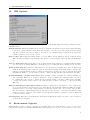
you might want to remove them again. Choose “IDE Options...”’ from the Defaults menu and press the “Clear
Registry” button, then quit the IDE. You can now remove Clean by moving the Clean folder to the Trash.
6
Quick Start
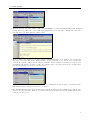
• Start the Clean IDE (CleanIDE.exe). You will see an empty project window. First we need to make
a new project or open an existing project. A Clean project consists of definition modules (.dcl files)
and implementation modules (.icl files). A definition module indicates which definitions defined in the
corresponding implementation module are exported. The topmost root module (the main module) is
always an implementation module.
3