1
6
QUICK START
The Clean IDE has a number of popular environments predefined. You have to choose which one you
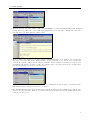
would like to use in this particular project. From the Environment menu choose Object IO. Now the
IDE knows which libraries to use in this project.
By the way, one can define new environments (“New Environment...”) or change existing ones (“Edit
Current...”). One can set the libraries to be used, by adding the paths of the folders in which the
corresponding Clean source modules can be found. In the environments one can also include “real”
libraries containing object code (Static Libraries and Dynamic Libraries). One can even define which
IDE components (Tools) to use (which Clean compiler, e.g. version 1.3 or version 2.0 , which linker, and
so on). In this way you can easily assign your own preferences to a project or switch between settings
just by choosing another environment setting. The environments will be remembered by the IDE, the
chosen environment will be remembered in the project administration file.
In addition to the environment you might also want to use more project specific libraries which you
might have created to structure your projects, but, which are too specific to put in an environment. For
example, the Life Game has a help facility. The corresponding Clean modules are put in a separate folder
to be shared by other examples.
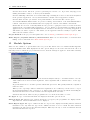
• Choose “Project Options...” from the “Project” menu, select the “Paths” panel and add the library
5