1
11
PATHS
System modules
System modules are special definition modules indicated by the keyword system instead of definition. This
indicates that the corresponding implementation modules are special system modules. These modules are
predefined and can only be made by system programmers.
9
Files
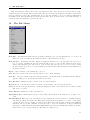
Files used by the Clean System have certain extensions that indicate their use. The following kinds of files are
recognized by the Clean System:
name.icl A Clean implementation module with the name ‘name’.
name.dcl A Clean definition module. It is assumed that a .icl file and its corresponding .dcl file are always
kept in one and the same folder.
name.abc An abc file generated by the Clean compiler.
name.o An object file generated by the Clean code generator.
name.s An assembly file generated by the Clean code generator.
The generated abc and object files are stored in the Clean System Files folder that will be generated in
the folder where the corresponding .icl (and .dcl) files are stored.
name.prj The project file.
name.exe An application generated by the linker. The generated application will be stored in the location
given in the Project Options dialogue reachable from the Project menu. By default it uses the same
name as the project with .exe extension and is stored in the same folder as the project file.
The .icl, .dcl, .abc, .s files are text files which can be edited with the Clean editor.
10
Windows
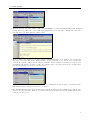
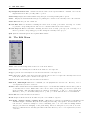
Several kinds of windows can appear on your screen.
.icl An editor window on an implementation module.
.dcl An editor window on a definition module.
Types A window that displays derived and checked type information as well as the derived and assumed
strictness information.
Errors & Warnings A window that displays warnings and error messages generated by the system.
Project A window that displays information on the current project.
Search Results A window displaying the results of the last search command.
Clipboard A window displaying the current contents of the clipboard.
Console A window showing the input and output of a Clean console application (see Environment Options,
p.9).
Any other text file can be opened in an editor window as well.
11
Paths
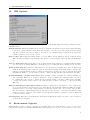
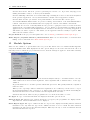
In a number of locations paths can be set for the IDE. These determine where the project manager looks
for Clean modules and intermediate files. For optimal performance these should reflect as accurately as
possible where modules can be found. In general the project manager first searches the paths given in the
Project Options dialogue in the order that they are listed. If the module is not found there then the
Environment paths of the current environment are searched.
8