1
FileMaker Go 14
®
Development Guide
© 2011-2015 FileMaker, Inc. All Rights Reserved.
FileMaker, Inc.
5201 Patrick Henry Drive
Santa Clara, California 95054
FileMaker and FileMaker Go are trademarks of FileMaker, Inc. registered in the U.S. and other countries. The file folder logo
and FileMaker WebDirect are trademarks of FileMaker, Inc. All other trademarks are the property of their respective owners.
FileMaker documentation is copyrighted. You are not authorized to make additional copies or distribute this documentation
without written permission from FileMaker. You may use this documentation solely with a valid licensed copy of FileMaker
software.
All persons, companies, email addresses, and URLs listed in the examples are purely fictitious and any resemblance to
existing persons, companies, email addresses, or URLs is purely coincidental. Credits are listed in the Acknowledgements
documents provided with this software. Mention of third-party products and URLs is for informational purposes only and
constitutes neither an endorsement nor a recommendation. FileMaker, Inc. assumes no responsibility with regard to the
performance of these products.
For more information, visit our website at http://www.filemaker.com.
Edition: 01
Contents
Chapter 1
Setting up solutions for FileMaker Go
Sharing FileMaker Pro files with FileMaker Go clients
Enabling FileMaker network sharing
Hosting files with FileMaker Server overview
Connecting to solutions
About file transfers
Transferring a file with container fields that store data externally
Importing to and from a transferred file
Chapter 2
Differences between FileMaker Go and FileMaker Pro
Features not supported in FileMaker Go
Behavior differences
Modes
Date and time lists
Custom menus (FileMaker Pro Advanced)
Printing
Saving records as a PDF file
Exporting
Container fields
Video and audio playback in container fields
Display state of objects
Snapshot link files
Scroll bars in portals
Encrypted files (FileMaker Pro Advanced)
Navigating slide controls
Popovers
Zoom level
Scripting and calculations
Scripts and functions behavior
Script steps not supported in FileMaker Go
5
5
5
6
6
7
7
7
9
9
9
9
9
9
10
10
10
10
10
11
11
11
11
11
11
11
11
11
15
4
Chapter 3
Designing solutions for FileMaker Go
Designing layouts
Tips for designing layouts and fields
Screen dimensions
Choosing fonts
Text styles
Keyboards for text, number, date, time, and timestamp fields
Considerations for data entry on an iOS device
Considerations for performance on an iOS device
Container fields
Layouts
Script triggers
External keyboards
Web viewers
Chapter 4
Protecting files in FileMaker Go
Opening files protected with passwords
Logging in after multitasking
Using the fmreauthenticate extended privilege
Suggestions for protecting remote and local files
If your files need less security
If your files need more security — one user per iOS device
If your files need more security — multiple users per iOS device
Security tips
SSL certificates
16
16
16
17
17
17
17
17
18
18
18
18
18
19
20
20
20
21
21
21
21
21
22
22
Chapter 1
Setting up solutions for FileMaker Go
FileMaker Go® lets you work with FileMaker Pro solutions on iPad, iPhone, or iPod touch. Build
solutions using FileMaker Pro. Then use FileMaker Go to work with the data on an iOS device.
For example, you can add, modify, delete, find, and sort records; display data in Form View, Table
View, and List View; view information in portals, tab panels, slide panels, and web viewers; scan
bar codes; and perform scripts and other tasks.
Use one of the following options to work with data in FileMaker Go:
1 Connect to a hosted file from an iOS device and work with data interactively. When you change
data on the iOS device, the data is updated on the host computer, and vice versa. You can
connect to files that are hosted by FileMaker Pro or FileMaker Server and are shared over a
Wi-Fi or mobile data network.
1 Transfer a file to an iOS device, then work offline with a local copy of the file on the device.
When you transfer a file to your iOS device, you are creating a copy of the remote file. When
you make data changes to the local file, the remote file is not updated. You must transfer the
file back to your computer, then use FileMaker Pro to import and update data. For information
about importing data, see “Importing to and from a transferred file” on page 7.
For information about connecting to hosted files or transferring files to or from a device, see
FileMaker Go Help. For information about opening files using a URL, see FileMaker Pro Help.
This guide provides information about tailoring solutions for FileMaker Go. To learn how to use
FileMaker Go, see FileMaker Go Help. If you are new to FileMaker Pro, see FileMaker Pro
documentation. To learn about, view, or download additional FileMaker documentation, visit
http://www.filemaker.com/documentation.
Sharing FileMaker Pro files with FileMaker Go clients
Enabling FileMaker network sharing
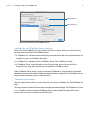
Before you connect to a file, make sure the file is enabled for FileMaker Network sharing.
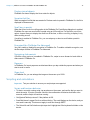
To enable peer-to-peer sharing in FileMaker Pro:
1. In FileMaker Pro, open the file.
2. Choose File menu > Sharing > Share with FileMaker Clients.
3. In the FileMaker Network Settings dialog box, set Network Sharing to On.
4. Select the file(s) to be hosted from the list of Currently open files.
5. For Network access to file, choose All users or Specify users by privilege set.
6. Click OK.
Chapter 1 | Setting up solutions for FileMaker Go
6
Network Sharing on
Allow network access
Settings to enable network sharing for FileMaker Go clients
Hosting files with FileMaker Server overview
Before you share FileMaker Pro files, prepare the files for hosting. Here is an overview of the
process used to host files with FileMaker Server.
1. In FileMaker Pro, edit the accounts and privilege sets that clients will use for shared access (for
example, Access via FileMaker Network).
2. In FileMaker Pro, upload the files to FileMaker Server. See FileMaker Pro Help.
3. In FileMaker Server, verify the status of your files using the Admin Console Activity >
Databases tab, and verify that the files are available to FileMaker clients.
When FileMaker Server starts, it opens and hosts all FileMaker Pro files located in the default
database folder and in the optional additional database folders, if specified. See FileMaker Server
Help for more information on server administration.
Connecting to solutions
After you share and host a file, you can connect to it as a client in FileMaker Go. See FileMaker Go
Help.
Devices connect to hosted solutions using the fmapp extended privilege. See FileMaker Pro Help.
Note FileMaker Go cannot access FileMaker Server hosts available through LDAP, and it
cannot view or use SSL certificates from LDAP hosts.
Chapter 1 | Setting up solutions for FileMaker Go
7
About file transfers
For information about transferring files to or from a device, see FileMaker Go Help.
Keep the following points in mind:
1 When you transfer a file to your iOS device, you are creating a copy of the remote file. When
you make data changes to the local file, the remote file is not updated. To set up a file to import
and update data from the local file to the hosted file using FileMaker Pro, see “Importing to and
from a transferred file,” below.
1 Routine backups are strongly recommended for any document stored on a computer or an iOS
device. See FileMaker Pro Help.
1 Before you replace an existing file on a device, make sure the file is closed or removed. Otherwise,
the file may not transfer properly and become damaged.
1 Before you transfer a file, make sure the device is not locked. Because of iOS security, you cannot
transfer files if the device is locked.
Transferring a file with container fields that store data externally
To transfer a file with container fields that store data externally, you must first embed the container
field data. To do this, in FileMaker Pro, use the Save a Copy As command and choose selfcontained copy (single file). Then transfer the copy, not the original file.
Importing to and from a transferred file
You can use the Import Records script step to merge data from a local FileMaker Pro file on a
device to another FileMaker Pro file. FileMaker Go must have network access to FileMaker Server
or FileMaker Pro.
Set up the field mapping and import order before you import. You can:
1
1
1
1
import from a remote source into a local file
import from a local source into a remote file
import from a remote source into a remote file
import from a local source into a local file
Example 1: Importing from a remote source (Source.fmp12) into a local database (Target.fmp12)
In this example, the Target.fmp12 file is on the iOS device. It needs a script that imports data from
a remote source (Source.fmp12). Since you can’t create scripts in FileMaker Go, you need to
create the script in FileMaker Pro, then transfer the file to FileMaker Go. You can then run the
script in FileMaker Go to update the local file (Target.fmp12) with data from the remote source
(Source.fmp12).
1. Open Source.fmp12 and Target.fmp12 in FileMaker Pro.
2. Create an “Import from Remote” script in Target.fmp12. For example:
Import Records [No dialog; “Source.fmp12”; Update existing; Mac Roman]
and set up a path to the source file using your machine IP address. For example:
fmnet:/192.168.10.10/Source.fmp12
3. Specify the import order.
Chapter 1 | Setting up solutions for FileMaker Go
8
4. Close Target.fmp12.
5. Transfer Target.fmp12 to FileMaker Go.
6. Open Target.fmp12 in FileMaker Go and run the script “Import from Remote.”
The local database is updated with data from the remote database.
Example 2: Importing from a local source (Source.fmp12) into a remote database (Target.fmp12)
1. Transfer Source.fmp12 to FileMaker Go.
2. Open Target.fmp12 in FileMaker Pro.
3. Create an “Import to Remote” script in Target.fmp12. For example:
Set Variable[$FilePath;Value:Get(DocumentsPath) & “Source.fmp12”]
Import Records[No dialog; “$FilePath”; Add; Mac Roman] where the path to
the source file on the device is file:$FilePath
4. In the Edit Script dialog box, select the Import Records script step and select Specify import order.
If the source fields do not appear in the Import Field Mapping dialog box, select Specify data
source. In the Specify File dialog box, for File Type, select FileMaker Pro files. Then add
another path to Source.fmp12 to the path list. For example:
file:$FilePath
file:Source.fmp12
5. Open Target.fmp12 remotely in FileMaker Go.
6. Run the script “Import to Remote.”
Using Target.fmp12 in FileMaker Go, you have added data from a file on the device
(Source.fmp12) to a file on the host computer (Target.fmp12).
Tip After you complete one import, the field mapping is retained if you selected Arrange by: last
order in the Import Field Mapping dialog box. There is no longer a need for the
file:Source.fmp12 reference.
Chapter 2
Differences between FileMaker Go and
FileMaker Pro
This chapter explains differences between FileMaker Go and FileMaker Pro, as well as
differences between FileMaker Go for iPhone and FileMaker Go for iPad.
Features not supported in FileMaker Go
FileMaker Go does not support the following FileMaker Pro features:
1 creating and modifying database schema such as tables, fields, relationships, data sources,
and privileges
1 creating and modifying database structure such as layouts, scripts, value lists, and custom
menus
1
1
1
1
1
1
importing data from any formats other than .fmp12
exporting to .fmp12, XML, or Excel .xls format
spell checking
external functions
plug-ins
hosting files
Behavior differences
Modes
Layout and Preview modes aren’t supported in FileMaker Go. However, you can preview records
by saving records as PDF and viewing the PDF within FileMaker Go.
Date and time lists
Differences in behavior between FileMaker Go and FileMaker Pro include:
1 Seconds or fractions of seconds aren’t available on the time/timestamp list in FileMaker Go. You
can type seconds into the field. Scripted or calculated times will display seconds on the device.
1 On iPad, the keyboard remains active while the date list is active.
Custom menus (FileMaker Pro Advanced)
FileMaker Go doesn’t support:
1 removal of the Close File menu item.
1 additional menu items that do not map to existing FileMaker Go menu items.
1 override of the Quick Find menu item by custom menus, though you can override the quick find
behavior.
Chapter 2 | Differences between FileMaker Go and FileMaker Pro
10
1 override of Save Record and Exit Record by custom menus.
1 display of an ampersand (&) in custom menu titles.
Note FileMaker Go displays menu items that are removed, but they are disabled.
Printing
1 The print options that you set for a file in FileMaker Pro have no effect on the print options for
the same file in FileMaker Go, and vice versa.
1 If you don’t specify page margins for a layout in FileMaker Pro, FileMaker Go uses the printer’s
default margin, which might vary with different printers or different print drivers. You should
specify page margins if you’re printing a layout where exact spacing is important, like labels or
a preprinted form.
Saving records as a PDF file
When you save records as a PDF file, FileMaker Go uses the name of the window for the PDF filename.
Exporting
By default, all manual export operations except .xlsx use UTF-8; .xlsx uses UTF-16.
You must use the Export Records script step to:
1 select fields that are not on the current layout.
1 configure the output file character set.
Container fields
1 The Inspector Data Formatting options Images or Interactive content do not apply to
container fields in FileMaker Go.
1 FileMaker Go doesn’t support setting up container fields to store data externally.
You can use the Insert From Device script step to enter content into a container field from a music
library, photo library, camera, video camera, microphone, or signature; or to enter content into a
container field or text field from a bar code source. See FileMaker Pro Help.
Video and audio playback in container fields
You can use FileMaker Pro to create scripts that control playback options in FileMaker Go, including
playing the media in full screen or as embedded; playing, pausing, or stopping the media; disabling user
interaction; showing or hiding playback controls; or choosing the position to start the playback from.
You can use the following script steps, functions, and script triggers to work with media in
FileMaker Go:
1 Script steps: AVPlayer Play, AVPlayer Set Options, AVPlayer Set Playback State
1 Script triggers: OnObjectAVPlayerChange, OnFileAVPlayerChange,
OnExternalCommandReceived
1 Functions: GetAVPlayerAttribute, Get(TriggerExternalEvent)
See FileMaker Pro Help.
Chapter 2 | Differences between FileMaker Go and FileMaker Pro
11
Display state of objects
FileMaker Go doesn’t display the Hover state for objects.
Snapshot link files
When a snapshot link file that was created in Preview mode is opened in FileMaker Go, the file is
displayed in Browse mode.
Scroll bars in portals
When the Allow vertical scrolling option in the FileMaker Pro Portal Setup dialog box is enabled,
FileMaker Go users can scroll within a portal using an iOS scroll bar. For the Show scroll bar
option, choose Always to display the scroll bar all the time, or When scrolling to display it only
while scrolling occurs.
If scrolling is enabled in FileMaker Pro, you can swipe up or down to scroll inside a portal in
FileMaker Go.
Encrypted files (FileMaker Pro Advanced)
You can’t enable or disable file encryption in FileMaker Go. To enable or disable encryption, use
the Developer Utilities in FileMaker Pro Advanced.
Navigating slide controls
If Enable swipe gestures is enabled in FileMaker Pro, swipe to move forward or back within a
slide control in FileMaker Go.
Popovers
In FileMaker Go, layout popovers are dismissed when you tap outside the popover and when you
start to scroll or zoom.
Zoom level
In FileMaker Go, you can enlarge the image on the screen up to 200%.
Scripting and calculations
Important Test your solution to ensure your script steps are supported.
Scripts and functions behavior
1 To abort a currently running script, tap anywhere on the screen, and confirm that you want to
abort the script. If you do not make a choice, the confirmation will dismiss itself after a few
seconds, and the script will continue running.
1 Get(SystemPlatform) returns 3 if the platform is iOS.
1 Send Mail doesn’t support Perform without dialog. The email displays on the device, and you
can send it manually. This does not apply to mail sent through SMTP.
1 The Select All and Set Selection script steps don’t highlight text if the keyboard is hidden on the
device.
Chapter 2 | Differences between FileMaker Go and FileMaker Pro
12
1 The Open URL script step using a Google Maps URL will open a browser, and then choosing
Open in Safari will open the Maps app.
1 If a window is hidden using the Adjust Window script step, FileMaker Go does not hide the
window, but it changes the order of the open windows that are displayed.
1 When you switch to another app, FileMaker Go enters a suspended state unless there is an
audio or video file playing. When you return to FileMaker Go, the app and scripts resume from
where they left off. For hosted files, if any of the records in the data set that a script is acting on
were modified while FileMaker Go was suspended, the script aborts. If none of the records
were modified, the script continues.
1 If you switch away from FileMaker Go for an extended period, and iOS forces the app to quit,
FileMaker Go attempts to generate a hibernation file. When you restart FileMaker Go, it uses
the hibernation file to reopen files. A hibernation file is not generated when a script with Allow
User Abort set to Off was running when you switched away from FileMaker Go.
1 The GetLayoutObjectAttribute function returns only PNG and JPEG images for the content
attribute for charts.
1 The New Window script step doesn’t support the Specify Advanced Style options.
1 Although you set up the Location and LocationValues functions in FileMaker Pro, they are
designed for use on devices.
1 The Insert File script step doesn’t support the dialog box options Storage options or Display.
1 The Exit Application script step closes all files but does not quit FileMaker Go.
1 Get(ApplicationArchitecture) returns arm7, arm7s, or arm64.
Get(ApplicationVersion) function
Get(ApplicationVersion) returns Go x.x.x for iPhone and iPod touch. Get(ApplicationVersion)
returns Go_iPad x.x.x for iPad. In FileMaker Server, Go x.x.x or Go_iPad x.x.x appears in Admin
Console.
Replace Field Contents script step
A script using Replace Field Contents can’t prompt users in FileMaker Go to specify the field and
data to be replaced. A Replace Field Contents script step with Perform without dialog
deselected will not be performed.
Save a Copy As script step
The options compacted copy, clone, and self-contained copy (single file) are supported when
you perform a Save a Copy As script in FileMaker Go, but not when you manually tap
Save/Send > Database in FileMaker Go. For the script step, the self-contained copy (single
file) option is equivalent to the compacted copy option.
Chapter 2 | Differences between FileMaker Go and FileMaker Pro
13
Save Records as PDF script step
If you don’t specify the output file path for the Save Records as PDF script step, FileMaker Go
uses the name of the window to save the PDF file.
Some Save Records as PDF script step options aren’t supported:
1
1
1
1
1
appending records to an existing PDF
selecting the Acrobat version
selecting Printing and Editing options on the Security tab
deselecting the option that allows screen reading software
options on the Initial View tab
Save Records as Snapshot Link script step
The snapshot link includes the current found set of record IDs, including the layout, view, sort
order, mode, and toolbar visibility.
If you don’t specify the output file path for the Save Records as Snapshot Link script step,
FileMaker Go uses the name of the file to save the snapshot link file.
You can open a snapshot link file on multiple devices if:
1 the FileMaker Pro file is stored on each device.
1 the snapshot link file was created in FileMaker Go.
1 the original FileMaker Pro file and the local copy of the file have matching filenames and are at
the same relative location.
Print Setup script step
Performing a Print Setup script step in FileMaker Go sets the paper size, orientation, and scale
options for printing in FileMaker Go without displaying the Print Setup dialog.
The Perform without dialog option has no effect on the Print Setup script step in FileMaker Go.
Print script step
If the Perform without dialog option is not selected, when you perform a Print script step,
FileMaker Go displays the Print Setup dialog. You can choose the settings in the dialog, then tap
Print to print the file.
Although the Maximum Image DPI option is not available in the Print script step, you can choose
a resolution in the Print Setup dialog at the time you print.
The Print script step settings for the number of copies and double-sided printing have no effect on
the print settings in FileMaker Go.
Export Field Contents script step
FileMaker Go exports text as UTF-8, but FileMaker Pro exports text as UTF-16.
Open Remote script step
When you open a remote file via the Open Remote script step, recent hosts will be listed along
with the other hosts in alphabetical sort order.
Chapter 2 | Differences between FileMaker Go and FileMaker Pro
14
Notes
1 By default, the files created by script steps appear in the Device list and are saved in the
Documents folder. To save the files in a temporary folder, use the Set Variable script step to
create a variable to specify the output file path and filename for the script step.
You can use the following example to create an email with the file as an attachment.
Set Variable [$Output; Value: Get( TemporaryPath ) & “sample.pdf”]
Save Records as PDF [No dialog; “$Output”; Records being browsed]
Send Mail [Send via E-mail Client; To: “[email protected]”; Subject:
“Invoice” ; Message: “Test”; “$Output”]
1 By default, when you run script steps, FileMaker Go creates a new output file. If you continue
running the script, a number is added to the end of each filename. For example, the first time
you run the Save Records as PDF script step for a sample file, the output filename is
sample.pdf. The second time you run the script, the filename will be sample 1.pdf.
To replace the output file with the new one instead of keeping multiple copies, add the file path
(file:fileName or filemac:fileName) to the script. For example, if you type file:sample.pdf
or filemac:sample.pdf in the Specify Output File dialog box each time you run the script,
the sample.pdf file in the Documents folder will be replaced with the new one.
The following example saves records as a PDF file named sample.pdf and will either create a
new file or overwrite the existing file.
Save Records as PDF [No dialog; “sample.pdf”; Records being browsed]
Show/Hide Menubar script step
In FileMaker Go, this script step shows or hides the menu bar or locks the menu bar to prevent
the state of the menu bar from being changed.
Show/Hide Toolbars script step
The Include Edit Toolbar option turns the FileMaker Go editing toolbar on or off.
OnGestureTap script trigger
In FileMaker Go, this script trigger is activated when you tap with one, two, or three fingers, or
double-tap with one finger.
If you double-tap with one finger, the trigger will be activated twice: at the first tap and again at the
second tap.
Get(WindowContentHeight) function
In FileMaker Go, the content area includes the layout but doesn’t include the status bar, menu bar,
or toolbar.
Chapter 2 | Differences between FileMaker Go and FileMaker Pro
15
Script steps not supported in FileMaker Go
FileMaker Go does not support some script steps. Unsupported script steps return error code 3:
Command is unavailable. Use Get(LastError) to check for this error code.
FileMaker Go does not display an alert for these script steps.
Use the Script Workspace window in FileMaker Pro to see a list of script steps that are not
supported in FileMaker Go.
Important Running unsupported script steps may lead to unintended behavior or data corruption.
Chapter 3
Designing solutions for FileMaker Go
This chapter explains what to consider when designing a solution that will be used on an iOS
device.
Designing layouts
When you design a layout, keep in mind that on an iOS device, you can’t:
1 remove views or layouts
1 add or remove fields
1 switch to layouts that aren’t displayed in the Layouts menu, unless you provide a navigation
button
1 define and assign value lists, unless they are used for drop-down lists and pop-up menus that
Allow editing of value list.
1 display tooltips
1 display leader characters such as “...” in tab control names
1 display shadows on layout objects
For general design considerations for devices, see the Apple developer website.
Tips for designing layouts and fields
1 In the New Layout/Report assistant, choose one of the Touch Device layouts.
1 Leave enough inactive space on the form so that users can tap outside a field to commit their
data.
1 Reduce the size of images as much as possible.
1 Use the PNG file format for images.
1 Use the screen stencils to help you work within the viewing area of a device.
1 If a wide variety of devices will access the layout, consider creating a layout for each device.
You can direct users to the appropriate layouts with the OnLayoutEnter script trigger, the
Get(SystemPlatform) function, and the Go to Layout script step.
1 Some FileMaker Pro themes use the Tahoma font. This font is not supported in iOS and will be
converted to Helvetica in FileMaker Go.
1 Choose one of the Touch themes, which are designed for touch-compatible input devices, in
the Change Theme dialog box. The Touch themes use the Arial and Verdana fonts.
1 In the Starter Solutions, adapt layouts that are designed for devices.
1 FileMaker Go supports accessibility using VoiceOver. For information about creating
accessible solutions, see FileMaker Pro Help.
1 If you apply FileMaker Pro themes to files that you plan to use on a device, check the
appearance of field label spacing, field heights, portals, and tabs on the device.
Chapter 3 | Designing solutions for FileMaker Go
17
1 Use the Set Allowed Orientations script step to control the orientation of the layouts in
FileMaker Go. See FileMaker Pro Help.
1 Use the Enable Touch Keyboard script step to enable or disable the touch keyboard. See
FileMaker Pro Help.
1 To create iOS-style grouped fields, in the Appearance tab of the Inspector, specify a Corner
radius value for each corner to make it round or square.
1 To have complete control over the user interface, hide the menu bar and toolbar using the
Show/Hide Menubar and Show/Hide Toolbars script steps. See FileMaker Pro Help.
Screen dimensions
To optimize your design for both portrait and landscape orientations, limit the width of the layout
to the screen width for the portrait orientation. This way, users don’t have to scroll right or left to
see the data.
Try to keep the information that needs to be most visible within the screen dimensions that are
shared by both orientations.
Use auto-resizing settings in FileMaker Pro to optimize the layout for portrait and landscape
rotations.
Choosing fonts
When choosing fonts, consider which platform you are designing for. Some fonts behave
differently by platform.
Not all fonts are supported on the desktop or on devices, and the fonts that are supported in iOS
are likely to change over time. Be sure to test your solutions on all platforms you plan to use.
Text styles
You can view the following text styles in FileMaker Go: bold, italic, underline, word underline,
double underline, title case, uppercase, lowercase, and strikeout.
FileMaker Go doesn’t support highlight, condense, extended, small caps, superscript, or
subscript.
When editing text, you can change to any font that is available in iOS, select a supported text style,
and change the text color to one that is available for the selected layout.
Keyboards for text, number, date, time, and timestamp fields
In the Data tab of the Inspector, you can set up text, number, date, time, and timestamp fields to
use a specific type of keyboard to help you quickly enter values in FileMaker Go. See
FileMaker Pro Help.
Considerations for data entry on an iOS device
1 Only fields are supported in the tab order. You can set up Tab and Return, but not Enter, to go
to the next field.
1 Consider using the Enable Touch Keyboard script step to enable or disable the touch keyboard
when users tap a field. Use Get(TouchKeyboardState) to check the current setting of the touch
keyboard. See FileMaker Pro Help.
Chapter 3 | Designing solutions for FileMaker Go
18
1 You can’t insert values into a field from an index on the device, and you can’t select
Auto-complete using existing values.
1 Paragraph alignment, line spacing, and indentation might not display correctly in container
fields. To prevent these appearance issues, use center alignment in container fields.
1 The Auto-Correction setting will not work in text fields that have script triggers set up to
capture keystrokes.
1 You can edit about 64K of text at a time.
1 Asian languages: sideways text isn’t supported. Input method editors (IMEs) will not work in text
fields that have script triggers set up to capture keystrokes.
Considerations for performance on an iOS device
Container fields
For container fields with images in remote files, the host scales the images before sending them
to the device. For container fields with images in local files, use smaller images to improve
performance.
Layouts
Make several layouts with a minimum number of objects instead of one layout with many objects.
For information about designing layouts, see “Tips for designing layouts and fields” on page 16.
Script triggers
To improve performance, use uncomplicated scripts in script triggers.
External keyboards
Some keystrokes behave differently on external keyboards.
Functionality
Behavior in FileMaker Go
Tab key
Supported for field types that display the onscreen keyboard.
Shift-Tab isn’t supported.
Undo, Redo, Cut, Copy, Paste, Select All keys
Supported
Keystrokes to move between records (for example,
Control-Down Arrow)
Not supported
Modifier keys (for example, Option or Alt)
Not supported
Eject key
Hides or shows the onscreen keyboard
Arrow keys
Not supported for value lists, date/time/timestamp pickers
Chapter 3 | Designing solutions for FileMaker Go
19
Web viewers
You can have multiple active web viewers if your device has sufficient memory.
Device memory
Maximum number of active web viewers
256 MB
1
512 MB
3
1 GB or more
4
Chapter 4
Protecting files in FileMaker Go
This chapter provides information about protecting your files and keeping the information secure.
Opening files protected with passwords
When users try to open a protected file in FileMaker Go, a dialog prompts them to specify an
account and password. FileMaker Go checks the following settings in the specified order to
determine how to open a protected file. If none of these settings are used, the user needs to enter
the login information to open the file.
1. File Options dialog box to log in automatically
In FileMaker Pro, you can use the File Options dialog box to automatically log in using a specific
account and password when you open the file.
2. User manual override
In FileMaker Go, users can temporarily bypass the default login information when they open a
file by touching and holding a filename in the files list. Releasing the filename displays a dialog
where users can enter a different account and password.
3. Password saved in Keychain Access
In FileMaker Pro, you can use the File Options dialog box to allow saving the password in
Keychain Access. Then, in FileMaker Go, users can turn on Save in Keychain if they don’t
want to enter the password each time they open the file. See FileMaker Go Help.
Important You should not enable Keychain Access to save the password for solutions that
have sensitive data.
Logging in after multitasking
When you press the Home button on your device, FileMaker Go moves to the background and
saves the state of the file. FileMaker Go also saves the state of the file when you answer a phone
call. When you switch back to FileMaker Go, you return to where you left off.
Files can be configured to require reauthentication after being in the background for a specified
period of time. See “Using the fmreauthenticate extended privilege” on page 21.
After FileMaker Go moves to the background, you must reenter your account and password to
return to the file, unless:
1 you are using the Guest account.
1 your account name and password match the account name and password set in the File
Options dialog box in FileMaker Pro.
1 you have returned to the file before the time limit specified in the fmreauthenticate extended
privilege.
Chapter 4 | Protecting files in FileMaker Go
21
1 you are using an account that does not have the fmreauthenticate extended privilege.
1 you saved the password in Keychain Access.
Note These conditions also apply to files converted from an earlier version of FileMaker Pro.
Using the fmreauthenticate extended privilege
Use the fmreauthenticate extended privilege to control when users will be required to
reauthenticate after not using FileMaker Go for a specified period of time.
With this privilege, when FileMaker Go switches to the foreground, users must reenter the account
name and password if the specified time limit has elapsed. Users can attempt to enter their
account name and password five times before FileMaker Go closes the files.
New privilege sets created in FileMaker Pro include the keyword fmreauthenticate10 by default.
The fmreauthenticate extended privilege activates anytime a user leaves the context of the app,
including iOS alerts and sleep.
If a file is converted from an earlier version of FileMaker Pro, FileMaker Pro adds
fmreauthenticate0 and fmreauthenticate10 to the keyword list for the converted file and
uses the fmreauthenticate0 extended privilege for all existing accounts.
Suggestions for protecting remote and local files
If your files need less security
1 Set a long server idle time for files served by FileMaker Server.
1 Increase the number of minutes before requiring re-login using the fmreauthenticate extended
privilege.
1 Don’t use the fmreauthenticate extended privilege.
If your files need more security — one user per iOS device
Remote files
Try to balance security needs and user convenience when specifying the amount of time:
1 before the passcode is required
1 for server idle time
1 before requiring re-login using the fmreauthenticate extended privilege
Local files
1 Take additional precautions to prevent someone from accessing files on lost or stolen devices.
1 Use the fmreauthenticate extended privilege to minimize unauthorized access.
If your files need more security — multiple users per iOS device
1 Set the passcode to be required immediately.
1 Set the fmreauthenticate extended privilege to fmreauthenticate0.
1 Users should be required to enter the passcode, then log in to files using their own accounts.
Chapter 4 | Protecting files in FileMaker Go
Security tips
To limit unauthorized access:
1 Important: Set a passcode so that iOS data protection is enabled on your device.
1 Use the free Find My iPad or Find My iPhone app. Enable the Remote Passcode Lock and
Remote Wipe features for your device.
1 Use the Get(PersistentID) function to help identify devices that access your solutions.
Notes
1 FileMaker Go doesn’t work with IPv6 file references or addresses.
1 If a host asks a client to close and there is no response after 30 seconds, FileMaker Go will
attempt to close files and the alert message will close.
1 File recovery isn’t supported on devices.
SSL certificates
For information about supported certificates, see the FileMaker Knowledge Base at
http://help.filemaker.com.
22