1
DMCNET Gateway Module User Guide
Chapter 2 Using EzDMC
2.2 Connecting to Gateway Module
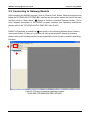
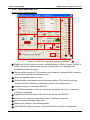
After launching the EzDMC program, click on "Search Card" button. When the program has
found the PCI-DMC-A01/PCI-DMC-B01 interface on the system, select the icon for the card,
and then click on "Scan Slave" (①) button to find the connected Gateway module. (For a
more detailed description of the EzDMC program interface and operating instructions,
please refer to the "PCI-DMC-A01/PCI-DMC-B01 User Guide").
EzDMC will generate a module list (➁) as shown in the following diagram when it finds a
connected module. Clicking on a module will call up that module's operating interface;
please refer to the following section for an explanation of how to use a module's operating
interface.
①
➁
Figure 2.2 Finding a connected gateway module
(ASD-DMC-GE16MN/ASD-DMC-GE16NT)
2-2
July 2014