1
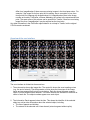
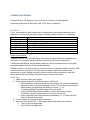
The roots and tips connected to the selected cell If the selected cell is a tip, it may be categorized as a Death or Disappearance (loss of a cell from the imaging without death, e.g. by migration out of view) The object identifier consists of the frame number, follwed by a hyphen, followed by the object number in that frame. Object numbers are assigned by the CellProfiler IdentifyPrimaryObjects module. Note that, because these are assigned for each image before object tracking, object numbers can change from one frame to the next as objects move, appear and disappear. 3. The Navigation Panel on the bottom provides buttons for moving through the list of reviewed events. Loading and Saving data Importing data from CellProfiler The “File / Import CSV…” menu option brings up the following dialog box: The required information is: CSV file for Image information The image data file created in CellProfiler using ExportToSpreadsheet. Select a file using the “Browse” button. CSV for Object information The object data file created in CellProfiler using ExportToSpreadsheet. Select a file using the “Browse” button. Field name for Parent Image Number The exact name of the column holding the image number for an objects „parent,‟ corresponding to ParentImageNumber above. Traxtile will attempt to find a column whose