1
ROBOT . HEAD to TOE
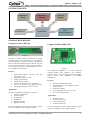
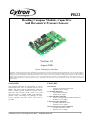
PR22 – Reading Compass Module, Capacitive & Barometric Pressure Sensors
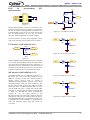
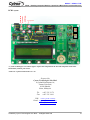
PCB circuit board
SOFTWARE
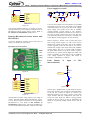
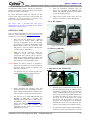
Flow Chart:
6
8
7
Display Startup Message Start 5
YES
9
YES
SW1 pressed?
SW2 pressed? Mode ‐1 Mode +1
10
NO
NO
11
1
2
3
LCD
NO
4
YES
SW3 pressed?
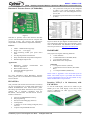
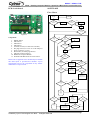
Figure 21
Component:
1.
2.
3.
4.
5.
6.
7.
8.
9.
10.
11.
RESET button.
SW1 button.
SW2 button.
SW3 button.
S1 Slides switch (Circuit Power ON/OFF).
DC plug socket (To 7-12V AC to DC adaptor).
Power connector (7-12V).
Box header (To ICSP programmer).
AD7746 Capacitive Sensor.
HMC6352 Compass Module.
SCP1000-D01 Barometric Pressure Sensor.
Mode = 1?
YES
SW1 pressed? YES
Sub Mode ‐1 NO
NO
SW2 pressed? YES
Sub Mode +1 NO
LCD NO
SW3 pressed? YES
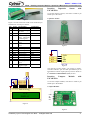
Please refer to Appendix A for the PCB layout of PR22.
The PCB layout is provided free therefore Cytron
Technologies will not be responsible for any further
modification or improvement.
NO
Sub Mode = 1?
YES
YES
Read Compass Module & Display on LCD SW3 pressed?
NO
NO
YES
Sub Mode = 2?
Calibration Mode & Display on LCD SW3 pressed?
YES
NO
Exit Calibration & Display on LCD Sub Mode = 3?
YES
SW3 pressed? NO
YES
Reset Offset & Display on LCD
Sub Mode = 4
NO
Mode = 2?
YES
Calibration & Display on LCD NO
Mode = 3 Created by Cytron Technologies Sdn. Bhd. – All Rights Reserved
Read Capacitive Sensor & Display on LCD
SW3 pressed?
YES
NO
Read Barometric Pressure Sensor & Display on LCD YES
SW3 pressed?
7