1
Release Notes R&S TSMU, TSMQ, TSML-x, TSMU-H
V12.72
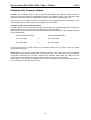
How to Reorder TSMx Firmware Options
1.
2.
3.
Search in the internet under: http://www.rohde-schwarz.com for a specific TSMx model
and check under “Options” the available options for a certain TSMx model.
Download the device specific Device ID File from the instrument using the
OptionKeyInstaller utility and submit this file with the TSMx option order (see Read Out
the Device ID File).
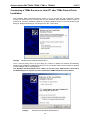
In return you will get a TSMx Option File CD-ROM with the necessary option keys. This
option key file(s) needs to be installed on that instrument by using the
TSMxOpitonKeyInstaller utility (Installing TSMx Firmware Options).
21