1
How does the B-phone work?
The B-phone operates within the GSM network.
The B-phone contains inbuilt motion and sound sensors;
that allows it to report events via phone call or SMS
messaging.
The B-phone contains inbuilt speaker and microphone;
allowing you to listen to the surroundings and talk to
your child.
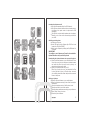
Switching on the B-phone:
Charge your B-phone.
Insert SIM card into the B-phone (the SIM Card must
contain the PIN Code “8888”).
Switch on the B-phone by holding the On/Off button for
5 seconds.
IMPORTANT!
To configure your B-phone you’ll need to download the
B-phone Browser onto your mobile phone!
Downloading the B-phone Browser onto your mobile phone:
a) Open the internet browser on your mobile phone. Enter
www.b-phone.eu/mob into the phones internet browser
and select the files b-phone.jad and b-phone.jar to
download and then execute them.
b) Open your internet browser on your PC.
Enter http://www.b-phone.eu/ and download the files
b-phone.jad and b-phone.jar. Transfer them across to
your mobile phone with a data cable, and then execute
them on the phone.
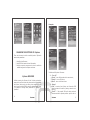
Setting up B-phone:
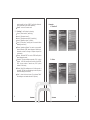
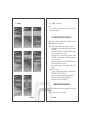
Open the B-phone Browser on your mobile phone.
Enter the telephone number(s) that will be receiving the
notifications.
Enter the telephone number of the B-phone device.
Select the sensitivity level of the sensors.
Select the other parameters according to your preferences.
Select “Send” when you’re done.
Close the B-phone Browser.
I
II