1
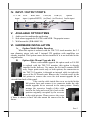
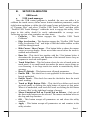
IV. INPUT / OUTPUT PORTS
12 V DC VGA
RJ45 Jack
USB (B) USB (A)
option
input
input (option RS232) (to Host) (to Devices) Audio input
V. AVAILABLE OPTION ITEMS
1. Audio port for multimedia application
2. Side mount upgrade kit FA-200 with MSR / Fingerprint sensor
3. Wall mount kit (WB-6000V-B)
VI. HARDWARE INSTALLATION
A.
Option Multi-Media Function
When this option is ordered with the TM-7115 touch monitor, the 3.5
mm diameter stereo jack and 2 internal 2W speakers with amplifiers are
already installed. This option cannot be late installed if it is not included in the
original order.
B.
Option Side Mount Upgrade Kit
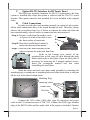
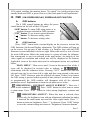
When a side-mount upgrade kit option such as FA-200
is ordered with the TM-7115 monitor, this option is already
installed in the delivery. No matter the kit itself contains MSR
only, finger print sensor only or both options, the connection to
the TM-7115 monitor is through an internal cable in right side
cover of the LCD/touch unit. Remove the 2 circled screws in the
left picture to remove the cover for side mount upgrade kit as
viewed from back of the panel.
Take out the cable inside this cover as circled in the
left picture here and connect it to connector inside the side
mount upgrade kit as arrowed in the same picture. Gently
arrange the excessive length of this cable
back in the hole and screw-fit it back to the
position originally occupied by the cover as
in the right picture. Please reserve the cover
if there is chance to have the side mount kit removed in the
future.
Part 3