1
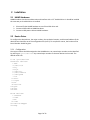
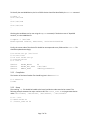
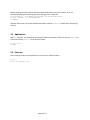
Hardware-Assisted Intrusion Monitoring System (HAIMSTM) User’s Manual (Linux) Soteria Systems, LLC January 27, 2014 1 INTRODUCTION ............................................................................................................................................. 3 1.1 1.2 2 KEY FEATURES ..................................................................................................................................................3 SPECIFICATION ..................................................................................................................................................5 INSTALLATION ............................................................................................................................................... 6 2.1 HAIMS HARDWARE ..........................................................................................................................................6 2.2 DEVICE DRIVER .................................................................................................................................................6 2.2.1 Configuration ...........................................................................................................................................6 2.2.2 Compilation ..............................................................................................................................................7 2.2.3 Setup ........................................................................................................................................................7 2.3 APPLICATIONS ..................................................................................................................................................8 2.4 CLEAN-UP ........................................................................................................................................................8 3 LOG INTEGRITY CHECKING ............................................................................................................................. 9 3.1 3.2 4 FILE INTEGRITY CHECKING ........................................................................................................................... 11 4.1 4.2 5 SETUP .............................................................................................................................................................9 LOG INTEGRITY CHECKER ..................................................................................................................................10 SETUP ...........................................................................................................................................................11 FILE INTEGRITY CHECKER...................................................................................................................................11 FILE ACCESS MONITORING .......................................................................................................................... 12 Page 2 of 12 1 Introduction 1.1 Key Features Hardware-Assisted Intrusion Monitoring System (HAIMS) is a hardware-assisted security solution using asymmetric hardware platform with a software package. Figure 1 illustrates the key features of HAIMS. It employs an asymmetric coprocessor hardware platform as a firm foundation for software applications. The asymmetric interface firmware running on the hardware platform implements an append-only storage that allows only read and append operations while prohibiting overwrite and erase operations. The append-only storage protects reference data from unauthorized modification. Log Integrity Checking File Integrity Checking File Access Monitoring Asymmetric Interface Firmware Asymmetric Coprocessor Hardware Platform Figure 1 Key features of HAIMS HAIMS provides the following three applications based on the append-only storage. Log Protection: It protects log files, which are imperative when an attack is detected or suspected. It serves as a blackbox recording activities of a server. File Integrity Checking: It checks if any important system files have been modified or not. Since the integrity data is stored in the HAIMS hardware, the data cannot be tempered nor erased. File Access Monitoring: It records the history of accesses to sensitive files. The history is stored in the HAIMS hardware so that they cannot be tempered. Page 3 of 12 S A S H Fo Since HAIMS is a hardware-based solution, it cannot be compromised. Any stored data in HAIMS cannot be tampered under any circumstances. It can also store and protect application code. Since HAIMS is a separate hardware, it does not incur performance degradation of the host server. HAIMS does not require modification to existing server applications. Page 4 of 12 1.2 Specification Table 1 HAIMS specification Dimension Interface Capacity Supported OS I/O Throughput 146 mm 101.6 mm 19 mm Standard 3.5” hard disk drive size SATA 2.0 64 GB / 128 GB Windows / Linux 805.68kbps (8 GB/day) Page 5 of 12 2 Installation 2.1 HAIMS Hardware HAIMS hardware has the same dimension and interface with a 3.5” hard disk drive. It should be installed the same way as a hard disk drive is installed. 1. 2. 3. Place and fix the HAIMS hardware to one of hard disk drive rack. Connect a SATA cable to HAIMS hardware. Connect a HDD power cable to HAIMS hardware. 2.2 Device Driver To configure the device driver, the major number, the raw device location, and the email address of the administrator should be set in the configuration file (conf.h). To compile the source, the location of the kernel headers should be given. 2.2.1 Configuration One major number should be assigned to the HAIMS device. An unused major number can be identified by referring to /proc/devices. Any unused major number of character devices can be used. The default value is 60 # cat /proc/devices Character devices: 1 mem 4 /dev/vc/0 4 tty 4 ttyS 5 /dev/tty 5 /dev/console 5 /dev/ptmx 7 vcs 10 misc 13 input 29 fb 36 netlink 128 ptm 136 pts 180 usb Block devices: 1 ramdisk 3 ide0 9 md 22 ide1 253 device-mapper 254 mdp Page 6 of 12 To identify the raw HAIMS device, the list of SATA devices should be identified by the fdisk command. # fdisk –l Disk /dev/sda … Disk /dev/sdb … Disk /dev/sdc … Checking the candidates one by one using the hdparm command, if the device name is “OpenSSD Jasmine”, it is the HAIMS device. # hdparm –i /dev/sdb Model=OpenSSD Jasmine, FwRev=0001, SerialNo=0123456789 … Finally, the source code of the device file should be uncompressed to any folder and the conf.h file should be updated accordingly. # # # # # mv haims.tar.gz /usr/local cd /usr/local tar xvfz haims.tar.gz cd haims/driver vi conf.h #define #define #define HAIMS_MAJOR HAIMS_DEV_PATH EMAIL_ADDR 60 “/dev/sdb” “admin@yourdomain” 2.2.2 Compilation The location of the kernel header files should be given in the Makefile. # vi makefile # make 2.2.3 Setup The resulting .ko file should be loaded to the kernel and device nodes need to be created. The following example assumes the major number as 60. The create_node.sh script generates device nodes /dev/haims0, /dev/haims1, /dev/haims2, … /dev/haims15. # cd ../bin # insmod haims.ko # ./create_node.sh 60 Page 7 of 12 Module loading and node creation should be repeated whenever the system reboots. It can be automated by doing the following steps once during the first installation# cp haims.ko /lib/modules/$(uname -r)/kernel/drivers/ # echo 'haims' >> /etc/modules # depmod After the above steps, the system would automatically load the haims.ko module every time during boot-up. 2.3 Applications With g++ compiler, the applications are compiled. Before compilation, make sure that the conf.h file is identical with the conf.h file in the driver folder. # cd ../src # make 2.4 Clean-up After installing the driver and applications, remove source codes for safety. # cd .. # rm –rf driver src Page 8 of 12 3 Log Integrity Checking When the administrator detects or suspects an attack, he/she usually investigates it by examining the logs. If the logs are contaminated or removed, it is extremely difficult for the administrator to deal with the attacks. Even worse, the administrator may not even be aware of the attack(s) if the logs are fabricated. If the attacker manages to obtain root privileges, they can make changes to every file, including the logs. We assume the strongest adversary, i.e., one that can obtain root privileges and make changes to anything they want, including the OS, device drivers, file systems, and applications. Our goal is to prevent the attacker from modifying or removing the logs, even if they obtain root privileges. The ultimate goal of the HAIMS log integrity checking is to prevent an attacker from modifying existing logs. Of course, if the intruder obtains root privileges, they can stop logging, or they can start generating forged logs after the intrusion. However, they cannot make changes to existing logs that have been generated before the intrusion. If the attacker obtains root privileges by using some sort of hacking tool, the history of using the tool will be recorded in the logs and the logs would not be modifiable. Additionally, the location where the attack originated from will also be traced in the log file. Therefore, the logs would still hold valuable information for the administrator to investigate, even if the attacker obtains all-encompassing root privileges. 3.1 Setup To check the integrity of a log file, a copy of the log file should be stored in the HAIMS device by using the tail command. For example, if we want to check the integrity of the kernel log, # tail –F /var/logs/kern.log > /dev/haims1 & This command makes a copy of kern.log to the HAIMS device. It keeps making a copy whenever new log is appended. Also, this example shows that the kernel log file is stored in the HAIMS device whose minor number is one. To protect multiple log files, they can be distinguished by the minor number. For example, # tail –F /var/logs/mail.error > /dev/haims2 & # tail –F /var/logs/sql.log > /dev/haims3 & # tail –F /var/logs/httpd.log > /dev/haims4 & Please note that minor number zero is reserved for the HAIMS system log. To make it easier to set up hooking log files, a script lic_setup.pl is provided. To use this script, the perl interpreter should have been installed and the first line of the lic_setup.pl should be updated accordingly. # vi ../etc/lic.conf 1 2 3 4 /var/log/kern.log /var/log/mail.err /var/log/sql.log /var/log/httpd.log # vi ../bin/lic_setup.pl Page 9 of 12 #!/usr/bin/perl # ../bin/lic_setup.pl ../etc/lic.conf To receive email alerts, the host system should have mailutils and postfix installed and setup properly. Refer to http://www.techienote.com/tag/configuring-postfix-to-relay-email-from-gmail for configuring postfix to send email through an external SMTP server like smtp.gmail.com. If your Linux machine already has all these setup, then you need not worry about anything here. And, most importantly register the admin address in conf.h in the EMAIL_ADDR macro. 3.2 Log Integrity Checker The log integrity checker compares the log file against the copy stored in the HAIMS device. Its function is the same with that of the diff command, but it can handle larger files by assuming they are log files. Two command line inputs are required. lic <a regular log file> <HAIMS device> For example, # ../bin/lic /var/logs/kern.log /dev/haims1 Nothing displayed means the two copies are identical. If it detects any mismatch, it displays mismatched lines. If the email address of the administrator is registered, an alert is sent to the email when the mismatch is detected. We strongly recommend checking the log integrity right after the log file is rotated or periodically (if it is not rotated). By using the cron daemon, the periodic checking can be automated. Also, we provide a perl script to run lic automatically from the table given in lic.conf. # ../bin/lic_check.pl ../etc/lic.conf To create the device nodes and to re-run the copying script whenever the system reboots, the haims_lic_boot.sh file is provided. Make sure that it contains the proper major number. # vi haims_lic_boot.sh # cp haims_lic_boot.sh /etc/init.d # /usr/lib/insserv/insserv /etc/init.d/haims_lic_boot.sh Page 10 of 12 4 File Integrity Checking File modification is usually (if not always) a prerequisite or a result of malware. In order for malware to be installed, an existing file is modified, or a new file is secretly placed in the system. Some malware tries to hide itself by replacing existing software utilities, which results in file modification. Therefore, file integrity checking is a powerful tool to find out the cause of attacks and malware. The threat model is that the attacker may modify or install files. Further, our threat model assumes that the attacker may be able to contaminate the reference data. If the attacker obtains root privileges, and run the file integrity checker again after installing malware to update the integrity information, the administrator cannot detect the malware by using the file integrity checker. The HAIMS file integrity checker detects the malware even in the said situation by exploiting the fact that any data stored in the HAIMS device cannot be tempered. 4.1 Setup The list of files to be checked should be provided in the fic.conf file. # vi ../etc/fic.conf 4.2 File Integrity Checker The file integrity checker accepts two commands: update and check. The update command means computing the checksum of the listed files and storing the checksums in the HAIMS device. The check command means computing the checksum of the list files and comparing them against a priori computed checksums. fic <command: update/check> <list> <HAIMS device> <date: MM/DD/YYYY> For example, # ../bin/fic update ../etc/fic.conf /dev/haims15 # ../bin/fic check ../etc/fic.conf /dev/haims15 1/28/2014 We recommend using minor number 15 for the file integrity checking. When updating the integrity information, the current date is recorded as a timestamp. When checking the integrity after a while, the last update date should be given. Even if the checksum is matched, if the timestamp is not matched, it is reported. If an attacker had modified the file and updated the integrity information, the timestamp should have been modified. Since the stored integrity information cannot be tempered, the attacker cannot modify the timestamp. Page 11 of 12 5 File Access Monitoring File accesses can be monitored by using the kernel's audit subsystem. First the administrator has to install the audit subsystem on the machine. This can be done on Ubuntu, by using the following command# sudo apt-get install auditd Next, the administrator, has to configure auditd to set a watch on the files he/she wants to monitor. This can be done using the auditctl utility as follows- # auditctl -w /etc/passwd -p war Where, -w <path/to/file> : Inserts a watch for the file specified i.e., /etc/passwd in the above example -p warx : Set permissions filter for a filesystem watch. r=read, w=write, x=execute and a=attribute change. The logs from auditd are stored to /var/log/audit/audit.log file in the hard disk. The log stored in the hard disk can be preserved on HAIMS as described in Section 3. To analyze the audit logs from HAIMS, the administrator can use the ausearch utility provided by the kernel's audit subsystem. Start ausearch utility with the following command# ausearch -i --input /dev/haimsX Where, -i : Interprets numeric entities in the log and outputs a human readable text format --input /dev/haimsX : Tells ausearch utility to read the logs directly from HAIMS device partition X (same parition as where the audit logs are stored). Page 12 of 12