1
3
Controls
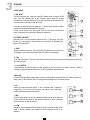
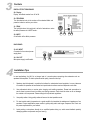
9 - AUX SEND
Level of the signal sent to the AUX SEND output (26) and the level of internal
effects. In the case of the use of an external processor, use a stereo inputs of
the console as effects return.
10 - PAN/BAL
Adjusts the stereo image of the signal.
In the case of mono inputs, it refers to “pan”, the sound moving between the left
and right depending on the position of the button. For stereo inputs there is a
balance between the left and right signal.
9
10
11
12
11 - PEAK
Red LED learning about the state of the input signal. Normally the Led must illuminate only occasionally. If it
remains on, the input level is too important and there is a risk of distortion. Then, adjust the level with the
LEVEL knob (12) or with the controls bass, medium and treble equalization. For a microphone input, there is
the possibility to adjust the gain with button (3).
12 - LEVEL
Level control for each channel from -∝ to +15 dB.
13 - CD/TAPE INPUT
Input for a CD player, MP3 or any other source of line level. The stereo signal
can be routed to the Control output and/or the Main output using the
appropriate switches (15) and (16).
13
14 - TAPE OUTPUTS
RCA stereo socket for the connection to a recorder.
14
15 - TAPE TO MIX
Selector sending the CD/TAPE signal to the Main mix.
15
16 - TAPE TO CTRL RM/PHONES
Selector sending the CD/TAPE signal to the output CTRL RM OUT (25).
17
17 - FX TO CTRL RM
Switch to send the effect to the CTRL RM out (25).
18
18 - CTRL RM/PHONES
Volume output of CTRL RM OUT (25) and PHONES (27).
16
19
19 - MAIN
Level of the mix sent to the outputs MAIN OUTPUTS (24), TAPE OUTPUT (14), CTRL RM OUT (25) and
PHONES (27).
6