1
3
Controls
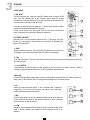
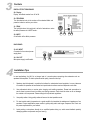
DIGITAL EFFECT PROCESSOR
29 - Display
Display the effects number from 00 to 99.
30 - PROGRAM
Turn the selector knob to the number of the selected effect and
press the button to confirm your choice.
31 - PEAK
The Led lights when the input level is at limit of saturation or when
the effect processor is in MUTE mode .
30 29
32 - MUTE
On/off switch of the effect processor.
32 31
BACK PANEL
33 - AC INPUT
Connector for the external power
supply block.
34 - ON / OFF
Main power supply on/off switch.
4
33
34
Installation Tips
In most applications, the M12 is an integral part of a sound system comprising other elements such as
speakers and amplifiers. To obtain optimum sound quality, here are a few tips:
1.  Speakers should be placed in a position that allows for unobstructed sound projection. In many instances
in beneficial for speakers to be elevated on tripod stands to achieve maximum dispersion and reach.
2.  Use professional advice or service when hanging and installing speakers. Please take precautions to
secure them to prevent them from falling and hurting someone. Care should be taken as to not damage
the cabinet or its components. Please comply with all pertinent regulations
3.  Use quality cables. Using quality cables will ensure the best possible sound.
4.  For best results match the speakers to a good amplifier that matches the wattage and impedance of our
speakers. Proper amplification power results in good quality audio and longer component life. Check out
the power requirement for your cabinet.
5.  Avoid pointing a microphone directly at an amplified speaker doing so, could cause feedback possibly
damaging speaker components and your hearing.
8