1
3
Controls
20
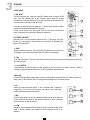
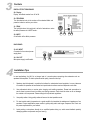
20 - POWER
Main supply power indicator.
21
22
21 - PHANTOM
+48 V PHANTOM power indicator.
22 - Output level LED-Meter
Two segments of 4 Leds show the levels from -20 dB to + 18 dB (saturation), the 0 indication corresponding to a
level of 0 dBu. Adjust the output volume so that the OL red Leds illuminate only occasionally. In general a good
mix occurs when the indicator varies between 0 and + 6. Beyond that, there is a risk of distortion. Similarly, a
less than -20 signal will affect the signal-to-noise ratio.
23 - FX TO MAIN
Adjusts the overall level of the internal effects from -∝ to +10 dB.
23
24 - MAIN OUT
Main mix stereo output controlled by the MAIN knob. It is used to be connected
to the amplification system. The output level varies between -∝ and +15 dB.
24
25 - CTRL RM OUT
This output is usually connected to monitor speakers, it can also be connected
to a second amplification system.
25
26 - AUX SEND
¼” Jack output routing the signal to a external processing device. This
connection is of type "Post fader", the signal being taken after the volume
control.
26
27 - PHONES
¼”Jack socket for stereo headphones.
27
28 - PHANTOM
On/off switch for + 48 V PHANTOM power of channel 1 to 4. To be used only
for electret microphones and some condenser microphones. Turn it off the for
any other use.
7 28