1
Viewing a Program Value
NOTE: When using the Relay Output Option the lockout
feature cannot be used.
Programmed values may be viewed at any time.
Program values may not be changed during a
regeneration.
Flow Sensor Select Options
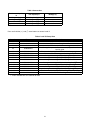
P19 is used to select the flow sensor type. Numbers 1
and 2 are for the Autotrol 1 inch and 2 inch turbine type
flow sensors. The number in P20 will be ignored when
P19 is programmed with a 1 or 2.
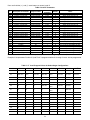
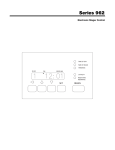
Level I - To locate and display a P value in Level I press
the (↑) or (↓) arrow button until the desired value is
displayed. Level I parameters are indicated by the
legend on the face plate of the control.
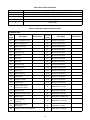
Other flow sensors can be used by entering a “3” in P19
and entering the correct “K-factor” in P20. The K-factor
is defined as pulses per gallon for U.S. units or pulses
per liter for metric units. The K-factor can be obtained
from the flow sensor manufacturer.
Level II - To locate and display a P value in Level II,
simultaneously press the (↑) and (↓) arrow buttons for 3
seconds to gain access. Press the (↑) or (↓) arrow
buttons until the desired location is displayed. Press
(←) to display the value in the P location.
If a “4” is entered in P19 then the definition of the
number in P20 becomes gallons or liters per pulse
depending on the units of measure selected.
Level III - To locate and display an L value in Level III,
simultaneously press the (←) and (↑) arrow buttons for
3 seconds to gain access an then press the (↑) or (↓)
arrow buttons until the desired location is displayed.
Press (←) to display the value in the L location.
Capacity Based Regeneration Start
Options
Level IV - To locate and display a “d” value in Level IV,
simultaneously press the (←) and (↓) arrow buttons for
3 seconds to gain access and then press the (↑) or (↓)
arrow buttons until the desired location is displayed.
Press (←) to display the value in the “d” location.
The following is an explanation of the regeneration start
options for single tank 962 Stager controls.
At the time of regeneration (time set in P2) the control
will check to see if a regeneration should start. This
check depends on the value programmed in P15.
Manual Regeneration
P15 = 0 or 2 Variable Reserve
To initiate a manual regeneration, simply press and hold
the REGEN button for 3 seconds. If an immediate
second regeneration is desired, wait for at least one
minute after the first regeneration begins and then
press and hold the REGEN button for 3 seconds. A
second regeneration will be performed immediately
following the first. The display will freeze and only show
the Regeneration Time Remaining as an indication that
the second regeneration will be initiated. When the first
regeneration is complete, the second regeneration will
begin and the display will alternate between Flow Rate
and Regeneration Time Remaining. The second
regeneration will be performed on the offline tank in twin
alternating applications.
The control calculates an average water usage for each
day of the week when it is using variable reserve. A
regeneration will start if the capacity remaining is less
than 1.2 times the average water usage for the next day.
P15 = 1 or 3 Fixed Reserve
The reserve capacity is calculated using the fixed
reserve capacity programmed in P16. The value in P16
is the percentage of the calculated system capacity
used for the reserve.
Example: If the programmed capacity is 10,000 grains
and the hardness is 10 grains/gallon the calculated
system capacity is 1000 gallons. The reserve capacity
is 300 gallons if the fixed reserve is set to 30%. A
regeneration will start if the capacity remaining at the
time of regeneration is less than 300 gallons.
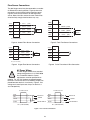
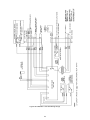
Lock-Out Feature
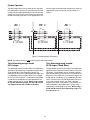
The lock-out feature may also be used to prevent
regenerations when a signal is present at the lock-out
terminals. Two or more 962 controls can be connected
together (see Figure 2) to prevent one from
regenerating while another is in regeneration. This
signal can also come from external equipment that can
provide a dry contact closure. (CONNECTION MUST
BE A DRY CONTACT).
The parameter P15 is also used to select immediate
regenerations or delayed regenerations only.
P15 = 0 or 1 Delayed Regeneration Only
Automatic regenerations will occur at the time of
regeneration only. The control will delay the start of
regeneration until the time of regeneration even if the
capacity remaining is reduced to zero gallons.
9