1
CBRICSTM – Corporate Bond Reporting and Integrated Clearing System
3.0
Gateway to the solution
This solution CBRICS (Corporate Bond Reporting & Integrated Clearing System) is accessible through the
internet at the following address – bricsonline.net. A few prerequisites for accessing the application are
given hereunder:
•
•
•
•
Internet should be available on the PC.
Internet Explorer (version 6.0 & higher) must be installed.
Java Runtime Environment must be installed
Please set the screen resolution at 1024 X 768 for best viewing.
4.0
Getting started
4.1
Logging into the system
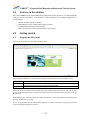
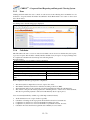
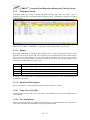
On going to the site the user will get the following screen:
The participant & admin user concerned needs to input the following details for accessing the system:
Participant
User ID
Password
The user should enter the id allotted to his organization here.
The participant admin user should enter the participant id here while the operations user
should login as the user Id allotted by the participant admin.
This is same as the user ID on first login/ selected password thereafter.
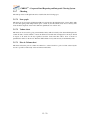
On first login, the user will be asked to change the password. Thereafter the user has to login with the new
password. On subsequent logins, except for login after password reset the user will not be asked to change
his password.
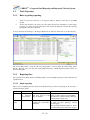
While inputting any of the fields if the user makes any mistake or leaves it blank the system will give the
message ‘Invalid user’ as a popup.
In case of any problem the user should after waiting for some time, logout and re-login. In case problem
persists, the helpdesk should be contacted.
7 - 22