1
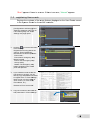
5.
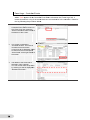
The
e “The error was
w reset
succcessfully.” Message
M
appe
ears.
Presss “OK” and then “Back” at the
top right of the screen.
s
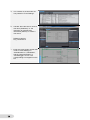
6.
On tthe “Active Events”
E
scree
en, you
will find that the event you ju
ust
clea
ared has bee
en deleted.
7.
As d
described in Step 3, if you
presss the “ Show
w Specified Page
P
”
buttton in the Details screen of the
user event, the page
p
created
d with
Sysmac Studio can
c be displa
ayed.
You
u can specifyy the page fro
om
[HM
MI]-[Controller Events]-[Us
ser
Eve
ents] on Sysm
mac Studio, as
a
desccribed in Ste
ep 8 below.
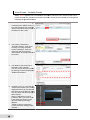
8.
Spe
ecify the page
e related to the
t
Trou
ubleshooter as below.
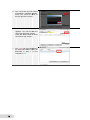
Sele
ect [HMI]-[Co
ontroller
Eve
ents]-[User Evvents], and
right-click on the
e edit pane of “User
Eve
ents” and sele
ect [Add].
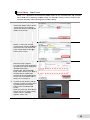
9.
Add
d in [Event Co
ode] the code of
the event for wh
hich to display the
related page, an
nd enter in
[Tro
oubleshooter Associated Page]
the name of the page to disp
play.
The
e [Event Code
e] represents
s the
code
e that is assiigned in [Eve
ent
Setttings] in Step
p 5 on Page 10.
With
h the settingss shown on the
t
right, when you press [ Show
w
Spe
ecified Page ] on the User
Eve
ents Details screen
s
of
Trou
ubleshooter, the [Emerstop]
page appears.
14
1
In
n [Event Nam
me/Commentt], the ones sset in [Event Name]
in
n Step 5 on Page
P
10 are automaticallly displayed.