1
Evvent Logs – Controlle
er Events
W
When “Yes” appears
a
in th
he Controlle
er Event Stattus column on
o the “Evennt Logs” tab, it
means that th
here is a log of the errors
rs that have occurred so
o far in the coontroller. Ch
heck for
w.
the log followiing the procedure below
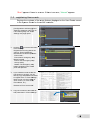
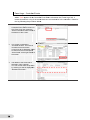
1.
When ““Yes” is disp
played in the
Controller Event Sttatus column on
the “Evvent Logs” ta
ab, press the
“Show Controller Events” button
n at
the botttom of the sccreen.
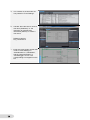
2.
The sccreen is switcched to
“Contro
oller Events”. A list of the
e
controller events th
hat have
occurre
ed so far is displayed.
d
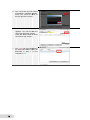
Se
elect
an event from the liist and press
s
“Show Detail” at the
e right bottom
m of
the scrreen.
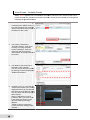
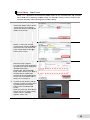
3.
The details of the event
e
that is
selecte
ed in Step 2 appear.
a
You ca
an recover fro
om the problem
by refe
erring to whatt is displayed
d in
“Detaile
ed Informatio
on”.
16
1