1
PCIe-miniPCIe Adapter – User Manual
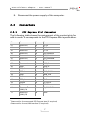
Pin
Name
15
GND
16
UIM_VVP
13
REFCLK+
14
UIM_RESET
11
REFCLK-
12
UIM_CLK
9
GND
10
UIM_DATA
7
CLKREQ#
8
UIM_PWR
5
Reserved 3
6
1.5 V
3
Reserved3
4
GND
1
WAKE#
2
3.3 V
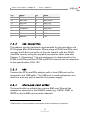
2.2.2
Pin
Name
CAN Connection
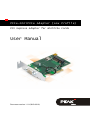
The adapter has the technical requirements for the operation of a
PCI Express Mini CAN adapter. When using a PCAN-miniPCIe card,
connect the D-Sub connector of the slot bracket with the PCANminiPCIe card by using the supplied connection cable (see also
Chapter 2.1 Operating). The pin assignment is determined by the
PCAN-miniPCIe card (see PCAN-miniPCIe manual) and corresponds
to the specification CiA® 102.
2.2.3
USB
Connect the PCIe-miniPCIe adapter with a free USB port on the
computer via a USB cable. The USB port is used exclusively as a
data line, and can not be used for the power supply.
2.2.4
Micro-SIM Card Holder
This card holder is suitable for a micro-SIM card. Should the
adapter be operated in the WWAN mode (e.g. UMTS, GSM, or
GPRS) a micro-SIM card must be inserted.
3
Reserved for future wireless coexistence control interface (if required)
8