1
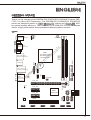
MS-7720
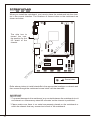
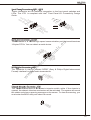
ATX 24-Pin Power Connector: JPWR2
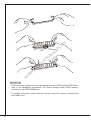
This connector allows you to connect an ATX 24-pin power supply. To connect the
ATX 24-pin power supply, make sure the plug of the power supply is inserted in
the proper orientation and the pins are aligned. Then push down the power supply
firmly into the connector.
eu
d
n
u
ro
V
.G 5 V
4
2 3.+ +5 V
d
2 2. +5 s un d
2 1. Re o un d
2 . r o n #
0
G
2 9. Gr rou ON d
1 8. G - un
1 7. PS o
1 6. Gr V V
1 5. -12 .3
1 4. +3
1 3.
1
V
.3
3 V
.+ 2 V
2 1 2
1 1.+ +1 B OK
1 0. VS R nd
1 5
u
W
.
9 .P ro nd
8 .G 5V u
7 .+ ro nd
6 .G 5V u
5 .+ ro 3V
4 .G 3. 3V
3 .+ 3.
2 .+
1
ce
m
V
2
1 V
.+ 2
3 .+1
4
an
d
n
u d
ro un
.G ro
1 .G
2
ua
ls
.
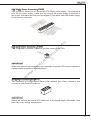
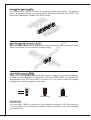
ATX 4-Pin Power Connector: JPWR1
This 12V power connector is used to provide power to the CPU.
vi
Important
w
w
w
.d
e
Make sure that all the connectors are connected to proper ATX power supplies to
ensure stable operation of the mainboard.
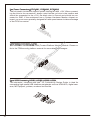
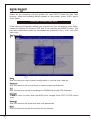
Serial ATA Connector: SATA1~6
This connector is a high-speed Serial ATA interface port. Each connector can
connect to one Serial ATA device.
Important
Please do not fold the Serial ATA cable into a 90-degree angle. Otherwise, data
loss may occur during transmission.
17