1
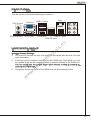
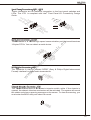
Parallel Port Header: JLPT1
This connector is used to connect an optional parallel port bracket. The parallel
port is a standard printer port that supports Enhanced Parallel Port (EPP) and
Extended Capabilities Parallel Port (ECP) mode.
T
C
L
Y
.S
5 E S
2 3.P U K# 7
2 .B C ND 6
1
2 9.A R ND 5
1 7.P R ND 4
1 .P R ND
5
1 .P R D3 2
3
1 1.P RN D 1
1 .P RN D 0
9 P N D
.
7 .PR N B#
5 .PR ST
3 .R
1
in
P d
o un d
.N ro un d
6
2 4.G ro un d
2 2.G ro un d
2 0.G ro un d
2 .G r o u n d
8
#
1 6 . G r o u n d IN
1 .G ro un L
4
S
1 2.G ro _ #
1 0.G PT IT
1 .L N #
8 .PI R #
6 .ER D
4 .AF
2
vi
w
.d
e
L
e D
n
o N
h E R
P _S ne
d
o
a E h
e NS P
.H E d
9 .S a R
7 .He IC L
5 .M I C
3 .M
1
ce
m
n
an
io
ct
te
e
D
e
n
o
n
h
io
P
ct #
d
e E
a
e Pin et C
D EN
.H
0 o
1 N IC S
.
8 .M RE nd
6 .P ou
4 Gr
.
2
ua
ls
.
eu
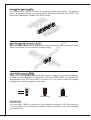
Front Panel Audio Connector: JAUD1
This connector allows you to connect the front panel audio and is compliant with
Intel® Front Panel I/O Connectivity Design Guide.
w
w
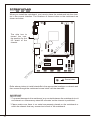
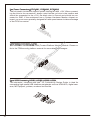
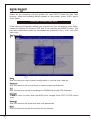
Clear CMOS Jumper: JBAT1
There is a CMOS RAM onboard that has a power supply from an external battery
to keep the data of system configuration. With the CMOS RAM, the system can
automatically boot OS every time it is turned on. If you want to clear the system
configuration, set the jumper to clear data.
1
1
1
JBAT1
Keep Data
Clear Data
Important
You can clear CMOS by shorting 2-3 pin while the system is off. Then return to
1-2 pin position. Avoid clearing the CMOS while the system is on; it will damage
the mainboard.
20