1
(2) Remove the sample holder plate. Set it down on a clean surface, or the hollow metal
cylinder, and load your sample(s). Cover all of the bolt holes, except the outermost ring.
Metal going through open bolt holes coats the heaters and lowers their efficiency.
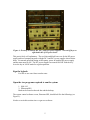
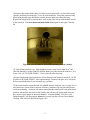
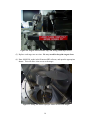
Replace the sample plate so that the three wells on the plate line up with the three screws
in the load lock. The three horizontal bolts heads should point to the right. Close the
lid.
Figure 10: Note orientation of three bolts pointing into the chamber
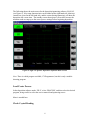
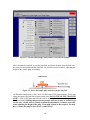
(3) Turn off the load lock vent. Main chamber pressure must be less than 5x10⁻⁶ torr
(first line labeled IG on the Granville Phillips display) to pump down the load lock. If it
is not, click ‘AUTO PUMP DOWN’. If it is, proceed to the next step
.
(4) Once base pressure has been achieved close the top of the load lock and click ‘AUTO
LOAD LOCK PUMP DOWN’. After approximately 2 minutes, the gate valve will open.
Refer to troubleshooting if you encounter any problems.
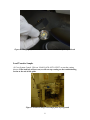
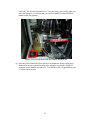
(5) Move the transfer arm to the load lock ONLY after the load lock valve is open. If it is
moved this time (in an effort to increase efficiency) machine will only jam and prevent
you from sputtering. An alarm will appear noting that the transfer arm is not in the home
position, and the blue interlock for the transfer arm will turn off- ignore both until you
have secured your sample in the main chamber! A button flashing ‘YES, have you
finished transfer” will also appear- do not hit yes until you have secured your sample!
Clicking YES will close the load lock gate valve.
9