1
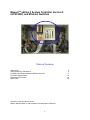
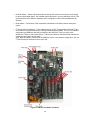
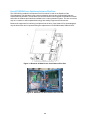
CAC3 Removal and Installation in a Maxum Gas Chromatograph
Replacement of the CAC3 in the Maxum analyzer is as follows:
Caution: Proper anti-static procedures are necessary while handling electrical
boards. Always wear an anti-static wrist strap when handling Maxum boards.
•
Before beginning replacement, if possible, save the current Maxum .amd database file to be
reloaded after the CAC3 board is replaced. Note that if the CAC3 is faulty, backup may not
function. In this case it will be necessary to use the most recent backup file.
•
Once the database is saved, power off the Maxum.
•
Open electronics door. If the latch is locked, use a 4mm (5/32”) Allen wrench to unlock. When
opening the door, be careful not to place tension on the maintenance panel interface ribbon
cable.
•
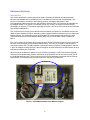
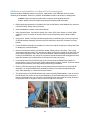
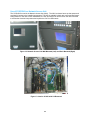
Using a 5/16” wrench or Phillips screwdriver (depending on assembly type), loosen the topmost
SYSCON assembly fastening nuts that secure the assembly to electronic enclosure mounting
bracket.
•
Pull the SYSCON assembly cage forward so it rests on the rubber mounting foot, being careful
not to damage any connected cables.
•
If boards are installed in the PCI slots that block removal of the CAC3, those boards must be
unplugged at this time. Disconnect interface cables for any board that must be removed and then
remove the board (make note of which cables are connected to which board before removing).
•
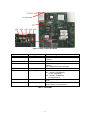
Disconnect the Ethernet cable from the CAC3 board. It is not necessary to disconnect the other
end of this cable.
•
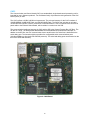
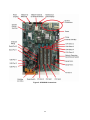
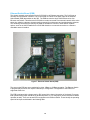
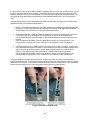
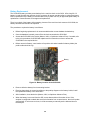
Remove the CAC3 board by grasping both sides firmly and pulling up. Do not touch board
mounted components.
•
Place the CAC3 in an anti-static bag for return to Siemens.
•
Install the new CAC3 board by pressing it firmly into the connectors, taking care not to touch any
components or connections on the board. Then, reconnect the Ethernet cable to the CAC3.
•
If any boards were removed from PCI slots, reinstall them at this time and reconnect their cables.
Verify that all boards and cables are in their correct locations.
•
Repeat previous steps in reverse order to slide the SYSCON assembly cage back into place,
tighten the fastening nuts, and close the analyzer door.
•
Apply power to the Maxum and allow it to boot.
•
Restore the analyzer database using the .amd file that was saved before beginning the
procedure.
•
When the CAC3 is removed, current date and time information is lost. If the analyzer is
configured to obtain date and time information from a central server, then it will update
automatically. If no time server is set, it will be necessary to manually set the date and time on
the analyzer.
20