1
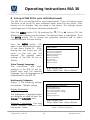
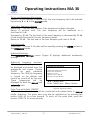
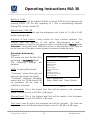
Operating Instructions MA 30 Return to 1 kHz: After having reached the highest (8 kHz) or lowest (250 Hz) test frequency by pressing ENTER (13) the test frequency of 1 kHz is automatically selected. Setting ON* can be turned OFF. Minimal level -10/0* dB The hearing threshold test and the audiogram start either at -10 dB or 0 dB. Default setting 0 dB. Direction of level button: Cursor button for level increase up/down. This function sets the direction of the button (decreasing/up in level increasing/down in level) or vice versa in order to change level in manual mode Attention: Saving data with STIMULUS button is only possible if you have set up the function interrupter mode instead of presenter mode (setting). Automatic Audiometry (Figure 9) This menu sets how the MA 30 is performed in Automatic Mode. The following settings are possible: Automatic Audiometry Mode Minimal level Maximal Level Start Level Pause length Variable Start level Retest Continue on Error Test with Pulse tones Voice Prompts Mode: Screening/Threshold* “Screening” means that only one level with be tested (start level). “Threshold” (Hughson Westlake) means that the 10 dB down/5 dB up procedure will be used to establish a threshold. Change Item Enter: Select item Menu: Return Figure 9 Minimal Level: This is the lowest level that will be tested in the automatic mode. (Choose from 0 to 90 dB in 5 dB steps) Maximal Level: This is the highest level that will be tested in the automatic mode. (Choose from 0 to 90 dB in 5 dB steps) Start Level: Level at which the automatic test will be initiated. This level can only be as low as the Minimal Level (choose from 0 to 90 dB in 5 dB steps) Geba_MA30_e_13b.doc 18 852 094/3 03/13