1
12
Watlow Silver Series OIT Installation Guide
Maintenance
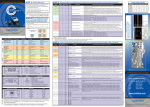
Figure 5: DIP switch connections
SW1
ON
OFF
OFF
OFF
OFF
SW2
OFF
ON
OFF
OFF
OFF
SW3
OFF
OFF
ON
OFF
OFF
SW4
OFF
OFF
OFF
ON
OFF
Mode
Touch Screen Calibration mode
Reserved
Force into Boot Loader mode
Reserved
Normal operation
-
Touch Screen Calibration mode: This mode allows you to
recalibrate the touch screen. You also have the option of
restoring the system passwords to defaults (Caution: all project
data in the OIT will be erased if passwords are reset).
-
Boot Loader mode: This mode forces the OIT to not execute
the project. This mode is used when replacing or reinstalling the
operating system. Contact Watlow for more information.
-
Normal Operation: All DIP switches must be in the OFF
position for normal operation.
Fusing Requirements
If the display does not come on within two seconds of power up, remove
power. An internal fuse will prevent damage if the polarity of the DC
power is incorrect. Check wiring to insure proper connections and try to
power up again.
0600-0069-0000 Rev D