1
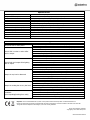
Specifications
Power Supply
Mic/Line channel inputs
Mic/Line channel controls
Line 3 + 4 stereo inputs
Line 3 + 4 stereo controls
Output connections
Output controls
FX connections (6.3mm jack)
FX controls
Indicators (LED)
Fire alarm contacts
Dimensions
Weight
230 – 250Vac 50Hz (IEC)
Ch 1 front combo and rear jack, Ch 2 combo (rear)
Level, Lo-cut, Gain, FX and Lo/Mid/Hi EQ faders
Input A (L+R) 6.3mm jack / Input B (L+R) RCA
Level, In A/B and Lo/Hi EQ faders
Outputs 1-3 (L+R) RCA, Output 4 (L+R) 6.3mm jack
Level, Line 3 on/off, Line 4 on/off
Footswitch, Send (defeats onboard reverb), L+R Return
Reverb time, Depth (onboard or external level)
Power, 48V, Mic/line signal+peak, Line peak, Output peak
Modular terminal, make-to-mute all except Mic 1
483 x 44 x 220mm
2.75kg
Troubleshooting
No power LED on front panel
Power LED is on but no other LEDs
and no output
Power light and output LEDs lighting
but no output
Output is very loud or distorted
Output is working but at very low level
Feedback
(loud squealing/howling from mics)
Ensure mains voltage is correct and connected properly
Ensure front panel power switch and mains outlet switch are on
Check XLR, jack and RCA leads are OK and connected properly
Ensure that low impedance mics. are connected with XLR, not jack
Check microphone or line signal is switched on
Ensure that any playback devices are not set to “Stop” or “Pause”
Ensure GAIN and LEVEL controls are not turned fully down
For condenser microphones, check that 48V is on and connected by XLR
Check that stereo input selectors are not switched out
Check OUT volume controls are not turned fully down
Check OUT connections to amplifier or recorder are OK
Check amplifier or recorder levels are not turned fully down
Check that fire contacts are not shorted out to mute
For condenser microphones, check that 48V is on and connected by XLR
Check level of amplifier, active speaker or recording device not set too low
Check level of input signal is not too high
Reduce input channel GAIN, LEVEL and EQ settings
Reduce OUT volume control(s)
Ensure Hi-Z line level input(s) are not connected via XLR
Check FX controls and DEPTH control, reducing if necessary
Check input gain level on recorder or recording software
Check level of amp, active speaker or recording device not set too high
Check level of input signal is not too low
Ensure low impedance line or mic signal is connected via XLR, not jack
Increase input channel GAIN, LEVEL and EQ settings if turned down
Increase OUT volume control(s)
Face microphone away from speakers and monitors
Reduce channel GAIN, LEVEL and EQ controls
Reduce channel FX controls and/or Reverb DEPTH
Reduce OUT volume controls and/or amplifier/active speaker volume level
Disposal: The “Crossed Wheelie Bin” symbol on the product means that the product is classed as Electrical or
Electronic equipment and should not be disposed with other household or commercial waste at the end of its useful life.
The goods must be disposed of according to your local council guidelines.
Errors and omissions excepted.
Copyright© 2014. AVSL Group Ltd.
953.020UK User Manual