1
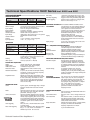
Technical Specifications 190C Series
OSCILLOSCOPE MODE
Time delay
VERTICAL DEFLECTION
Bandwidth
Rise time
Bandwidth limiter
Number of inputs
Input coupling
Input sensitivity
Normal/Invert
Variable Attenuator
Input voltage
Vertical resolution
Accuracy
Input impedance
Fluke 225C
Fluke 199C
200 MHz
1.7 ns
Fluke 215C,
Fluke 196C
100 MHz
3.5 ns
Fluke 192C
60 MHz
5.8 ns
User selectable: 10 kHz, 20 MHz or off
2 inputs plus external trigger. All inputs isolated
from each other and from ground.
AC or DC, with ground level indicator
2 mV/div to 100 V/div
On both input channels; switched separately
Variable Gain on input channel A
1000V CAT II, 600 V CAT III rated - See ‘general
specifications’ for further details.
8 bit
± (1.5% of reading + 0.04 x range/div)
1 MΩ ± 1% // 15 pF ± 2 pF
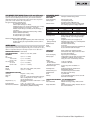
HORIZONTAL
Maximum real-time
sample rate
Number of digitizers
Time base range
Maximum record length
Accuracy
Glitch capture
Fluke 225C
Fluke 199C
2.5 GS/s
Fluke 215C
Fluke 196C
1 GS/s
2
2
5 ns/div
to 5 s/div
Fluke 192C
500 MS/s
2
10 ns/div
to 5 s/div
3000 points per input in Scope-mode;
27,500 points per input in ScopeRecord™ roll
mode (5 ms/div … 2 min/div)
± (0.01% of reading + 1 pixel)
50 nsec (5 µsec/div to 1 min/div)
DISPLAY AND ACQUISITION
Display
144 mm Full-Color LCD, with backlight
Display Modes
Input A, Input B, dual, average, Replay
Visible screen width
12 divisions in scope mode
Persistence modes:
Digital persistence short / medium / long
/ infinite
Waveform Mathematics
A+B, A-B, A*B, all with user selectable scaling
of resultant; A versus B (X-Y-mode); Frequency
Spectrum using FFT analysis.
Acquisition modes
Normal, auto, single shot, ScopeRecord™, roll,
glitch capture, waveform compare with automatic “Pass / Fail testing”. Bus Health test mode
(225C and 215C only), Eyepattern Display of
single ended or differential bus signal (Fluke
225C and 215C only).
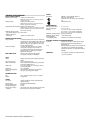
TRIGGER AND DELAY
Source
Modes
Connect-and-View™
Video triggering
Pulse width triggering
Input A, input B, external trigger input. All input
references isolated from each other and from
ground.
Automatic Connect-and-View™, free run, single
shot, edge, delay, video, video line, selectable
pulsewidth, dual slope, N-cycle
Advanced automatic triggering that recognizes
signal patterns, automatically sets up and continuously adjusts triggering, time base and amplitude. Automatically displays stable waveforms
of complex and dynamic signals like motor drive
and control signals. Can be switched off if so
desired.
NTSC, PAL, PAL+, SECAM. Includes field 1, field
2 and line select.
Pulse width qualified by time. Allows for triggering <t, >t, =t, =/ t, where t is selectable in
minimal steps of 0.01 div or 50 nsec.
Technical Datasheet Fluke ScopeMeters 2
Dual slope triggering
N-cycle triggering
incl. 225C and 215C
1 full screen of pre-trigger view or up to 100
screens (=1200 divisions) of post-trigger delay.
Triggers on both rising and falling edges alike
Triggers on N-th occurrence of a trigger event;
N to be set in the range 2 to 99.
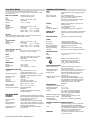
AUTOMATIC CAPTURE OF The instrument ALWAYS memorizes the last
100 SCREENS
100 screens (no user setup required). When an
anomaly occurs on screen, the REPLAY button
can be pressed to review the full screen
sequence over and over. Instrument can be set
up for triggering on glitches or intermittent
anomalies and will operate in “baby-sit”
mode capturing 100 events.
Replay
Manual or continuous replay. Displays the
captured 100 screens as a “live” animation, or
under manual control. Each screen has dateand time-stamp.
Replay storage
Up to 2 sets of 100 screens each can be saved
for later recall and analysis.
FFT - FREQUENCY SPECTRUM ANALYSIS
Shows frequency content of oscilloscope
waveform using Fast Fourier Transform
Window
Automatic, Hamming, Henning or None
Automatic Window
Digitally re-samples acquired waveform to get
optimum frequency resolution in FFT resultant
Vertical Scale
Linear / Logarithmic, in volts
Frequency Axis
Logarithmic; frequency range automatically set
as function of timebase range of oscilloscope
WAVEFORM COMPARE AND PASS/FAIL TESTING
Waveform compare
Provides storage and display of a reference
waveform for visual comparison with newly
acquired waveforms. Reference is derived from
an acquired waveform and can be modified in
the ScopeMeter or externally using FlukeView
Software.
Pass/Fail Testing
In waveform compare mode, the Color
ScopeMeter can be set up to store only
matching (“Pass”) or only non-matching (“Fail”)
acquired waveforms in the replay memory bank
for further analysis.
AUTOMATIC
Vdc, Vac rms, Vac+dc, Vpeak max, Vpeak min,
SCOPE MEASUREMENTS Vpeak to peak, Aac, Adc, Aac+dc, frequency
(Hz), risetime, falltime, power factor, Watts, VA,
VA reactive, phase, pulsewidth (pos./neg.),
dutycycle (pos./neg.), temperature °C, temperature °F, dBV, dBm into 50Ω and 600Ω
VPWM ac, VPWM ac+dc for measurement on
pulsewidth modulated motordrives and
frequency inverters
CURSOR MEASUREMENTS
Source
Input A, input B or the Mathematical Result trace
(excl. A vs B curve)
Dual horizontal lines
Voltage at cursor 1 and 2, voltage between cursors
Dual vertical lines
Time between cursors, 1/T between cursors (in
Hz), voltage between markers, risetime with
markers, falltime with markers; Vrms between
cursors, Watts between cursors.
Single vertical line
Min-Max and Average voltage at cursor position;
Frequency and RMS-value of individual
frequency component in FFT Result.
ZOOM
Up to 16x horizontal zoom