1
 estimate is to obtain the best available data to support a thorough analysis of all the alternatives. Before you begin, take a moment to gather size, staffing, and productivity information for the project. These will become the primary inputs to the estimate. If this information is not available, don’t worry. SLIM‐Estimate will supply industry‐based default settings to guide you. The inputs you need are: •
Team size ‐ number of FTE (Full Time Equivalent) people you plan to use at the peak of the code and test phase. •
PI – productivity determined from one or more similar completed projects. If you don’t have this information, most templates contain both domain‐ and industry‐specific trends to help you pick a safe, reliable PI. Consult QSM’s Understanding SLIM‐Estimate Inputs reference for detailed information on determining PI. •
Effective Size – product measure gleaned from project artifacts. Again, if you don’t have these, most templates have at least one sizing method built right into the Size Calculator. And don’t forget to check out the Sizing Spreadsheets in the Samples and Templates folders of your application directory! The sample spreadsheets (.xls) contain a variety of sizing methods and gearing factors. Consult QSM’s Understanding SLIM‐
Estimate Inputs reference for detailed information on estimating size. •
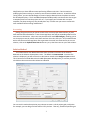
Constraints – limitations on the budget of time, effort, team size, and cost that drive SLIM’s effort‐time trade‐off calculations. Prioritize them, so you can rank alternative solutions. To create a new estimate based on a template, select File | New from the menu and check Import Settings from Existing Template. Browse to the directory where your template is stored and select it. Since you’ve already customized your Project Environment settings, you should be able to focus on entering the assumptions, and select the best solution options. UnderstandingSolutionOptions
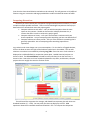
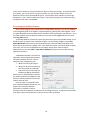
SLIM offers seven ways to build an estimate. The method you choose will be determined by the amount and detail of your input data, the type of problem you need to solve, and the time available to create the estimate. The complete menu of solution methods is presented on the New Project Options screen, presented when you are creating a workbook. Once you have opened an existing workbook file, the “Wizard” solutions methods may be accessed from the Estimate menu. The SLIM‐Estimate User Manual thoroughly explains each solution method. Review each of the methods in 2