1
 ExpectedTotalSize
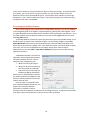
Expected Total Size results from the combined effect of each data element on this screen: Function Unit (Total ‘FU’), Gearing Factor, percent New, Modified, and Reused functionality, and the Uncertainty Range. If the Function Unit is the same as the Basic Unit of Work (see Global Options and Project Environment data tabs), the Gearing Factor is 1. Total ‘FU’ can be entered directly, or computed using the Sizing Calculator. Keep in mind that the range of uncertainty will translate to a corresponding level of variability around the resulting effort and duration predictions. Set the range to reflect your confidence in the size estimate. See QSM’s reference Understanding SLIM‐Estimate Inputs for detailed instructions for selecting and using one or more of the techniques in the Sizing Calculator. ProductivityIndex(PI)
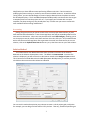
You can enter the expected PI directly into the field, or allow SLIM to roll up the value from the PI Calculator. The PI History option is only available if you have loaded historical projects into the template. It is a good idea to use this option, even if you only have one project, because it documents the source of the PI data if you are not using the QSM database. As with Expected Total Size, the range of uncertainty will translate to a corresponding level of variability around the resulting effort and duration predictions See QSM’s reference Understanding SLIM‐Estimate Inputs for detailed instructions for selecting and adjusting productivity using in the PI Calculator. DefectTuningFactor
The Defect Tuning Factor is a scaling parameter that tunes SLIM‐Estimate’s reliability model up or down to match your historical defect discovery data. For each historical project you have loaded into the current workbook, a Defect Tuning Factor will be calculated (if you have provided defect data). If you have not loaded historical data, the defect curves will be determined from the Primary Trend Group. The display will read as 100%, indicating the QSM default prediction will apply. PhaseTuning
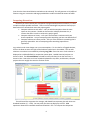
The Phase Tuning options give you a great deal of flexibility in modeling SLIM’s four development phases to your environment. You can specify three variables: phase Start, Duration, and Effort. Additionally you can set the overlap with the next phase. SLIM performs the estimate calculations for Phase 3. Time and effort for Phases 1, 2, and 4 are then generated as percentages of phase 3. Each phase has its own tab, allowing you to configure each active phase independently. This is particularly 6