1
MENU
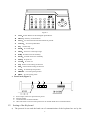
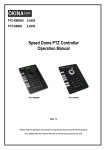
Figure 1
z
CAM:Select address of the intelligent Speed Dome .
z
MENU:Auxiliary control buttons.
z
AUTO:To control auto-horizontal rotation for pan/tilt.
z
CLEAR: To clear inputted data
z
0-9: Number key
z
WIDE:To a wide angle.
z
TELE:To turn to a telescopic range.
z
FAR:To make focus far manually.
z
NEAR:To make focus near manually.
z
OPEN:To open iris.
z
CLOSE:To close iris.
z
ON:Switch on the setting of function.
z
OFF:Switch off the setting of function.
z
CALL:To call the preset position.
z
PRESET:To set the preset position.
z
SHOT:To call cruising track.
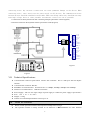
2. Rear Panel (Figure 2)
A
B
D
C
DC12V OUT GND RS485
+ + -
A. Power input connector: input DC12V power.
B. DC12V Output.
C. Communication connector RS485:
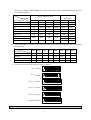
D. ID-Code switch: Used to set the protocol in use and the baud rate of communications.
IV.
Setting of the Keyboard
a) The protocol in use and the baud rate of communication of the keyboard are set by the
4