1
3
Menu/Display (refer to function of
camera)
ON
OFF
4
Digital Zoom
ON
OFF
5
Reserved
6
Focus
Automatic
Manual
7
Iris
Automatic
Manual
Automatic
Manual
Indoor Mode
Outdoor Mode
ATW Mode
One Push WB
Color
Black & White
< 180°, low speed
> 180°, low speed
< 180°, middle speed
> 180°, middle speed
< 180°, high speed
> 180°, high speed
Start Programming
End Programming
Run
Move joystick to
stop
8
9
White Balance Mode(WB)
10
11
Black & White/Color Switching
12
14
Set Auto Pan (Only conditions for
scan. If start scan, operate as Item
6 in this paragraph)
15
Reserved
16
Reserved
17
Self-learning
programming
18
Control of self-learning of track
13
of
track
z
z
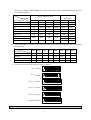
For different camera, control functions in the list could be different.
For the camera with the menu, switch ON/OFF the menu by “[MENU]+[3]+[ON]”, and switch
ON/OFF the OSD by “[MENU]+[3]+[OFF]”. In case the camera has the menu and the menu is
ON:
1. Select the item on the menu by buttons [WIDE]/[TELE] to scroll the cursor up or down;
2. Chang the status of the selected item on the menu by buttons [FAR]/[NEAR];
3. Switch OFF the menu as per operations in the list after the menu is set.
z Take care of differences between the Menu of Speed Dome and the Menu of Camera. For the
speed dome with the menu, enter the menu by “[64] +[CALL]” and basic operations are as
follows:
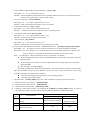
1. Call No.64 preset point to open the main menu by the control keyboard.
2. When the menu appears on the screen, move the
cursor to the item you need to set by “TILT UP”
and “TILT DOWN”, and enter the settings of the
item to make change by “PAN LEFT” and “PAN
RIGHT”;
右
3. Speed up operation of the joystick after keeping it
上
for one second in one direction.
4. All settings of the menu could not be lost even
power failure occurred;
下
5. Operations under special case can be referred on
the description of the menu of the ball machine.
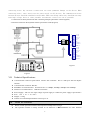
12. Use the Joystick to Control the Speed Dome Camera:
Figure3
You can use the speed joystick to control the Pan/Tilt
direction and speed of the dome of the camera randomly. The speed of pan/tilt is decided by the angle of the
joystick you operated (Figure 3). Change the tilting angle of the joystick you can adjust the speed evenly and
the camera can be focused automatically in the course of scan to keep images being distinct.
上
左
右
下
低速度
高速度
VI. Installation and Connection
Attention: Please read the operation manual of the keyboard and the speed dome carefully before
7
左