1
Operation
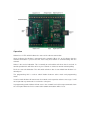
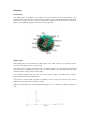
Netiom has 3 LEDs which indicate the status of the ethernet connection.
Green indicates that Netiom is connected to the network. When it is on it indicates that the
network connection is present but not necessarily that Netiom is communicating with the
network.
Amber is the receive indication. This is normally on and switches off when data is received. In
normal operation this will flicker off every few seconds as it detects normal network polling.
Red is the transmit indication. This will switch off when data is transmitted from Netiom. It is
normally on.
The programming link is used to switch Netiom between active mode and programming
mode.
In active mode Netiom will connect to the network and respond to ethernet messages. It will
not respond to any commands issued on the serial port.
In programming mode Netiom will not access the network but it will accept commands from
the serial port. When the link is removed all network connections will be reset.