1
FieldServer Configuration Manual
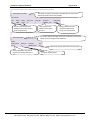
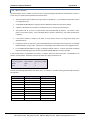
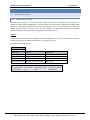
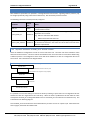
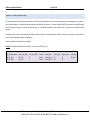
Appendix B.4.4.
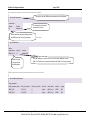
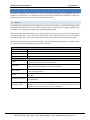
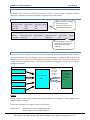
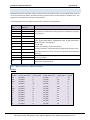
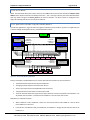
Section Title
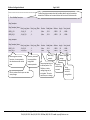
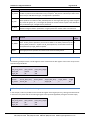
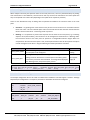
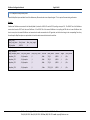
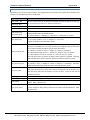
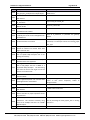
Connections
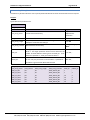
Column Title
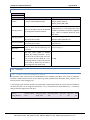
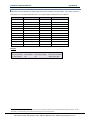
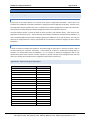
Port
Baud*
Parity*
Data_Bits*
Stop_Bits
Line_Drive_Off
Line_Drive_On
Ic_Timeout
Turnaround_Delay
(Turnaround_Time)
Client/Server_Mode
Node_Retire_Delay*
Write_Queue_Mode*
Write_Queue_Size*
Bias_Mode*
Page 77 of 90
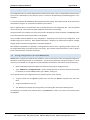
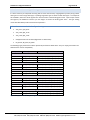
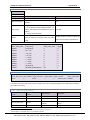
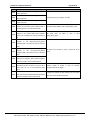
Connections/ Adapters
Function
Legal Values
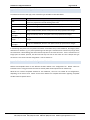
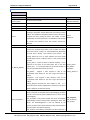
Specifies the port through which the device is connected to the
16
P1-P8, R1-R2
FieldServer.
300,
9600,
Specifies Baud Rate
38400;
Even,
Odd,
Specifies serial data byte parity
None
Sets number of data bits for serial port.
7, 8;
Sets the stop bits for communications
1, 2
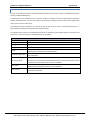
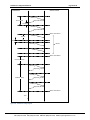
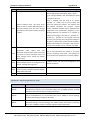
When using RS-485, specifies delay from end of message to when the RTS Time
in
line is deasserted
seconds
When using RS-485, specifies delay after RTS is asserted until message is Time
in
transmitted
seconds
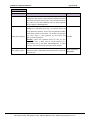
Timeout
in
Specifies inter-character timeout period within a message once it starts
seconds
This is the time the Server takes to initiate a response after having Delay
in
received a poll.
seconds
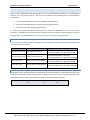
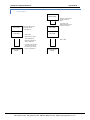
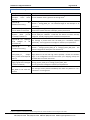
Where two FieldServers are connected in Hot Standby mode each with a
PEX and a SCADA Tier, if the SCADA Tier of one FieldServer polls the
Client_Only
SCADA Tier of the other FieldServer, that tier will start acting as a Server.
Setting this parameter to Client_Only will prevent this happening.
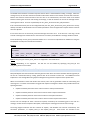
This parameter allows the user to configure a time after which a Node is
Time (s), 0
no longer polled until the FieldServer is restarted. See Section 6.1.4
Mode for dealing with potential accumulation of successive writes to the Overwrite,
same point can be configured.
Blocking.
The length of the queue can be configured if blocking mode is set.
Blocking will occur when there is no more space on the Write_Queue.
Non-negative
If size=0 every successive write is blocked. A message will be displayed integer, 0
when blocking occurs, except if the Queue_Size=0.
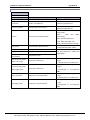
Only relevant to Protonode and X25. If this parameter is set to Yes or
Enabled, it loads the RS-485 line by placing additional resistance on it This
Enabled, Yes,
has the benefit of making the signals cleaner in a noisy environment but
Disabled, No
may reduce the maximum number of devices possible in a multidrop
configuration.
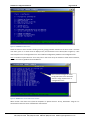
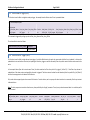
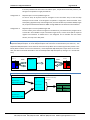
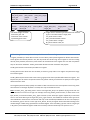
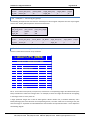
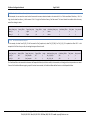
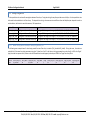
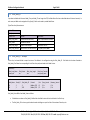
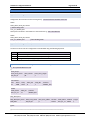
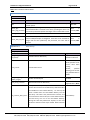
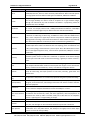
Section Title
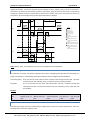
Adapter
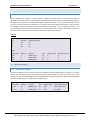
Column Title
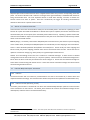
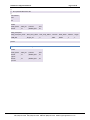
Adapter
MAC_Address (Net_number)
Function
Adaptor name
Specify Network MAC address
Legal Values
Arcnet, DH+, Modbus+, Profibus, etc...
16
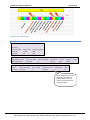
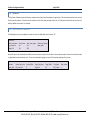
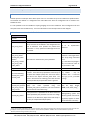
Not all ports shown are necessarily supported by the hardware. Consult the appropriate Instruction manual for details of the ports available
on specific hardware.
FieldServer Technologies 1991 Tarob Court Milpitas, California 95035 USA Web: www.fieldserver.com
Tel: (408) 262-2299 Fax: (408) 262-2269 Toll Free: (888) 509-1970 email: [email protected]