1
MediaWorkStation Basic Edition Tec
User Manual
Playback video
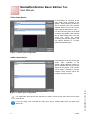
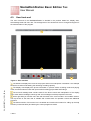
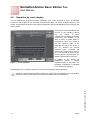
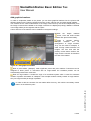
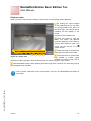
When you open a video from the session or export area, the video player will be displayed.
By shifting the control triangle
on the positioning bar you can set it
to any play position in the video. On
the left margin, the position will be
indicated as time display in the
format
minutes:seconds:milliseconds.
Press this button to play the
video. The button has different
functions depending on the state of
playing. After starting to “play”, this
button has the function of a
“pause” button.
1
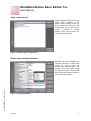
Press this button to stop playing
and jump to the start of the video.
2
3
4
5
Press this button to picture-wise
play forward or reverse. When
pressing the button longer than 3
seconds the video changes to slow forward/reverse. The video is played in “slow motion”.
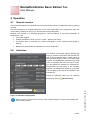
Figure 22 - Player area
Fast forward/fast reverse. When pressing this button longer than 3 seconds, the video clip jumps to
the end/beginning of the video.
GA_MWS29BETec_1-2014_EN.doc
Learn in section „New area“ under „Add comments“, how you can add additional information to
a recording.
1-2014
21