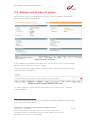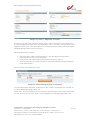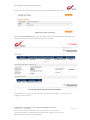
1
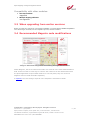
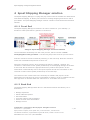
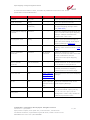
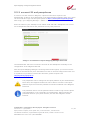
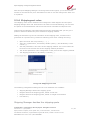
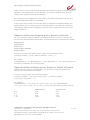
bpost shipping manager Magento module – User manual Version 4.1.0 Confidential | Copyright © 2011 by bpost. All rights reserved. Version 4.1.0 | 9/11/2012 bpost, limited company under public law | Centre Monnaie, 1000 Brussels VAT BE 0214.596.464 | Legal Entities Register Brussels | Postal Current Account IBAN BE94 0000 0000 1414 | BIC BPOTBEB1 1 / 28 bpost shipping manager Integration Manual Table of Contents 1 Module modifications ................................................................................... 3 2 Glossary of Terms ......................................................................................... 4 3 Introduction .................................................................................................. 5 3.1 Required knowledge ........................................................................................ 5 3.2 Compatibility ................................................................................................... 5 3.3 When upgrading from earlier versions .............................................................. 6 3.4 Recommended Magento code modifications .................................................... 6 4 bpost Shipping Manager solution .................................................................. 7 4.1.1 4.1.2 Front End ......................................................................................................................... 7 Back End .......................................................................................................................... 7 5 Magento module .......................................................................................... 9 5.1 Before installation ............................................................................................ 9 5.2 Installation ....................................................................................................... 9 5.3 Configuration ................................................................................................... 9 5.3.1 5.3.2 5.3.3 5.3.4 5.3.5 5.3.6 5.3.7 5.4 Front end integration ..................................................................................... 19 5.4.1 5.4.2 5.4.3 5.5 Configuration of the module ........................................................................................... 9 account ID and passphrase ........................................................................................... 12 Return URL’s .................................................................................................................. 13 Error codes .................................................................................................................... 13 Available shipping methods .......................................................................................... 14 Shippingcost rules ......................................................................................................... 15 Exclude shipping method on product ........................................................................... 17 Layout /design ............................................................................................................... 19 Consumer selects delivery method ............................................................................... 19 Order confirmation ....................................................................................................... 21 Adding track & trace to orders ........................................................................ 22 6 Appendix .................................................................................................... 26 6.1 Roles and Access rights ................................................................................... 26 6.2 Reporting ....................................................................................................... 26 6.3 Testing ........................................................................................................... 26 6.4 Supported versions of Magento ...................................................................... 26 6.5 Installation / upgrades via Magento Connect .................................................. 26 6.6 Sending full address fields to bpost ................................................................. 27 Positioning of the field ................................................................................................................ 27 Making the field mandatory ........................................................................................................ 28 Confidential | Copyright © 2011 by bpost. All rights reserved. Version 4.1.0 | 9/11/2012 bpost, limited company under public law | Centre Monnaie, 1000 Brussels VAT BE 0214.596.464 | Legal Entities Register Brussels | Postal Current Account IBAN BE94 0000 0000 1414 | BIC BPOTBEB1 2 / 28 bpost shipping manager Integration Manual 1 Module modifications The following modifications have been introduced into the module: Version Change 4.1.0 4.1.0 BUGFIX: Weight parameter is now correctly transferred BUGFIX: removal of space in front of <?php tag 4.1.0 4.1.0 BUGFIX: An issue with CDN and resource URL’s is fixed BUGFIX: In case no shipping method is required (virtual products) the javascript pop-up is not shown BUGFIX: A wrong syntax in the delivery cost rule throwing Magento exceptions is altered 4.1.0 4.1.0 BUGFIX: Shipping cost rules are overruled by Magento settings (e.g. free shipping coupon codes or free shipping) 4.1.0 COMPABILITY: the bpost Shipping manager is now compatible with the one-step-checkout module 4.1.0 COMPABILITY: The module is now compatible with Magento 1.7 CHANGE: It is now possible to toggle to show or don’t show the bpost logo in the “address fields” step CHANGE: Added description to adapt the address fields in order to correctly send through address fields to the pop-up 4.1.0 4.1.0 Confidential | Copyright © 2011 by bpost. All rights reserved. Version 4.1.0 | 9/11/2012 bpost, limited company under public law | Centre Monnaie, 1000 Brussels VAT BE 0214.596.464 | Legal Entities Register Brussels | Postal Current Account IBAN BE94 0000 0000 1414 | BIC BPOTBEB1 3 / 28 bpost shipping manager Integration Manual 2 Glossary of Terms Throughout this document, the following terms and abbreviations are used. They are explained in this table. Term ERP Definition Enterprise Resource Planning: The technology solutions for large companies or other organizations to manage their resources, including customers, supplies, accounting, and other "back office" activities. Lightbox BPACK@bpost A simple, unobtrusive (java)script used to overlay websites. It is easy to setup and works on all modern browsers. Pick-up & Go: bpost delivery method. For more information please visit www.bpost.be. bpost delivery method. For more information please visit www.bpost.be. The new name of PUGO, a delivery method of bpost Consumer Customer back-end End user, customer of a webshop Magento pages, available when the shopw owner is logged on Administrator Administrator back-end Person responsible for sending the parcels Magento back end for administrator bpost platform bpost Shipping Manager platform PUGO Bpack 24/7 Confidential | Copyright © 2011 by bpost. All rights reserved. Version 4.1.0 | 9/11/2012 bpost, limited company under public law | Centre Monnaie, 1000 Brussels VAT BE 0214.596.464 | Legal Entities Register Brussels | Postal Current Account IBAN BE94 0000 0000 1414 | BIC BPOTBEB1 4 / 28 bpost shipping manager Integration Manual 3 Introduction This document describes the installation procedure of the bpost Shipping Manager Magento Plugin. Please note that the Shipping Manager Integration Manual does not explain how to use the Back-End of the Shipping Manager, used for the management of orders and the generation of labels. Please refer to the bpost Shipping Manager user guide if you want to work with the Back End interface. The plugin has been developed by PHPro, commissioned by bpost Parcels Europe in September 2011. For contact details: PHPro +32 3 871 99 66 Business Park King Square Veldkant 35 B - (B) 2550 Kontich http://www.phpro.be bpost Parcels Europe +32 2 276 28 12 Muntcentrum 1000 Brussel http://www.bpost.be/shippingmanager 3.1 Required knowledge In order to use this manual you need knowledge of the following topics: Magento framework HTTPS The bpost Shipping Manager is an application that is created for any framework or eCommerce solution. For Magento, a specific plugin has been created. The bpost Shipping Manager runs in an HTTPS environment, in order to safeguard the communication of private data. bpost strongly recommends using https and is not responsible for issue due to integrations in http environments. 3.2 Compatibility Compatibility with Magento versions: The bpost Shipping Manager Magento plugin is tested following Magento version: Community Edition o 1.4.2.0 o 1.5.x o 1.6.x o 1.7.0 Enterprise Edition o 1.9.1.0 o 1.10.0.0 Confidential | Copyright © 2011 by bpost. All rights reserved. Version 4.1.0 | 9/11/2012 bpost, limited company under public law | Centre Monnaie, 1000 Brussels VAT BE 0214.596.464 | Legal Entities Register Brussels | Postal Current Account IBAN BE94 0000 0000 1414 | BIC BPOTBEB1 5 / 28 bpost shipping manager Integration Manual Compatibility with other modules: One-step checkout Supported Multiple shipping addresses not supported 3.3 When upgrading from earlier versions Before you make any changes to your Magento installation you should always disable compilation. Once the changes are made, run the compilation process, and then enable it. 3.4 Recommended Magento code modifications Image 1: Standard integration not sending through address fields Within Magento, the street name and number are entered in the same default address field. As there exists no clear logic to retrieve the number from this field and because the bpost application requires both fields to be correctly filled, they are cleared if Magento does not send the fields separately. In Apendix, the code change required in the template is described in detail. Confidential | Copyright © 2011 by bpost. All rights reserved. Version 4.1.0 | 9/11/2012 bpost, limited company under public law | Centre Monnaie, 1000 Brussels VAT BE 0214.596.464 | Legal Entities Register Brussels | Postal Current Account IBAN BE94 0000 0000 1414 | BIC BPOTBEB1 6 / 28 bpost shipping manager Integration Manual 4 bpost Shipping Manager solution The bpost Shipping Manager is a plug and play solution that is available for national and international shipping. It allows your business to manage shipping and returns and to print labels. The bpost Shipping Manager solution contains a Front End and a Back End solution. 4.1.1 Front End The bpost Shipping Manager Front End is an online solution for your webshop / eSolution to offer bpost delivery options to consumers. Image 2: bpost Shipping Manager Front End solution The Front End fits seamlessly into the order process, which is shown in Fout! Verwijzingsbron niet gevonden.. The following steps show how the process works: First the consumer selects his desired product(s) in the web shop. Next the consumer enters his credentials and performs a check out. During the checkout process, when selecting the delivery method / address, the consumer is redirected via URL (POST parameters) to the Shipping Manager Front End. In the Front End he selects the appropriate delivery method and options. All the information is automatically sent to the bpost systems and all the information is also returned via URL redirect (POST parameters) to the web shop. The consumer then comes back to the web shop to validate and pays the order. Afterwards, the web shop can send a confirmation to bpost in order to validate the sale after payment via another POST URL redirection or via a REST web service. 4.1.2 Back End The bpost Shipping Manager Back End is a web-based solution that allows your ebusiness to: Manage shipments Select additional options Generate labels Link web orders to parcel shipping Access Track & Trace information Manage returns Confidential | Copyright © 2011 by bpost. All rights reserved. Version 4.1.0 | 9/11/2012 bpost, limited company under public law | Centre Monnaie, 1000 Brussels VAT BE 0214.596.464 | Legal Entities Register Brussels | Postal Current Account IBAN BE94 0000 0000 1414 | BIC BPOTBEB1 7 / 28 bpost shipping manager Integration Manual Image 3: bpost Shipping Manager Back End solution In Fout! Verwijzingsbron niet gevonden. we show you the process in which the Back End is placed. The following steps show how the process works: The shipping information, which is returned either by an integrated Front End or by REST web services, can be stored in your Back-office or ERP system and is automatically stored in the systems of bpost. This covers information such as: shipping address, product, client name, etc. It is possible to manage the information through the Shipping Manager Back End which is hosted by bpost. E-tailers can access it via the bpost portal to manage orders, select options and generate labels. Generated labels can be printed by the Shipping Manager and can be used to launch the logistic flow. It is possible to follow the shipped parcels with the integrated Track & Trace tool. Apart from this solution, the bpost Shipping Manager allows the deep integration of its functionalities into ERP or other back-office systems. This deep integration is thoroughly explained throughout the following sections and in the chapter Web Services. For Magento, a plug-in solution has been build in order to facilitate the integration of the bpost Shipping Manager into the framework. The module may not reflect all your requirements. As the code is written based on the Open Source model, you and/or any certified partner are free to alter the module at any time. Confidential | Copyright © 2011 by bpost. All rights reserved. Version 4.1.0 | 9/11/2012 bpost, limited company under public law | Centre Monnaie, 1000 Brussels VAT BE 0214.596.464 | Legal Entities Register Brussels | Postal Current Account IBAN BE94 0000 0000 1414 | BIC BPOTBEB1 8 / 28 bpost shipping manager Integration Manual 5 Magento module 5.1 Before installation In order to have access to the bpost Shipping Manager, you must have a bpost contract, sign the bpost Shipping Manager License Agreement and obtain an account ID + password to configure the application. Please contact the bpost parcels sales team at +32 2 211 11 11 or send an email to [email protected] 5.2 Installation 1 Install the module from Magento Connect (http://www.magentocommerce.com/magento-connect) or copy files directly from the archive into the directory of your Magento installation. Magento connect v1: magento-community/Bpost_Shippingmanager Magento connect v2: http://connect20.magentocommerce.com/community/Bpost_Shippingmanager 2 Purge the cache storage of Magento (flush cache storage) 3 Done 5.3 Configuration 5.3.1 Configuration of the module Maintenance of the module can be done in the Administrator back-end once the module has been installed via Magento Connect. The configuration of the module will be made accessible via Admin > System > Configuration > Shipping Methods. Image 4: Configuration menu Confidential | Copyright © 2011 by bpost. All rights reserved. Version 4.1.0 | 9/11/2012 bpost, limited company under public law | Centre Monnaie, 1000 Brussels VAT BE 0214.596.464 | Legal Entities Register Brussels | Postal Current Account IBAN BE94 0000 0000 1414 | BIC BPOTBEB1 9 / 28 bpost shipping manager Integration Manual Image 5: Shipping method options Image 6: example of configuration panel Confidential | Copyright © 2011 by bpost. All rights reserved. Version 4.1.0 | 9/11/2012 bpost, limited company under public law | Centre Monnaie, 1000 Brussels VAT BE 0214.596.464 | Legal Entities Register Brussels | Postal Current Account IBAN BE94 0000 0000 1414 | BIC BPOTBEB1 10 / 28 bpost shipping manager Integration Manual In order for the module to work, a number of parameters need to be set. These parameters are described below. Parameter Possible values Default Enabled Yes / No bpost AccountId String / Fill in your bpost account ID bpost passphrase String (shown as password) / Fill in the password which is set in the bpost Shipping Manager backend (read more). Allowed bpost shipping methods Selection / Select the shipping methods that you wish to include in the bpost Shipping Manager. Multiple selections are possible with CTRL+click. Shippingcost rules String / Build in your own business logic to define the price setting of the bpost Shipping Manager (read more) Free delivery from (in €) Float / From this amount on, all available shipping costs will be set to €0. (read more) Ship to Applicable Countries Selection Ship to Specific Countries List of countries Sort order integer Front end URL URL https://shippin The unique link to the bpost Shipping gmanager.bpos Manager t.be/ShmFrontE nd/start Api uri URL https://api.bpo Link to the webservice api of the st.be/services/s bpost Shipping Manager hm/ Proxy host Proxy port No Description Turns the Shipping Manager on or off All Allowed Countries / Enable all countries or just a selection of countries. Make sure that the list is identical to the list configured in the bpost Shipping Manager. Multiple selection of all countries that are available to send parcels to. Determines order of the shipping methods presented in shipping method section of checkout page. When your Magento installation runs on a server behind a proxy server, you can enter the proxy server settings here. This is only needed to make the api features work Confidential | Copyright © 2011 by bpost. All rights reserved. Version 4.1.0 | 9/11/2012 bpost, limited company under public law | Centre Monnaie, 1000 Brussels VAT BE 0214.596.464 | Legal Entities Register Brussels | Postal Current Account IBAN BE94 0000 0000 1414 | BIC BPOTBEB1 11 / 28 bpost shipping manager Integration Manual 5.3.2 account ID and passphrase In order to use the module in Magento, a bpost account ID is required. The administrator is able to set a passphrase in the bpost Shipping Manager back-end, which can be found after login into the bpost portal at https://www.bpost.be/portal/goLogin. After Login, go to Shipping Manager > Admin > edit shop. Enter the name of your webshop in the “Name” field and add a Passphrase. Be sure to use a Passphrase that follows the password security best practices. Image 7: Credentials in bpost Shipping Manager back end The administrator will have to enter the account ID and Passphrase manually in the configuration of the Magento backend. After the bpost Shipping Manager License Agreement was signed, you received a user manual. In this document, more information on how to use and configure the back-end is explained. If you did not receive this document, please request it via [email protected]. The passphrase can be changed in the bpost platform by the administrator. Once done, the Magento module will not be able to connect to the bpost platform anymore unless the password is likewise modified in the Magento back end. The password used is not the password that is used to login into the bpost portal application. It is a manually set configuration. When entering the password linked to your portal account, the link with Magento will not function. Confidential | Copyright © 2011 by bpost. All rights reserved. Version 4.1.0 | 9/11/2012 bpost, limited company under public law | Centre Monnaie, 1000 Brussels VAT BE 0214.596.464 | Legal Entities Register Brussels | Postal Current Account IBAN BE94 0000 0000 1414 | BIC BPOTBEB1 12 / 28 bpost shipping manager Integration Manual 5.3.3 Return URL’s In the bpost Shipping Manager back-end, a number of return URL’s need to be entered. They should be created based on the following structure: http://{BASE URL}/shippingmanager/postback/{action} The following actions are available: Confirm url: Error url: Cancel url: confirm error cancel If your shop would be available at http://www.shopname.com, this would give: http://www.shopname.com/shippingmanager/postback/confirm http://www.shopname.com/shippingmanager/postback/error http://www.shopname.com/shippingmanager/postback/cancel Image 8 - Return URL's in bpost Shipping Manager 5.3.4 Error codes It is possible that one of the following error codes appears. The description explains what the possible solution to this error could be. Error Code Refers to Type Description 1110 orderReference Required Order reference is required but it 1210 orderReference Format error Order reference is too long 1211 orderTotalPrice Format error Order total prince contains invalid 1212 costCenter Format error hasn't been supplied integer (must be in eurocent) Order cost center is too long Confidential | Copyright © 2011 by bpost. All rights reserved. Version 4.1.0 | 9/11/2012 bpost, limited company under public law | Centre Monnaie, 1000 Brussels VAT BE 0214.596.464 | Legal Entities Register Brussels | Postal Current Account IBAN BE94 0000 0000 1414 | BIC BPOTBEB1 13 / 28 bpost shipping manager Integration Manual 1220 orderLine Format error Order line has invalid format 1221 orderLine Format error Order line contains invalid price (must 1240 customerCountry Format error Customer country code is invalid 1251 customerLastName Format error Last name is too long 1252 customerStreet Format error Street name is too long 1253 customerStreetNumber Format error Street number is too long 1254 customerBox Format error Box number is too long 1255 customerCity Format error City name is too long 1256 customerPostalCode Format error Postal code is too long 1257 customerPhoneNumber Format error Invalid phone number 1258 customerEmail Format error Invalid email 1320 customerCountry Data error Customer country code is not 2000 N/A Security error be in eurocent) correctly configured in back end Access denied (authentication failed) Most likely, you do not have access to the application. Please ensure that you are using the correct account ID and passphrase which are shown in chapter 5.3.2. 5.3.5 Available shipping methods All shipping methods in the portfolio of bpost are available in the back end of Magento as a multi-select field. There is no synchronization between the shipping methods configured in the bpost platform and these in Magento. The user is responsible to synchronize the shipping methods configured in the bpost platform to the Magento module. Image 9 - Available shipping methods within bpost portal application Confidential | Copyright © 2011 by bpost. All rights reserved. Version 4.1.0 | 9/11/2012 bpost, limited company under public law | Centre Monnaie, 1000 Brussels VAT BE 0214.596.464 | Legal Entities Register Brussels | Postal Current Account IBAN BE94 0000 0000 1414 | BIC BPOTBEB1 14 / 28 bpost shipping manager Integration Manual After the bpost Shipping Manager License Agreement was signed, you received a user manual. In this document, more information on how to use and configure the back-end is explained. 5.3.6 Shippingcost rules The shipping costs can be calculated and configured in both Magento and the bpost Shipping Manager back end. Because this can lead to misunderstandings, we will leave the option to the administrator which environment will calculate the shipment cost. Configuring the shipping rules within Magento has the advantage that you can give a quote to customers before they have selected a shipping method. Adding the business logic for the calculation of the shipping costs, is based on the generation of a specific string. Please use following rules when creating the string: Open and close with curly braces( { … } ). There are 2 parameters, enclosed by double quotes (“) and divided by a semi column (:). The first parameter is the name of the shipping method. The correct name can be found in the selection box of the shipping method parameter. The second parameter is the configuration of the price for this shipping method. The shipping methods are divided by a comma ( , ). Image 10: Shippingcost rules The following configuration settings for the cost calculation are available: Shipping Manager decides the shipping quote Magento defines the shipping quote, based on flat rate Magento defines the shipping quote, based on weight of the basket Free delivery Shipping Manager decides the shipping quote Confidential | Copyright © 2011 by bpost. All rights reserved. Version 4.1.0 | 9/11/2012 bpost, limited company under public law | Centre Monnaie, 1000 Brussels VAT BE 0214.596.464 | Legal Entities Register Brussels | Postal Current Account IBAN BE94 0000 0000 1414 | BIC BPOTBEB1 15 / 28 bpost shipping manager Integration Manual Please refer to the user manual that has been provided after signing the bpost Shipping Manager License Agreement. In this document, it is clearly explained how the price setting of the shipping costs can be managed. By leaving the field “Shippingcost rules” empty, the default configuration as set-up in the bpost Shipping Manager is maintained. At the end of the procedure to select the delivery method on the bpost platform, the bpost platform will do a back post to the Magento platform. This data will contain the new shipping address and the shipping cost which will be updated in the order on the Magento platform. Magento defines the shipping quote, based on flat rate For every available shipping method, it is possible to define a flat rate. This rate will overwrite any bpost defined configuration. The following delivery methods are available: BPACK@home BPACK@bpost BPACK 24/7 BPACK WORLD EXPRESS BPACK WORLD In order to overwrite the default value: please use the following mask: {“Delivery method” : “price”,”Delivery method” : “price”, …} for example {“BPACK@home” : “5”,”BPACK@bpost” : “4.50”,”BPACK 24/7” : ”5”} will set the price of the delivery methods to the value provided. Magento defines shipping quote, based on weight of basket Similar to the previous price configuration, it is possible to set prices based on the weight of all the products in the basket. In order to do so, please use the following mask: {“Delivery method” : {“kg”:”price”,”kg”:”price”,…},”Delivery method” : {“kg”:”price”,”kg”:”price”,…}…} For example {"BPACK@home" : {"0":"4.50","2":"5.50","5":"8","10":"14"},”BPACK@bpost” : {"0":"4","2":"5","5":"7.50","10":"13.50"}}, which would give following pricing matrix: 0-2 2-5 5-10 > 10 BPACK@home 4.50 5.50 8.00 14.00 BPACK@bpost 4.00 5.00 7.50 13.50 Confidential | Copyright © 2011 by bpost. All rights reserved. Version 4.1.0 | 9/11/2012 bpost, limited company under public law | Centre Monnaie, 1000 Brussels VAT BE 0214.596.464 | Legal Entities Register Brussels | Postal Current Account IBAN BE94 0000 0000 1414 | BIC BPOTBEB1 16 / 28 bpost shipping manager Integration Manual Free delivery A common practice for web shops is to give free shipping starting from a certain amount in the shopping cart. If the field “Free delivery from (in €) is left blank, free delivery is not configured. If however an amount is set, the cart will be checked if the total cost of the cart is more than the amount specified. If so, Magento will force the bpost platform to offer a free shipment, setting all available shipping methods to € 0.00. Image 11: Configuration Free delivery 5.3.7 Exclude shipping method on product In case a certain product is not illegible for a specific bpost shipping method, it is possible to add this to the product attributes. For example: You do not want your consumers to be able to ship a big and heavy couch with BPACK 24/7. The Shipping Manager module introduces a new product attribute “excluded_bpost_shippingmethods” which is located in the list of attributes: Catalog Attributes Manage attributes. In order to use this feature, please add this attribute to the desired attribute sets. Image 12: List of attributes Image 13: Product edit page Confidential | Copyright © 2011 by bpost. All rights reserved. Version 4.1.0 | 9/11/2012 bpost, limited company under public law | Centre Monnaie, 1000 Brussels VAT BE 0214.596.464 | Legal Entities Register Brussels | Postal Current Account IBAN BE94 0000 0000 1414 | BIC BPOTBEB1 17 / 28 bpost shipping manager Integration Manual Once added to the attribute set, the attribute will be available on the product edit page. The attribute will be shown on this page as a multi select box with the shipping methods you configured for the Shipping Manager module. Keep in mind that selecting one of the methods on the product will exclude the selected shipping method when the product is placed in the shopping cart. Confidential | Copyright © 2011 by bpost. All rights reserved. Version 4.1.0 | 9/11/2012 bpost, limited company under public law | Centre Monnaie, 1000 Brussels VAT BE 0214.596.464 | Legal Entities Register Brussels | Postal Current Account IBAN BE94 0000 0000 1414 | BIC BPOTBEB1 18 / 28 bpost shipping manager Integration Manual 5.4 Front end integration In this part we will point out what changes to expect during the checkout process when the Shipping Manager shipping method is enabled. You can also watch the movie on http://youtu.be/q5epShhFfs4 for a visual representation. 5.4.1 Layout /design Magento is distributed with a default look & feel which can be customized per installation. Therefore the module will be integrated in the “out of the box” Magento theme (template) and is customisable by following the standardized Magento template mechanism. For the bpost platform shown in an iFrame inside the Magento one page checkout, the styling can be done through the bpost platform administration pages. This allows the adaptation of colours and logo’s. Please refer to the User Manual, which was received after the bpost Shipping Manager License Agreement was signed. 5.4.2 Consumer selects delivery method The bpost module is seamlessly integrated with the default Magento checkout page. If activated, in the second step (Billing Information), the following field is added, allowing your customer to choose his delivery address via the bpost Shipping Manager. If the checkbox is selected, the consumer is automatically sent to step 4 and the iFrame as shown in image 16 is opened. Image 14: Checkout workflow In the 4th step (shipping method), the shipping methods are listed per carrier. Each carrier can have a single or multiple shipping methods. Image 15: Default Magento way to show shipping methods Confidential | Copyright © 2011 by bpost. All rights reserved. Version 4.1.0 | 9/11/2012 bpost, limited company under public law | Centre Monnaie, 1000 Brussels VAT BE 0214.596.464 | Legal Entities Register Brussels | Postal Current Account IBAN BE94 0000 0000 1414 | BIC BPOTBEB1 19 / 28 bpost shipping manager Integration Manual When the customer clicks the bpost logo, a modal box including an iFrame, with the bpost Shipping Manager loaded, will appear on top of the page, disabling all the fields on the underlying page. The customer has to complete the process in the modal box in order to return to the Magento checkout process. The customer can close the modal box by clicking the close icon in the top right corner of the iFrame canvas. This will also deselect bpost as shipping method. Image 16: bpost Shipping Manager When the process in the modal box is finished successfully, the bpost platform will be closed automatically. The bpost platform sends the details from the selection back to the Magento platform which will trigger an update of the shipping method, cost and address. The customer will automatically continue to the next step without having to click the button “continue”. It is important that the environments, bpost and Magento, work within the https protocol. If not, some browsers may report unsecure content on the page because there is a mix of secure and unsecure content on the page. bpost does not support the http protocol. Confidential | Copyright © 2011 by bpost. All rights reserved. Version 4.1.0 | 9/11/2012 bpost, limited company under public law | Centre Monnaie, 1000 Brussels VAT BE 0214.596.464 | Legal Entities Register Brussels | Postal Current Account IBAN BE94 0000 0000 1414 | BIC BPOTBEB1 20 / 28 bpost shipping manager Integration Manual 5.4.3 Order confirmation On the order confirmation page the selected delivery method and costs associated with it will be available. Image 17: Order confirmation page in Magento When the customer created an account during the checkout procedure, he can access this page by logging in to his Magento account. Image 18: Login for customer in Magento Once logged in, the customer can follow the status of his order. When he views the order details page and the shipment has been created by the administrator in the Magento Admin Panel (see next chapter), the Track & Trace URL will appear on the screen, with a deeplink to the bpost Track& Trace application. Confidential | Copyright © 2011 by bpost. All rights reserved. Version 4.1.0 | 9/11/2012 bpost, limited company under public law | Centre Monnaie, 1000 Brussels VAT BE 0214.596.464 | Legal Entities Register Brussels | Postal Current Account IBAN BE94 0000 0000 1414 | BIC BPOTBEB1 21 / 28 bpost shipping manager Integration Manual 5.5 Adding track & trace to orders Once an order is placed via the Magento front end, it will be available in the Magento back end by following Sales Orders. Image 19: Order overview In the “Shipping and Handling Information” tab, you will see the selected bpost shipping method. In our example this is bpost - @shop. In the bpost Shipping Manager platform, you can find an order with the same id (in the screenshot this is 100000001). Image 20:bpost Shipping Manager back-end To create a shipment, simply click the “ship” button on top of the screen1. Following screen will appear. 1 For more information on how to use the bpost Shipping Manager, please refer to the user manual document. Confidential | Copyright © 2011 by bpost. All rights reserved. Version 4.1.0 | 9/11/2012 bpost, limited company under public law | Centre Monnaie, 1000 Brussels VAT BE 0214.596.464 | Legal Entities Register Brussels | Postal Current Account IBAN BE94 0000 0000 1414 | BIC BPOTBEB1 22 / 28 bpost shipping manager Integration Manual Image 21: Order > Shipment overview In order to use the track and trace options, first create a barcode for your shipment in the bpost Shipping Manager back-end application. This is currently not supported in the Magento backend. For more information on creating barcodes, please consult the bpost Shipping Manager back-end user manual. When the barcode is created: click the button “Add Tracking Number” in the tab Shipping Information; select bpost as carrier in the dropdown; the field title will automatically be filled with the string “bpost”; enter the barcode, previously created on the bpost Shipping Manager Platform, in the field number; This will result in the following screen: Image 22: Add tracking number to shipment You can add multiple barcodes, depending on the number of packages you created on the bpost Shipping Manager back end. When done, save the shipment and you will be redirected back to the order detail page. You will now see a link “Track Order” in the Shipping and Handling Information tab Confidential | Copyright © 2011 by bpost. All rights reserved. Version 4.1.0 | 9/11/2012 bpost, limited company under public law | Centre Monnaie, 1000 Brussels VAT BE 0214.596.464 | Legal Entities Register Brussels | Postal Current Account IBAN BE94 0000 0000 1414 | BIC BPOTBEB1 23 / 28 bpost shipping manager Integration Manual This link leads to a popup page with the tracking information of the order. Image 23: Order overview The link Track this Parcel will open the bpost Track & Trace application and shows the tracking information for the parcel linked to this barcode. Image 24: bpost Track & Trace application The consumer can either receive the Track & Trace Info by mail or can check it by logging in to his account. Confidential | Copyright © 2011 by bpost. All rights reserved. Version 4.1.0 | 9/11/2012 bpost, limited company under public law | Centre Monnaie, 1000 Brussels VAT BE 0214.596.464 | Legal Entities Register Brussels | Postal Current Account IBAN BE94 0000 0000 1414 | BIC BPOTBEB1 24 / 28 bpost shipping manager Integration Manual Image 25: My orders > Order overview Confidential | Copyright © 2011 by bpost. All rights reserved. Version 4.1.0 | 9/11/2012 bpost, limited company under public law | Centre Monnaie, 1000 Brussels VAT BE 0214.596.464 | Legal Entities Register Brussels | Postal Current Account IBAN BE94 0000 0000 1414 | BIC BPOTBEB1 25 / 28 bpost shipping manager Integration Manual 6 Appendix 6.1 Roles and Access rights Access rights are integrated in the default Magento Roles and Rights functionality. An administrator can be granted access to a set of modules. When installing the module, a new user role will be introduced “bpost administrator”. With this extra role, the administrator of the Magento installation will be able to grant access to certain users to manage the bpost module configuration. Deep links on the order page will be always available for all users who can view an order and/or a shipment. 6.2 Reporting The module was integrated in Magento in such a way that the reporting functionality of Magento can still be used in comparison to some other shipping methods which overwrite the default Magento functionality and standard principals behind the “shipping address” implementation. 6.3 Testing The module has been tested with both unit and functional testing. The unit tests are included in the distribution package. 6.4 Supported versions of Magento The minimal supported version is set to Magento Community edition 1.4.x and Magento Enterprise edition 1.10.x. The module will be compatible from these versions onwards. By respecting the standards concerning Magento development, the chance for incompatibility problems has been reduced. Compatibility with Major releases like for example Magento 1.x.x to 2.x.x may lead to incompatibility off the module. 6.5 Installation / upgrades via Magento Connect The module is available as Magento Connect extension. Magento connect will handle the installation of the module and can also handle upgrades. Confidential | Copyright © 2011 by bpost. All rights reserved. Version 4.1.0 | 9/11/2012 bpost, limited company under public law | Centre Monnaie, 1000 Brussels VAT BE 0214.596.464 | Legal Entities Register Brussels | Postal Current Account IBAN BE94 0000 0000 1414 | BIC BPOTBEB1 26 / 28 bpost shipping manager Integration Manual 6.6 Sending full address fields to bpost The Bpost Shipping Manager module supports using the 2nd address line field as the street number. The following steps describe how to make the necessary changes, which eventually result in the below screen capture: Positioning of the field In order to position the field and show the correct label, a modification in the files template/checkout/onepage/billing.phtml and shipping.phtml file of your theme is required. In these files, find the lines where the address fields are added: Change the code to reflect the following images (changes are described below): Confidential | Copyright © 2011 by bpost. All rights reserved. Version 4.1.0 | 9/11/2012 bpost, limited company under public law | Centre Monnaie, 1000 Brussels VAT BE 0214.596.464 | Legal Entities Register Brussels | Postal Current Account IBAN BE94 0000 0000 1414 | BIC BPOTBEB1 27 / 28 bpost shipping manager Integration Manual Changes made are: 1. 2. 3. 4. 5. 6. Remove the PHP for-loop. Change the two <li> items to one containing both fields. Change the class of the <li> item from “wide” to “fields” Add the label for the street number field Surround each field and its according label with a div which has the “field” class Change the string in the label and the title of the number field to print out “Number” (this can be translated later to your language) 7. Change the id’s of the field to “billing:street2” 8. Change the value of the field to fetch the value of the 2d street line (<?php echo $this->htmlEscape($this->getAddress()->getStreet(2)) ?>) Repeat these steps in the template/checkout/onepage/shipping.phtml file for the shipping address. The finetuning in positioning and width of the fields depends on your theme and needs to be done via CSS. Making the field mandatory To make the field mandatory, we will add the “required-entry” CSS class to the field: Hereby you can find the above changes in a txt format, allowing you to copy paste. Confidential | Copyright © 2011 by bpost. All rights reserved. Version 4.1.0 | 9/11/2012 bpost, limited company under public law | Centre Monnaie, 1000 Brussels VAT BE 0214.596.464 | Legal Entities Register Brussels | Postal Current Account IBAN BE94 0000 0000 1414 | BIC BPOTBEB1 28 / 28