1
9.2. Running the program after a crash
If the software was stopped incorrectly (for example, a battery of your device was low
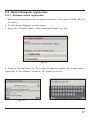
and it turned off), during the next run you will see an after-crash information (Fig. 160).
Fig. 160
In this mode, you can choose one of the following options:
“Start application” – if the software starts in a after-crash mode for the first time, select
this option. In this case, Navitel Navigator will save all your settiong, but there is a probability that during the incorrect stop a mistake appeared, so the Navitel Navigator will
work incorrectly. If the software doesn’t start correctly when you select this option, try
one from the options below.
“Restore settings from last successful start” – Navitel Navigator automatically saves all
the user data and settings when it works with no exceptions. You can use them to start
the software after crash. Note, that the last changes, like settings, last places and
favorites lists that were changed during the last work session could be missed.
“Reset all settings” – if no of the options above didn’t make Navitel Navigator start correctly, use this menu item. Note, that History, Favorites lists, all the settings will be
missed, but waypoints and Navitel.SMS will be saved.
If the program doesn’t start after all, please, contact our technical support:
[email protected].
69