1
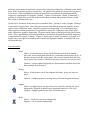
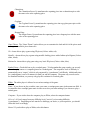
Chameleon:
The Chameleon Power Up transforms the capturing piece into a chameleon piece with
the same color as the capturing piece.
Gryphon:
The Gryphon Power Up transforms the capturing piece into a gryphon pawn piece with
the same color as the capturing piece.
Dragon King:
The dragon Power Up transforms the capturing piece into a dragon piece with the same
color as the capturing piece.
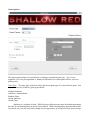
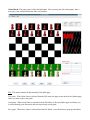
Game Theme: The “Game Theme” option allows you to customize the look and feel of the pieces used
in the game. Available piece themes are:
3D : choose this to play a game using 3D pieces (Colors: white, red)
Metallic : choose this to play a game using metallic looking pieces with a Indian styled figures (Colors:
white, black)
Minimalist: choose this to play game using very basic 2D pieces (Colors: white, blue)
Ranked Game: Check this box to play a ranked game. To help standardize game results, you are only
allowed to play human vs. computer games for a ranked game. The computers' level of difficulty is
automatically set to “expert”, which is only surpassed by “grandmaster” in difficulty. Additionally time
for a ranked game is set to 10 minutes for both you and the computer. The game only records scores
for Standard Antichess, so you may only play this variation for a ranked game.
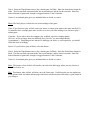
White: The white player is allowed to set various settings of the game.
Name: If you choose to play as white, enter your name, or unique game name in the name text field. It
is essential to have a unique game name in order to receive your own ranking if you choose to play a
ranked game.
Computer: If you wish to have the computer play as White, select the computer button.
AI Level: AI Level ranges from easy difficulty level (“novice”) to increasing difficulty
(“grandmaster”). Depending on how much of a challenge you desire, or your experience, you should
select this level accordingly.
Mortal: If you decide to play as White, select this button.